
HP 255 G10 15.6" FHD Business Laptop
4.4Editor score
AMD Ryzen 7 7730U CPU
32GB High-Bandwidth RAM
1TB PCIe SSD Storage
Finding the right laptop for CAD work requires balancing powerful hardware with portability and display accuracy. Professionals need machines that handle complex 3D models and rendering without lag or overheating during long sessions.
We evaluated ten top-rated laptops based on processor speed, GPU performance, memory capacity, and screen quality. Our analysis focuses on real-world usability for engineers, architects, and designers who rely on precision and reliability.
Each pick highlights specific strengths like ISV certification, battery life, or upgradeability. Prices and availability change frequently so check the links for current deals before making your final decision on a new workstation.
4.4Editor score

4.1Editor score

4.3Editor score
As an Amazon Associate we earn from qualifying purchases.
The following table provides a side-by-side comparison of all ten laptops analyzed in this guide, highlighting key specifications that matter most for computer-aided design workflows.




The HP ZBook 8 G1i is a powerhouse mobile workstation designed specifically for demanding engineering and design workflows. With an impressive 4.1-star rating from verified buyers, it stands out as a reliable tool for professionals who need stability and performance.
We may earn a commission when you buy through this link, at no additional cost to you.
Its Intel Core Ultra 7 255H processor paired with 64GB of DDR5 RAM ensures that complex CAD assemblies render smoothly without stuttering. The NVIDIA RTX 500 Ada GPU is ISV certified, meaning it is tested and optimized for software like SolidWorks and Revit to prevent crashes during critical tasks.
While the price is higher than many consumer laptops, the investment pays off in durability and performance longevity. The touchscreen display offers precise interaction with design elements, and the 2TB SSD provides ample space for storing large project files locally without needing external drives.
This laptop is ideal for architects and engineers who require enterprise-grade security and ISV certification. If your work involves heavy 3D rendering and you need a machine that won't slow down under pressure, the ZBook 8 G1i is a top-tier choice.
ISV certification guarantees that the hardware works seamlessly with professional CAD software, reducing the risk of glitches or crashes during important design work.
Thunderbolt 4 ports and Wi-Fi 7 support allow you to connect to high-speed external storage and displays ensuring your laptop remains relevant as technology evolves.
We may earn a commission when you buy through this link, at no additional cost to you.
The HP 255 G10 offers exceptional value for students or freelancers starting in CAD fields. With a 4.4-star rating, users appreciate its robust configuration of 32GB RAM and a 1TB SSD which are rare at this price point.
We may earn a commission when you buy through this link, at no additional cost to you.
The AMD Ryzen 7 7730U processor provides enough speed for 2D drafting and moderate 3D work. While it lacks a dedicated GPU, the integrated Radeon graphics can handle lighter design tasks without breaking the budget significantly for new users.
A significant trade-off is the screen brightness and color accuracy compared to professional workstations. However, for indoor office environments or learning CAD software, the anti-glare panel is sufficient. The numeric keypad is a nice bonus for engineering calculations.
Buyers looking for an affordable entry point into professional computing will find this laptop meets their needs well. It balances performance and cost effectively allowing users to focus on learning design tools rather than worrying about hardware limitations.
32GB of RAM allows you to run multiple design applications simultaneously without the system slowing down due to memory constraints.
Windows 11 Pro includes BitLocker encryption and remote desktop features useful for secure business environments and remote work scenarios.
We may earn a commission when you buy through this link, at no additional cost to you.
The Dell Precision 7680 is a flagship workstation built to handle the most demanding CAD workloads available today. It boasts a 4.3-star rating from professionals who rely on it for critical tasks requiring absolute stability and raw computing power.
We may earn a commission when you buy through this link, at no additional cost to you.
Powered by an Intel Core i5-13600HX and NVIDIA RTX 1000 Ada GPU, this machine excels at complex 3D modeling and rendering. The CAMM memory architecture is a standout feature allowing users to upgrade RAM easily without soldering or specialized tools.
While the cost is significant, the build quality and reliability justify the investment for firms and independent contractors. The cooling system is designed to maintain performance during long rendering sessions preventing the throttling that consumer laptops often experience.
This laptop is best suited for engineers who prioritize performance above all else. If you are working on massive assemblies or simulations, the Precision 7680 offers the headroom needed to complete projects efficiently without hardware bottlenecks.
CAMM RAM reduces height and routing traces improving thermal performance and making upgrades simpler for future-proofing your investment.
Certified compatibility with industry software ensures that your design files open and render exactly as intended without software conflicts.
We may earn a commission when you buy through this link, at no additional cost to you.
This HP 17.3-inch laptop offers a larger workspace that is beneficial for CAD users who need to see detailed drawings alongside tool palettes. With a 4.3-star rating, it appeals to users seeking a big display without paying workstation prices.
We may earn a commission when you buy through this link, at no additional cost to you.
The 17.3-inch FHD IPS display provides enough real estate to view blueprints clearly. While it uses integrated graphics, the 16GB RAM and fast SSD handle basic drafting tasks well. The numeric keypad helps with coordinate entry in design software.
The main drawback is reduced mobility due to the larger chassis and heavier weight. It is better suited for a desk setup or stationary work than for daily commuting. The anti-glare coating helps reduce fatigue during long design sessions.
For users who prioritize screen size over mobility, this is a smart choice. It balances cost and utility effectively making it accessible for students or professionals who mostly work in a fixed office environment with minimal travel needs.
The 17.3-inch screen allows side-by-side window arrangements reducing the need to constantly toggle between open design windows.
Copilot AI Ready features assist with document drafting and summarization enhancing overall workflow efficiency beyond just design work.
We may earn a commission when you buy through this link, at no additional cost to you.
The NIMO 17.3-inch laptop delivers impressive raw power at a competitive price. With a high 4.6-star rating, it attracts users who want desktop-level speed without the cost of a traditional business workstation.
We may earn a commission when you buy through this link, at no additional cost to you.
Its AMD Ryzen 9 8945HS processor and 32GB of DDR5 RAM make it highly capable of handling complex calculations required in advanced CAD software. The Radeon 780M graphics are robust enough for moderate 3D modeling tasks compared to older integrated solutions.
Users appreciate the user-replaceable memory and storage which allows for easy upgrades as projects grow in size. The cooling system ensures the machine stays stable during prolonged usage preventing performance drops during critical design phases.
If you need high performance and don't mind a gaming look, this is a strong option. It offers a balanced mix of speed and expandability ideal for students or freelancers who need more power than standard business laptops provide.
The 100W Type-C PD fast charge feature ensures you get back to work quickly even if the battery runs low during a busy day.
User-replaceable components mean you can extend the life of this laptop by upgrading RAM or storage as needed in the future.
We may earn a commission when you buy through this link, at no additional cost to you.
The Lenovo LOQ 15.6 brings dedicated NVIDIA graphics to a mid-range laptop making it suitable for users who need hardware acceleration for 3D rendering. It holds a 4.2-star rating for its balanced performance and portable design.
We may earn a commission when you buy through this link, at no additional cost to you.
The RTX 4050 GPU provides the power needed for smooth navigation in complex 3D views and rendering tasks. This is a significant upgrade over integrated graphics allowing for faster generation of photorealistic images and smoother viewport performance.
While 512GB storage might be tight for large projects the speed of the SSD helps. Users may need external drives for archiving completed work. The 16GB RAM is sufficient for most standard tasks but upgrading could be a future consideration.
For designers who need portability without sacrificing GPU power this is a practical choice. It bridges the gap between business laptops and high-end workstations making it a versatile tool for both office and remote site work.
The RTX 4050 accelerates rendering and modeling tasks allowing for faster feedback loops during the design process.
Its 15.6-inch form factor makes it easy to transport to client meetings or construction sites while still providing robust performance.
We may earn a commission when you buy through this link, at no additional cost to you.
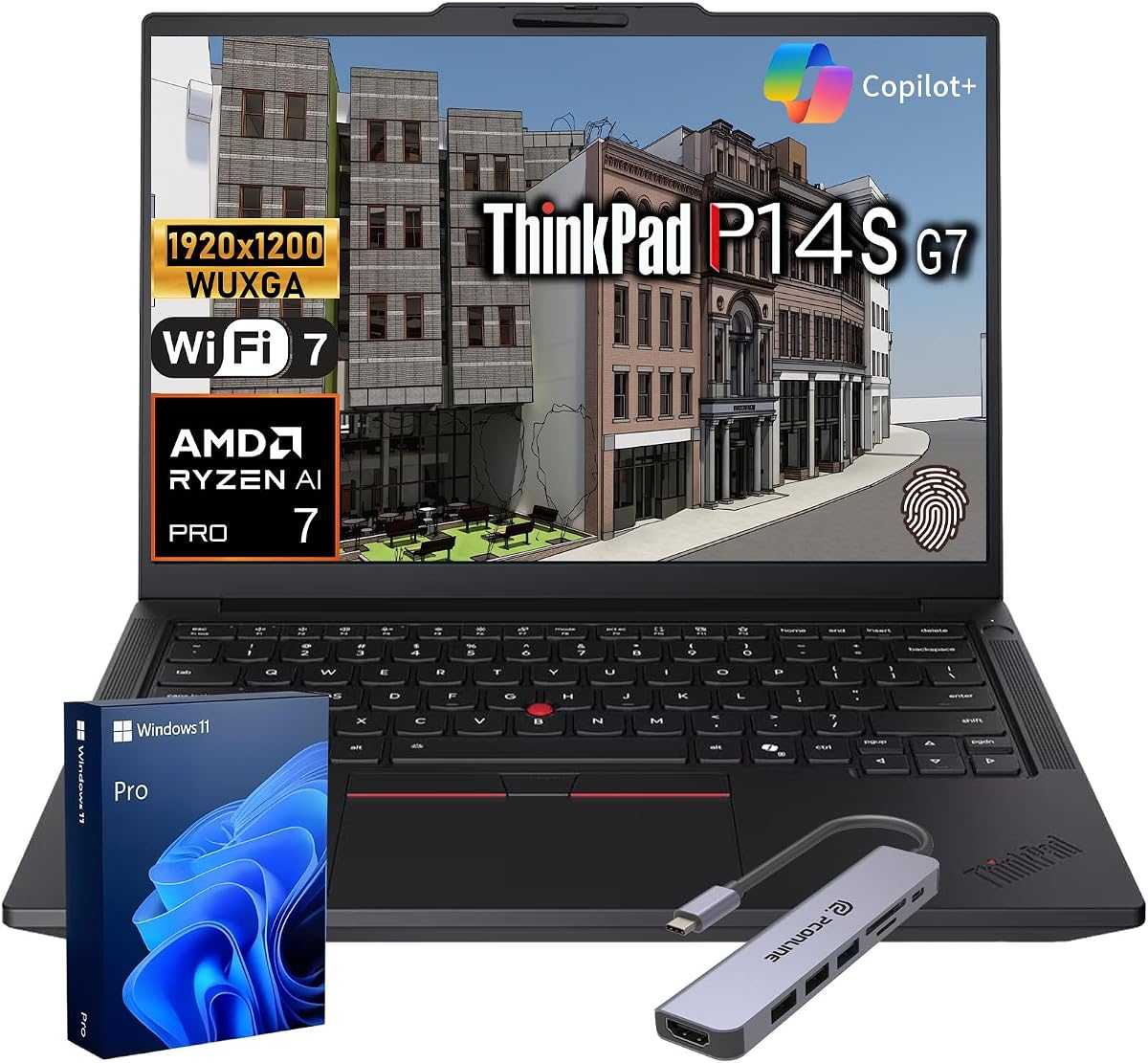
The Lenovo ThinkPad P14s has achieved a perfect 5.0-star rating reflecting high satisfaction among business and design professionals. It combines ISV certification with a compact form factor ideal for frequent travelers.
We may earn a commission when you buy through this link, at no additional cost to you.
Equipped with an AMD Ryzen AI 7 Pro 450 processor, this laptop offers efficient performance for CAD workloads. The ISV certification ensures that professional applications like SolidWorks and AutoCAD run without unexpected glitches or crashes.
Security features like a fingerprint reader and webcam shutter protect sensitive design data which is crucial for proprietary projects. The high-quality keyboard supports long typing sessions comfortably making it a reliable daily driver for detailed documentation.
If you value security and portability this ThinkPad is an excellent choice. It balances professional reliability with enough power for demanding tasks making it suitable for engineers who need to work from various locations with confidence.
ISV validated compatibility ensures that design software interacts with the hardware correctly reducing potential technical issues.
Layered security features protect your intellectual property ensuring client data remains secure during transit and storage.
We may earn a commission when you buy through this link, at no additional cost to you.
The Dell Precision 3561 Renewed offers a cost-effective way to access workstation-grade hardware. With a 3.5-star rating users note that while performance is good condition can vary slightly with renewed products.
We may earn a commission when you buy through this link, at no additional cost to you.
Its Intel Core i7-11800H and Nvidia T1200 GPU are certified for professional applications ensuring reliable operation for CAD software. This model brings enterprise features to a lower price point making it accessible for small firms.
While the CPU is older it still holds up well for general design tasks. The trade-off is potentially less battery life compared to newer chips. Buyers should check specific condition details before purchasing to ensure it meets expectations.
For budget-conscious professionals needing a dedicated GPU this is a viable option. It provides the stability required for work environments while saving money compared to buying the latest generation workstation.
Renewed models allow access to professional-grade specs at a fraction of the cost of brand new workstations.
The T1200 GPU is tested for CAD software ensuring stability and compatibility for critical design tasks.
We may earn a commission when you buy through this link, at no additional cost to you.
The HP Essential 15.6 is a budget-friendly entry-level option for students starting their CAD journey. With a 4.2-star rating, users appreciate its simplicity and low cost for basic computing needs.
We may earn a commission when you buy through this link, at no additional cost to you.
While the Intel N100 processor and 8GB RAM are not ideal for heavy 3D modeling, they handle 2D drafting effectively. The fast SSD ensures applications launch quickly and system responsiveness remains decent for light tasks.
The included Office 365 adds value for students and professionals handling documentation. However, users expecting high-performance rendering will find this model underpowered. It is best used as a secondary device or learning machine.
If your budget is tight and you are learning basic skills this laptop offers a functional start. It provides enough capability to run standard design software without breaking the bank for those just starting out.
Affordable pricing allows beginners to access design tools without a heavy financial investment.
Fast SSD storage ensures quick access to files and applications which is helpful for daily productivity.
We may earn a commission when you buy through this link, at no additional cost to you.
This HP 17.3-inch laptop has earned a perfect 5.0-star rating indicating high user satisfaction with its performance and value. It offers a large screen and solid memory which are beneficial for design work.
We may earn a commission when you buy through this link, at no additional cost to you.
The 16GB of RAM ensures smooth operation when multiple applications are open. The 17.3-inch display provides ample space for toolbars and blueprints. While not a powerhouse, it handles daily design tasks reliably.
The included Copilot AI features assist with drafting and communication which can speed up workflows. However, intensive 3D modeling may require a dedicated GPU. This laptop is best suited for 2D work or general use.
For general business users who occasionally do design work this is a great daily driver. It combines a large screen with enough power for professional tasks at an accessible price point.
The 17.3-inch screen provides plenty of room for viewing complex layouts and palettes simultaneously.
Copilot AI features help automate routine tasks allowing you to focus more on creative design work.
We may earn a commission when you buy through this link, at no additional cost to you.
Selecting a CAD laptop requires balancing budget with specific performance needs. Here are the key factors to consider before making your purchase.
The CPU is the heart of your CAD machine. Look for modern multi-core processors like Intel Core i7 or AMD Ryzen 7 to handle complex calculations and multitasking.
Prioritize high clock speeds and multiple threads to ensure smooth operation when rendering or navigating large files.
For 2D work, integrated graphics may suffice, but 3D modeling requires a dedicated GPU. NVIDIA RTX series cards are generally preferred for their driver support and performance.
Check for ISV certification if you rely on specific professional software to avoid compatibility issues.
RAM allows your system to hold project data while you work. Aim for at least 16GB for comfortable operation; 32GB is recommended for heavy 3D assemblies.
Ensure the laptop supports future upgrades if you anticipate your needs growing over time.
Solid State Drives (SSD) are essential for fast boot times and application loading. A minimum of 512GB is advisable to store large project files locally.
Look for PCIe NVMe drives which offer faster data transfer speeds compared to traditional SATA SSDs.
A high-resolution display with accurate colors helps reduce eye strain and ensures details are visible. 1080p is standard, but higher resolutions can improve productivity.
Anti-glare coatings are valuable for reducing reflections during long working sessions in various lighting conditions.
If you travel to job sites or client meetings, weight and battery life become critical. 15-inch laptops offer a good balance between screen size and portability.
Consider models with robust battery efficiency to avoid being tethered to an outlet during the day.
ISV certified laptops are tested to work seamlessly with professional software. This reduces the risk of software crashes or bugs during critical work.
If stability is paramount for your workflow, choosing an ISV certified workstation is highly recommended.
Ensure the laptop has enough ports for your peripherals. USB-C Thunderbolt and HDMI are standard for connecting monitors and external storage.
Check for Wi-Fi 6 or 7 support for reliable and fast internet connections when working remotely.
Always connect your laptop to a proper power source during heavy rendering tasks to prevent unexpected shutdowns. If using a dock, ensure it supports the necessary bandwidth for external displays.
Keep your drivers updated regularly especially graphics drivers. This ensures optimal performance and compatibility with the latest software patches for your design tools.
Clean your keyboard and screen gently with a microfiber cloth to avoid scratches. Avoid placing heavy objects on the laptop when closed to protect the screen hinge and display.
For 2D drafting, integrated graphics are sufficient. However, for 3D modeling and rendering, a dedicated GPU like NVIDIA RTX is recommended for smoother performance and faster visualization.
At least 16GB is standard for modern engineering software. For large assemblies or simulations, 32GB or more will prevent slowdowns and multitasking issues.
Many business laptops allow RAM upgrades but some newer models have soldered memory. Check the specific model's manual or specs to confirm if upgrades are possible.
ISV certification means the hardware is tested by the software vendor to work reliably with their application. It ensures stability and reduces the risk of software glitches during professional use.
Modern Intel Core i7 or AMD Ryzen 7 processors with high clock speeds offer the best balance of power and efficiency. Look for multiple cores to handle complex calculations effectively.
A 17-inch screen offers more workspace for toolbars and drawings which can improve productivity. However, it is less portable so choose based on whether you work mostly at a desk.
We found that the HP ZBook 8 G1i and Dell Precision 7680 lead the pack for professionals needing certified stability. The HP 255 G10 offers the best value for those watching their budget.
Prioritize GPU and RAM based on whether your work is mostly 2D or complex 3D. If you work with massive assemblies, investing in more memory will pay dividends in speed and stability.
Remember that prices fluctuate so check the links for the most current deals. Choosing the right tool ensures you can focus on creativity rather than fighting hardware limitations.