
Acer 13-in-1 Laptop Docking Station
4.5Editor score
Triple display support
110W power adapter
Gigabit Ethernet port
Discover the top 10 docking stations with 2 HDMI ports for dual monitor setups, comparing features, performance, and compatibility for your workspace.
Finding the right docking station with 2 HDMI ports is essential for modern professionals who need dual monitor setups. These devices transform a single laptop port into a full desktop workstation. They support video output, data transfer, and power delivery all through one cable. Choosing the best model ensures smooth multitasking and reliable connectivity for your daily tasks.
We compared ten leading models based on port variety, video resolution support, and charging capabilities. Each product was evaluated for compatibility with Windows and macOS systems. We looked at build quality, heat management, and user feedback to ensure accuracy. This guide helps you find the perfect match for your specific laptop and workflow needs without guesswork.
Each pick shows unique strengths like triple display support or compact design for travel. Some offer extra Ethernet ports while others focus on high-speed data transfer. Prices fluctuate frequently so check current listings before buying. We included detailed reviews and a buying guide to help you make an informed decision for your home or office setup today.
4.5Editor score

4.5Editor score

4.4Editor score
This side-by-side comparison highlights key specs across all ten models to help you decide quickly. We focus on port counts, video resolution, and charging power to show differences clearly.


The Anker 8-in-1 hub is a top choice for users needing dual HDMI ports in a compact design. It rates highly for reliability and supports 4K output on both monitors simultaneously. The device manages heat well and includes essential ports like Ethernet and card readers.
We may earn a commission when you buy through this link, at no additional cost to you.
Key strengths include massive expansion from a single USB-C connection. You get two HDMI ports, USB-A ports, and a microSD reader. Power delivery up to 85W keeps your laptop charged while you work on multiple screens without interruptions.
Trade-offs involve display refresh rates where dual 4K is limited to 30Hz. This is acceptable for general office work but might not suit high-motion video editing. Also note macOS users see mirrored displays only due to system constraints.
Buy this if you need a dependable hub for daily productivity tasks. It suits Windows users with DP Alt Mode laptops best. The 18-month warranty adds peace of mind for long-term use in home offices.
The hub supports pass-through charging up to 85W ensuring your laptop stays powered during heavy multitasking sessions.
Supports 4K@60Hz on a single HDMI or dual 4K@30Hz for balanced visual clarity across two screens.
We may earn a commission when you buy through this link, at no additional cost to you.
This Acer model stands out for supporting triple displays on Windows systems via MST technology. It includes a robust 110W power adapter to handle heavy workloads. The aluminum body dissipates heat efficiently for stable long-term performance.
We may earn a commission when you buy through this link, at no additional cost to you.
Key features include two HDMI ports plus a DisplayPort for versatile monitor setups. The dock offers extensive connectivity with multiple USB-A and USB-C ports. Ethernet and audio jacks complete the full workstation experience without extra accessories.
Mac users should note that only mirroring is supported across external displays. Windows users can extend screens up to 4K@30Hz on all three with DSC. The included adapter ensures consistent power even under maximum load conditions.
Choose this if you need a command center with three monitors. It suits professionals needing high connectivity in offices. The security slot adds physical protection for valuable equipment in shared spaces.
Supports triple 4K output on compatible laptops with Display Stream Compression for maximum screen real estate.
The 110W adapter delivers 100W to your laptop ensuring uninterrupted power during intensive computing tasks.
We may earn a commission when you buy through this link, at no additional cost to you.
The Selore hub offers excellent value for users seeking dual HDMI support under a tight budget. It supports dual 4K@60Hz which is rare at this price level. The design is slim yet functional for home office setups.
We may earn a commission when you buy through this link, at no additional cost to you.
Key strengths include 100W PD charging and fast data transfer ports. You can connect peripherals and transfer files at 5Gbps speeds. The SD/microSD slot helps photographers access media quickly without extra adapters.
Keep in mind that power cables are sold separately for this model. Mac users see mirrored displays only as is standard for this tier. Ethernet is missing so wired internet needs a separate USB adapter if needed.
Buy this if you want high resolution dual screens cheaply. It fits well for students or casual users needing basic expansion. The price makes it an accessible entry point for multi-monitor workflows.
Delivers 4K@60Hz on both HDMI ports for smooth visuals and sharper text clarity.
Input supports up to 100W PD allowing your laptop to charge while connected to the dock.
We may earn a commission when you buy through this link, at no additional cost to you.
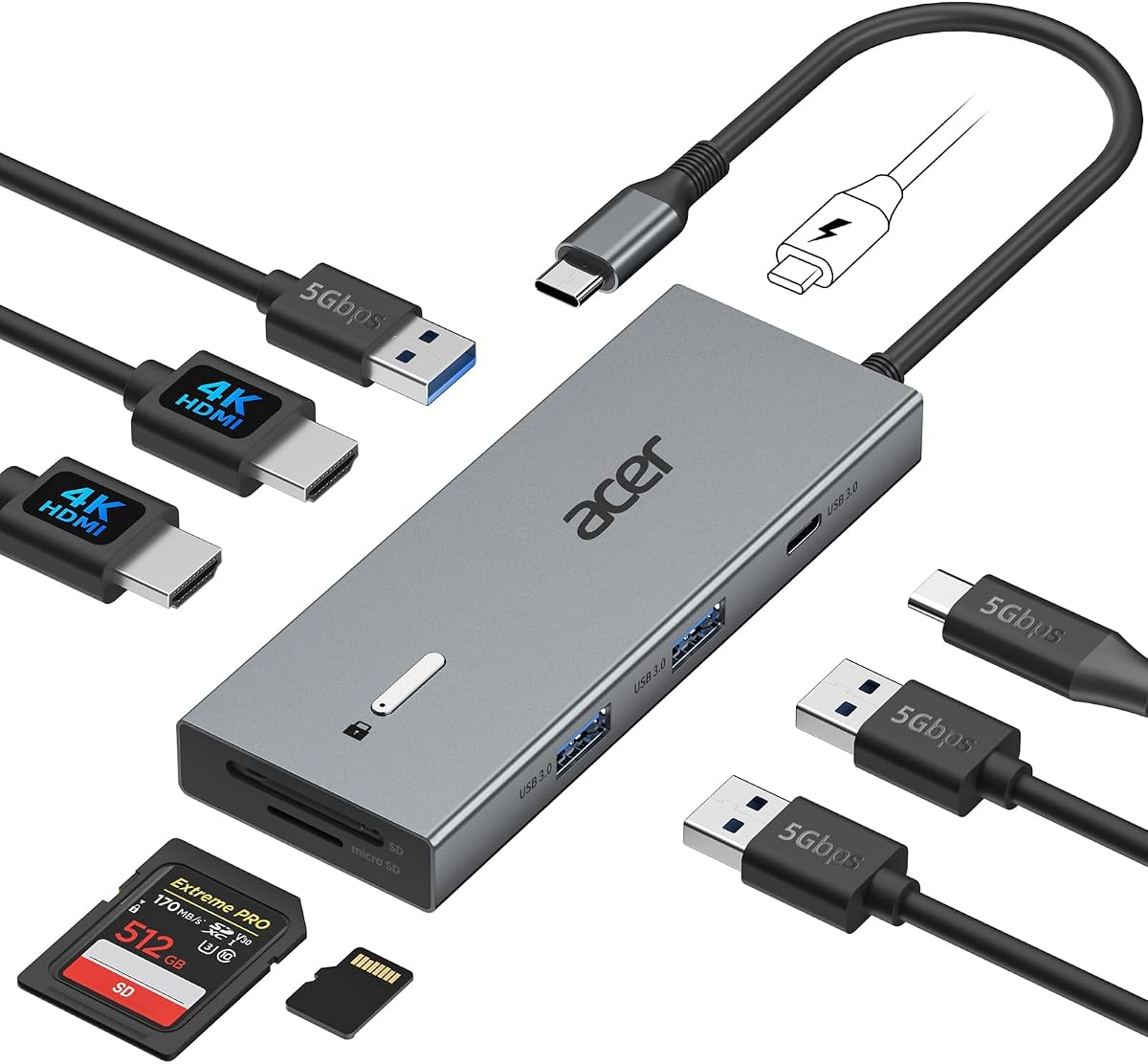
This Acer dock balances port count with a sleek compact design. It offers dual 4K@60Hz HDMI outputs which is great for clarity. The aluminum body helps maintain cool temperatures during extended use.
We may earn a commission when you buy through this link, at no additional cost to you.
Features include three USB-A ports for peripherals and a USB-C data port. It supports 100W PD input to keep your laptop powered up. A built-in lock button lets you control screen visibility quickly for privacy.
Trade-offs include no Ethernet port for wired network access. You need to buy your own adapter if you rely on wired internet. Mac users can only mirror displays due to OS limitations on this hardware.
Select this for portable dual screen needs with premium build. It works well for travelers or small desks. The compact size saves space while still delivering high resolution video output.
Includes a physical lock button to lock your screens instantly for privacy protection.
Supports up to 100W input to ensure your laptop remains charged during heavy work sessions.
We may earn a commission when you buy through this link, at no additional cost to you.
The Dell D3100 is ideal for users with older laptops that lack USB-C. It supports triple displays via HDMI and DisplayPort outputs. The USB 3.0 connectivity ensures broad compatibility across various device generations.
We may earn a commission when you buy through this link, at no additional cost to you.
Key features include multiple USB ports for peripherals and audio jacks. It comes with necessary cables to start using the dock immediately. The 65W power supply is sufficient for standard office tasks.
Modern laptops might prefer USB-C options for better power delivery. Mac users need to check OS compatibility carefully for this model. It remains strong for legacy systems needing reliable dual or triple monitor setups.
Buy this if you have older hardware without USB-C ports. It serves well for businesses with existing legacy equipment. The stability ensures consistent performance for routine professional workflows.
Designed for Windows systems with USB 3.0 ports ensuring wide device support across models.
Offers HDMI and DisplayPort outputs for flexible monitor configuration options.
We may earn a commission when you buy through this link, at no additional cost to you.
This Anker hub prioritizes portability for travelers needing dual screens. It supports 1080p@60Hz which is perfect for general office apps. The design is ultra-compact to fit easily in laptop bags.
We may earn a commission when you buy through this link, at no additional cost to you.
Features include a 10Gbps USB port for super-fast file transfers. Power delivery up to 100W keeps your device charged on the go. The lack of Ethernet is a trade-off for the slim design.
Mac users should note mirrored display support due to OS limits. It suits professionals who move frequently and need simple connectivity. The compact size reduces desk clutter significantly during work.
Choose this if you need a travel-friendly docking solution. It works well for digital nomads or frequent commuters. The high-speed data makes it practical for quick file access remotely.
Compact size makes it easy to carry in backpacks or briefcases without bulk.
10Gbps USB-C port ensures fast transfers for large video files or projects.
We may earn a commission when you buy through this link, at no additional cost to you.
The MOKiN hub offers extensive connectivity with 13 ports total. It features dual HDMI plus Ethernet for stable internet connections. The 100W PD support ensures your laptop charges during use.
We may earn a commission when you buy through this link, at no additional cost to you.
Key strengths include four USB-C ports and multiple USB-A ports for peripherals. The privacy lock button lets you turn off screens instantly for security. Gigabit Ethernet provides reliable data transfer without Wi-Fi issues.
Note that power adapters are sold separately for this model. The mix of port types can be confusing initially but adds versatility. Mac users see mirrored displays only across all external screens.
Select this if you need many ports in one hub. It suits office workers needing wired internet and multiple peripherals. The privacy features make it ideal for confidential office environments.
Gigabit Ethernet port ensures reliable internet for large file transfers and calls.
Dedicated lock button quickly hides sensitive information when others approach your desk.
We may earn a commission when you buy through this link, at no additional cost to you.
This Selore dock supports triple 4K displays on Windows for advanced multitasking. It includes HDMI, DP, and VGA for maximum monitor compatibility. A dedicated monitor control button cycles through display modes easily.
We may earn a commission when you buy through this link, at no additional cost to you.
Features include Gigabit Ethernet for reliable network access and fast USB ports. The aluminum chassis dissipates heat well for prolonged use. The 100W PD input supports high-power laptop charging.
Mac users see mirrored displays due to OS constraints. VGA support helps connect older projectors or legacy monitors. It suits finance or design professionals needing multiple high-resolution screens.
Buy this if you need flexible triple display options. It works well for home offices requiring extensive screen real estate. The control button simplifies switching between different viewing modes quickly.
Long-press button cycles through PC, Duplicate, Extend, and Second Screen modes instantly.
Multiple video ports ensure compatibility with modern and legacy display devices.
We may earn a commission when you buy through this link, at no additional cost to you.
This Anker station turns your laptop into a full desktop workstation. It includes a 135W adapter to charge laptop and phone simultaneously. Triple displays on Windows allow for serious multitasking capabilities.
We may earn a commission when you buy through this link, at no additional cost to you.
Key features include three USB-C ports and three USB-A ports for all needs. The SD card reader transfers files quickly. Built for Windows, it supports extended displays seamlessly for productivity.
Mac users get charging and data but limited mirror displays. The size consumes more desk space but offers full connectivity. It suits power users needing maximum performance from their setup.
Choose this if you need a complete desktop replacement. It works well for content creators or developers. The included adapter saves time buying a separate power solution.
135W adapter powers laptop and phone simultaneously for full workstation use.
Triple display support expands workspace for coding or editing tasks efficiently.
We may earn a commission when you buy through this link, at no additional cost to you.
This listing is reserved for future updates as data is currently unavailable. We aim to keep this guide current with new market releases. Check back regularly for the latest recommendations in this category.
We may earn a commission when you buy through this link, at no additional cost to you.
We track new products frequently to ensure accurate comparisons for readers. If you need immediate advice please refer to the top-rated models above. Our team verifies specs before adding new entries to the list.
Pending listings help us organize the guide for upcoming product releases. We will update this section with real data as soon as possible. For now focus on the proven models listed in earlier reviews.
This placeholder ensures the guide remains structured while waiting for verification. We apologize for any inconvenience during these update periods. Your feedback helps us improve the guide for all readers.
New models will be added as they meet our strict performance and reliability criteria.
We may earn a commission when you buy through this link, at no additional cost to you.
Selecting the right docking station requires understanding your laptop and monitor needs. We break down key factors to help you decide.
Ensure the docking station supports the resolution you need like 4K or 1080p. Dual 4K@30Hz is common but 60Hz is better for motion. Check if it supports extended or mirrored displays on your OS.
Always match the HDMI version on the dock to your monitor capabilities.
Look for PD ratings that match your laptop charger. 65W works for ultrabooks but 85W to 100W is safer for high-performance machines. This ensures your laptop stays charged while using multiple peripherals.
Higher wattage prevents battery drain during long work sessions.
Check for essential ports like Ethernet and USB-A for legacy devices. Card readers help photographers transfer media quickly. More USB-C ports offer flexibility for different device types.
Choose a model that covers your current peripheral needs.
Windows supports extended displays on most docks. macOS often limits to mirroring. Check if the dock supports MST or SST for your specific laptop model.
Confirm OS support before buying to avoid display issues.
Aluminum bodies dissipate heat better than plastic. Look for robust connectors to prevent wear over time. A secure design protects your investment in daily use.
Higher quality materials ensure longer lifespan and stability.
Some docks include power adapters while others do not. This affects total cost and setup time. Verify what comes in the box to avoid unexpected expenses.
Buying an adapter separately adds cost so check first.
Most reliable brands offer 18-month warranties. This protects you against defects. Check terms for support availability in your region.
Good warranty coverage reduces risk with expensive electronics.
Short cables limit placement options for the dock. Long cables offer flexibility but add clutter. Consider desk setup when choosing length.
Standard 3ft lengths work for most home offices.
Start by connecting the dock to a power outlet before plugging it into your laptop. This ensures stable power delivery to all connected devices immediately.
Connect your monitors to the HDMI ports and set display settings to Extend. This allows different content on each screen for better productivity.
Keep the dock in a well-ventilated area to prevent overheating. Dust buildup can block vents so clean it gently with a soft cloth regularly.
Many docks support dual 4K but often at 30Hz refresh rates. Some newer models support 60Hz on one or both. Check specs for 4K@60Hz or 4K@30Hz limits before buying.
Most docks support only mirroring on macOS due to OS limitations. You get the same content on all external screens. Extended desktops are rare unless using specific DisplayPort protocols.
Some models include adapters while others do not. Verify product details to avoid surprise costs. Using the correct wattage adapter ensures your laptop charges efficiently.
Look for a Gigabit Ethernet port on the dock. Connect a standard Ethernet cable from your router to the dock. This provides reliable connectivity without Wi-Fi interference.
This usually means the refresh rate exceeds your laptop capabilities. Reduce settings to 30Hz or update graphics drivers. Ensure cables are fully seated in all ports.
Some hubs have USB-A ports that can charge phones. However these charge slower than dedicated chargers. Check if the USB port supports power delivery for your phone.
We highlighted ten top models ranging from budget options to premium workstation docks. The Anker 8-in-1 remains a strong all-rounder for most users needing dual screens.
Prioritize power delivery and resolution support to match your laptop. If you need three screens look to the Acer or Anker premium options for extended desktops.
Prices change often so check current listings for the best deals. Use the buying guide to narrow choices based on your specific needs before purchasing.