
SAMPHON RGB Monitor Light Bar
4.1Editor score
Dual Mode Front and Backlight
Nine RGB Backlight Effects
USB Powered with Memory Function
Finding the right light behind monitor for eye care is essential for anyone who spends long hours in front of a screen. Proper lighting reduces strain, prevents headaches, and creates a comfortable workspace that supports productivity throughout the day.
We compared ten leading monitor light bars based on optical design, color temperature range, and ease of use. Each product was evaluated for its ability to eliminate glare, save desk space, and provide consistent illumination for various tasks.
Each pick highlights unique features tailored to different needs, from budget-friendly options to premium models with wireless controls. Prices and availability change frequently, so verify current details before purchasing to ensure you get the best value available.
4.1Editor score

4.6Editor score

4.7Editor score
As an Amazon Associate we earn from qualifying purchases.
This side-by-side comparison highlights the core specifications of each monitor light bar to help you make an informed decision based on your specific workspace needs and budget constraints.


The SAMPHON RGB Monitor Light Bar stands out as an affordable solution for users seeking both task lighting and ambient atmosphere. With a solid 4.1 rating, it offers dual lighting modes that cater to both productivity and entertainment needs effectively.
We may earn a commission when you buy through this link, at no additional cost to you.
Its standout feature is the combination of a front light that reduces glare and a nine-mode RGB backlight that enhances immersion. The front light uses a 45-degree beam angle to illuminate the desk without shining into your eyes or reflecting on the screen.
While the build is functional, it lacks the premium feel of higher-end models. The controls are straightforward tactile buttons, which is convenient but may lack the precision found in wireless systems. However, for the price, the versatility is hard to beat.
This light is ideal for gamers and students on a budget who want to reduce eye strain without breaking the bank. It balances essential eye care features with fun aesthetic options, making it a practical choice for a variety of setups.
You can use the front light for focused work while enjoying dynamic RGB colors behind the monitor for a gaming atmosphere.
The targeted lighting reduces strain by ensuring light hits the desk directly rather than your eyes, making long sessions more comfortable.
We may earn a commission when you buy through this link, at no additional cost to you.
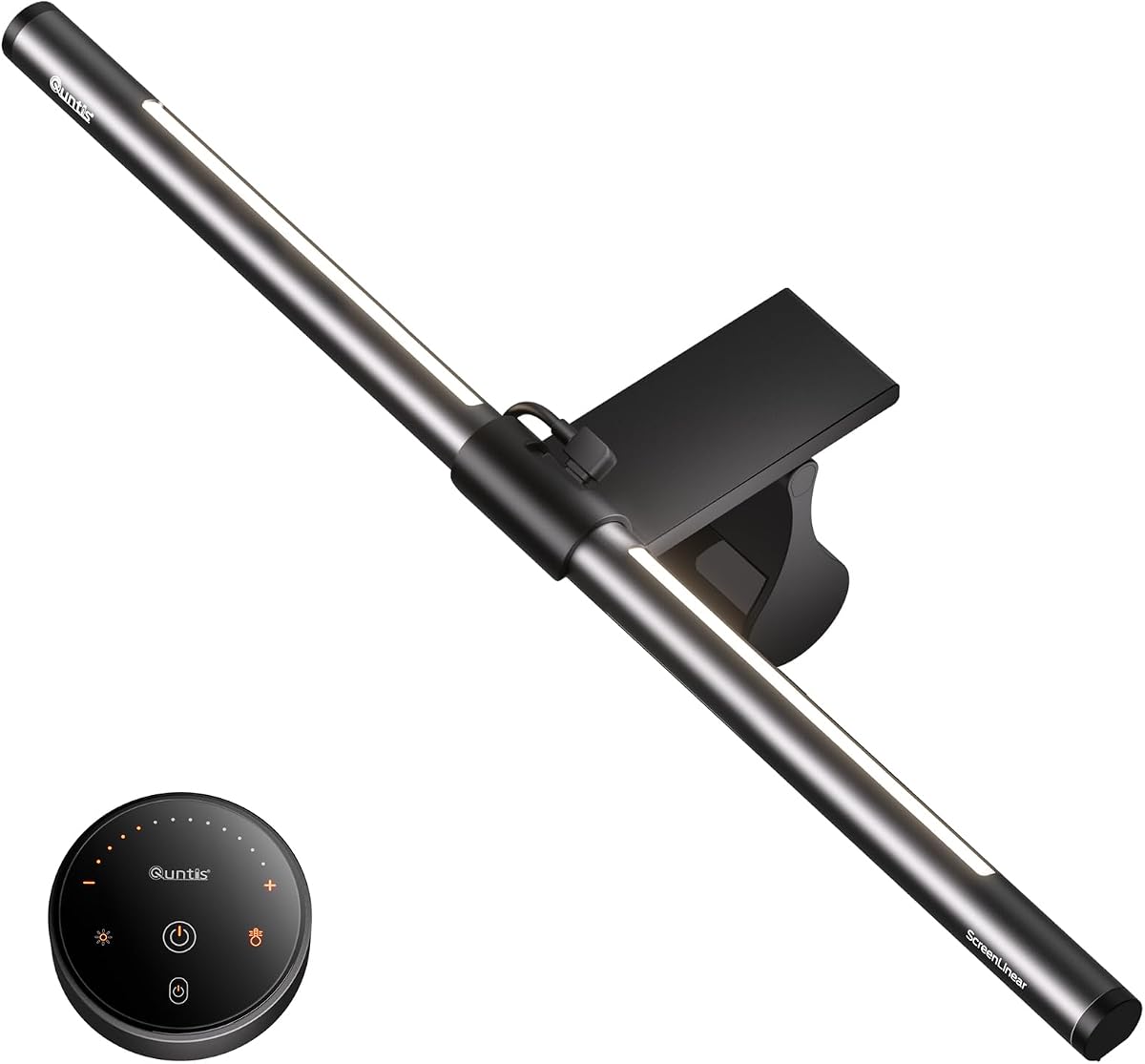
The Quntis Computer Monitor Lamp earns its spot as the Editor's Choice by balancing advanced eye care technology with practical design. It features a high CRI and auto-dimming capabilities that adapt to your environment seamlessly.
We may earn a commission when you buy through this link, at no additional cost to you.
Its asymmetrical optical design ensures that light goes only to your desk, eliminating screen glare completely. The built-in ambient light sensor adjusts brightness up to 900 lux, preventing visual fatigue by maintaining consistent illumination levels.
The high CRI of 98 makes colors look vibrant and true to life, which is crucial for designers and creative professionals. However, it relies on touch controls rather than a remote, which might be less convenient for some users compared to wireless options.
For professionals who prioritize eye health and color accuracy, this lamp is an excellent investment. It delivers a stable, comfortable lighting experience that supports focus and reduces the risk of strain during extended work hours.
The sensor monitors your room brightness and adjusts the light automatically to ensure your eyes are never exposed to sudden changes.
The unique angle ensures light hits your keyboard and desk while avoiding reflection on your screen or direct glare in your eyes.
We may earn a commission when you buy through this link, at no additional cost to you.
The YEELIGHT Monitor Light Bar is designed with safety and durability in mind, featuring a full metal body and an RG0 blue light rating. This makes it one of the safest options on the market for long-term eye protection.
We may earn a commission when you buy through this link, at no additional cost to you.
Its ultra-high CRI of 95 ensures vibrant, true-to-life colors, which is perfect for anyone working with visual media. The stepless dimming allows you to fine-tune brightness and color temperature precisely to match your task.
While it lacks a wireless remote, the long-press touch controls are intuitive and easy to use. The low-profile design ensures your webcam is not obstructed during video calls, adding to its utility for remote workers.
This bar is best suited for those who value build quality and safety certifications. It provides a reliable, comfortable lighting solution that withstands daily use while keeping your eyes protected from harmful blue light.
This rating confirms the light emits negligible hazardous blue light, making it safe for sensitive eyes and prolonged exposure.
The metal construction not only looks sleek but also dissipates heat effectively, ensuring the light stays cool to the touch.
We may earn a commission when you buy through this link, at no additional cost to you.
The BenQ ScreenBar Halo 2 represents the pinnacle of monitor lighting technology, combining premium features like a wireless controller and smart motion sensor. Its 4.7 rating reflects superior performance and reliability in the high-end category.
We may earn a commission when you buy through this link, at no additional cost to you.
The wireless dial allows for precise adjustments to brightness and color temperature, while the motion sensor automates power on and off based on your presence. The ambient backlight reduces contrast between the screen and surroundings for added comfort.
Though expensive, the build quality and engineering justify the cost. The Asym-Light technology guarantees zero glare, and the color rendering index exceeds 95 for professional accuracy. It is built to last with a lifespan over 50,000 hours.
This is the ideal choice for professionals and enthusiasts who demand the best lighting experience. If you want seamless control and top-tier eye care without compromising on quality, this model is worth the investment.
The dedicated dial lets you adjust settings with a simple twist, giving you instant control without reaching for the lamp itself.
The sensor detects when you are near and turns the light on or off automatically, saving energy and enhancing ease of use.
We may earn a commission when you buy through this link, at no additional cost to you.
This generic ultrawide monitor light bar is specifically designed to cover larger desk surfaces and screens. Its 15.7-inch length delivers 900 lux across the center, ensuring that wide setups receive uniform illumination without dark corners.
We may earn a commission when you buy through this link, at no additional cost to you.
The patented asymmetric lighting directs light to your desk while avoiding your eyes or screen reflection. Stepless dimming and three color temperatures allow you to customize the environment for focus or relaxation as needed.
Controls are kept simple with a mechanical switch on the side, which is easy to operate but less modern than touch panels. It is a cost-effective solution for users with larger monitors who need broader light coverage.
For those with ultrawide or multi-monitor setups, this bar provides the necessary width to light everything evenly. It is a practical, budget-friendly way to reduce eye strain across a wide workspace.
The extended bar ensures that light reaches both sides of your workspace, reducing the need for extra lamps on your desk.
A single mechanical switch handles power and color changes, making it easy for anyone to adjust settings without menus.
We may earn a commission when you buy through this link, at no additional cost to you.
The LYMAX Monitor Light Bar offers a wireless remote option that is rare at this price point. It uses a gravity damper bracket for stability, ensuring the light stays in place without wobbling on your monitor.
We may earn a commission when you buy through this link, at no additional cost to you.
The wireless controller allows you to adjust brightness and color from your seat, which is a convenient feature for daily use. The light is designed to minimize glare and flicker, making it comfortable for long study or work sessions.
It runs on a CR2450 battery for the remote, which is easily replaceable, though some may prefer rechargeable solutions. The metal enclosure provides durability while keeping the weight light enough for safe mounting.
This bar is a great balance between features and cost. If you value the convenience of a remote and a stable mount, it provides solid performance and reliability for home or office use.
The wireless remote lets you change settings instantly without reaching out, making adjustments seamless during work or gaming.
The gravity damper design ensures the lamp hangs securely on top of your monitor without the need for tight clamps.
We may earn a commission when you buy through this link, at no additional cost to you.
The Colorpanda Monitor Light Bar provides a simple yet effective solution for desktop lighting. Its 16.14-inch length ensures wide coverage, and the metallic finish adds a touch of elegance to any workspace.
We may earn a commission when you buy through this link, at no additional cost to you.
Installation is quick thanks to the counterweight clip, which secures the lamp without tools. The touch buttons allow you to cycle through color temperatures and brightness levels easily, with a memory function that saves your last preference.
It lacks advanced features like wireless control, but it delivers consistent light that reduces eye fatigue. The design is straightforward, focusing on core functionality rather than complex controls or extra modes.
For users who want a reliable, no-fuss lighting upgrade, this bar is a strong candidate. It is easy to set up and provides the essential eye care benefits needed for daily computer use.
You can clip the light onto your monitor in seconds without needing any tools, making it perfect for quick installation.
The built-in memory remembers your preferred brightness and color, so you do not need to adjust settings every time you turn it on.
We may earn a commission when you buy through this link, at no additional cost to you.
The Pzloz Architect Desk Lamp offers a flexible alternative to fixed monitor bars with its swing arms and wide range of adjustment. This makes it suitable for tasks like drafting or reading papers where light direction matters.
We may earn a commission when you buy through this link, at no additional cost to you.
It features a wireless remote and 25 lighting combinations, allowing for detailed customization of brightness and color. The clamp design keeps it stable, while the eye-care features ensure it does not cause strain.
Unlike fixed bars, this lamp can be moved to light specific areas of your desk, making it versatile for multi-tasking. However, its larger size means it takes up more space than a simple bar mount.
For those who need flexible lighting rather than a fixed screen bar, this lamp is an excellent choice. It provides versatile illumination for complex tasks while maintaining a focus on visual comfort.
The swing arms let you direct light exactly where you need it, whether on a document or a specific part of the desk.
A wireless remote makes it easy to switch modes without moving your hands from your keyboard or mouse.
We may earn a commission when you buy through this link, at no additional cost to you.
The Quntis Dual Light RGB Bar combines serious eye care with vibrant RGB lighting. It features a front light that is certified for safety and a backlight with 24 modes to enhance your gaming setup.
We may earn a commission when you buy through this link, at no additional cost to you.
With a center illuminance of 900 lux, it provides ample light for work while the RGB mode adds a relaxing atmosphere. The notched clip ensures your webcam is not blocked during video calls.
The controls allow you to manage both front and back lights independently. This flexibility lets you use the lamp for focused work or immersive gaming depending on the time of day.
This lamp is perfect for gamers who want to reduce eye strain without sacrificing style. It delivers a professional-grade lighting experience that adapts to both productivity and entertainment needs.
The 24 RGB modes create a dynamic background that syncs with your gaming sessions, making the environment more engaging.
The notched design ensures your camera has a clear view, which is important for remote workers and streamers.
We may earn a commission when you buy through this link, at no additional cost to you.
The Quntis Monitor Light Bar Glow features a dual protection design that uses both front and back light sources to reduce contrast. This helps lower eye strain by softening the difference between your screen and the dark room.
We may earn a commission when you buy through this link, at no additional cost to you.
It includes a smart remote with touch technology, allowing you to control settings easily from a distance. The sliding weighted clip ensures a secure fit on both thin and curved monitors without causing damage.
With 84 LED beads, it offers even illumination across the desk. The stepless dimming and color control give you precise management over the lighting environment to suit your current task.
This model is ideal for users who need advanced glare reduction and remote control. It provides a balanced, high-quality lighting setup that supports focus and comfort during long hours.
The back light reduces harsh contrast between your bright screen and dark room, making long sessions more comfortable.
The innovative sliding clip adjusts to fit monitors of different thicknesses securely, ensuring stability without scratching.
We may earn a commission when you buy through this link, at no additional cost to you.
Choosing the right monitor light bar involves considering several key factors that affect eye health and usability. This guide breaks down the most important elements to look for.
An asymmetrical optical design is critical to prevent screen glare and direct light from entering your eyes. Look for lamps that direct light at a 45-degree angle toward your desk.
Ensure the light has a focused beam to avoid illuminating the screen or your eyes directly.
Adjustable color temperature allows you to switch between warm light for relaxation and cool light for focus. A range from 3000K to 6500K covers most needs effectively.
Opt for models that offer stepless dimming for precise control over brightness levels.
Harmful blue light can disrupt sleep and cause strain. Look for certifications like RG0 or compliance with IEC standards to ensure safety.
Verify that the lamp uses flicker-free technology to maintain stable light output without invisible fluctuations.
A high CRI ensures colors look accurate and natural, which is vital for designers and video editors. Aim for a CRI of 90 or higher.
Higher CRI also reduces eye fatigue by providing clearer and more distinct object outlines.
The clamp should be adjustable and stable, fitting both flat and curved monitors without wobbling. A counterweight design is often more stable than heavy clamps.
Check that the mounting hardware will not damage your screen or bezels during installation.
Touch controls are common, but wireless remotes add convenience for users who want to adjust settings without reaching out.
Memory functions that remember your last settings are useful for maintaining consistent lighting habits.
USB-C connectivity is becoming the standard for modern monitors. Ensure the lamp can be powered by your PC or a compatible power bank.
Long cable lengths provide flexibility in where the power source is placed on your desk.
Metal bodies dissipate heat better than plastic and offer a more premium look. Consider the weight to ensure it does not overwhelm your monitor stand.
Durability ensures the light remains effective over years of use without dimming or failing.
When installing your light bar, ensure the clip is centered on the top of your monitor. Adjust the angle so the light points downward toward your keyboard and desk rather than directly at your eyes.
For best results, set the brightness to match your ambient room light. Use warmer temperatures in the evening to reduce disruption to your sleep cycle and cooler temperatures during the day for focus.
Clean the surface of the light bar with a dry, soft cloth to avoid scratching. Avoid using harsh chemicals or sprays that might damage the LEDs or the protective lens coating.
Yes, by eliminating screen glare and providing consistent illumination on your desk, a light bar reduces the effort your eyes need to focus. This helps prevent fatigue and headaches during long work sessions.
Most modern light bars are designed with flexible clips that adapt to curved screens. Always check the manufacturer specifications to ensure compatibility with your specific monitor curvature.
Well-designed light bars have a low profile that keeps your webcam clear. They illuminate your face from above without casting harsh shadows, making you look better during video meetings.
Adjust brightness until your desk is evenly lit without causing a stark contrast to your screen. The light should be bright enough to read comfortably but not so bright that it feels harsh.
USB powered lamps are energy efficient and easy to connect to your computer. They draw minimal power and avoid the need for extra wall outlets near your desk.
Stepless dimming allows you to adjust brightness across a continuous range, while fixed dimming offers preset levels. Stepless provides more precise control for specific tasks.
Choosing the right light behind monitor for eye care can significantly improve your daily work experience. Whether you prefer the budget-friendly SAMPHON or the premium BenQ ScreenBar, the key is finding a model that eliminates glare and supports your vision.
Prioritize features like asymmetrical optics and high CRI to ensure your lighting is both safe and functional. These factors directly impact how comfortable you feel after hours of screen time.
Remember to check current prices and availability before making your final decision. Investing in a quality monitor light bar is a smart move for long-term eye health and productivity.