
Getorli Mini PC Ryzen 5 3501U, 16GB RAM 512GB SSD, Triple Display, WiFi 6
4.6Editor score
Affordable Price Point
16GB RAM Standard
WiFi 6 Connectivity
We compare the top Htpc Mini PC models for 2026 focusing on performance, connectivity, and multimedia features to help you choose the right unit.
Finding the right Htpc Mini PC can transform your entertainment setup without taking up valuable space. These compact devices pack impressive power into small chassis, making them ideal for streaming, office work, and light gaming in any room.
We evaluated ten leading models based on processor speed, graphics capabilities, connectivity options, and expandability. Our analysis focuses on real-world performance for home theater use, ensuring each pick delivers smooth playback and reliable networking for your media needs.
Each pick below shows key specs, pros, and cons to guide your decision. Prices and stock change frequently, so verify current details before purchasing. We aim to provide honest insights so you can invest confidently in a system that meets your specific requirements.
4.6Editor score

4.3Editor score

4.4Editor score
This table provides a quick side-by-side view of the top Htpc Mini PC models. We highlight core specifications like processor type, memory capacity, storage options, and display support to help you compare features at a glance.




The GMKtec G10 Mini PC stands out as the top choice for most users seeking a balanced Htpc Mini PC. With a rating of 4.3 stars, it offers reliable performance for media streaming and daily tasks. The inclusion of a 1TB SSD ensures you have plenty of room for your media library.
We may earn a commission when you buy through this link, at no additional cost to you.
At its core, the Ryzen 5 3500U processor with Radeon Vega 8 graphics handles video playback effortlessly. It supports three displays simultaneously, which is rare at this price point. You can connect via HDMI 2.1, DP, or USB-C, giving you flexibility for multi-monitor setups in a living room or home office.
While it does not support the latest WiFi 6 standards, its Ethernet port provides stable wired connections for streaming. The fan may become noticeable if you push the CPU hard during video encoding, but for typical HTPC use, it remains quiet. Memory expansion to 64GB allows future-proofing if your needs grow.
This model is ideal for users who want strong multimedia capabilities without breaking the bank. Its balance of CPU power, storage, and display options makes it the best all-around pick. If you need a compact PC that handles 4K content and light multitasking, this should be your primary consideration.
The integrated Radeon Vega 8 GPU delivers smooth 4K video decoding and supports casual gaming, making it versatile for entertainment centers.
Two M.2 slots allow for dual storage drives, enabling you to separate OS files from media content easily.
We may earn a commission when you buy through this link, at no additional cost to you.
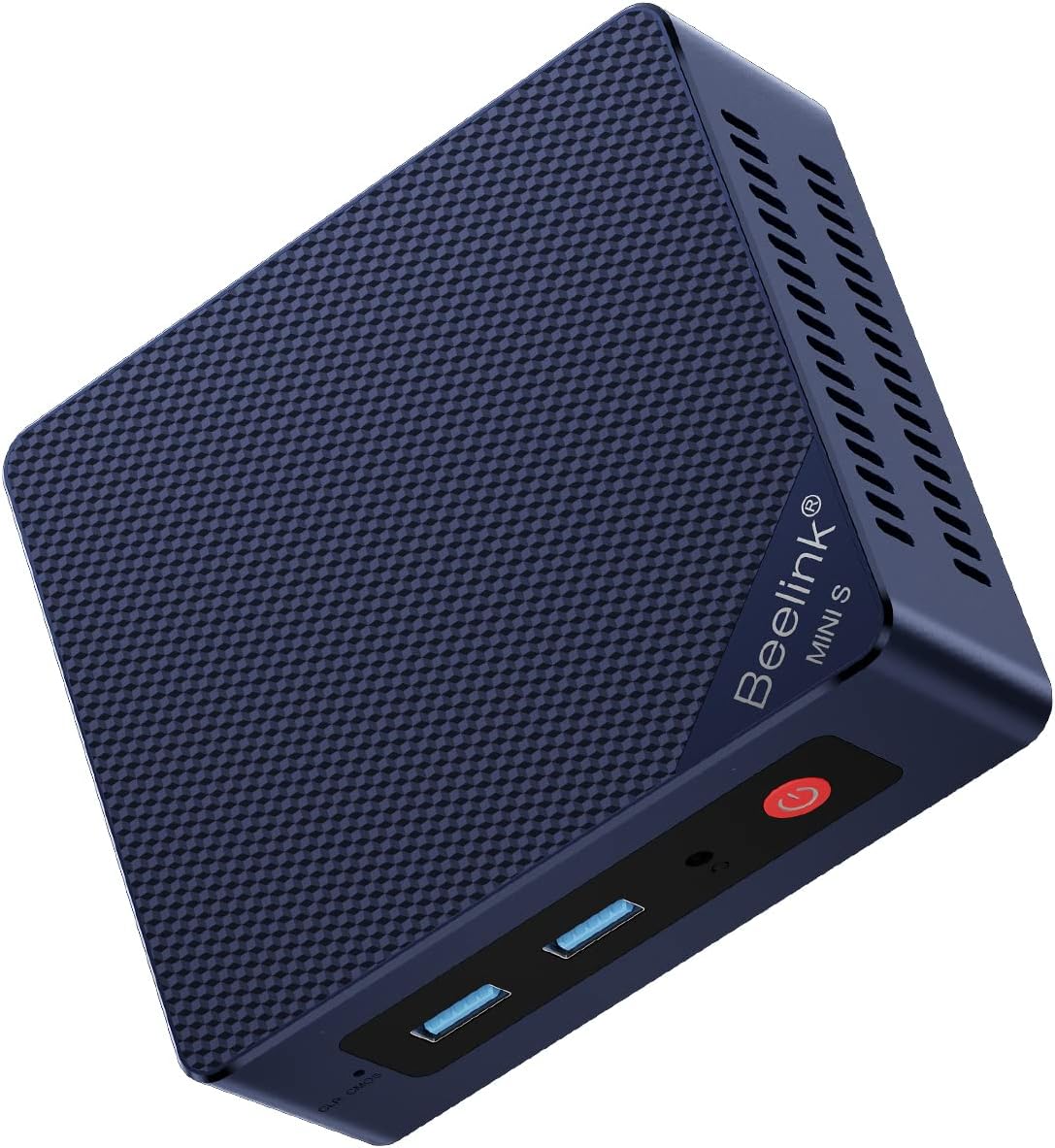
The Getorli Mini PC earns the best budget award by delivering essential Htpc Mini PC features at a competitive price. With a 4.6 rating, customers appreciate its value and responsiveness. It packs a Ryzen 5 3501U processor that handles daily tasks well.
We may earn a commission when you buy through this link, at no additional cost to you.
Its 16GB RAM and 512GB SSD provide a smooth user experience for browsing and streaming. The inclusion of WiFi 6 is a significant upgrade over older models, ensuring better wireless performance in crowded networks. You can connect up to three displays using HDMI and USB-C, which is impressive for this tier.
Performance may lag slightly behind higher-tier chips during heavy multitasking, but for typical home theater use, it is sufficient. The compact size allows for discreet installation behind a monitor or TV. If you need a reliable budget unit without sacrificing basic connectivity, this is a strong candidate.
This device is best suited for users with limited budgets who still want modern wireless standards. Its high satisfaction score suggests quality construction and good customer support. While not the fastest, it offers the most value for casual media consumption and light productivity tasks.
WiFi 6 support reduces latency and improves streaming quality in households with many connected devices.
VESA mount support allows you to hide the PC completely, keeping your entertainment area tidy.
We may earn a commission when you buy through this link, at no additional cost to you.
The Beelink SER5 MAX sets the standard for premium Htpc Mini PC devices with its powerful Ryzen 7 7735U processor. Rated 4.4 stars, it excels in handling demanding applications beyond simple media playback. Its 6nm technology ensures efficient performance even under load.
We may earn a commission when you buy through this link, at no additional cost to you.
With 24GB of fast LPDDR5 memory and a 1TB SSD, multitasking is seamless. The graphics subsystem supports triple 4K displays at 120Hz, which is excellent for high-refresh-rate monitors and gaming. This makes it suitable for users who need a single box for work and entertainment.
The advanced cooling design keeps temperatures stable during long sessions, though the price reflects this premium build. The LPDDR5 memory is soldered, meaning you cannot upgrade it later, so the initial 24GB is your limit. However, this capacity is usually enough for most professional tasks.
Choose this model if you need maximum performance and display flexibility in a compact form factor. It serves well as a high-end HTPC or a portable workstation. If you want future-proof speed and support for multiple 4K screens, this is the ultimate choice for power users.
Triple 4K 120Hz output allows for smooth visuals in gaming or detailed CAD work on external monitors.
Eight cores and sixteen threads handle video editing and 3D rendering with ease in a small footprint.
We may earn a commission when you buy through this link, at no additional cost to you.
This GMKtec G10 variant focuses on networking strength, making it a unique Htpc Mini PC for server enthusiasts. The dual 2.5GbE Ethernet ports allow for advanced firewall setups like pfSense without extra hardware. It retains the reliable Ryzen 5 3500U processor for balanced performance.
We may earn a commission when you buy through this link, at no additional cost to you.
Connectivity is extensive with HDMI 2.1 and USB-C support for video and power. You can charge it via a PD adapter, adding mobility for office use. The triple display capability supports productive multi-monitor workflows. Performance mode in the BIOS unlocks higher power limits for heavier tasks.
The lack of WiFi 6 means wired connections are preferred for best results. While the fan noise is typical for compact systems, it can be managed in a ventilated area. This setup is perfect for users needing robust networking and video output in one device.
If you run a home lab or need secure network isolation, this mini PC is a top contender. It combines home PC power with networking flexibility. Choose it if you value wired speed and advanced port options over wireless speed in your media center.
Dual 2.5GbE ports enable router or firewall functionality without buying separate network equipment.
USB-C PD charging lets you use a power bank for true mobile office setups.
We may earn a commission when you buy through this link, at no additional cost to you.
The Beelink MINI S13 is an excellent Htpc Mini PC for Intel fans who prioritize efficiency. Powered by the new N150 processor, it offers decent performance for routine tasks. Its quiet operation makes it a great addition to a living room environment.
We may earn a commission when you buy through this link, at no additional cost to you.
It supports dual 4K screens at 60Hz, allowing for productive dual-monitor setups. WiFi 6 ensures fast wireless connectivity for streaming without wires. The compact design with VESA mount keeps your workspace clean. Intel Unison integration helps sync notifications with your phone.
While it lacks triple displays, its simplicity is a plus for basic setups. The fan is well-designed to keep noise low even under moderate load. It works well for office work and streaming. If you prefer Intel stability over raw speed, this is a solid option.
This model is best for users needing a quiet, efficient box for browsing and media. Its 16GB RAM ensures smooth multitasking. If you want a small PC that blends into your TV setup without distraction, this Intel-based unit is a reliable choice.
Low power consumption means less heat and lower electricity bills for always-on setups.
Two HDMI ports allow side-by-side multitasking for work or entertainment without extra adapters.
We may earn a commission when you buy through this link, at no additional cost to you.
The GMKtec G11 uses a Ryzen Embedded processor designed for continuous operation, making it ideal for robust Htpc Mini PC applications. Its stable performance supports 24/7 workloads like media servers. The graphics are significantly faster than basic Intel chips.
We may earn a commission when you buy through this link, at no additional cost to you.
It offers dual 2.5GbE ports for flexible networking. Triple display support helps manage complex visual tasks. The dual-channel RAM ensures smooth data flow for multimedia. This reliability suits users who need a PC that runs reliably for long periods.
It may cost more due to its industrial-grade CPU. However, the performance and connectivity justify the investment for professional needs. If you run a digital sign system or need a stable home server, this offers better longevity than standard models.
This device is perfect for users needing reliability and strong networking. Its balance of speed and stability is unique. If you prioritize consistent performance for critical tasks, this embedded unit is a premium choice in the mini PC market.
The embedded CPU is designed for long uptime, reducing wear on internal components during extended use.
Dual 2.5GbE ports allow for advanced network segmentation or high-speed file transfers.
We may earn a commission when you buy through this link, at no additional cost to you.
The Beelink MINI S12 is a practical Htpc Mini PC for daily tasks. It features the Intel N100 processor which handles browsing and office apps well. Its low power draw is great for energy-conscious users. The 16GB RAM ensures smooth multitasking.
We may earn a commission when you buy through this link, at no additional cost to you.
Dual 4K HDMI output supports high-resolution content. The 2.5G LAN port offers fast wired connections for streaming. It includes Intel Unison for phone integration. The compact size saves desk space, and the cooling system keeps noise low.
It supports fewer displays than premium models, which limits multi-monitor setups. However, for standard dual-screen needs, it works perfectly. The balance of cost and performance makes it a versatile choice. If you want reliability without extra frills, this is a safe buy.
Choose this model for general computing and streaming. Its efficient design suits small home offices or entertainment centers. If you need a dependable PC that runs quietly and efficiently, this Beelink unit delivers strong value for everyday use.
Minimal power usage reduces your carbon footprint while maintaining reliable performance for daily work.
The 2.5G LAN port ensures quick transfers for home media servers and high-speed internet use.
We may earn a commission when you buy through this link, at no additional cost to you.
The KAMRUI E1 is an affordable Htpc Mini PC that gets the job done. With a Ryzen 5 3500U, it handles basic tasks well. It offers dual 4K display support for a sharp viewing experience. The included 256GB SSD provides quick boot times.
We may earn a commission when you buy through this link, at no additional cost to you.
You get multiple USB ports for peripherals. The USB-C port supports video output, adding flexibility. While the 8GB RAM is the limit, it works for light multitasking. It fits well in small spaces with VESA mount options. For the price, it delivers solid performance.
Limited storage and memory can be restrictive for heavy media. Upgrading the SSD helps but requires opening the case. If you have moderate needs and budget constraints, it is a good fit. It balances essential features well for entry-level users.
This model suits basic home or office needs. It provides a reliable start without spending too much. If you want an entry-level unit that supports modern video standards, the E1 is a practical choice for your setup.
The competitive price makes it accessible for users needing a compact PC for basic tasks.
Ready to use out of the box with pre-installed OS for immediate productivity.
We may earn a commission when you buy through this link, at no additional cost to you.
The GMKtec M2 Pro S features an Intel i7-1185G7 for fast single-core performance. This Htpc Mini PC excels in apps relying on quick response times. The Intel Iris Xe graphics provide decent visual performance. Triple display support enables flexible multi-tasking.
We may earn a commission when you buy through this link, at no additional cost to you.
USB4.0 offers high-speed data and video transfers. 2.5G LAN ensures fast network speeds. WiFi 6 adds modern wireless capabilities. It is a strong option for those needing speed in a small box. However, the 11th Gen chip is older than newer options.
It runs warmer under load compared to lower-power chips. Cooling is adequate but fan noise may increase. If you need high clock speeds for specific software, this is a good choice. It balances performance and size effectively for many users.
Choose this if you want strong Intel performance and modern ports. It suits power users who need fast processing. If you want speed and connectivity in a compact unit, this GMKtec model meets those requirements well.
USB4.0 allows rapid data transfers and external display connections with high bandwidth.
The high clock speed ensures responsive performance for legacy apps and gaming.
We may earn a commission when you buy through this link, at no additional cost to you.
The Beelink MINI S12 Pro is a compact Htpc Mini PC for efficient use. It uses the N100 chip which balances power and heat well. With 16GB RAM, it handles daily work smoothly. Its small size helps keep your setup tidy.
We may earn a commission when you buy through this link, at no additional cost to you.
Dual 4K HDMI ports provide clear visuals for streaming. WiFi 6 and Bluetooth 5.2 offer stable wireless connections. The 2.5G LAN ensures fast internet access. The design allows placement behind monitors to save space. It includes rich interfaces for peripherals.
While graphics are basic, it is enough for standard 4K content. The lack of triple displays limits advanced setups. However, for most users, it is more than sufficient. Its high rating shows customer satisfaction with reliability. This is a great pick for general use.
If you want a small, efficient PC for media and work, this is a strong option. It offers modern connectivity in a tiny package. If you need a compact unit that fits anywhere, this Pro model delivers reliable daily performance.
The tiny chassis allows placement behind monitors or in tight entertainment centers easily.
WiFi 6 and Bluetooth 5.2 ensure stable connections for peripherals and streaming.
We may earn a commission when you buy through this link, at no additional cost to you.
Choosing the right Htpc Mini PC depends on your specific needs. We break down the key factors to consider before purchasing a unit.
The processor determines how well the Htpc Mini PC handles tasks like streaming and multitasking. Look for models with at least four cores for smooth performance. Newer chips offer better efficiency and graphics capabilities for media playback.
Prioritize CPUs with strong integrated graphics to avoid buying a separate GPU. This ensures your unit can handle modern video codecs without lag.
Memory capacity affects how many apps you can run simultaneously. For comfortable use, 16GB RAM is recommended. Storage speed matters for boot times; opt for NVMe SSDs rather than SATA drives.
Ensure the unit offers expansion options if you need more space later. Many models allow upgrades to memory and drives for flexibility.
Consider how many screens you need to connect. Some Htpc Mini PC models support dual displays while others support three or more. Check for HDMI 2.1 or DisplayPort versions to match your monitor capabilities.
USB-C ports with video support add versatility for connecting modern displays. This feature is increasingly common in higher-end units.
Network speed is vital for streaming 4K content without buffering. WiFi 6 provides better wireless stability than older standards. Wired Ethernet options like 2.5GbE offer even faster speeds for stationary setups.
If you plan to use the unit as a media server, a fast LAN port is essential. This ensures smooth file transfers and remote access.
Noise levels can affect your viewing experience in a living room. Fanless designs are rare for higher-performance models. Look for units with effective cooling solutions that keep noise low even during intensive tasks.
Read reviews regarding fan noise under load. Some users may prefer a slightly larger chassis for better airflow and quieter operation.
The number and type of USB ports matter for peripherals. You may need USB 3.2 ports for external drives. Ensure there are enough audio jacks if you connect speakers or headsets directly.
Modern units often include specialized ports like USB4 for fast data transfer. Verify that the ports match your existing accessories before buying.
Htpc Mini PC units are designed to be energy efficient. Lower power draw means less heat and electricity usage. This is important for devices that run continuously as media servers or digital signs.
Check the TDP of the processor to gauge power needs. Efficient models save costs over time and reduce cooling requirements.
A good warranty protects your investment against defects. Look for brands offering at least a one-year guarantee. Reliable customer support helps resolve any setup issues quickly.
Some providers offer extended warranties for additional security. Check the return policy and support availability before purchasing.
Place your Htpc Mini PC in a well-ventilated area to prevent overheating. Ensure there is enough space around the chassis for air to circulate freely. Avoid enclosing it in tight cabinets without vents.
Connect your displays and peripherals using the available ports. Start with HDMI for video and USB for peripherals like a keyboard and mouse. Use a stable power source to protect internal components from surges.
Keep the system updated with the latest driver patches for optimal performance. Regularly clean dust from vents using a can of compressed air to maintain airflow. Monitor system temperatures to ensure the cooling fans are working properly.
An Htpc Mini PC typically has better graphics capabilities to support video decoding. It often includes HDMI 2.1 or DisplayPort outputs for high resolution. These units are optimized for silent operation in living rooms.
Yes, many units can run light or casual games well. Look for models with strong integrated graphics like Vega 8. For AAA gaming, you will still need a dedicated graphics card.
Upgrading depends on the specific model. Many allow RAM and SSD upgrades through accessible panels. Some soldered models limit memory expansion options. Check the specs before buying if you plan to upgrade.
Use an HDMI cable to connect the PC to your TV directly. If your TV lacks HDMI ports, you may need an adapter. Ensure your cable supports the required resolution for best quality.
Most Htpc Mini PC models support Linux distributions out of the box. Drivers are usually available for modern Wi-Fi and Ethernet. Check community forums for specific compatibility details.
These units generally consume between 15W and 65W depending on the load. This is much lower than standard desktops. It makes them cost-effective for 24/7 operation.
We have reviewed the top 10 Htpc Mini PC models to help you find the right fit. From the versatile GMKtec G10 to the budget-friendly Getorli, there is a unit for every need.
Prioritize performance and connectivity based on your specific tasks. If you need powerful graphics, consider the Beelink SER5 MAX. For basic streaming, the MINI S13 is a solid choice.
Always check current prices before purchasing as they fluctuate frequently. Use our guide to compare specs side by side. We hope this helps you choose a reliable system for your home setup.