
SteelSeries Apex 3 Gaming Keyboard – Black
4.6Editor score
Water resistant design
Quiet gaming switches
Magnetic wrist rest
Explore our expert guide on the best keyboard for Fortnite in October 2026. We compare ten top-rated models featuring mechanical switches, RGB lighting, and
Finding the right keyboard for Fortnite can significantly impact your performance in the heat of battle. Whether you are building structures quickly or aiming for precise shots, the responsiveness and durability of your input device matter. This guide reviews ten top models designed to meet the demands of competitive gaming.
We evaluated these keyboards based on switch type, key rollover capability, build quality, and customization options. Our analysis focuses on how each device handles rapid inputs and complex macro sequences common in Fortnite gameplay. We also considered comfort during long sessions and the value offered at different price points.
Each pick in this list highlights specific strengths that cater to different playstyles and budgets. From budget-friendly membrane options to high-end mechanical switches, there is a suitable choice for every gamer. Please note that product availability and pricing may change over time, so check current listings before purchasing.
4.6Editor score
4.5Editor score

4.5Editor score
The following table provides a side-by-side comparison of the ten keyboards reviewed in this guide. Each entry highlights essential specifications such as switch technology, layout size, and connectivity options to help you quickly identify the model that fits your setup.






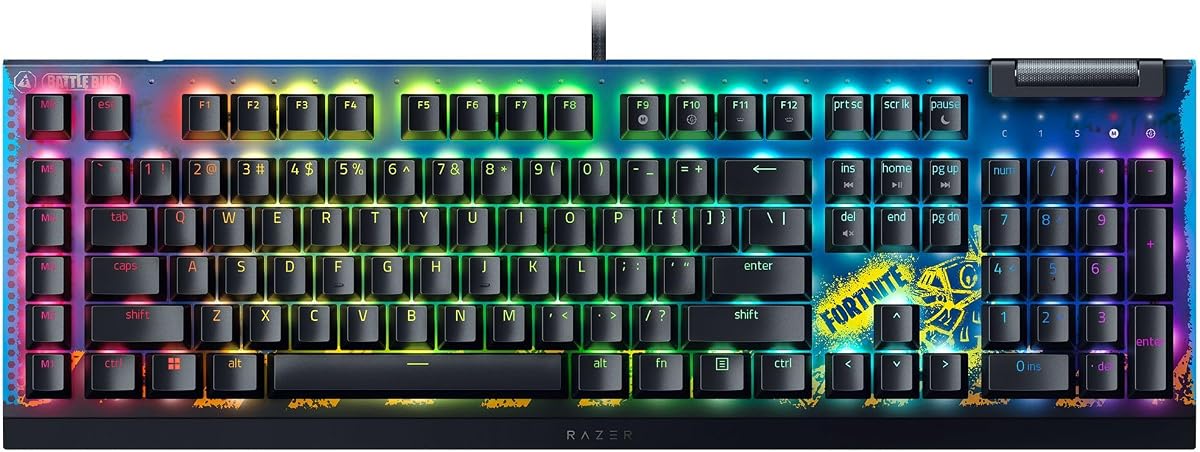
The Razer BlackWidow V4 X stands out as a top contender for Fortnite players seeking performance and reliability. With a rating of 4.5 stars, it offers a balance of speed and comfort that suits intense gaming sessions. The keyboard features yellow mechanical linear switches designed for rapid inputs without the noise of clicky alternatives.
We may earn a commission when you buy through this link, at no additional cost to you.
Its standout feature is the set of six dedicated macro keys which can be programmed for complex build rotations. This allows players to execute multi-key sequences with a single press, giving a competitive edge in high-stakes moments. The linear switches have a 1.2mm actuation point and require only 45 grams of force for instant responsiveness.
While the keyboard is generally quiet due to built-in sound dampeners, some users might find the lack of dedicated media keys limiting compared to larger models. However, the multi-function roller and secondary media keys mitigate this issue for most users. The doubleshot ABS keycaps ensure that labels remain visible even after extensive use.
This keyboard is ideal for gamers who prioritize speed and customization without compromising on build quality. The Chroma RGB lighting adds a personalized touch to any setup. For those looking to dominate in Fortnite with precise and rapid inputs, this model offers a robust solution backed by reputable gaming hardware engineering.
The six dedicated macro keys allow you to map complex build sequences to single presses, streamlining your rotation during combat.
Yellow mechanical switches provide a smooth and quiet typing experience thanks to internal sound dampeners, perfect for shared spaces.
We may earn a commission when you buy through this link, at no additional cost to you.
The SteelSeries Apex 3 is an excellent entry-level option for Fortnite players on a budget. It holds a strong rating of 4.6 stars, indicating high customer satisfaction despite its lower price point. This keyboard uses whisper quiet gaming switches that provide a nearly silent experience while maintaining the necessary responsiveness for gaming.
We may earn a commission when you buy through this link, at no additional cost to you.
One of its most practical features is the IP32 water resistance which protects against accidental spills. This durability is rare in budget keyboards and adds significant value for users who worry about drink mishaps during intense play. The included premium magnetic wrist rest offers full palm support, reducing fatigue during long sessions.
While it does not feature mechanical switches, the low friction design ensures millions of keypresses without degradation. The 10-zone RGB illumination allows for some customization without the complexity of per-key lighting. Dedicated multimedia controls let you adjust volume on the fly, which is convenient for balancing game audio and voice chat.
This keyboard is perfect for students or beginners who want reliable performance without spending a lot. It works across multiple platforms including Windows, Mac, and consoles. For those seeking a durable and comfortable keyboard that won't break the bank, the Apex 3 delivers impressive value and functionality.
The IP32 water-resistant coating prevents accidental liquid damage, ensuring the keyboard survives spills during late-night gaming sessions.
A premium magnetic wrist rest provides ergonomic support to reduce wrist strain and enhance comfort during extended matches.
We may earn a commission when you buy through this link, at no additional cost to you.
The Redragon S101-3 PRO offers a complete package for gamers who need both a keyboard and mouse without separate purchases. With a rating of 4.5 stars, this combo set provides a full-size RGB backlit keyboard and a high-precision mouse designed for gaming. It is an ideal choice for first-time gamers or those upgrading from basic office peripherals.
We may earn a commission when you buy through this link, at no additional cost to you.
This keyboard features independent macro record keys that allow users to record complex command sequences. By downloading the intuitive software, you can customize lighting effects and record macros to gain a competitive edge. The soft-touch membrane keys provide satisfying feedback while remaining quiet, making it suitable for shared environments.
The included mouse boasts adjustable DPI settings ranging from 800 to 7200 for precise control. Both the keyboard and mouse save settings directly to the hardware, meaning your preferences persist even after restarting your PC. The anti-ghosting technology ensures that every key press is registered instantly during intense action sequences.
For budget-conscious users seeking a durable and responsive upgrade, this combo delivers exceptional value. The ergonomic wrist rest helps reduce fatigue during marathon sessions. While it uses membrane switches rather than mechanical ones, the performance is reliable and sufficient for most Fortnite players looking to improve their setup affordably.
This complete wired set includes both a keyboard and mouse, providing everything you need for gaming without buying peripherals separately.
Five dedicated macro keys allow you to record complex sequences giving you a tactical advantage in complex gameplay scenarios.
We may earn a commission when you buy through this link, at no additional cost to you.
The GEODMAER 65% Gaming Keyboard is designed for players who value portability and desk space efficiency. With a compact design that removes the numpad, it saves space on the desktop while retaining separate arrow keys essential for navigation. It holds a rating of 4.3 stars, reflecting its practical design for gamers and office users alike.
We may earn a commission when you buy through this link, at no additional cost to you.
This keyboard connects via a detachable Type-C cable to provide a stable and constant connection. The 26 keys no-conflict feature ensures that simultaneous inputs are registered accurately, preventing missed commands during fast gameplay. The keyboard features 11 media buttons and can be easily carried in a backpack due to its lightweight size.
The LED backlight options include modes like always bright and breathing mode which can be adjusted using function keys. Although it uses membrane technology, the imitation mechanical feel provides a satisfying typing experience without the high price of mechanical switches. UV treatment on keycaps helps prevent fading over time.
For gamers with limited desk space or those who travel frequently, this keyboard is an excellent choice. Its simple setup and compact design make it easy to integrate into any gaming station. While it lacks some features of larger models, it delivers reliable performance at a very accessible price point.
The 65% layout removes the numpad to save space on the desktop while keeping arrow keys for precise movement control.
Its ultra-compact size allows the keyboard to fit easily into a backpack, making it ideal for gaming on the go.
We may earn a commission when you buy through this link, at no additional cost to you.
The Aula WIN60 HE represents the cutting edge of gaming keyboard technology with its Hall Effect magnetic switches. This model offers an ultra-low latency of 0.02mm and a polling rate of up to 8000Hz for unmatched speed. It is rated 4.5 stars and is designed specifically for FPS titles where quick-stop shooting and accuracy are critical.
We may earn a commission when you buy through this link, at no additional cost to you.
Its magnetic switches enable faster peeking and complex combos by eliminating physical contact wear and tear. The rapid trigger mode ensures lightning-fast response times allowing you to reset keys instantly. This level of performance gives a competitive edge in high-stakes moments compared to traditional mechanical keyboards.
Customization is handled through a powerful yet easy-to-use web-based driver accessible from any device. You can remap keys and create advanced macros without downloading bulky software. The compact 60% layout saves desk space without sacrificing functionality making it perfect for gaming or travel.
This keyboard is ideal for competitive gamers who demand the highest precision and speed available. While it requires an internet connection for the driver, the convenience of web-based settings is a modern advantage. For those willing to invest in premium technology to gain a performance edge, the WIN60 HE is a top choice.
Hall effect magnetic switches use cutting-edge technology to ensure precise actuation without physical contact eliminating wear and tear.
Ultra-low step distance allows for lightning-fast response times perfect for rapid shooting and complex combinations in matches.
We may earn a commission when you buy through this link, at no additional cost to you.
The AULA F75 Pro Wireless mechanical keyboard offers versatile connectivity with Bluetooth, 2.4GHz, and USB wired options. It receives a 4.6-star rating for its solid build quality and smooth typing experience. This keyboard features hot-swappable switches allowing beginners to easily DIY their own setups without soldering issues.
We may earn a commission when you buy through this link, at no additional cost to you.
Its tri-mode connection allows it to connect to up to five devices simultaneously making it great for multi-device users. The keyboard includes a multi-function knob to control backlight or volume which adds to its convenience. The side-printed PBT keycaps use heat sublimation to ensure durability without fading over time.
The advanced structure with PCB single key slotting optimizes resilience and stability. Five layers of filling silencer effectively counteract cavity noise providing a solid and thocky typing feel. With a 4000mAh battery it offers long-lasting life for wireless usage sessions.
This keyboard is perfect for those who want a compact 75% layout with arrow keys but also need wireless flexibility. The pre-lubricated stabilizers and LEOBOG reaper switches bring a pleasant mechanical sound. For gamers who value both portability and customizability, the F75 Pro is a strong contender.
Bluetooth 5.0 and 2.4GHz wireless modes allow you to connect up to five devices and switch easily for multitasking.
Hot-swappable switches allow you to replace components easily while side-printed PBT keycaps ensure long-lasting clarity.
We may earn a commission when you buy through this link, at no additional cost to you.
The AULA WIN68 HE features an industry-leading 8000Hz polling rate and ultra-low latency of 0.3ms. It is a Hall Effect magnetic switch keyboard that allows users to personalize actuation points down to 0.1mm increments. This keyboard holds a 4.5-star rating and is optimized for professional gamers and coders.
We may earn a commission when you buy through this link, at no additional cost to you.
Its customizable web driver allows users to manage RT, SOCD, and RGB settings without downloading bulky software. The south-facing LEDs provide a better visual experience with 16 preset lighting effects. The 60% design saves up to 40% of desktop space while retaining arrow keys and basic function keys for control.
The detachable USB cable ensures a stable connection and enhances the gaming experience for portable setups. Individual keys can be set for press/reset sensitivity to match keystroke habits. This level of precision allows users to truly experience customization and personalization for their specific gaming needs.
This keyboard is ideal for those who want magnetic switch performance without the cost of premium brands. It offers flexibility for different game types by allowing sensitivity adjustments. For gamers looking for a reliable wired option with advanced features, the WIN68 HE provides exceptional value and performance.
Each key can be personalized to the smallest unit of 0.1mm providing an ultra-precise keying experience for varied styles.
The professional web driver allows users to customize settings without needing to install software on their systems.
We may earn a commission when you buy through this link, at no additional cost to you.
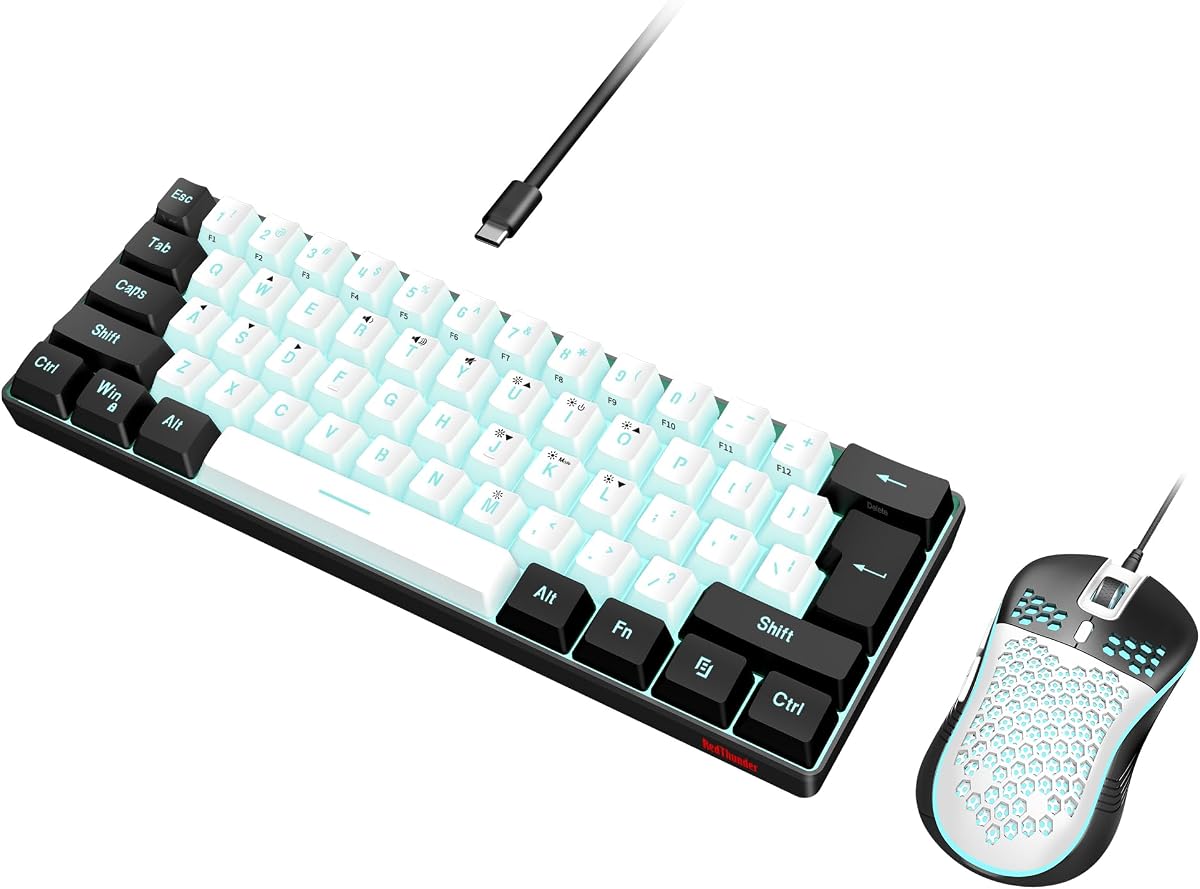
The RedThunder 60% Gaming Keyboard and Mouse Combo is an ultra-compact set designed for neat desk organization. The 61-key layout leaves plenty of space for mouse movements which is preferred by many FPS gamers. With a rating of 4.3 stars, it offers a reliable entry-level solution for PC and console users.
We may earn a commission when you buy through this link, at no additional cost to you.
The keyboard features a water-resistant triple protection design that prevents damage from spilled drinks. The included mouse uses a honeycomb shell to weigh up to 65 grams for reduced fatigue and increased flexibility. The high-precision optical sensor supports up to 7200 DPI and a 1000Hz polling rate.
RGB lighting modes include permanent and breathing effects that can be adjusted for brightness and speed. The keyboard uses gold-plate interfaces and waterproof braid USB cables for stable data transmission. Its minimalist design appeals to those who prefer a clutter-free gaming environment.
For budget gamers who want a compact setup without compromising on essential features, this combo is a strong option. The lightweight mouse and water-resistant keyboard ensure durability during regular use. While it lacks mechanical switches, it delivers consistent performance suitable for casual to intermediate Fortnite play.
The lightweight honeycomb shell reduces weight to prevent fatigue during long gaming sessions and improve movement speed.
Water-resistant design prevents damage from accidental spills ensuring the keyboard remains functional after minor accidents.
We may earn a commission when you buy through this link, at no additional cost to you.
The Logitech G PRO Mechanical TKL is built with and for esports athletes seeking competition-level performance. It features durable GX Blue click switches that deliver an audible and tactile click for secure keypresses. With a rating of 4.6 stars, it is a trusted choice for competitive gaming tournaments and home setups.
We may earn a commission when you buy through this link, at no additional cost to you.
Its tenkeyless design frees up table space for mouse movement making it easy to transport to events. The keyboard uses LIGHTSYNC to highlight keys and program lighting patterns to onboard memory for tournament systems without software. The detachable Micro USB cable ensures secure connections and safe transport in travel bags.
Users can execute complex actions with keyboard macros through Logitech G HUB software. Rubber feet provide excellent stability during intense gaming while three-step angle adjustments add comfort. Although the clicky switches may be loud for shared rooms, they offer clear feedback that many gamers prefer.
This keyboard is ideal for competitive players who prioritize durability and brand reputation. The compact size is perfect for maximizing mouse movement range. For those who enjoy tactile feedback and want a reliable mechanical keyboard backed by esports experience, the G PRO TKL is a top tier choice.
Onboard memory allows you to store lighting patterns directly on the keyboard for tournament systems without software installation.
GX Blue switches deliver an audible and tactile click for a solid and secure keypress feeling.
We may earn a commission when you buy through this link, at no additional cost to you.
The ATTACK SHARK X68 HE RT offers adjustable Hall Effect magnetic switches with a rapid trigger function for ultra-responsive gameplay. It holds a 4.6-star rating for its ability to bind four functions to one key based on pressing degrees. This keyboard allows you to adjust actuation points from 0.1mm to 3.4mm for custom sensitivity.
We may earn a commission when you buy through this link, at no additional cost to you.
Its web driver support allows users to remap keys and set macros without installing software. The top-mount structure and pre-lubed satellite switches provide a quiet and smooth typing experience. South-facing LEDs and double shot PBT keycaps ensure durability and superior shine-through for an immersive visual setup.
This keyboard supports dual system switching between Windows and Mac with one button which adds versatility. The compact 68-key layout retains separate arrow keys and includes a curved wrist rest for ergonomics. It is designed specifically for winning in fast-paced games like FPS and RTS titles.
For gamers seeking advanced features like magnetic switches at an affordable price, this is an excellent option. The ability to customize actuation points offers flexibility that mechanical switches cannot match. For those looking to maximize performance without breaking the bank, the X68 HE RT delivers exceptional value.
Adjustable actuation points allow you to bind four functions to one key based on pressing degree for flexible control.
South-facing LEDs and double shot PBT keycaps ensure superior shine-through and durability for long-term use.
We may earn a commission when you buy through this link, at no additional cost to you.
Choosing the right keyboard involves understanding key factors like switch type, layout, and features. This guide outlines the essential aspects to consider for an optimal Fortnite experience.
Switch type determines the tactile feel and speed of your keyboard. Mechanical switches like blue or red offer durability and speed, while magnetic switches provide adjustable actuation. Membrane switches are quieter and more affordable but may lack the same responsiveness.
Choose mechanical or magnetic switches for competitive play and membrane for budget or quiet environments.
The size of the keyboard affects desk space and mouse movement. Full-size keyboards include a numpad, while TKL and 60% layouts save space for better mouse range. Ensure the layout retains arrow keys which are essential for navigation in Fortnite.
Opt for TKL or 60% layouts to maximize space for mouse movements during intense battles.
Anti-ghosting ensures that multiple key presses are registered simultaneously. In fast-paced games like Fortnite, you often need to move and build at the same time. Look for keyboards with full N-key rollover to prevent missed inputs.
Always check for N-key rollover or anti-ghosting to ensure accurate input during complex moves.
Macro keys allow you to program complex sequences into a single press. This is useful for building structures quickly in Fortnite. Check if the keyboard has dedicated macro keys or software support for programming.
Select a keyboard with programmable macros to streamline your build rotations and gain an advantage.
Wired keyboards offer lower latency than wireless ones, which is critical for competitive play. However, modern wireless options with 2.4GHz connections can perform similarly. Decide if you prefer the freedom of wireless or the stability of wired connections.
Prioritize wired connections for tournament play, or choose high-quality wireless for a clutter-free setup.
Durability ensures your keyboard lasts through long gaming sessions. Look for features like water resistance and durable keycaps. Brands with proven track records often offer better build quality and warranty support.
Look for water-resistant features and high-quality materials to ensure long-term reliability.
Customization allows you to personalize lighting and key mapping. RGB lighting enhances the visual appeal, while customizable profiles save settings for different users. A good driver or software makes these adjustments easy.
Choose a keyboard with intuitive software to easily customize lighting and key settings.
Ergonomics impacts comfort during long sessions. Features like adjustable feet and wrist rests help maintain a neutral posture. Reducing strain allows you to play longer without fatigue.
Consider keyboards with ergonomic supports like wrist rests or adjustable angles to prevent strain.
To maintain optimal performance, regularly clean your keyboard using compressed air or a soft brush to remove dust and debris from between the keys. This prevents sticky keys and ensures smooth actuation during gameplay.
Avoid eating or drinking near your keyboard to prevent spills. If a spill occurs, unplug the device immediately and let it dry completely before reconnecting to avoid damage to internal circuits.
Customize your macro keys and settings using the provided software before playing to save time during matches. Regularly update your firmware through the manufacturer's website to access the latest features and security patches.
The best keyboard depends on your playstyle and budget. Mechanical keyboards with fast switches are generally recommended for competitive play due to their responsiveness. Models like the Razer BlackWidow V4 X offer a balanced mix of speed and macro features ideal for Fortnite.
While not strictly necessary, mechanical keyboards provide faster response times and better durability. If you play frequently, investing in one improves precision. Budget-friendly mechanical options or high-end membrane models can also perform well for casual players.
TKL (Tenkeyless) or 60% layouts are often preferred because they free up desk space for mouse movement. This extra space allows for lower DPI settings and more room for sweeping motions which are common in FPS games like Fortnite.
Modern wireless keyboards with 2.4GHz connections offer low latency comparable to wired ones. However, for tournaments or if budget is not a concern, wired options still provide the absolute most stable connection without battery concerns.
Anti-ghosting is a feature that ensures multiple key presses are registered simultaneously. In Fortnite, you often move and build at the same time. This technology prevents missed inputs when you press several keys together during intense moments.
Most gaming keyboards come with software that allows you to record and assign macros. Open the software, select the macro key, record your key sequence, and assign it. Some keyboards have dedicated keys for this without needing extra software.
It depends on the switch type. Clicky switches are loud and tactile, while linear switches are quiet and smooth. If you play late at night, consider linear or red switches to avoid disturbing others in your household.
Gaming keyboards typically last between 5 to 10 years depending on usage. Mechanical switches have a lifespan of millions of keypresses. Proper care like keeping them clean and avoiding spills can extend their longevity significantly.
We explored ten diverse keyboard options ranging from budget-friendly combos to high-end magnetic switches. Each model offers unique strengths whether you prioritize speed, comfort, or customization. The Razer BlackWidow V4 X leads with its balance of macro support and speed.
When choosing, consider how much space you have and if you need wireless connectivity. Competitive players might prefer fast mechanical switches, while casual gamers may find membrane models sufficient. Align your choice with your budget and specific gameplay needs.
Remember that prices and availability can change over time so check current listings before buying. We hope this guide helps you find the perfect keyboard to enhance your Fortnite experience and help you win more matches.