
Corsair RS120-R ARGB Reverse Fans White Triple Pack
4.7Editor score
Reverse rotor for flawless lighting
Six RGB LEDs per fan
2,100 RPM max speed
Daisy-chain connection support
High static pressure design
Discover the best Corsair case fans for 2026. This guide compares top models like RS, LX, RX, and QX for airflow, noise, and RGB lighting performance.
Choosing the right cooling solution is crucial for maintaining peak performance in your PC build. Corsair offers a wide range of case fans designed to deliver exceptional airflow, low noise, and stunning RGB lighting effects.
We evaluated ten popular Corsair fan models based on their airflow capacity, static pressure, noise levels, and connectivity options. Our analysis focuses on real-world performance metrics and user feedback to help you make an informed decision.
Each product entry highlights key specifications, pros, cons, and ideal use cases. Please note that pricing and availability can change frequently, so always verify current details before purchasing your next cooling component.
4.7Editor score

4.6Editor score

4.5Editor score
The following table provides a side-by-side comparison of all ten Corsair case fan models we reviewed. It highlights key specifications including size, speed, airflow, and unique features to help you quickly identify the best fit for your system.


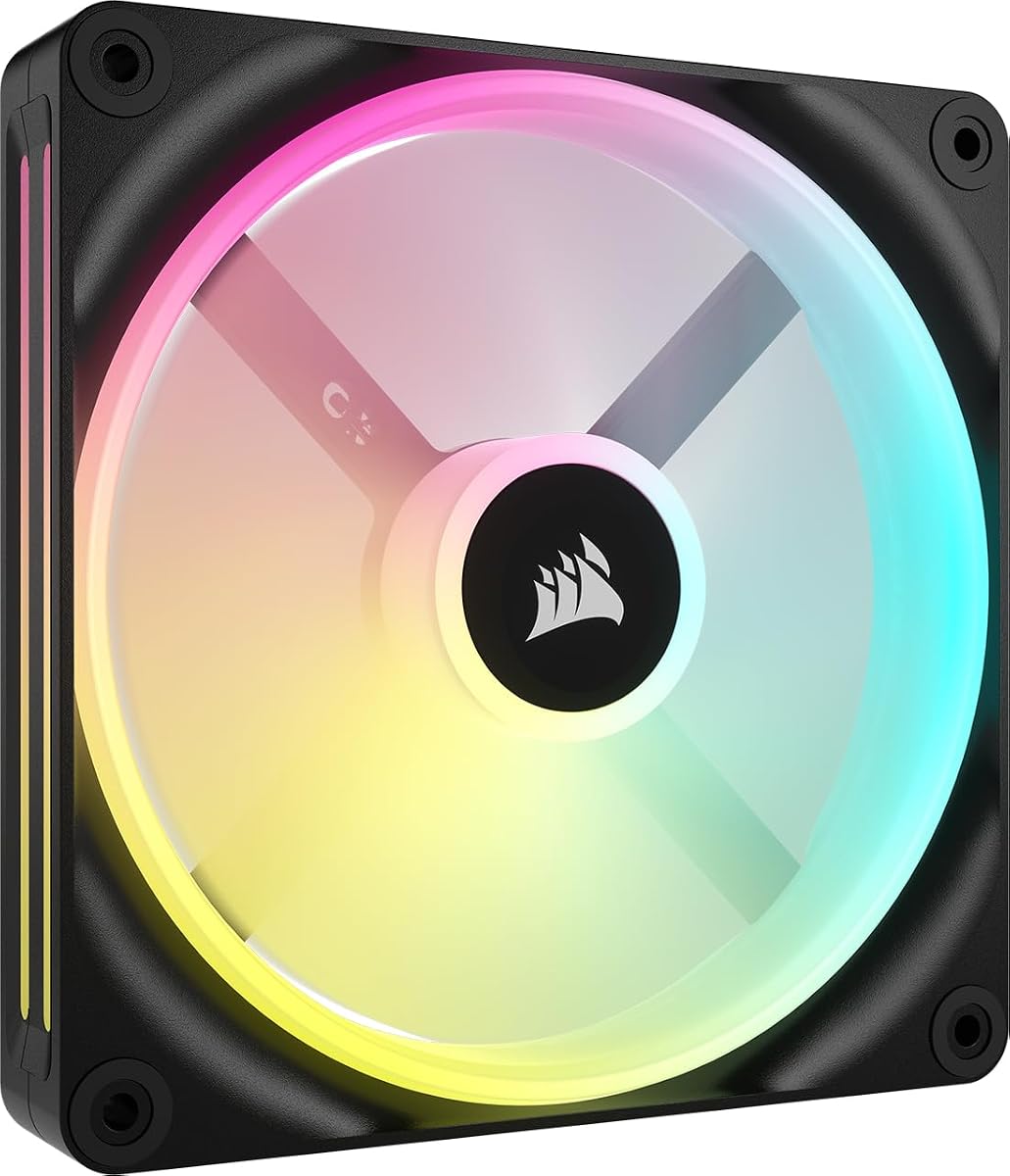


This white triple pack of reverse rotor fans offers an excellent balance of aesthetics and performance. With a rating of 4.7 stars, users praise its ability to show off lighting even when mounted as intake. The reverse design ensures the frame does not block the view of the LEDs.
We may earn a commission when you buy through this link, at no additional cost to you.
Performance-wise, the fans reach up to 2,100 RPM delivering 65.8 CFM of airflow. The static pressure of 2.81mm H2O makes them suitable for radiator cooling tasks as well. The Magnetic Dome bearing helps keep noise levels low even under higher loads during peak usage times.
The main trade-off is the simpler lighting design compared to higher-end models. There are only eight LEDs per fan and no dual loops. However, for most users, the clean look combined with the price point makes this a very acceptable compromise for a full case upgrade.
This pack is ideal for builders who want a clean white aesthetic without breaking the bank. It suits those who prioritize visible RGB and efficient airflow over advanced lighting features. We recommend it for general cases and radiator setups where reverse mounting is desired.
The reverse rotor ensures the fan blades do not obstruct the RGB ring. This creates a uniform look on the front of your case regardless of airflow direction.
Daisy-chain connections reduce cable clutter. You only need one PWM header and one ARGB header to control all three fans in the pack.
We may earn a commission when you buy through this link, at no additional cost to you.
The black triple pack of RS120 ARGB fans focuses on cooling efficiency. With 72.8 CFM of airflow, they push air effectively through dense radiators. The Magnetic Dome bearing ensures quiet operation even when spinning at full speed for extended periods.
We may earn a commission when you buy through this link, at no additional cost to you.
AirGuide Technology is a standout feature here. It uses anti-vortex vanes to direct airflow specifically at hot components. This increases the efficiency of cooling without requiring higher fan speeds which would generate more noise.
While it lacks the reverse rotor option of other models, the performance for radiator mounting is excellent. The daisy-chain system keeps installation clean and straightforward. It is a solid choice for those prioritizing thermal performance over specific aesthetic tricks.
Buy this if you need reliable cooling for an AIO cooler or water block. It fits well in standard cases where the fan is mounted to the back or top. The price point and performance make it a strong contender for budget-conscious cooling builds.
Anti-vortex vanes focus air flow where it is needed most. This helps maximize cooling efficiency per RPM compared to standard fans.
Daisy-chain connectors mean one cable per type. This significantly reduces clutter inside your PC case for a cleaner look.
We may earn a commission when you buy through this link, at no additional cost to you.
This kit stands out for its advanced lighting and connectivity. The dual light loops offer a vibrant look. It comes with the iCUE Link System Hub which simplifies installation significantly. Users report smooth integration with other iCUE devices.
We may earn a commission when you buy through this link, at no additional cost to you.
Cooling performance is strong with 5.22mmH2O static pressure. This makes it one of the best options for pushing air through thick radiators. The AirGuide Technology ensures that air is directed efficiently. The RPM goes up to 2,400 for maximum cooling potential when needed.
The main drawback is the reliance on the iCUE ecosystem. If you do not plan to use the hub or compatible motherboard, some features may be unused. However, the included hub often makes the initial cost worthwhile for new builds.
Choose this if you want a high-end RGB experience with minimal cable mess. It is perfect for builds that will expand with more iCUE components later. The combination of cooling and aesthetics places it at the top of our list.
Connect fans with bridge connectors directly to the hub. This eliminates the need for multiple PWM and RGB cables to the motherboard.
18 LEDs spread across inner and outer rings. This creates a richer lighting effect than single loop fans.
We may earn a commission when you buy through this link, at no additional cost to you.
This black version mirrors the white model in performance. It offers the same reverse rotor design which is rare at this price point. It is a great choice for builders who prefer dark cases but still want visible RGB lighting from the front.
We may earn a commission when you buy through this link, at no additional cost to you.
The specifications match the white variant with 65.8 CFM airflow. The Magnetic Dome bearing keeps operation quiet. This allows for high RPM usage without creating excessive noise in your room. It works well as intake or exhaust in most chassis.
The simplicity of the fan is both a pro and a con. It lacks advanced hubs or dual loops. However, it delivers solid performance for standard cases. It is easy to install using standard motherboard headers or simple daisy-chain setups.
Recommended for black-themed builds on a budget. It ensures your intake fans do not hide their lights. If you want a clean look without spending a fortune, this is an excellent option to consider for your next PC build.
The black frame blends with dark cases. This keeps the focus on the RGB ring rather than the motor housing.
Delivers reliable airflow for general cooling. Not the highest CFM but sufficient for most standard CPU coolers and cases.
We may earn a commission when you buy through this link, at no additional cost to you.
This 140mm fan provides substantial airflow for its size. It reaches 82.5 CFM which is excellent for case ventilation. The Time Warp lighting mode adds a unique touch when used with the hub. It is designed for quiet operation even at higher speeds.
We may earn a commission when you buy through this link, at no additional cost to you.
The single fan purchase allows flexibility in building. You can mix sizes or add fans over time. The magnetic dome bearing ensures longevity and reduced noise. It supports Zero RPM mode so it stops spinning when loads are low.
Note that full lighting features require the iCUE Link System Hub. If you have older fans you might need to upgrade or plan for the hub cost. Still it is a great standalone option for a specific exhaust or intake slot.
Ideal for expanding existing setups with larger fans. It fits standard 140mm mounts. Use it for top exhaust or front intake where space allows. The balance of silence and airflow makes it a solid choice for quiet systems.
140mm blades move more air at lower RPMs. This results in less noise compared to multiple 120mm fans achieving the same flow.
Fan stops completely at low loads. This helps maintain silence during idle tasks like browsing or watching videos.
We may earn a commission when you buy through this link, at no additional cost to you.
This kit combines reverse rotor design with premium iCUE Link features. It offers dual light loops which look stunning when mounted. The reverse rotor keeps the RGB visible from the front. It includes QuikTurn Screws for easier installation without losing tools.
We may earn a commission when you buy through this link, at no additional cost to you.
Cooling capability is high with 4.72mm H2O pressure. This is sufficient for challenging radiator setups. The 2,400 RPM speed allows aggressive cooling when needed. Zero RPM mode ensures silence during light tasks.
The main challenge is the cost. It is a significant investment for fans. However if you value lighting aesthetics and high static pressure this is one of the few reverse options with these features. It suits high-end builds well.
Buy this if you want top tier reverse cooling and looks. It is a complete package for those using the iCUE ecosystem. The included screws and connectors make setup a breeze for enthusiasts.
Screws that lock quickly with less force. This reduces installation time and frustration when mounting fans in tight spots.
Visible ring lighting even when intaking. This is rare for premium fans that often hide the rear motor on the front.
We may earn a commission when you buy through this link, at no additional cost to you.
This fan is distinct for its 5mm thicker design. This extra thickness allows larger blades which move more air at lower speeds. The result is up to 102.9 CFM airflow. It is one of the highest CFM options available for 140mm fans.
We may earn a commission when you buy through this link, at no additional cost to you.
The trade off is that it needs a deeper case or radiator support. Not all mounts fit a 30mm thick fan. The lower 1,600 RPM limit helps reduce noise while maintaining flow. It is perfect for quiet high-airflow needs.
The window in the frame lets you see the LEDs from the side. This adds to the aesthetic appeal in open or glass cases. It connects via iCUE Link for seamless integration. The Magnetic Dome bearing keeps vibration low.
Choose this for maximum airflow efficiency. If your case can accommodate the thickness this fan delivers unmatched air movement. It is a top pick for enthusiasts who want silence without sacrificing cooling power.
More surface area on blades moves more air. This allows lower RPMs for the same cooling which reduces noise significantly.
Side window enables viewing from angles. This enhances the look if you have a windowed side panel or open case.
We may earn a commission when you buy through this link, at no additional cost to you.
This MAX fan focuses on high static pressure. At 4.2mm-H2O it is designed to push through resistance. This makes it ideal for dense radiators. The Liquid Crystal Polymer construction reduces vibration which aids in quiet operation.
We may earn a commission when you buy through this link, at no additional cost to you.
It matches the airflow of the RS120 series but with higher pressure. The frame is strong and durable. It resists bending and flexing under stress. This ensures consistent performance over time.
The AirGuide vanes direct air more precisely. This increases cooling efficiency without raising RPM. It is a single purchase so you can buy exactly what you need. It does not include RGB lighting features.
Recommend for pure cooling performance. If silence and static pressure are your main goals this is a great choice. It is often used for high-end liquid cooling loops where push-pull setups are needed.
High static pressure helps air penetrate obstacles. This is critical for radiator cooling where fins restrict airflow passage.
Liquid Crystal Polymer is rigid. This reduces fan blade flutter which lowers noise and improves stability.
We may earn a commission when you buy through this link, at no additional cost to you.
This standard RX fan is very versatile. It provides 95.7 CFM which is high for a standard 140mm fan. It is suitable for case ventilation or cooling. The AirGuide Technology helps direct air where needed.
We may earn a commission when you buy through this link, at no additional cost to you.
It connects via iCUE Link for easy integration. It has eight RGB LEDs for decent lighting effects. The Magnetic Dome bearing ensures it remains quiet. It has a nice balance of performance and features.
The single purchase allows you to add just one fan to fix a hot spot. It is available in white for aesthetic matching. It is not as thick as the MAX fan but has higher pressure.
Ideal for general case expansion. Use it for rear exhaust or top intake. It fits standard mounts easily. This fan is a reliable workhorse for keeping your system cool and stylish.
95.7 CFM is significant. This moves a lot of air without noise. Good for open airflow designs.
Window in frame enhances LED visibility. This gives a premium look compared to standard closed frame fans.
We may earn a commission when you buy through this link, at no additional cost to you.
This renewed kit offers fans and a hub. It is a great way to enter the iCUE ecosystem. The double fan kit includes the necessary components to start your fan chain. You get two 140mm fans with magnetic dome bearings.
We may earn a commission when you buy through this link, at no additional cost to you.
Renewed products are tested but may be open box. This is a good way to get high end gear at a lower price. The performance is expected to match new units. Ensure you check return policies when buying renewed items.
It lacks a specific rating but fans are usually high quality. The hub simplifies wiring immediately. You do not need to worry about extra cables. This is a strong option for budget builds wanting premium features.
Consider this if you need fans and a hub. It covers the basics of iCUE integration. It is best for buyers comfortable with renewed products. It is a cost effective way to upgrade your system cooling and lighting.
Renewed items often cost less. They are tested by the manufacturer to work like new. This saves money without losing quality.
Includes all basics for connection. This saves you from buying the hub separately later. It is a complete solution for two fans.
We may earn a commission when you buy through this link, at no additional cost to you.
Selecting the right case fans depends on your specific cooling needs and build style. This guide breaks down the key factors you should consider before making a purchase to ensure you get the best performance for your investment.
Airflow fans move air quickly but struggle against resistance. Static pressure fans push air through tight spaces. Radiators and dust filters benefit from high static pressure models like the RX MAX or RS120 MAX.
For general case ventilation standard airflow fans work best. Choose high static pressure only for radiator or intake behind filters.
Ensure your case supports 120mm or 140mm mounts. 140mm fans usually provide more air at lower noise. Check the clearance before buying thick models like the RX MAX which need extra depth.
Standard cases accept 120mm and 140mm easily. Thick fans are for specialized mounting points.
RGB fans add color but increase cost. Non-RGB fans focus purely on cooling. Decide if you want lighting effects or just cooling.
RGB offers a customizable look. Non-RGB is often simpler and cheaper.
Daisy-chain connectors save motherboard headers. Standard connectors require more headers. iCUE Link uses a hub to reduce cables completely.
Use daisy-chain or iCUE for cleaner builds.
Magnetic Dome bearings reduce friction and noise. This extends fan life. Avoid older sleeve bearings if you want quiet and durable fans.
Magnetic bearings are the best for longevity.
Look for quiet operation at high speeds. Zero RPM mode stops fans at idle. This helps maintain silence during light usage.
Zero RPM and low RPM modes are quiet.
Reverse fans show the RGB ring when mounted as intake. This looks clean on the front of a case. Standard fans hide the motor behind the frame.
Reverse fans are best for aesthetic builds.
Compare packs versus single fans. Packs save money. Renewed products save more money. Check warranty details before buying.
Packs offer better value than singles.
Install fans in a push-pull configuration for radiators. This requires two fans facing opposite directions on each side. It significantly increases cooling efficiency and lowers heat retention.
Clean dust from the blades regularly using compressed air. Dust accumulation increases noise and reduces performance. Do not let the blades spin while cleaning to avoid damage.
Update your motherboard or fan control software. This ensures you get all RGB effects and performance features. Keep your BIOS up to date for compatibility.
Yes you can mix different Corsair fans. However for best results use similar RPM ranges. Different models work together but cable management may vary.
iCUE Link is a bridge system for fans. It connects multiple fans to one hub. This reduces motherboard headers and simplifies RGB control.
You need a 5V ARGB header on your motherboard. Check your manual to confirm. If not present use a controller.
You cannot reverse standard fans. Buy a reverse rotor model. These fans are designed to show the RGB from the front.
Not always. Thicker fans move more air but need space. Only use them if your case supports the extra depth.
Zero RPM Mode stops fans at low loads. This keeps your system silent. It is useful for office tasks or idle.
A minimum of 2 intake and 1 exhaust is common. More fans help but may increase noise. Balance air intake and exhaust.
Yes magnetic bearings are better. They reduce friction and noise. They also last longer under continuous use.
The Corsair RS120-R ARGB Reverse Triple Pack stands out for its balance of price and aesthetics. The iCUE Link LX120 RGB offers the best premium experience. The RX140 MAX delivers unmatched airflow for specific needs.
Prioritize your cooling requirements before choosing features. If you want silence look for Magnetic Dome bearings. If you want looks consider reverse rotor options. Always check mount clearance first.
Check current prices before purchasing. Prices fluctuate based on sales and availability. This guide provides the best options for November 2026 to help you start your build.