
LeapFrog 2-in-1 LeapTop Touch
4.7Editor score
Converts to tablet mode
Five learning modes included
Customizable name feature
Discover the top laptops for 5 year olds comparing educational features, durability, and screen quality to help parents choose the best learning device for
Finding the right laptop for a five year old requires balancing educational value with durability and ease of use. These devices are designed to introduce young children to basic computer skills while keeping them engaged with interactive content and games that promote learning through play.
We compared ten top rated options based on educational content, screen quality, keyboard design, and overall build quality. Our analysis focuses on models that offer age appropriate activities, bilingual support where available, and robust parental controls to ensure a safe digital environment for early learners.
Each pick highlights specific strengths such as offline capabilities, bilingual modes, or realistic typing experiences. Please note that availability and pricing can change frequently, so check current listings before purchasing to ensure you get the best deal for your family needs.
4.7Editor score

4.5Editor score

4.2Editor score
This side-by-side comparison highlights the key specifications and educational features of the top ten laptops designed for children aged five and up. We evaluate screen type, activity count, language options, and build design to help you find the perfect match for your child learning needs.





The VTech Genio Bilingual JuniorBook Learning Laptop for Kids stands out as a top choice for parents seeking a comprehensive educational tool. With a rating of 4.5 stars, this device combines realistic hardware design with robust software features that teach essential computer skills without needing online connectivity. It is specifically designed to mimic a grown-up computer, making it familiar and engaging for young users.
We may earn a commission when you buy through this link, at no additional cost to you.
This laptop offers over 80 preloaded activities covering math, science, language arts, music, and Spanish. The full-size QWERTY keyboard and cursor controller help children develop fine motor skills and typing familiarity early on. Additionally, the bilingual feature allows every activity to be played in English or Spanish, fostering immersive language learning that can adapt to a child home growing needs.
While the device is robust and well-designed, it does require four AA batteries for operation, which can add to ongoing costs if not managed carefully. The screen angle is fixed, which might not be comfortable for all seating positions. However, these trade-offs are acceptable given the high quality of the educational content and the durable construction that withstands active play.
Parents who want a reliable offline learning device that grows with their child will find this laptop an excellent investment. It bridges the gap between toy and tool, offering real-world skills in a safe environment. We recommend this model for families prioritizing language exposure and realistic computer simulation for their five year olds.
The full-size QWERTY keyboard helps kids transition from toy keys to standard computer layouts, building confidence for future schoolwork.
Switching between English and Spanish activities supports dual-language households or introduces a second language naturally through play.
We may earn a commission when you buy through this link, at no additional cost to you.
The Lexibook Unicorn Educational Laptop for Kids offers a diverse range of educational activities tailored to engage young minds. With a rating of 4.3 stars, it provides a mix of learning modes including English and Spanish, mathematics, and logic games. The design is inspired by real laptops, featuring a realistic mouse and keyboard that encourage proper usage habits.
We may earn a commission when you buy through this link, at no additional cost to you.
This device emphasizes skill building through fun activities that test knowledge at different levels. Children can practice dactylography, clock reading, and general knowledge while enjoying music and melodies. The games component tests logic, memory, and speed, ensuring a balanced approach to cognitive development. The slim, elegant design makes it easy for small hands to grip and carry.
One potential downside is the reliance on batteries, which must be replaced periodically to keep the device running. Unlike more advanced models, there is limited scope for customizing content beyond what comes preloaded. Despite this, the variety of subjects covered makes it a strong contender for parents looking for a well-rounded educational toy.
If your child enjoys structured learning mixed with creative play, this laptop is a solid option. It covers essential foundational skills while keeping the experience light and enjoyable. We suggest considering this model for families seeking an affordable entry point into educational computing with a touch of personality.
Activities are designed with progressive difficulty, allowing children to test and improve their knowledge as they master each topic.
The music and melodies feature introduces notes and composition, giving kids a head start in musical appreciation and creativity.
We may earn a commission when you buy through this link, at no additional cost to you.
This Kids Laptop with a color screen provides a visually stimulating learning environment for young children. With a rating of 4.2 stars, it features a 4.3 inch TFT color screen that offers clearer visuals compared to standard toy laptops. The device includes 48 learning modes covering alphabet, math, colors, animals, and general knowledge to support a broad curriculum.
We may earn a commission when you buy through this link, at no additional cost to you.
The ergonomic design mimics real laptops with a realistic mouse and keyboard, making it comfortable for extended use. The compact size of 11 by 8 by 1.2 inches ensures it is easy to handle and store. Interactive games help test logic, memory, and speed, adding an element of fun to the educational process.
Users should note that the screen comes with a protective film that needs to be removed before first use to ensure optimal visibility. The functionality is relatively basic compared to more complex tablets, focusing primarily on structured learning rather than open-ended exploration. However, the clarity of the screen makes it a good choice for visual learners.
For parents looking for a budget-friendly option with a color display, this laptop delivers good value. It keeps children engaged with bright visuals and straightforward activities. We recommend it for families wanting a simple, effective tool to reinforce early learning concepts at home.
The TFT color screen enhances engagement by providing clear and vivid graphics that help children focus on educational content.
Its slim design makes it easy for kids to carry around, encouraging independent learning in different areas of the house.
We may earn a commission when you buy through this link, at no additional cost to you.
The LeapFrog 2-in-1 LeapTop Touch is a highly rated option that transforms from a laptop to a tablet with a simple flip. With a strong rating of 4.7 stars, it offers versatile learning modes including ABCs, numbers, games, music, and messages. The role-play activities allow kids to pretend to be like adults, which enhances engagement and social skill development.
We may earn a commission when you buy through this link, at no additional cost to you.
One of the most standout features is the ability to customize the device with the child's name, age, and avatar. This personalization makes the experience feel more unique and engaging for the child. The keyboard includes letters A to Z and numbers 1 to 10, providing a foundational layout for early typing skills.
While the screen is smaller than many modern devices, the flip design allows for tablet use which can be more intuitive for touch-based learning. It requires three AA batteries, which means ongoing maintenance is needed for continuous play. Despite these minor inconveniences, the high rating reflects strong satisfaction among parents.
For families on a budget who still want high-quality educational content, this laptop is an ideal choice. It grows with the child, moving from simple letter recognition to more complex role-play scenarios. We highly recommend this model for its versatility and strong educational foundation.
The ability to switch between laptop and tablet modes keeps the device fresh and adaptable to different play preferences.
Customizing with the child's name helps them take ownership of their learning device, increasing their interest and engagement.
We may earn a commission when you buy through this link, at no additional cost to you.
The VTech Play Smart Preschool Laptop in Pink offers a sleek design that resembles a grown-up's computer. With a rating of 4.6 stars, it includes 30 activities with leveled learning to ensure that children are challenged appropriately. The device allows for personalization with a child's name, age, and avatar, making the experience feel tailored to them.
We may earn a commission when you buy through this link, at no additional cost to you.
Educational content includes basic Spanish words, letters, numbers, and shapes. Children can identify letters, explore letter sounds, and categorize foods into fruits or vegetables to build logic skills. The music game allows kids to listen to instrument sounds, adding a creative layer to the learning process.
The activities are designed to grow with the child, ensuring that the device remains useful as they advance in their skills. However, the content is relatively static compared to devices with app stores or online updates. The battery life depends on two AA batteries, which need periodic replacement for sustained use.
This laptop is perfect for parents who want a stylish yet functional tool for early learning. It balances fun and education well without overwhelming young users. We recommend it for families seeking a durable and attractive option for preschool-aged children.
The progression of activities ensures that children are not bored by easy tasks or frustrated by overly difficult ones.
Listening to instrument sounds helps develop auditory discrimination and an appreciation for music alongside other subjects.
We may earn a commission when you buy through this link, at no additional cost to you.
The LEXiBOOK LAPTAB 10 inch Version 11 Touchscreen Laptop offers advanced features that bridge the gap between a toy and a real computer. With a rating of 4.2 stars, it features a 10.1 inch HD touchscreen and an octa-core processor for smooth performance. This model is designed for families who want a more durable and versatile device for long-term use.
We may earn a commission when you buy through this link, at no additional cost to you.
It includes the Power Academy app and access to thousands of games and apps via Google Play, providing endless entertainment options. Parental controls are robust, allowing parents to manage time, apps, and safe browsing with Qwant Junior. This ensures that the experience remains safe and tailored to the child's needs.
While the higher price point may be a consideration, the build quality and functionality justify the investment for many households. The 128GB storage allows for plenty of content download and offline access. The inclusion of USB ports and Bluetooth connectivity adds practical utility that many toy laptops lack.
This laptop is ideal for tech-savvy parents who want to introduce their children to a more modern computing environment safely. It supports both educational growth and entertainment with equal weight. We recommend this model for those seeking a high-end, future-proof solution for early learners.
Comprehensive tools allow parents to set time limits and filter content, ensuring a safe digital environment for children.
USB and Bluetooth ports make the device more versatile, allowing connection to peripherals for expanded functionality.
We may earn a commission when you buy through this link, at no additional cost to you.
The Kids Laptop with Camera offers a unique combination of education and creativity through its photography features. With a rating of 4.6 stars, it includes 64 activities ranging from alphabet learning to colorful games. The camera allows kids to take pictures using cute frames and filters, encouraging self-expression and memory recording.
We may earn a commission when you buy through this link, at no additional cost to you.
The 4.3 inch TFT color display provides vibrant visuals that make the learning activities engaging. The ergonomic design ensures that the laptop is easy to handle for small hands. After mastering educational content, children can enjoy a range of games and take funny pictures, blending learning with entertainment effectively.
While the camera resolution is not high definition like adult devices, it is sufficient for capturing moments and fostering creativity in young users. The device requires batteries for operation, which is typical for this category. The combination of learning modes and photography makes it stand out from standard educational laptops.
For parents who want to encourage creativity alongside academic skills, this laptop is a wonderful choice. It provides a safe space for children to explore photography while building foundational knowledge. We recommend this model for families valuing artistic expression in their children's learning journey.
The camera with filters and frames helps children explore visual creativity in a fun and safe environment.
With 64 modes, the device offers enough variety to keep children interested over a long period of time.
We may earn a commission when you buy through this link, at no additional cost to you.
The LeapFrog LeapPad Academy is a learning tablet designed to grow with kids from age three to eight. With a rating of 4.3 stars, it includes more than 20 educator-approved learning apps covering math, reading, writing, and coding. The 7 inch shatter-safe screen ensures durability during active use.
We may earn a commission when you buy through this link, at no additional cost to you.
Users can find hundreds of additional games, videos, and eBooks through the LeapFrog App Center. The device includes a stylus, tough bumper, and kickstand for versatile usage. Parental controls allow for setting time limits and managing apps, ensuring a safe experience for young learners.
A key consideration is the need for a subscription to access the full LeapFrog Academy content library after the trial period. Unlike traditional laptops, it lacks a physical keyboard, relying instead on touch and stylus input. However, this makes it ideal for handwriting practice and touch interaction.
For families invested in the LeapFrog ecosystem, this tablet offers a comprehensive learning experience. It balances screen time with educational value through structured app content. We recommend it for parents who want a durable and manageable device for long-term learning.
Content vetted by educators ensures that learning activities are age-appropriate and educationally sound.
The included stylus supports writing and drawing skills, helping children prepare for school tasks.
We may earn a commission when you buy through this link, at no additional cost to you.
The Lexibook Barbie Educational Laptop combines style with substantial educational content to engage young learners. With a rating of 4.3 stars, it features 124 activities in English and Spanish covering math, logic, and music. The design is inspired by authentic laptops, featuring a realistic mouse and keyboard for proper usage habits.
We may earn a commission when you buy through this link, at no additional cost to you.
Children can enjoy games like Snake, Memory, and Puzzle after completing educational tasks, ensuring a blend of entertainment and learning. The compact dimensions make it easy to transport, making it ideal for learning on the go. Multiple levels for each activity allow kids to progress at their own pace.
While the device is relatively thick compared to modern slim laptops, this contributes to its durability. The battery dependency means ongoing costs for power management. Despite these minor drawbacks, the high activity count and bilingual support make it a strong educational tool.
Parents looking for a device that appeals visually while delivering strong academic value will appreciate this laptop. It balances fun and function effectively to keep children engaged. We recommend it for families seeking a portable and reliable learning companion.
Multiple levels within activities ensure that children can learn, test, and improve skills over time without boredom.
Fun games provide a reward for learning, keeping motivation high throughout the session.
We may earn a commission when you buy through this link, at no additional cost to you.
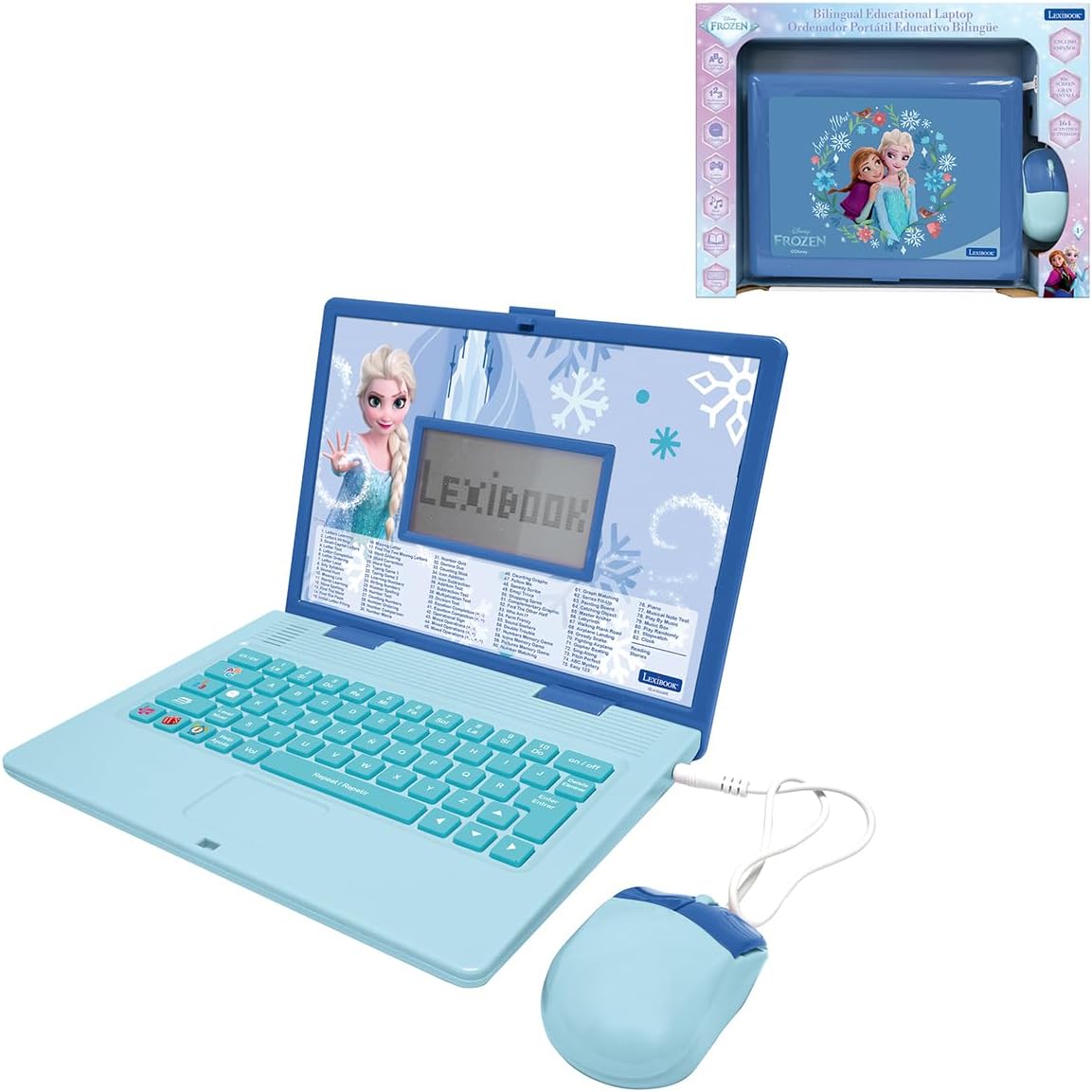
The LEXiBOOK Frozen Educational Laptop offers a themed learning experience backed by 164 activities. With a rating of 4.5 stars, it covers English and Spanish exercises including vocabulary, spelling, and logic games. The device features voice guidance and a clear LCD screen for easy navigation and accessibility.
We may earn a commission when you buy through this link, at no additional cost to you.
This laptop includes quiz challenges and music modes to keep sessions enjoyable from the first activity. The lightweight design makes it easy to take anywhere, supporting learning in different environments. The theme appeals to many children, driving higher engagement and interest in the content.
The focus on bilingual learning is a strong feature for families wanting to develop language skills. However, the reliance on batteries means regular maintenance is needed. The fixed content ensures stability, though it lacks the flexibility of app-based updates.
For families seeking a thematic device that supports language development and logic skills, this laptop is a great option. It combines fun visuals with educational rigor to keep children engaged. We recommend this model for parents prioritizing bilingual support in their children's education.
Easy switching between English and Spanish helps build strong language skills through motivated and fun activities.
Interactive voice guidance assists navigation, making the device accessible to children with varying reading skills.
We may earn a commission when you buy through this link, at no additional cost to you.
Choosing the right laptop for a five year old involves considering educational content, physical design, and safety features to ensure a positive learning experience.
Evaluate the variety and depth of learning activities. Look for laptops that cover core subjects like math, reading, and logic while offering interactive games that reinforce concepts. High quality content should adapt to different skill levels to keep the child engaged without frustration.
Prioritize models that offer structured learning paths and age appropriate challenges.
If language development is a priority, choose a laptop that supports multiple languages. Bilingual options allow children to switch between English and Spanish seamlessly, promoting language exposure in a natural way.
Check if the device offers full activity support in both languages rather than just basic menus.
A realistic QWERTY keyboard and mouse help children develop fine motor skills and familiarity with standard computer layouts. Ergonomic design ensures comfort during extended use.
Look for keys that are easy to press and a mouse that fits small hands well.
Children's devices must withstand drops and rough handling. A durable build with protective edges and a strong shell is essential for longevity.
Consider models made from high impact materials that have a history of reliable performance in home environments.
A clear color screen improves visibility and engagement with educational content. Look for displays with good contrast and resolution to reduce eye strain.
Ensure the screen size is appropriate for the child's viewing distance and comfort level.
Most toy laptops run on AA batteries, so consider the battery life and replacement frequency. Some advanced models offer rechargeable options for cost efficiency over time.
Evaluate how long the device lasts on a single charge or battery set to plan accordingly.
Offline capabilities are important for travel or homes with limited internet access. Ensure the laptop comes with preloaded activities that do not require a connection.
If connectivity is desired, check for parental control features that keep browsing safe and monitored.
Robust parental controls allow parents to manage screen time and access to content. This ensures the device remains a safe learning environment.
Look for customizable settings that let you restrict certain features or track progress.
Begin by inserting the required batteries or charging the device if applicable. Ensure the protective film on the screen is removed for optimal visibility before starting any activities.
Encourage your child to explore the different learning modes and games regularly. Monitor their usage to ensure they are engaging with educational content rather than just playing without learning goals.
Store the laptop in a safe place when not in use to prevent accidental damage. Keep the keyboard and mouse clean with a soft cloth to maintain functionality over time.
These laptops are generally designed for children between 3 and 8 years old. They offer activities that grow with the child, making them suitable for preschoolers and early elementary students alike.
Most toy laptops operate offline with preloaded activities. However, some advanced models offer optional connectivity for additional content downloads, which require a stable internet source.
Batteries are often included for demo purposes only. You should expect to purchase new batteries separately for regular and continuous use.
Some laptops allow name and avatar customization, but content customization is limited compared to tablet apps. Look for models with adjustable difficulty levels to tailor the experience.
They are built to be more durable than standard electronics, using high impact materials. However, they are not indestructible and should still be handled with care by children.
While they mimic real keyboards, toy laptops usually have simplified layouts. They help develop typing skills but are not fully functional for standard computing tasks.
Yes, most are compact and portable. However, ensure they have sufficient battery life or carry extra batteries for long trips without access to charging.
Check the battery connection first as most issues are power related. If problems persist, contact the manufacturer for support or consider replacing the device if under warranty.
We have reviewed the top laptops for five year olds offering a mix of educational value durability and engaging features. The VTech Genio stands out for its bilingual capabilities while the LeapFrog 2-in-1 offers great versatility for younger children.
Prioritize devices that offer offline activity and realistic input methods to build early computer skills effectively. Ensure the laptop aligns with your child's learning goals and interests to maintain their enthusiasm for learning.
Please check current prices and availability as they can change frequently. Selecting the right model will provide a solid foundation for your child's educational journey and screen time development.