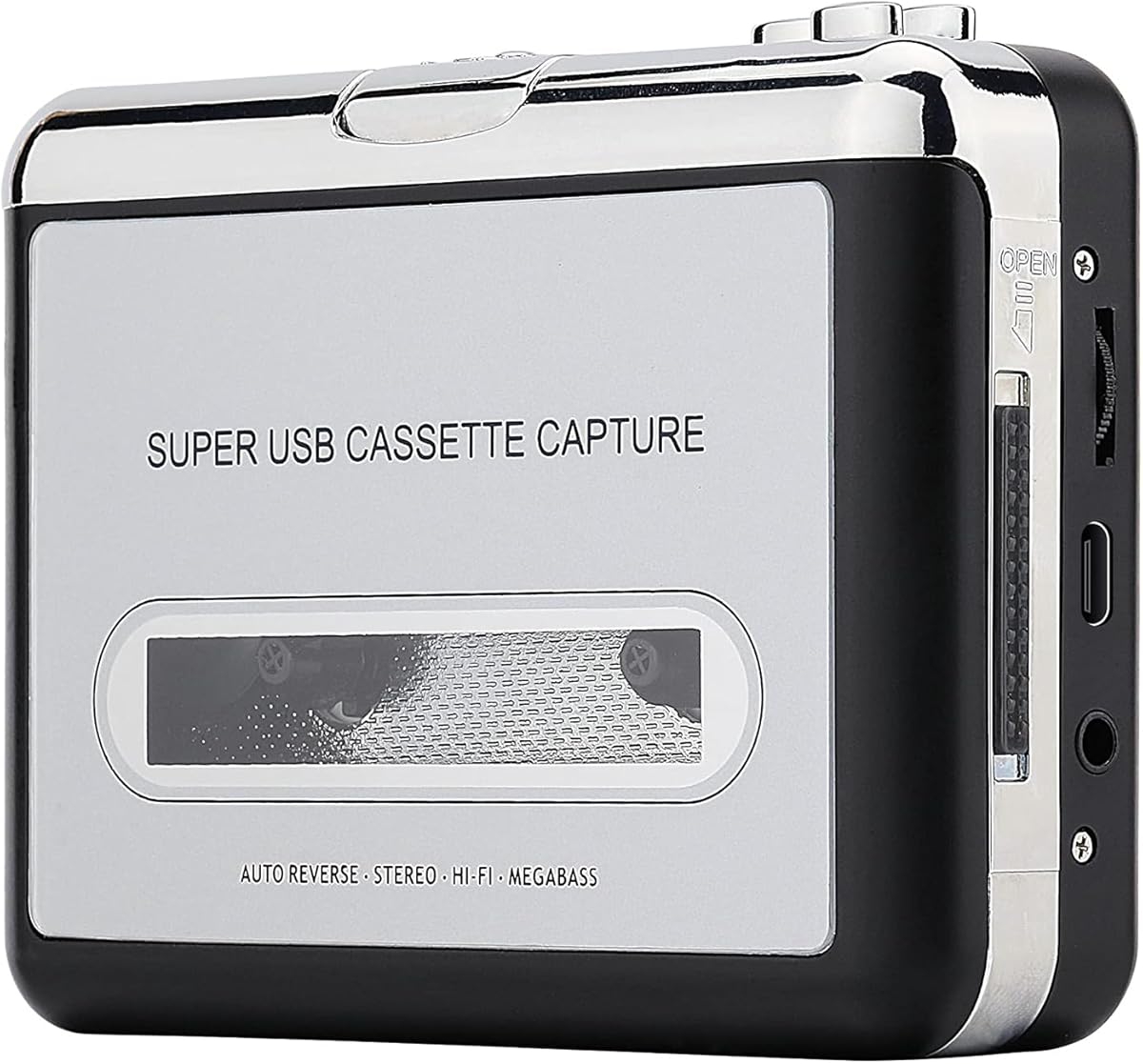
Reshow Cassette Tape Player
3.8Editor score
USB cable conversion
Includes converter software
3.5mm AUX output
This guide compares the top cassette to MP3 converter models available in October 2026 to help you choose the right device for digitizing your audio collection.
Converting analog cassette tapes to digital formats preserves precious memories and music for future listening. A reliable cassette to MP3 converter simplifies this process, allowing you to enjoy old recordings on modern devices without quality loss or complex setups.
We evaluated ten highly rated converters based on ease of use, sound quality, portability, and additional features like Bluetooth or SD card support. Our selection includes options for beginners and enthusiasts who want flexible digitization methods without needing a computer for every transfer.
Each product pick highlights key strengths and ideal use cases so you can match a device to your specific needs. Prices and availability may change over time, so please verify current details on the product pages before making your final purchase decision today.
3.8Editor score

4.2Editor score

4.3Editor score
The following table provides a side-by-side overview of key specifications and features for all ten converters reviewed in this guide. Use this comparison to quickly identify differences in storage options, battery life, connectivity, and recording capabilities across models.


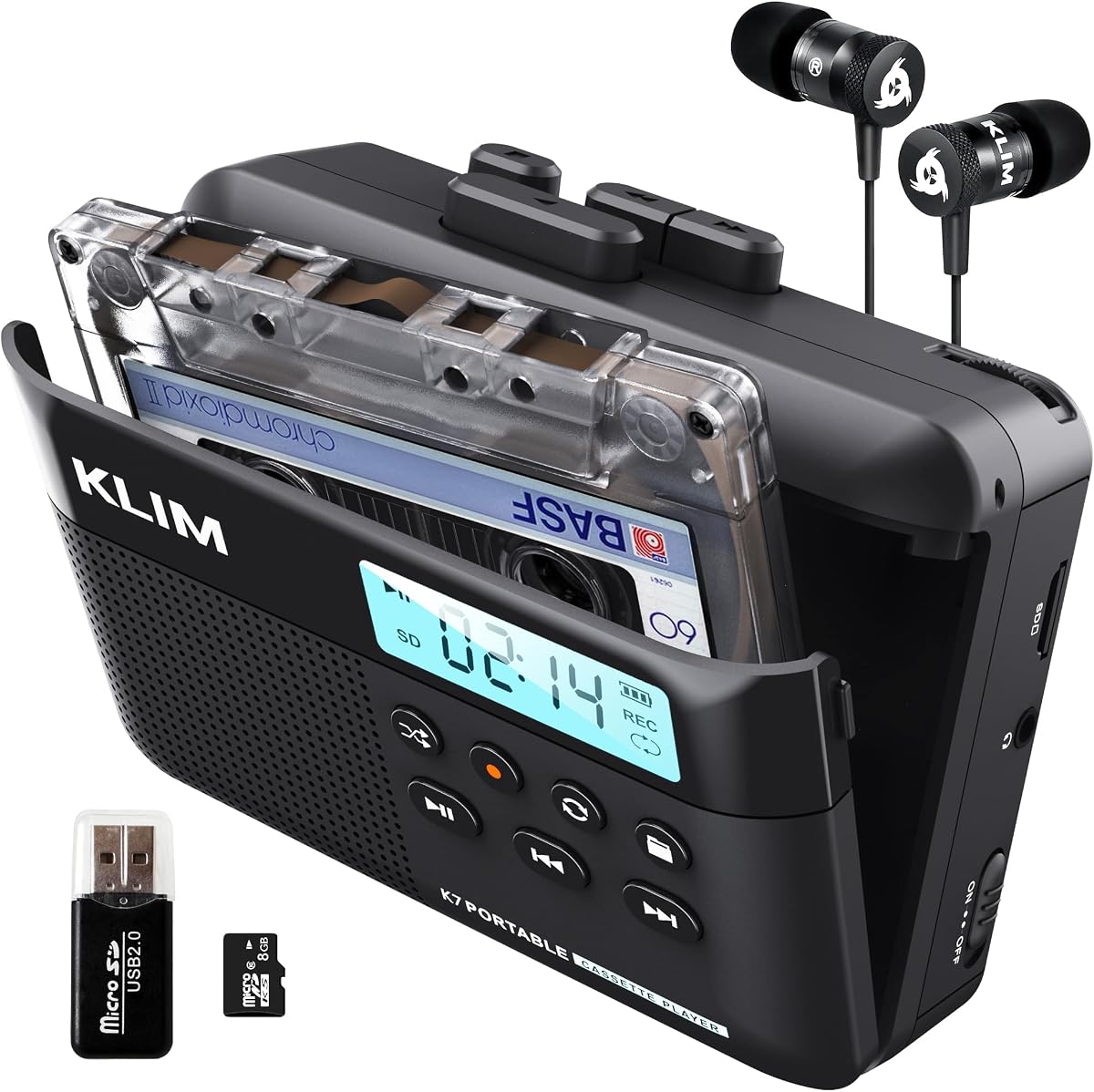


The K7 Cassette Player earns our Editor's Choice for combining ease of use with practical features that streamline tape digitization. With a 4.2 rating and a clean design, it lets you convert tapes directly to MP3 files on an included 16GB SD card without needing a computer or extra software.
We may earn a commission when you buy through this link, at no additional cost to you.
Its standout features include a built-in microphone for recording notes or meetings, a rechargeable 1000mAh battery lasting for multiple sessions, and a 3.5mm earphone jack for private listening. The package is complete with a USB-C cable, SD card reader, and user manual for smooth out-of-box setup.
While the device excels at playback and conversion, it does not support recording onto blank cassette tapes, which may limit some creative use cases. Additionally, there are no advanced audio EQ settings, so users seeking fine-tuned sound control may need external tools for post-processing.
This player is ideal for anyone wanting a simple, portable way to preserve cassette collections on the go. Its balance of features, battery life, and included accessories makes it a reliable daily driver for turning old tapes into modern digital files quickly.
You can convert tapes directly to MP3 files using the included SD card without installing any drivers or software on your computer. This simplicity saves time and technical hurdles for casual users or those on the move.
The built-in microphone lets you capture thoughts or sessions, while the integrated speaker and earphone jack offer flexible listening options for different environments and preferences.
We may earn a commission when you buy through this link, at no additional cost to you.
The SEMIER Small Cassette Player stands out with its two-way conversion capability, allowing you to record from tapes to digital files or even from digital sources to blank tapes. This flexibility suits enthusiasts who want to remix or preserve mixes creatively while still offering straightforward MP3 digitization for old collections.
We may earn a commission when you buy through this link, at no additional cost to you.
Its compact design includes an LCD screen for easy navigation, a sensitive built-in microphone for audio capture, and dual power options via USB-C cable or four AA batteries. The package comes with a 16GB SD card, USB reader, and converter software for Audacity, giving you multiple paths to manage your audio files.
One limitation is that it does not support Type IV or metal tapes, so users with those specific media types will need to verify tape compatibility before use. Also, at 0.52 lbs, it is slightly heavier than some ultra-light portable options, though still compact enough for travel.
Choose this player if you need both playback and recording flexibility without investing in a desktop setup. The inclusion of software and multiple power options makes it a strong contender for hobbyists who want control over how they digitize and organize their cassette library.
Unlike many players that only digitize tapes, this model supports recording digital audio to blank cassettes, perfect for creating custom mixtapes or transferring phone playlists to tape.
The integrated LCD screen simplifies tracking your recording progress and navigating menus, reducing reliance on external devices for basic control and status checks.
We may earn a commission when you buy through this link, at no additional cost to you.
The Gracioso Bluetooth Cassette Converter brings modern wireless convenience to vintage tapes with its dual Bluetooth modes that let you stream to headphones or play phone audio through the player. With a 4.3 rating and robust build, it offers the most versatile audio integration for users who want to mix analog and digital seamlessly.
We may earn a commission when you buy through this link, at no additional cost to you.
Key strengths include a 2000mAh rechargeable battery providing up to 10 hours in Bluetooth mode, a powerful 6W speaker for clearer playback, and USB direct recording that avoids needing a computer. The device also supports recording music from Bluetooth sources onto blank cassette tapes, a rare feature for nostalgic mixtape makers.
Its premium nature comes with a higher price and a slightly bulkier form factor than basic portable players. Users should also ensure USB drives are formatted FAT32 as noted, which may require pre-formatting for older drives. These are minor trade-offs given the advanced feature set.
If you want a high-end solution that bridges classic tape listening with modern streaming and recording, this model delivers exceptional value. The combination of battery life, speaker power, and Bluetooth flexibility makes it a top choice for audiophiles and tech-savvy collectors.
Dual Bluetooth modes let you transmit tape audio to wireless headphones or receive music from a phone to play through the player's speaker for flexible listening scenarios.
The 2000mAh battery supports up to 10 hours of Bluetooth streaming and six hours of tape playback, ensuring long listening sessions away from power outlets.
We may earn a commission when you buy through this link, at no additional cost to you.
The ClearClick Cassette Tape to USB converter simplifies digitization by saving MP3 files directly to a USB flash drive without requiring a computer. With the highest rating in this guide at 4.5 stars, it appeals to users who value speed and straightforward operation for converting whole tape collections quickly.
We may earn a commission when you buy through this link, at no additional cost to you.
Its automatic track splitting feature intelligently separates songs into individual MP3 files, saving manual editing work. The device includes a 16GB USB drive, earbuds for monitoring, and a portable design that doubles as a personal tape player. ClearClick also offers USA-based tech support and a two-year warranty for peace of mind.
While convenient, this model lacks a built-in speaker, so you need headphones to monitor audio during conversion. Additionally, the USB drive must be formatted beforehand which adds a small setup step. These limitations do not outweigh the ease of use for most digitization tasks.
Pick this converter if your priority is minimal setup and clean file management for large tape batches. The auto-splitting and plug-and-play design make it ideal for families or archivists who want to preserve cassettes without technical complexity or software dependencies.
The file splitting feature analyzes silence gaps between songs to create separate MP3 files automatically, reducing post-processing time and improving file organization.
Instant setup means you just connect the USB drive and press record, making it accessible for users who prefer to avoid drivers or software installation entirely.
We may earn a commission when you buy through this link, at no additional cost to you.
The Reshow Cassette Tape Player offers an affordable entry point for digitizing tapes by converting them to MP3 format via a USB cable connected to a computer. With a lightweight design and included software, it provides a budget-friendly solution for those who already have a PC and want to minimize hardware costs.
We may earn a commission when you buy through this link, at no additional cost to you.
Its vintage-style silver finish appeals to collectors who value aesthetics alongside function. The 3.5mm AUX jack allows connection to headphones, car stereos, or external speakers, enhancing versatility beyond just digital transfer. The package includes a guide and 5V DC USB power cord to ensure convenient conversions.
Since transfers require a computer and software setup, this model is less portable than standalone converters. The rating of 3.8 suggests occasional user experience issues with software compatibility or build quality, so checking recent reviews is advisable before purchase for expected reliability.
This player suits budget-conscious buyers who don't mind using a laptop for file transfers. If you prioritize cost over standalone convenience and already own a computer for digitization, it delivers basic functionality without a significant financial investment or complex hardware requirements.
Converter software included in the package guides you through file transfers to your computer, ensuring proper MP3 formatting for modern playback devices and media libraries.
The standard 3.5mm AUX jack lets you connect any headphones or external speakers for immediate listening or car integration without extra adapters or proprietary connectors.
We may earn a commission when you buy through this link, at no additional cost to you.
The K7 Cassette Player with an 8GB SD card offers a compact alternative for users who need less storage or want to minimize cost while keeping core features. It maintains the easy no-computer conversion workflow, letting you save MP3 files directly to the included SD card with minimal setup steps.
We may earn a commission when you buy through this link, at no additional cost to you.
Its 4.3 rating reflects strong performance in portability and ease of use. The device includes a rechargeable battery, built-in microphone, and earphones so you can record notes and listen on the go. The package comes with a USB-C cable and SD reader for straightforward file management.
The 8GB capacity limits total storage compared to higher-capacity variants, so frequent converters may need to offload files more often. Also like other K7 models, it does not support recording to cassette tapes, which narrows its use to playback and digital transfer mainly.
Choose this model if you have a smaller cassette collection or prefer a smaller, lighter device. Its balance of essential features and included accessories makes it a practical choice for travel or casual digitization without investing in larger storage options or higher costs.
With its lightweight body and included earphones, this player is perfect for converting tapes while traveling or commuting without needing a laptop or desktop station.
The package provides everything you need including a USB-C cable, SD card reader, and earphones so you can start converting and listening immediately after unboxing.
We may earn a commission when you buy through this link, at no additional cost to you.
The K7 Cassette Player with a 32GB SD card extends storage for users with large cassette libraries or those who want fewer file transfers. It shares the same easy workflow and portability as smaller variants, making it a scalable option for collectors managing extensive music or archival content.
We may earn a commission when you buy through this link, at no additional cost to you.
Its 4.2 rating highlights consistent performance and reliability. The device includes a rechargeable 1000mAh battery, built-in microphone, and earphones, enabling flexible recording and listening. The package also comes with a USB-C cable and SD card reader for seamless file access.
The higher storage capacity comes at a modest price increase compared to the 8GB version, but offers better long-term value for extensive collections. The device remains lightweight and portable despite the larger SD card, so there is no compromise on travel convenience or form factor.
Select this variant if you plan to digitize hundreds of tapes or want ample space without constantly clearing storage. It delivers the same trusted features with enhanced capacity, making it a smart investment for serious collectors or archivists using portable solutions.
The 32GB card accommodates many more MP3 files than smaller options, reducing the frequency of offloading data and keeping your digital library organized longer.
Despite the larger storage, it maintains the same portability and battery life as other K7 models ensuring your workflow remains fast and reliable on any project.
We may earn a commission when you buy through this link, at no additional cost to you.
The Reshow Cassette Tape Player in black offers a sleek alternative for budget-conscious users seeking a straightforward USB cable conversion to MP3 format. With a 3.9 rating, it mirrors the functionality of the silver version but with a modern look that fits various aesthetic preferences and spaces.
We may earn a commission when you buy through this link, at no additional cost to you.
Its lightweight build and included software make it accessible for basic digitization tasks without needing extra hardware. The 3.5mm AUX jack supports multiple audio outputs, letting you connect headphones or car stereos. The package includes a guide and USB power cord to ensure quick setup.
This model requires a computer for file transfers, which limits its use compared to standalone SD card players. User ratings suggest possible software compatibility quirks, so updating drivers or checking system requirements before starting transfers is recommended for best results.
Pick this player if you want an affordable solution and already own a laptop or desktop. Its classic design and basic functionality serve well for occasional conversions or small collections where portability and standalone features are secondary to cost savings and style.
The black finish gives a modern look to this simple converter, making it a discreet option for desk or shelf placement without standing out visually.
Converter software included handles the transfer process so you can organize and manage your MP3 files on your computer for easy access and backup.
We may earn a commission when you buy through this link, at no additional cost to you.
The USB Cassette to MP3 Converter features an auto reverse function and manual or auto recording modes, offering flexibility for converting entire tapes without pausing. With a nostalgic walkman design and included headphones, it appeals to users who value hands-off recording and portable use without a computer.
We may earn a commission when you buy through this link, at no additional cost to you.
It supports USB flash drives up to 128GB and saves tracks separately in auto mode. The device runs on USB power or two AA batteries for mobility and includes a carry bag for protection. The 3.5mm AUX jack allows private listening during conversions or playback.
User ratings hover around 3.8, suggesting some challenges with USB drive compatibility or skipping during playback with slower drives. Ensure drives are fast and formatted FAT32 as specified to avoid interruptions. These requirements add minor setup steps but do not block core functionality.
Choose this converter if you prefer auto recording and don't mind managing USB drive formatting. Its auto reverse and portable battery options make it a practical pick for users who want minimal intervention during long tape conversions or travel-based projects.
The auto reverse feature switches tape sides automatically during recording, saving time and effort when converting full-length tapes without manual flipping or interruptions.
Switch between auto and manual modes to save individual songs automatically or control recording manually for custom tracks or non-standard content.
We may earn a commission when you buy through this link, at no additional cost to you.
The K7 Cassette Tape Player with a 16GB SD card offers a standard bundle that includes a built-in speaker for immediate playback and listening during conversions. Its 4.2 rating reflects reliable performance and ease of use, making it a straightforward choice for users wanting a complete portable kit.
We may earn a commission when you buy through this link, at no additional cost to you.
It supports direct MP3 conversion without software, includes a rechargeable battery, built-in microphone, and earphones for versatile audio handling. The package comes with all necessary cables and a user manual so you can start digitizing tapes right away without hunting for accessories.
This model shares core limitations with other K7 variants, such as no cassette recording support, which may limit creative reuse of tapes. However, the included speaker adds convenience for quick checks and listening without external headphones, improving the user experience slightly.
Opt for this player if you want an all-in-one portable solution with minimal setup steps. The inclusion of a speaker and full accessory kit makes it a safe pick for casual listeners or travelers who want a self-contained device for preserving and enjoying cassette tapes.
The integrated speaker lets you listen to tapes or monitor conversions without needing headphones, offering hands-free playback in quiet environments or small spaces.
Every package includes cables, SD card, reader, and manual so you have everything needed to start using the player immediately upon receiving your order.
We may earn a commission when you buy through this link, at no additional cost to you.
Selecting the right cassette to MP3 converter depends on your workflow, storage needs, and how much portability versus control you require. This guide outlines key factors to consider so you can match a device to your goals and avoid unnecessary complexity.
Some converters require a computer and software to transfer files, while others save MP3s directly to SD cards or USB drives without external hardware. If you want portability and simplicity, choose a standalone device that avoids extra steps or setup. Computer-dependent models may offer more file control but reduce convenience on the go.
Prioritize standalone solutions if you value quick, software-free workflows and travel frequently with your tapes.
Devices come with 8GB, 16GB, or 32GB storage options, which determines how many MP3 files you can hold before needing to offload. Larger capacity suits collectors with hundreds of tapes, while smaller options reduce cost for occasional users. Check if the model supports expandable storage via additional SD cards if you expect growth.
Choose higher capacity if you plan to digitize extensive collections regularly without managing transfers often.
Power sources vary from rechargeable batteries to AA batteries or USB cable power. Rechargeable units offer cost savings and convenience for long sessions, while AA batteries provide longer life in emergencies or remote use. Consider how often you convert tapes and whether charging access is reliable where you work.
Opt for rechargeable batteries for daily use and AA options for extended fieldwork or backup needs.
Built-in microphones let you record notes or ambient sound, while 3.5mm jacks support headphones, car stereos, or external speakers. Some models offer Bluetooth for wireless streaming, which adds flexibility for modern setups. Evaluate whether you need these features or prefer standard wired connections for simplicity.
Select models with Bluetooth and microphone if you want versatile recording and listening without extra cables.
Certain converters allow recording from digital sources to blank tapes as well as tape to digital, enabling creative mixtapes or restoration. This feature is rare and mainly useful for enthusiasts or DJs who want to create physical copies from digital files. If you only need preservation, single-direction conversion is sufficient.
Choose two-way models only if you plan to duplicate digital audio onto cassette tapes regularly.
Automatic track splitting detects gaps between songs to save individual MP3 files, saving time on manual editing. Manual recording requires you to mark tracks after conversion, which can be tedious for long sessions. If organization matters, look for devices with auto-split capabilities built in.
Prioritize auto track splitting to keep your files organized without post-processing software or effort.
Most players work with Type I normal tapes, but some exclude Type IV metal tapes. Verify your tape types before buying to avoid incompatibility issues. If you have specialized tapes, check product specs for supported formats or choose models noted for broader compatibility to avoid waste.
Check tape compatibility specs if you own metal or specialty tapes to ensure successful conversion and playback.
Prices vary widely, so balance cost with features you truly need. Higher-end models may include Bluetooth or auto-split, while budget units focus on basic conversion. Also check warranty length and support options for long-term reliability and troubleshooting assistance if issues arise.
Select a warranty that covers at least two years to ensure service support for durability or defects.
Start by fully charging the device or inserting fresh batteries to ensure stable performance during conversion. Insert your cassette tape carefully aligning the reels and press play while initiating the record or transfer button. If your model uses a computer connect the USB cable and launch the provided software to begin the file transfer process.
Monitor audio levels using built-in controls or headphones to prevent clipping or distortion during recording. If your device supports track splitting allow it to detect pauses between songs to save separate files automatically. After conversion remove the storage card or drive and transfer files to your computer for backup or cloud storage.
Clean the tape heads regularly with a soft cloth or alcohol swab to maintain sound quality over time. Store tapes and devices in dry, cool environments away from direct sunlight or humidity to prevent warping or mold. Replace worn belts or heads if playback becomes muffled or skips to extend the lifespan of your converter.
Many modern converters save MP3 files directly to SD cards or USB drives without requiring a computer. These standalone models simplify the process for users who want to digitize tapes on the go. Computer-dependent units offer more file management but add setup steps. Check the product details to confirm whether it supports standalone operation.
Most cassette to MP3 converters require drives to be formatted FAT32 for compatibility with MP3 file systems. Using exFAT or NTFS may cause errors during recording or playback. Format your drive on a computer using the appropriate utility before inserting it into the converter. Always back up data before reformatting.
Some models support two-way conversion allowing you to record from digital sources or USB onto blank tapes. This feature is useful for creating custom mixtapes or archiving digital music to physical media. Many basic players only convert tapes to MP3 and cannot record to tape. Verify product specs for two-way support before purchasing.
Converters with auto track splitting detect silence between tracks to save separate files automatically during recording. This saves time compared to manual splitting after conversion. For models without this feature you may need editing software to cut tracks post-transfer. Check the product features for split capability before purchase.
Rechargeable batteries are ideal for frequent users due to cost savings and convenience. AA batteries work well for occasional use or backup when charging is unavailable. Devices powered only by USB lack portability for travel. Select a power option that matches your typical usage frequency and access to charging.
Older tapes may have tape damage or worn heads that affect sound quality. Clean the tape and device heads before conversion and ensure the deck is functioning correctly. Using high-quality headphones or speakers can help mask minor distortions during playback. Poor tapes may still be digitized but might require noise reduction software later.
The K7 Cassette Player models stand out for their balance of portability storage options and ease of use making them ideal for casual collectors and travelers. The Gracioso Bluetooth Cassette Converter offers advanced features like dual Bluetooth modes and powerful speakers for audiophiles who want modern integration with vintage tapes.
Prioritize standalone devices with rechargeable batteries and auto track splitting to simplify your workflow and reduce reliance on computers. If you need two-way recording or large storage, choose models that support these capabilities to match your specific preservation and creative goals without future limitations.
Always check current prices and availability on product pages as deals change regularly. Verify compatibility with your tape types and storage formats before purchasing to ensure a smooth digitization experience. These converters let you preserve precious analog memories for future listening in convenient digital formats.