
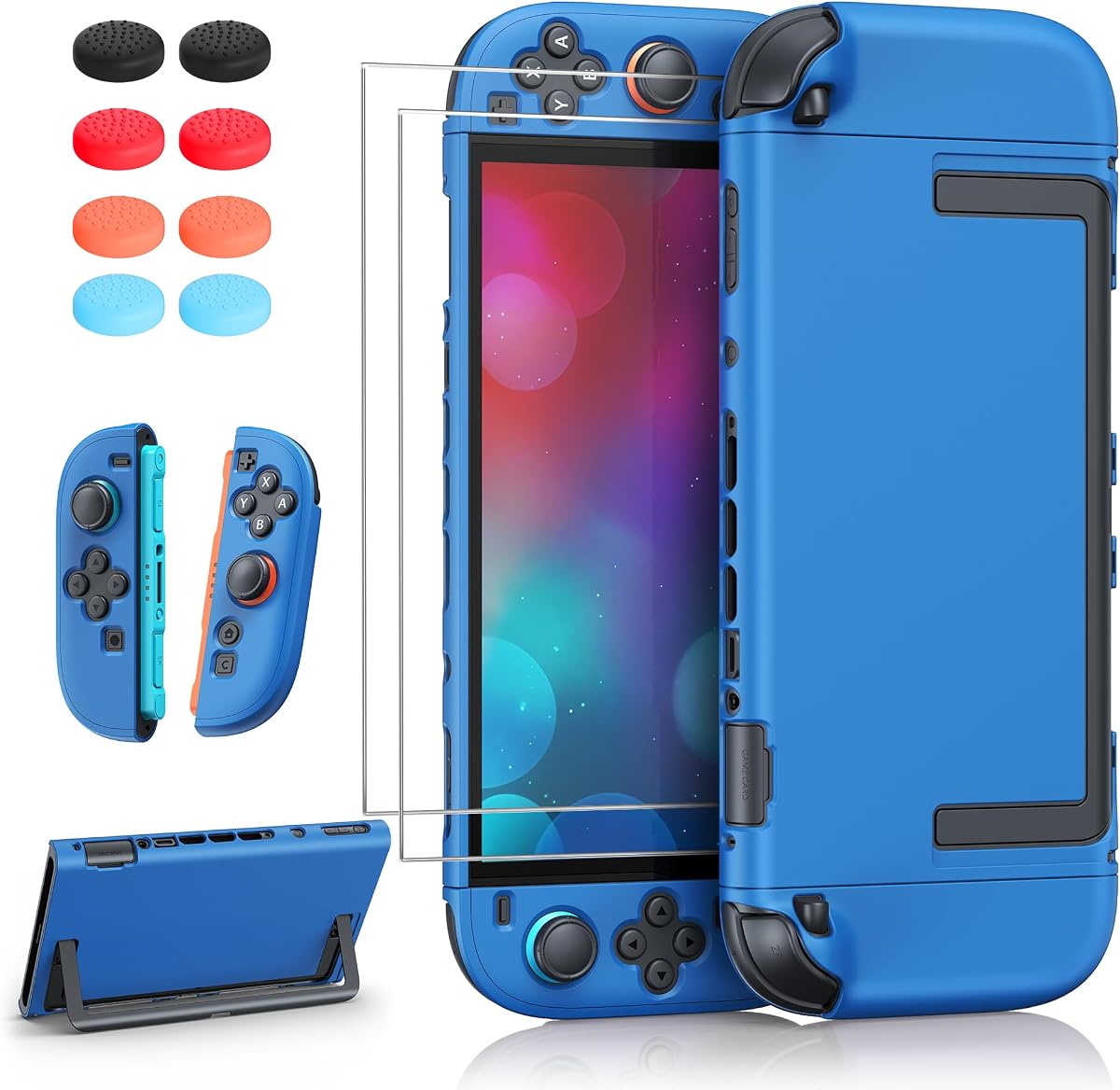
ewnol Dockable Case for Nintendo Switch 2
4.4Editor score
Includes screen protectors
Ergonomic grip design
Full function access
This guide compares the top dockable Switch 2 cases for protection and gaming comfort across all modes without needing removal for TV or stand use.
Protecting your Nintendo Switch 2 is essential for long-term durability. A good dockable case ensures seamless transitions between handheld, tabletop, and TV modes without constant removal. Look for slim designs that preserve portability while offering robust defense against drops and scratches during daily travel or intense gaming sessions.
We evaluated ten top-rated options based on compatibility, grip quality, and protective features. Each product was assessed for dock alignment, button accessibility, and overall build durability. Our analysis highlights cases that balance heavy-duty shielding with ergonomic comfort for extended play across all Switch 2 usage scenarios and environments.
Each pick details unique strengths like stand integration or card slots to fit your style. Note that availability and pricing fluctuate frequently on major retailer sites. Always verify current stock and warranty terms before purchase to ensure you get the best value for your specific gaming needs today.
4.4Editor score

4.6Editor score

5.0Editor score
This side-by-side comparison highlights key features across all ten selected cases to help you find the perfect match for your gaming style and protection needs.



The SUPCASE for Nintendo Switch 2 Case is a top-rated option offering seamless docking and robust military-grade protection for daily travel. Its unique foldable Joy Con coverage keeps controllers secure during gameplay while allowing quick removal for sharing sessions. Users praise its ergonomic grip and eco-friendly polycarbonate shell that resists yellowing over time.
We may earn a commission when you buy through this link, at no additional cost to you.
This case features a revolutionary hinge mechanism enabling Joy Con assembly and disassembly without detaching the full shell. The seamless dock compatibility ensures uninterrupted transitions to TV mode without removing the protective layer. Enhanced gaming experience is supported by anti-slip rubberized texture that improves handling during intense gameplay.
While the case is built for durability with U.S. military-grade standards, it does not support the Switch 2's kickstand function. The weight-balanced construction adds some bulk but preserves the console's natural feel. Users prioritizing full protection and secure Joy Con attachment will find the trade-off acceptable for reliable defense.
Ideal for travelers and parents seeking reliable protection for the Switch 2, this case delivers professional-grade shielding. The raised bezel guards the screen from contact inside the dock. We recommend this for users who value secure Joy Con connection and seamless docking above slim profile convenience.
The foldable Joy Con coverage ensures controllers stay firmly connected during intense play without needing constant reattachment or risking drops.
Designers engineered uninterrupted docking capability so you never remove the case when switching to TV mode, saving time and wear.
We may earn a commission when you buy through this link, at no additional cost to you.
The ewnol Dockable Case offers an affordable all-in-one bundle with essential accessories including screen protectors and thumb caps. Designed for the Switch 2, it allows direct docking without removal while maintaining reliable protection against daily wear. Users value the ergonomic grip design that improves comfort during extended handheld sessions.
We may earn a commission when you buy through this link, at no additional cost to you.
This protective case features a U-shaped opening allowing the stand to open completely for tabletop play. Precise cutouts ensure unobstructed access to all ports and buttons. The premium shock-absorbing TPU and scratch-resistant hard PC material provide lightweight yet reliable defense against drops and bumps.
A minor consideration is that the dock fit feels tight by design to prevent wobbling during connection. The case relies on standard materials rather than premium finishes but delivers solid value for budget-conscious shoppers. The included accessories make it a complete starter kit for new owners.
We recommend this for players seeking a complete protective set without spending on premium features. The ergonomic grip and dockable design ensure comfortable handling and seamless transitions. Best for those prioritizing value and essential protection over advanced structural enhancements.
The package includes screen protectors and thumb caps making it a complete kit for immediate full coverage protection upon arrival.
The comfortable shape improves hand support during long gaming sessions reducing fatigue for handheld play without extra accessories.
We may earn a commission when you buy through this link, at no additional cost to you.
The Mumba Fortress Case delivers true 360-degree protection with a durable front cover and heavy-duty back shell. Its detachable front allows docking without removing the entire case keeping the rear shell on for continuous protection. Users appreciate the six locking game card slots and sturdy aluminum kickstand offering premium utility for travelers.
We may earn a commission when you buy through this link, at no additional cost to you.
This case features a one-piece anti-wobble Joy-Con design locking controllers firmly to prevent accidental detachment. The aluminum alloy kickstand offers stepless adjustment up to 120 degrees for any desk height. Military-grade drop protection ensures defense against impacts and scratches while maintaining ergonomic comfort during extended play.
While the case offers comprehensive protection and premium materials, it requires detaching the front cover before placing the console in the dock. The higher price reflects the advanced structural features and complete coverage. Best for users seeking maximum security and travel convenience for their Switch 2.
We recommend this for enthusiasts wanting full coverage and premium build quality. The adjustable kickstand and card slots add significant value. Ideal for travelers and competitive players prioritizing complete defense and flexible viewing angles.
Simply detach the front cover to dock your console while keeping the rear shell on for full protection during charging and TV play.
Built-in aluminum stand offers wide stepless adjustment for any desk height ensuring steady gameplay without wobble or fatigue.
We may earn a commission when you buy through this link, at no additional cost to you.
The Dockable Blue Case features a unique pop-up Joy-Con quick release mechanism allowing one-press detachment without removing the full shell. Its anti-fingerprint carbon fiber grip elevates the aesthetic and reduces slippery handling. Users appreciate the seamless dock compatibility and kickstand integration supporting uninterrupted multi-mode gaming.
We may earn a commission when you buy through this link, at no additional cost to you.
This 1-piece high-impact hard shell absorbs shock from drops with thickened corners protecting against commuter slips. The hidden spring-latch design enables swapping controllers mid-game without prying or scratching. Anti-yellowing PC material ensures long-term freshness and premium visual appeal during daily use.
A minor consideration involves the specific color choice and learning curve for the release button. The case relies on standard PC materials rather than advanced alloys. Users valuing quick controller changes and anti-fingerprint texture will find the design highly practical.
We recommend this for players prioritizing fast Joy-Con access and style. The carbon fiber grip and seamless docking offer great utility. Best for social gamers frequently swapping controllers for multiplayer sessions on the go.
Press the +/- buttons on the back to detach Joy-Cons in one second without removing the case for uninterrupted multiplayer gaming.
Carbon fiber textured grip prevents fingerprints and improves comfort solving the common slippery handle flaw during intense play.
We may earn a commission when you buy through this link, at no additional cost to you.
The SUPCASE Protective Case features a built-in hollow aluminum-alloy stand offering sturdy hands-free tabletop play. Its precision dock-compatible design lets you switch modes without case removal saving time during setup. Users praise the textured anti-slip finish and secure Joy-Con hinge covers ensuring reliable protection during travel.
We may earn a commission when you buy through this link, at no additional cost to you.
The adjustable stand opens to preferred angles between 30 and 90 degrees for flexible viewing. It folds flush into the back when not in use preserving a slim profile. The multi-layer hard shell balances impact protection with a 145g weight to maintain the console's natural feel.
While the aluminum stand is durable it adds some weight compared to plastic alternatives. Adjusting the stand requires gentle handling to avoid damage. Users valuing robust tabletop options and seamless docking will find the added utility worth the minor bulk.
We recommend this for tabletop gamers needing a stable stand. The seamless dock fit and textured grip enhance comfort. Best for users prioritizing durable stand options and secure controller attachment during play.
Built-in aluminum stand provides sturdy hands-free gaming at any angle folding flush for travel without extra accessories.
Larger ergonomic grips and flip-out hinge covers ensure Joy-Cons stay securely connected during play while allowing quick removal.
We may earn a commission when you buy through this link, at no additional cost to you.
The Belkin Nintendo Switch 2 Grip Case delivers ergonomic comfort with a textured non-slip surface designed for all-day play. It supports quick Joy-Con removal and kickstand mode for flexible gameplay. Users value the sustainable construction using recycled plastic and included two-year coverage for peace of mind.
We may earn a commission when you buy through this link, at no additional cost to you.
This grip is crafted for seamless performance with Switch 2 accessories like travel bags. The dock compatible design keeps the case on while docking to TV. It provides secure handling during handheld or docked play reducing fatigue during long sessions.
A consideration is the higher price for a grip-focused accessory rather than full protection. The material sustainability and brand reputation offer value. Users prioritizing brand quality and comfort will find this grip a reliable upgrade over stock controllers.
We recommend this for eco-conscious players needing comfort during long sessions. The two-year coverage and brand trust add significant value. Best for users prioritizing ergonomic grip over heavy-duty shell protection.
Comfortable textured non-slip grip supports long sessions without fatigue improving control during handheld and docked play.
Made with 75% recycled plastic materials supporting environmental goals while delivering reliable gaming protection and comfort.
We may earn a commission when you buy through this link, at no additional cost to you.
The FASTSNAIL Grip Charging Case features a detachable 10,000mAh power bank for extended gaming sessions anywhere. Its dual-layer protection combines TPU and PC materials for military-grade defense against drops. Users appreciate the front cover with game card slots and ergonomic grip reducing hand fatigue during marathon play.
We may earn a commission when you buy through this link, at no additional cost to you.
The detachable design ensures a perfect fit with official docks after removing the power bank and front cover. The quick-release frame allows removing Joypads in seconds. A large U-shaped cutout provides full access to the built-in kickstand for desktop gaming convenience.
A consideration is the need to remove the front cover and bank before docking limiting true dockable convenience. The case relies on standard materials rather than premium finishes. Users prioritizing battery life and card storage will find the trade-off acceptable for extended travel.
We recommend this for travelers and marathon gamers needing power. The card slots and dual protection offer practical utility. Best for users prioritizing battery capacity and carrying capacity over full dockable convenience.
Detachable power bank supports travel and extended sessions providing reliable backup power when outlets are unavailable.
Detach power bank and cover to dock seamlessly with official docks ensuring reliable connection and charging compatibility.
We may earn a commission when you buy through this link, at no additional cost to you.
The PlayVital Hard Case uses a split design allowing fast installation and removal of console and Joy-Con covers. Its slim lightweight build remains fully dockable without needing removal. Users value the included foldable stand replacing the built-in kickstand and the durable PC material resisting scratches and drops.
We may earn a commission when you buy through this link, at no additional cost to you.
Precision cutouts ensure smooth access to all ports and triggers supporting handheld and docked modes. The raised support on Joy-Con grips improves handheld comfort reducing fatigue. The kit includes thumbstick caps and card slot covers making it a practical bundle for daily use.
A consideration is the lack of kickstand support in the case itself. The materials are basic PC rather than premium alloys. Users valuing quick installation and included accessories will find the design highly practical for travel.
We recommend this for travelers and budget-conscious shoppers. The split design and extra stand offer great value. Best for users prioritizing ease of use and accessory variety.
Separate covers for console and Joy-cons allow fast installation improving handheld comfort during long gaming sessions.
Includes stand thumb grips and card cover making it a practical aesthetic bundle for daily protection and utility.
We may earn a commission when you buy through this link, at no additional cost to you.
The FYOUNG Upgrade Protective Case offers a complete bundle with controller cases screen protectors and thumb grips. Its dockable hard shell requires no removal for TV mode saving setup time. Users appreciate the ultra-slim separable design fitting easily into travel pouches for daily convenience.
We may earn a commission when you buy through this link, at no additional cost to you.
The shell features durable PC material with matte finish providing reliable protection against bumps and falls. Precise engineering ensures full access to all ports and the kickstand. The included HD tempered glass screen protectors deliver crystal-clear clarity superior scratch resistance for display protection.
A consideration is the basic build quality compared to premium cases. The matte finish may show smudges over time. Users valuing essential protection and value will find the starter kit practical and affordable for new owners.
We recommend this for budget-conscious players needing complete coverage. The screen protectors and slim profile offer great utility. Best for users prioritizing value and travel readiness.
Bundle includes console case controller cases screen protectors and grips guarding your Switch 2 against drops in one package.
Ultra-slim separable case adds minimal bulk allowing protected console to fit easily into carrying cases and travel pouches.
We may earn a commission when you buy through this link, at no additional cost to you.
The PlayVital Protective Case offers customizable solid colors and matching button toppers for a clean aesthetic. Its dockable design allows charging and TV mode without removal saving time. Users value the split structure making handheld and docked play seamless and the ergonomic raised arc grips aligning with palms.
We may earn a commission when you buy through this link, at no additional cost to you.
The tough PC shell resists bumps and scratches ensuring reliable daily protection. Inner color-matched silicone pads smooth button presses and reduce wear. The unified design theme is easy to clean and reassemble for playful everyday protection that matches personal style.
A consideration is the basic PC material compared to premium alloys. Stickers may wear over time with heavy use. Users valuing style and easy assembly will find the design highly practical for personalization.
We recommend this for style-conscious players needing reliable protection. The solid colors and thumb grips add aesthetic value. Best for users prioritizing personalization and ease of use.
Multiple solid colors with matching button toppers provide a clean mix-and-match look elevating your Switch 2 aesthetics.
Three-piece split structure makes handheld docked and tabletop play seamless with raised arc grips for secure palm support.
We may earn a commission when you buy through this link, at no additional cost to you.
Selecting the ideal case requires balancing protection comfort and functionality. Consider these key factors to match your specific gaming needs and travel requirements effectively.
Ensure the case supports seamless docking without needing removal. Look for precision cutouts and slim profiles that align perfectly with official docks. This feature saves setup time and reduces wear during mode switching between handheld and TV play.
Always check product specs for dock alignment claims before purchasing to avoid compatibility issues.
Prioritize cases with textured or contoured handles that reduce hand fatigue. A good grip ensures comfortable long sessions without slipping. Look for rubberized or carbon fiber textures that improve handling during intense gameplay.
Choose a grip that feels secure in your hands to prevent accidents during handheld play.
Look for shock-absorbing PC or TPU materials rated for impact protection. Military-grade standards or drop-test ratings indicate robust defense against drops. Durable materials prevent cracks and scratches over time during daily travel.
Select material ratings that match your activity level for reliable daily protection.
Consider kits that include screen protectors thumb grips and stands. These add-ons save money and ensure comprehensive coverage immediately upon arrival. Value bundles often provide better overall protection for the price.
Check package contents to verify all necessary accessories are included in the set.
Cases should be lightweight enough to maintain the console's natural feel without adding bulk. Heavy cases can strain hands during extended play. Aim for designs that balance protection with portability for travel comfort.
Check product weight specifications to ensure the case does not add excessive bulk.
Verify if the case supports the built-in kickstand or includes an external stand. Some designs block the stand requiring removal for tabletop play. Integrated stands or open designs ensure hands-free viewing options.
Ensure the design allows free access to the stand for tabletop gaming.
Choose colors and textures that match your style and resist fingerprints. Anti-yellowing materials keep the case looking fresh over time. Customizable designs allow personalization for a unique look.
Select finishes that maintain visual quality and resist daily wear effectively.
Compare pricing to find the best value for protection and features. Look for warranty coverage to protect against manufacturing defects. Reputable brands often offer longer support periods.
Invest in cases that offer reliable warranty support for long-term peace of mind.
Install the case by aligning ports and gently pressing the shell into place. Ensure all cutouts align perfectly with buttons and triggers. Check that the Joy-Con clips snap securely before gameplay.
For cleaning use a soft microfiber cloth to wipe off dust and fingerprints. Avoid harsh chemicals that might damage the PC material. Regularly check hinges and latches for any signs of wear.
When docking remove any external battery packs if required. Ensure the case fits snugly without forcing it into the dock. If resistance is felt check alignment or remove the case to prevent damage to ports.
Most cases listed are designed for seamless docking but check specifications for dock compatibility. Some may require removing battery packs or front covers. Always verify alignment with official docks before purchase to ensure compatibility.
Many cases support the built-in kickstand with U-shaped cutouts. However some thicker designs may block it. Check for stand compatibility before purchase if tabletop play is a priority for your usage.
Most standard cases fit third-party docks but some may require specific dimensions. Verify dock clearance and cutout alignment to avoid blocking ports. Test docking with your specific dock before extended use.
Many cases feature quick-release mechanisms allowing detachment without removing the shell. Check the product for latch buttons or hinge systems. Avoid pulling hard on controllers to prevent damage during removal.
Cases generally protect the back and sides but screen protection requires separate screen protectors. Some bundles include tempered glass for full coverage. Use both case and screen protector for complete defense against drops.
Use a soft microfiber cloth and mild soap for stubborn stains. Avoid abrasive cleaners that damage the PC material. Regular cleaning keeps the case looking fresh and prevents grime buildup.
Our top picks offer diverse solutions from budget-friendly kits to premium 360 protection. Consider your gaming habits and travel needs when selecting the right option. The SUPCASE Mumba and ewnol cases provide reliable performance for most users.
Prioritize ergonomic grip and seamless dock compatibility to enhance your experience. Durability and accessory bundles add significant value for long-term ownership. Choose cases that balance protection with ease of use for daily comfort.
Always verify current availability and warranty terms before purchasing. Prices and stock may vary across retailers so check official sources for the best deal. Regular updates ensure you get the most reliable protection available today.