
BENGOO Gaming Mouse Wired
4.6Editor score
4 Adjustable DPI Levels
RGB Backlit Lighting
Ergonomic Comfort Design
This guide compares the top ten light up LED mouse models for performance, comfort, and style to help you find the perfect illuminated gaming or office mouse
Finding the right light up LED mouse can transform your workspace into a vibrant gaming station or a sleek modern office setup. These devices combine functionality with aesthetic appeal, offering customizable lighting effects that match your personal style while delivering precise tracking for daily tasks and competitive play alike.
We evaluated ten top-rated models based on ergonomics, connectivity options, DPI adjustability, and lighting features. Our comparison focuses on real-world usability, battery life for wireless options, and build quality to ensure you select a mouse that performs reliably under various conditions without breaking the bank.
Each pick below highlights specific strengths like silent clicking, rechargeable batteries, or RGB breathing lights. Prices and availability change frequently, so please verify current details on the product pages before making your final decision to ensure you get the best value for your specific needs.
4.6Editor score

4.3Editor score

4.5Editor score
The following table provides a side-by-side comparison of all ten selected light up LED mouse models. Review the key specifications such as DPI range, connectivity type, and special features to quickly identify which device aligns best with your usage requirements and budget constraints.




The BENGOO Gaming Mouse Wired stands out as a highly affordable option that delivers essential gaming features without breaking the bank. With a solid 4.6 rating from users, it offers customizable RGB backlighting and an ergonomic design that suits long sessions comfortably.
We may earn a commission when you buy through this link, at no additional cost to you.
Its four adjustable DPI settings allow you to switch speeds between 1200 and 3600 effortlessly. The six buttons including forward and back keys enhance navigation for different game types. The skin-friendly material ensures your hand stays comfortable during extended use.
While it lacks wireless freedom, the wired design ensures zero latency which is crucial for competitive play. The RGB lighting adds a vibrant touch to your setup though it may not be as advanced as high-end models.
This mouse is ideal for budget-conscious gamers or office workers needing a reliable pointing device with style. Its compatibility across Windows versions makes it a versatile choice for various systems.
The multi-color lighting effects match your personal style and highlight your game atmosphere effectively.
Switch between four DPI levels on the fly to adapt to different game scenarios instantly.
We may earn a commission when you buy through this link, at no additional cost to you.
This rechargeable wireless gaming mouse earns our editor choice pick for balancing performance and convenience. It features silent click buttons perfect for libraries or offices and offers up to twenty-five days of battery life when lights are off.
We may earn a commission when you buy through this link, at no additional cost to you.
The three adjustable DPI levels range from 1200 to 2400 providing flexibility for work and gaming. The flowing rainbow backlight creates a stunning visual environment that can be toggled off to save power. The compact receiver stores safely inside the mouse body.
While the light mode drains battery faster it enhances your workspace ambiance significantly. The silent clicks eliminate noise distractions making it suitable for shared spaces. The ergonomic design supports comfortable use over extended periods.
Buyers seeking a wireless solution that does not require constant battery changes will appreciate this model. Its wide compatibility with Mac and PC systems adds to its appeal for diverse users.
Make clicks without noise to avoid disturbing others while working or playing games.
Enjoy weeks of usage on a single charge with the built-in rechargeable battery system.
We may earn a commission when you buy through this link, at no additional cost to you.
This RGB wired gaming mouse distinguishes itself with a durable metal frame and advanced lighting effects. Its 4.5 rating reflects satisfaction with its high precision tracking up to 3200 DPI and comfortable ergonomic shape for daily use.
We may earn a commission when you buy through this link, at no additional cost to you.
The four layers of surface coating combined with laser carving provide a unique tactile feel. Six buttons allow versatile navigation while the breathing light mode enhances your gaming setup atmosphere. The shockproof chassis ensures longevity under heavy use.
Although it comes at a higher price point the build quality justifies the cost for those wanting reliability. The wide OS compatibility covers everything from Windows to Linux making it a universal tool for tech enthusiasts.
Investors looking for a premium feel without paying flagship prices will find this model compelling. Its warranty and compatibility with gaming consoles add significant value for a versatile workstation setup.
Metal flanking and chassis make the mouse more anti-drop and crash-resistant than plastic alternatives.
Adjust DPI up to 3200 to match your specific tracking needs for work or gaming.
We may earn a commission when you buy through this link, at no additional cost to you.
The HOTLIFE Wireless Mouse offers flexibility with both Bluetooth and 2.4G wireless modes. Its slim design and silent operation make it perfect for professionals working in shared environments or traveling frequently.
We may earn a commission when you buy through this link, at no additional cost to you.
With a dedicated back to desktop button navigation becomes seamless during web browsing. The rechargeable battery lasts about eight to ten days on a single charge. LED lighting adds a subtle visual cue without being distracting.
The ergonomic shape is lightweight yet comfortable for long work sessions. While it does not match high-end gaming mice in speed it excels in office productivity scenarios. Its compatibility with Mac and Windows ensures broad utility.
Users needing a reliable mouse for meetings or cafes will appreciate the quiet clicks and dual connectivity. The auto sleep mode helps conserve battery life when the device is idle for extended periods.
Switch between Bluetooth for modern laptops and 2.4G for older PCs easily without extra tools.
Get days of usage from a two hour charge thanks to the efficient internal battery system.
We may earn a commission when you buy through this link, at no additional cost to you.
This multifunction wired mouse delivers a balanced mix of performance and style. With 3200 DPI and a breathing light design it suits both gaming and office tasks effectively. The ergonomic shape ensures comfortable hand placement during long sessions.
We may earn a commission when you buy through this link, at no additional cost to you.
Six buttons including scroll wheel and DPI switch offer great customization without software. The 7 color glowing effect highlights your atmosphere while maintaining a clean look. Its plug and play design means immediate use after plugging in.
While the build is standard plastic the price point makes it a great entry level option. The wide compatibility ensures it works with most systems including Linux and Mac. It is a solid choice for those needing reliability.
Buyers who want a straightforward mouse with aesthetic flair will find this model appealing. The on the fly DPI switching allows you to adapt speed instantly for different applications.
The 7 color glowing LED light adds a unique visual atmosphere to your workspace.
No extra drivers needed just plug into USB and start using immediately.
We may earn a commission when you buy through this link, at no additional cost to you.
This rechargeable wireless mouse offers a solid mid range option for gamers and professionals. It features silent clicks and a reliable 2.4G connection up to ten meters. The nano receiver stores safely in the bottom compartment for easy transport.
We may earn a commission when you buy through this link, at no additional cost to you.
The 7 color breathing light adds a nice touch to your setup though you can turn it off to save battery. Six buttons provide essential navigation including forward and back. The auto sleep mode kicks in after eight minutes of inactivity.
While the DPI caps at 1600 it is sufficient for most general gaming and office work. The ergonomic shape reduces fatigue during extended use. The rechargeable design eliminates the need to buy disposable batteries frequently.
Ideal for users who want wireless convenience without frequent battery swaps. Its compatibility with gaming consoles adds versatility for those who use a single device across platforms.
Enjoy quiet operation that keeps you focused without disturbing those around you.
The mouse automatically enters sleep mode to extend battery life when not in use.
We may earn a commission when you buy through this link, at no additional cost to you.
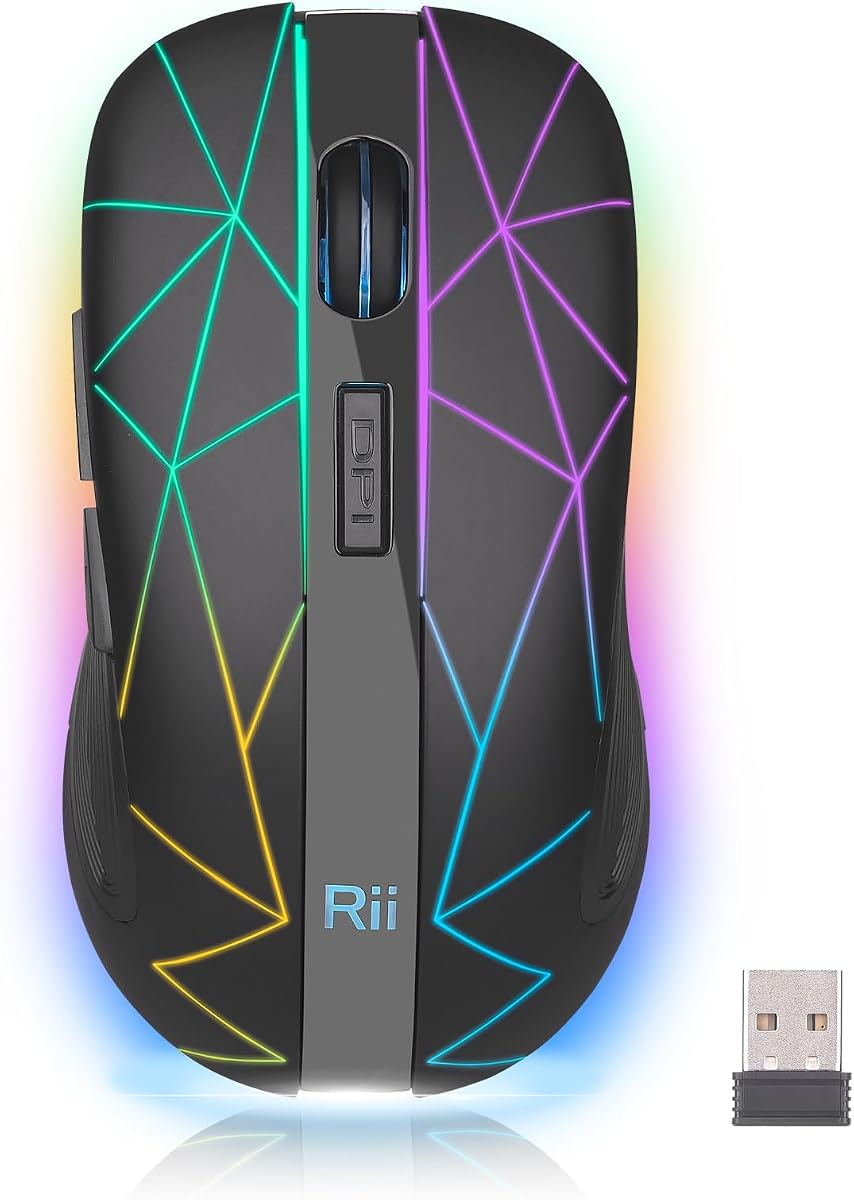
The Rii Wireless Mouse is designed for portability without sacrificing essential features. Its compact size makes it easy to slip into a laptop bag for travel. The intelligent sleep mode activates after five minutes to conserve energy effectively.
We may earn a commission when you buy through this link, at no additional cost to you.
Seven different colors change randomly during use creating a cool atmosphere. The ergonomic contoured shape fits naturally in your hand for comfort. It connects easily via USB without requiring any driver installation.
While it lacks advanced gaming specs it serves office users well. The smooth cursor control ensures accurate navigation. Its compatibility with Mac OS and Windows makes it versatile for home or office use.
Travelers or students looking for a simple light up mouse will appreciate this model. The rechargeable battery and reliable connection provide a stress free experience.
Small dimensions make this mouse ideal for carrying in a laptop bag or backpack.
Auto enters sleep after five minutes to extend battery life during periods of inactivity.
We may earn a commission when you buy through this link, at no additional cost to you.
The TENMOS M2 focuses on comfort with its skin friendly materials and ergonomic shape. It offers silent clicks and a rechargeable battery that supports use even while charging. The cool LED light adds ambiance without overwhelming your eyes.
We may earn a commission when you buy through this link, at no additional cost to you.
With three CPI levels you can switch speeds to meet your precision needs. The 2.4G wireless transmission ensures lag free performance for daily tasks. Its soft light creates a fancy atmosphere for work and gaming sessions.
While the DPI is capped it suits most standard users well. The ergonomic design prevents hand fatigue making it suitable for long hours of typing or gaming. The silent buttons ensure you do not distract others.
Users prioritizing comfort over high-end specs will find this model excellent. Its ability to function while charging adds convenience for continuous workdays.
Skin friendly materials ensure maximum comfort for your hand during long work or gaming sessions.
No need to wait for charge to finish use the mouse even while it is plugged in.
We may earn a commission when you buy through this link, at no additional cost to you.
The TENMOS V7 offers a rainbow LED light and silent clicks for a refined experience. Its rechargeable design means no battery replacements are needed. The wireless transmission provides stable performance up to ten meters distance.
We may earn a commission when you buy through this link, at no additional cost to you.
Sleep mode activates after ten minutes to conserve power effectively. The 2.4G lag-free technology ensures accurate cursor movement for precision tasks. The quiet clicks help you stay focused without noise interruptions.
Though the build is standard it is reliable for general use. The LED switch allows you to turn off lights if desired. Its compatibility with Mac and Windows makes it a flexible option for various systems.
Users wanting a reliable wireless mouse with subtle style will appreciate this pick. The silent features make it perfect for libraries or shared office spaces.
Colorful breathing light changes randomly to create a visually pleasing workspace.
Quiet clicks keep the environment peaceful for those around you during use.
We may earn a commission when you buy through this link, at no additional cost to you.
This dual mode mouse supports both Bluetooth and 2.4G for flexible connectivity. Its silent buttons and ergonomic shape make it comfortable for long sessions. The rechargeable battery ensures you do not waste money on disposable replacements.
We may earn a commission when you buy through this link, at no additional cost to you.
The 7 color breathing light adds a stylish touch to your desk setup. Auto sleep after eight minutes helps save power during idle times. The 2.4G wireless ensures smooth signal transmission without delay for gaming.
Though it caps at 1600 DPI it is sufficient for general productivity. The silent clicks allow focused work in public spaces. Its compatibility with iOS devices adds extra utility for mobile users.
Buyers wanting modern connectivity options will find this model versatile. The dual mode feature ensures it works with almost any device you own.
Connect via Bluetooth for mobile devices or 2.4G for PC to suit any setup needs.
Enjoy clicking without noise so you never disturb others around you during use.
We may earn a commission when you buy through this link, at no additional cost to you.
Selecting the right light up LED mouse involves balancing features with your specific workflow and budget. This guide breaks down the essential factors to consider to ensure you make an informed decision that meets your needs.
Decide between wired and wireless options based on your environment. Wired mice offer zero latency which is critical for competitive gaming but limit your movement range. Wireless mice provide freedom and cleaner desk setups but require battery management and may have slight input delay depending on the technology used.
If you play fast-paced games choose a wired model or a high-end wireless with low latency tech. For office work or casual gaming wireless convenience often outweighs the minor latency difference.
Dots Per Inch (DPI) determines cursor sensitivity. Higher DPI means the cursor moves faster on screen for fewer physical movements. Look for models that allow on-the-fly switching so you can adapt to different tasks without changing settings manually.
Ensure the DPI range covers your needs. Most general users are fine with up to 2400 DPI while precision tasks may require higher settings.
Comfort is paramount for long-term use. An ergonomic shape that fits the natural curve of your hand reduces fatigue and prevents strain. Check the mouse weight and size to ensure it matches your hand dimensions.
Try different shapes if possible or read reviews regarding comfort. A comfortable mouse improves your productivity and enjoyment significantly.
Lighting effects range from simple steady LEDs to complex RGB breathing or crackle modes. These add style and ambiance to your setup. Ensure the lighting can be toggled off if you prefer a minimalist look or want to save power.
For wireless mice be aware that lighting consumes battery. If you prioritize battery life look for models that allow you to disable lights easily.
Rechargeable batteries are more eco-friendly and cost-effective over time. Check the estimated battery life with lights on and off as lighting significantly impacts power consumption. Look for fast charging capabilities so you are not sidelined for long.
Some mice allow use while charging which is a great feature for heavy users. Always check the battery capacity if available to gauge longevity.
The number and placement of buttons affect workflow efficiency. Standard mice have left right scroll and DPI buttons but gaming models often include extra keys for shortcuts. Silent click technology is a plus for quiet environments like offices or libraries.
Consider if you need extra programmable buttons for specific software or games. More buttons mean more customization but can sometimes clutter the surface.
Check the materials used. Plastic is common and affordable but metal frames offer better shock resistance and longevity. Surface coatings can prevent slipping and improve tactile feel. Reviews often highlight long-term durability issues.
Higher build quality means a mouse that lasts longer and feels better. Look for reinforced cables on wired models to prevent fraying.
Ensure the mouse supports your operating system. Most modern mice work with Windows and macOS but checking for Linux or console compatibility is important if you use varied setups. Universal compatibility ensures you can use the device across different computers.
Plug and play functionality is preferred to avoid installing drivers. Check the product specs for supported OS versions to avoid confusion.
To get started simply plug the USB receiver into your computer or connect via Bluetooth depending on your model. Press the power switch to wake the device and enjoy the initial lighting effects. Adjust the DPI button to find a cursor speed that suits your comfort.
For maintenance clean the sensor lens gently with a soft cloth to ensure tracking accuracy. Avoid exposing the mouse to liquids and store it in a dry place. If using a wireless model charge the battery fully before first use to maximize its lifespan.
To preserve battery life turn off the lights when not in use or enable power saving modes if available. Use the provided software if necessary to customize lighting colors or button assignments. Always eject the receiver safely from your USB port if you plan to move the mouse to another device.
Yes most of the light up LED mouse models listed support macOS alongside Windows systems. Always check the specific compatibility list in the product details to ensure full functionality with your Mac device before purchasing.
Battery life varies based on usage and lighting settings. Some models claim up to 25 days without lights on but using LED effects will reduce this time significantly. Check the specific battery specs for your chosen model.
Most models include a switch or button to turn off the lights. This helps save battery life on wireless versions and provides a cleaner look if you do not need the visual effects for your setup.
Several options in this guide feature silent click technology which reduces noise during use. If quiet operation is important for your workspace check the product features to confirm silent button design before buying.
The maximum DPI ranges from 2400 to 3200 depending on the model. Higher DPI allows for faster cursor movement which is useful for gaming or multitasking on large displays.
Most of these mice are plug and play requiring no drivers for basic use. However if you want advanced customization like button remapping you might need to download specific software from the manufacturer.
We have reviewed ten top light up LED mouse options ranging from budget wired models to versatile wireless choices. Our top picks highlight the BENGOO for value the Rechargeable Wireless for balance and the RGB Wired for durability and precision.
Prioritize ergonomics and battery life if you plan to use the mouse for long hours. Features like silent clicks and dual connectivity add convenience that improves daily workflow and comfort in shared spaces.
Prices and stock fluctuate so verify the current offers on the product pages before purchasing. With the right choice you can elevate your gaming or work setup with style and functionality.