
Lenovo Smartcard Wired Keyboard II
4.4Editor score
Low cost entry point
Wired USB connectivity
Standard full size layout
This guide compares the top ten keyboards with smart card readers for secure authentication, highlighting features, compatibility, and build quality for
Secure authentication is critical for modern workplaces. A keyboard with smart card reader integrates security directly into your typing workflow. This ensures that only authorized personnel can access sensitive systems without extra hardware.
We evaluated ten top models based on build quality, reader compatibility, and ergonomic design. Each product offers unique advantages for government, banking, or healthcare environments requiring robust access control measures daily.
Our picks highlight performance, security standards, and ease of use. Note that availability and specific pricing may fluctuate over time. Always verify current stock and compatibility before making your final purchasing decision today.
4.4Editor score
4.6Editor score

4.6Editor score
The following table provides a side by side comparison of all ten models. It highlights key specifications such as connectivity, security standards, and unique features to help you identify the right device for your specific operational needs quickly.


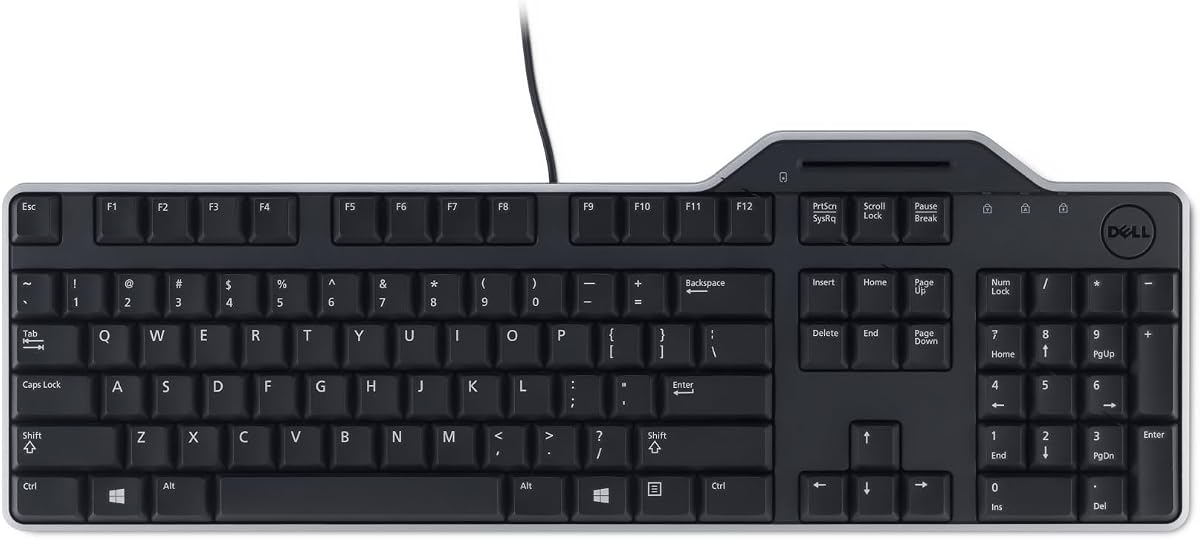
This Dell keyboard stands out as a top choice for secure enterprise environments. With a high rating of 4.6 stars, users appreciate its reliable performance. The integrated smartcard reader enhances security without compromising the typing experience significantly.
We may earn a commission when you buy through this link, at no additional cost to you.
Its spill-resistant design protects against accidental liquid damage, a common issue in office settings. The ergonomic layout with a detachable palm rest ensures comfort during long shifts. Wired USB connectivity guarantees fast and secure data transfers without battery dependency.
While it lacks backlighting, the focus on security and durability makes up for this omission. The modern black design fits well in professional workspaces. Some users note that it is strictly USB, limiting wireless flexibility.
Ideal for IT departments needing robust security and durability. We recommend this for organizations prioritizing hardware resilience and secure login processes. Its balance of features justifies its position as a leading model in this category.
The built-in reader allows seamless authentication for secure web applications and logon systems efficiently.
Spill-resistant construction ensures the device survives common office accidents and maintains functionality over years.
We may earn a commission when you buy through this link, at no additional cost to you.
This mechanical keyboard offers premium features for high-demand workstations. Rated 4.6 stars, it combines security with typing precision. The red switches provide silent feedback, reducing noise in quiet office environments.
We may earn a commission when you buy through this link, at no additional cost to you.
It supports multiple international security standards including EMV and FIPS Publication 201. A dedicated Copilot AI hotkey aids productivity by launching tools instantly. Large print keycaps improve legibility for users with visual challenges.
The wired connection ensures stable performance without signal interference. However, the price is higher than standard membrane models. The mechanical switches might not suit everyone's preference compared to softer alternatives.
Best for professionals needing high durability and advanced features. Choose this if you value tactile feedback and secure access control. Its robust build and security certifications make it a top-tier investment.
Red switches deliver distinct feedback and sound for every keypress, ensuring typing accuracy and comfort.
Copilot hotkey provides instant access to AI assistance, streamlining coding and writing tasks efficiently.
We may earn a commission when you buy through this link, at no additional cost to you.
This model offers a straightforward solution for basic secure access needs. With a 4.4-star rating, it delivers essential functionality without complexity. The package dimensions suggest a compact footprint suitable for smaller desks.
We may earn a commission when you buy through this link, at no additional cost to you.
It connects via standard USB for plug-and-play operation. The lightweight design reduces desk load, making it easy to move. While it lacks advanced ergonomic or aesthetic features, it serves core authentication purposes well.
The build quality is functional but not rugged. Users should expect standard membrane performance without extra durability protections. It is ideal for temporary setups or budget-conscious procurement cycles.
Select this for cost-effective deployment across large fleets. It meets basic compliance needs without over-investing in features. For organizations needing simple card readers, this model provides excellent value.
Provides standard smartcard reading capabilities for basic login security without additional hardware.
Designed to fit easily into tight workspaces, optimizing desk real estate for other equipment.
We may earn a commission when you buy through this link, at no additional cost to you.
This keyboard is designed specifically for government agencies and compliant procurement. Rated 4.1 stars, it focuses on ergonomic safety and regulatory standards. The split design encourages natural hand positions to reduce strain during extended use.
We may earn a commission when you buy through this link, at no additional cost to you.
It supports international standards like ISO7816 and PC/SC 2.0 for secure authentication. The integrated palm rest helps maintain natural posture and relieves joint pain. Internet and multimedia hotkeys provide quick access to common tools.
While the split layout aids ergonomics, it may require an adjustment period for some users. The membrane keys are quiet but lack mechanical feedback. The device is robustly built for secure industries.
Ideal for government and healthcare sectors prioritizing ergonomics and compliance. Choose this if you need TAA compliance and enhanced posture support. It is a practical tool for secure and comfortable daily operation.
Meets U.S. Trade Agreement Act Specifications for government and military supplier requirements effectively.
Split zones and sloped shape encourage neutral wrist positions to minimize long-term strain.
We may earn a commission when you buy through this link, at no additional cost to you.
This model emphasizes strict security protocols for high-risk environments. With a 4.6-star rating, it is trusted for certified applications. It supports protocols like T=0 and T=1 alongside ISO 7816 compliance for reliable card reading.
We may earn a commission when you buy through this link, at no additional cost to you.
It is FIPS 201 and EMV 2000 Level 1 approved ensuring top-tier validation. Secure PIN entry protects credentials from shoulder surfing. The thin smart card contacting unit keeps the profile sleek on the desk.
Driver support extends to Windows, macOS, and Linux systems for broad deployment. However, it lacks modern multimedia features or lighting. The focus is purely on secure data input and access control.
Best for financial and critical infrastructure sectors. Choose this if strict regulatory compliance is mandatory. Its robust protocol support and driver versatility make it a reliable tool for secure operations.
Compatible with Windows, macOS, and Linux ensuring wide deployment across different organizational systems.
Dedicated PIN pad allows private entry of credentials to prevent visual data leakage.
We may earn a commission when you buy through this link, at no additional cost to you.
This Dell model offers reliable functionality with a strong 4.7-star rating. It focuses on secure data transfer and user comfort. The wired USB connection eliminates battery concerns while ensuring stable performance.
We may earn a commission when you buy through this link, at no additional cost to you.
Spill resistance protects the device from accidental liquid damage effectively. Low-profile keys provide a quiet typing experience that does not disturb coworkers. A detachable palm rest adds essential ergonomic support for long shifts.
While it lacks advanced smart features, it performs core tasks reliably. The design is simple yet practical for daily use. It is a solid choice for general office environments needing basic security.
Ideal for users seeking dependable performance without complexity. Choose this if you value comfort and basic security. Its high rating confirms reliability for standard authentication needs.
Wired USB ensures fast and reliable data flow without battery dependency or wireless delays.
Spill-resistant design safeguards internal electronics against common liquid accidents in busy offices.
We may earn a commission when you buy through this link, at no additional cost to you.
This model is built for strict federal compliance and secure access control. Rated 3.8 stars, it meets essential regulatory standards like FIPS 201. It ensures reliable authentication and data protection for sensitive organizations.
We may earn a commission when you buy through this link, at no additional cost to you.
It features a quiet-click mechanism to maintain focus without disturbing colleagues. The TAA compliant status makes it ready for use in U.S. Federal Government institutions. A 3-year limited warranty offers added peace of mind.
The full-size numeric keypad enhances productivity for data entry tasks. While ergonomic features are basic, it serves its purpose well. The lower rating suggests it may lack some modern conveniences.
Best for federal agencies requiring specific compliance standards. Choose this if you need guaranteed regulatory adherence. Its warranty and security certifications make it a secure choice for restricted access.
Supports PIV and ISO standards ensuring secure access for federal and defense sector workers.
3-year warranty covers defects providing assurance for long-term deployment in critical environments.
We may earn a commission when you buy through this link, at no additional cost to you.
This HP model focuses on slim, functional design for office desks. Rated 4.5 stars, it balances security with practical build. The slim profile ensures it fits well even in cramped workspace conditions.
We may earn a commission when you buy through this link, at no additional cost to you.
It features LED indicators for key lock status at a glance. The built-in spill drain manages liquid accidents by directing them away from electronics. Membrane switches offer a quiet typing experience for shared offices.
The 6ft cable provides flexible positioning relative to the PC. While it lacks advanced ergonomics, it is robust for daily use. The security reader supports standard secure access workflows effectively.
Ideal for users needing a compact, reliable device. Choose this if desk space is limited and spill protection is a priority. Its practical features make it a solid addition to any business setup.
Compact profile reduces desk clutter, leaving more room for documents and other accessories.
Clear key light indicators show lock status instantly without needing to check screen prompts.
We may earn a commission when you buy through this link, at no additional cost to you.
This board combines smartcard and NFC capabilities for versatile security. Rated 4.2 stars, it supports both contact and contactless authentication. The GS Approval ensures it meets strict German standards for quality.
We may earn a commission when you buy through this link, at no additional cost to you.
Secure mode with encryption protects data especially for thin clients and public terminals. It supports ISO 14443 A/B compliant cards for broad compatibility. The secure authentication mode adds a layer of privacy for sensitive work.
The QWERTY layout is standard for most users. While it supports read/write functions, the focus remains on security integrity. It is well suited for specialized high-risk environments.
Best for organizations requiring contactless and card integration. Choose this if you need NFC alongside traditional smartcard support. Its encryption capabilities make it ideal for secure access workflows.
RF/NFC interface allows tap-to-read access alongside standard smartcard insertion for versatile workflows.
Dedicated secure mode encrypts data during authentication to prevent interception during login.
We may earn a commission when you buy through this link, at no additional cost to you.
This OEM version offers factory-grade reliability for replacements. Rated 4.4 stars, it provides consistent performance for enterprise setups. The unopened packaging ensures a new device ready for immediate use.
We may earn a commission when you buy through this link, at no additional cost to you.
It integrates a standard smartcard reader for secure login workflows. The English layout matches typical office setups without customization. It connects via standard USB for fast and secure data transfers.
While it is purely functional, it meets core replacement needs well. The build quality is durable enough for daily office tasks. There are no extra features, but this keeps the focus on utility.
Ideal for IT managers needing reliable bulk replacements. Choose this if you need consistent performance and secure authentication. Its OEM quality ensures it matches original system standards.
OEM sourcing ensures the keyboard meets original Dell specifications and quality standards.
Unopened and ready to use reduces setup time for IT departments deploying hardware quickly.
We may earn a commission when you buy through this link, at no additional cost to you.
Selecting the right secure keyboard requires understanding both security needs and ergonomic comfort. This guide breaks down critical factors to help you choose the best device for your environment and workflow.
Look for devices supporting standards like FIPS 201, EMV 2000, or ISO 7816. These certifications ensure the reader meets strict regulatory requirements for government or financial access. Higher compliance levels reduce risks during audits.
Verify that the keyboard supports PC/SC or CCID standards for smooth integration with operating systems. Without these, drivers may be difficult to install or update regularly.
Most secure keyboards use wired USB for stability and security. Wireless models may be more convenient but can introduce latency or interference issues. Ensure the cable length fits your desk distance comfortably.
Wired connections also eliminate the need for battery replacements or charging cycles. This reduces maintenance and ensures the device stays powered during critical login sessions.
Features like split layouts or adjustable palm rests reduce strain over long shifts. Look for keyboards that promote a natural hand position to prevent repetitive stress injuries. Comfort is as vital as security.
Consider models with low-profile keys if quiet operation is a priority. Membrane switches are often quieter than mechanical ones but may lack tactile feedback.
Spill-resistant designs or built-in drains protect against liquid accidents common in office environments. Look for keyboards with sturdy housings that can withstand daily handling and cleaning.
Check the rated lifespan in keystrokes. Higher counts like 50 million indicate longer service life and better return on investment for heavy users.
Government agencies and healthcare providers often require TAA compliant or FIPS approved devices. Confirm the product documentation lists all necessary compliance badges before purchase.
Non-compliant devices may fail security audits leading to replacement costs. Prioritize models that clearly state their adherence to relevant industry standards.
Ensure the keyboard provides drivers for your specific OS. While Windows support is standard, macOS and Linux users must check compatibility carefully.
Look for universal support options that allow plug-and-play functionality without complex driver installation. This simplifies deployment across mixed environments.
Some models offer multimedia or AI hotkeys for faster access to tools. While not essential, these can improve workflow efficiency significantly for technical staff.
Evaluate whether extra keys add value or just clutter the layout. Simpler designs are often easier to maintain and less prone to user error.
Look for at least a 1-year warranty covering defects. Brands offering 3-year warranties signal confidence in their build quality and reliability over time.
Check if the manufacturer offers clear documentation or customer support channels. Good support ensures issues with driver updates are resolved quickly.
Connect the USB cable to your computer and wait for automatic driver recognition. Most systems will identify the reader as a standard HID device immediately upon connection.
Insert your smartcard into the reader slot and enter your PIN if prompted. Ensure the card is fully seated to avoid connection errors during authentication.
Clean the keyboard surface regularly with a soft cloth and mild cleaner. Avoid liquids entering the gaps to maintain the integrity of the spill-resistant design.
Yes, many models support macOS if you check driver compatibility. Devices supporting standard USB HID or CCID protocols usually work without extra software. Always verify specific OS support before purchasing.
Most secure keyboards use wired USB to ensure stable and secure data transfers. Wireless options exist but are less common for high-security environments. Check product specs to confirm connectivity type.
TAA compliance ensures the product meets U.S. Trade Agreement Act standards for government procurement. It is essential for federal agencies and organizations requiring government-approved hardware. Look for TAA labels in product descriptions.
Use a dry cloth to wipe the slot gently. Avoid inserting liquids or abrasive materials that could damage internal contacts. Regular dusting keeps the reader functioning optimally over time.
Most use standard plug-and-play protocols but check OS requirements. Some models may need specific drivers for advanced security features or encryption. Always download from the official manufacturer website.
They integrate secure authentication directly into your input device reducing external hardware needs. This enhances privacy by allowing secure PIN entry and access control. It simplifies workflows while maintaining high security standards.
Mechanical switches offer durability and tactile feedback but cost more. Membrane switches are quieter and often more affordable. Choose based on your preference for feel and budget constraints.
Most support ISO 7816 smartcards and sometimes NFC or contactless cards. Check specific protocol support like T=0 or T=1 for compatibility. Advanced models may support read/write functions for broader use.
Our picks range from budget-friendly options to premium ergonomic models. Each option serves different needs whether for government compliance or basic secure access.
Prioritize security standards and ergonomics over extra features. A device that protects data and reduces strain is worth the investment for daily use.
Always check current availability and compatibility before buying. Security hardware evolves rapidly ensuring your device remains supported.