
Corded Landline for Seniors
4.2Editor score
Photo dialing buttons
110dB loud ringer
No battery required
This guide compares the top captioned telephone models for hearing loss, featuring real-time captions, amplified sound, and easy dialing for seniors.
Captioned telephones offer a vital solution for individuals with hearing loss who want to stay connected through voice calls. These devices display real-time text captions alongside audio, ensuring conversations are clear and missed words are minimized. Choosing the right model depends on specific needs like internet connectivity, screen size, and amplification levels.
We have evaluated ten leading models based on features, user feedback, and accessibility design. Our comparison covers traditional landline options, VoIP compatible devices, and hybrid systems with cordless handsets. Each product was reviewed for ease of use, caption accuracy, and sound quality to help you find the best fit.
Each pick below highlights key strengths, potential trade-offs, and ideal user scenarios. We include detailed specs and pros and cons to aid your decision-making process. Please note that product availability and pricing can change frequently, so verify details before purchasing to ensure you get the latest version.
4.2Editor score

4.3Editor score
4.5Editor score
This side-by-side comparison highlights the core specifications of all ten products reviewed. We focus on connectivity type, volume capabilities, and accessibility features to help you distinguish between standard landlines and specialized captioned units.


The Hamilton CapTel 2400iSPNBT stands out as the top choice for those needing reliable captioning support. With a 4.3 rating, users praise its large touchscreen and clear real-time text display. It transforms voice calls into confident conversations by ensuring words are both heard and read.
We may earn a commission when you buy through this link, at no additional cost to you.
Its key strength lies in the dual captioning modes, allowing users to switch between fully automated and assisted options. The phone supports volume control up to 40dB, making it suitable for significant hearing loss. Additionally, the built-in answering machine displays voicemail captions directly on the screen.
However, the device requires a high-speed internet connection and service registration for US residents, which might be a hurdle for some. Users must ensure their telephone service is compatible before setup. Despite this, the clarity gained from captions often outweighs the setup complexity.
This model is ideal for seniors or individuals with hearing loss who want to stay connected without missing details. The combination of amplified sound and visual text makes it a comprehensive solution. We recommend it for those prioritizing clarity and ease of reading during calls.
Instant captions ensure every word is visible, reducing stress and confusion during conversations.
Volume control up to 40dB helps users with moderate to severe hearing loss hear callers clearly.
We may earn a commission when you buy through this link, at no additional cost to you.
This corded landline offers an affordable and accessible alternative for seniors needing simplified calling features. Rated 4.2, it features customizable photo speed-dial buttons to help those with memory loss connect effortlessly. The design focuses on visual cues rather than complex navigation menus.
We may earn a commission when you buy through this link, at no additional cost to you.
Its loud ringer reaches 110dB, ensuring calls are never missed even in noisy environments. The device runs entirely on a standard RJ11 phone line, removing the need for batteries or Wi-Fi. A programmable SOS button adds a layer of safety for emergency situations.
While it lacks the text captioning of higher-end models, its simplicity makes it a great budget option. Users with dementia or visual impairments benefit from the large, clear buttons and flashing visual indicators. The hands-free feature also supports users with arthritis or weak grip strength.
This phone is best for those who prioritize ease of use over advanced digital features. It is a reliable tool for maintaining connections with family without the complexity of internet-dependent services. Consider this if your needs focus on basic, loud, and simple calling.
Photo buttons allow users to dial by seeing a face rather than remembering a number.
No batteries or Wi-Fi means the phone works even during power outages or internet failures.
We may earn a commission when you buy through this link, at no additional cost to you.
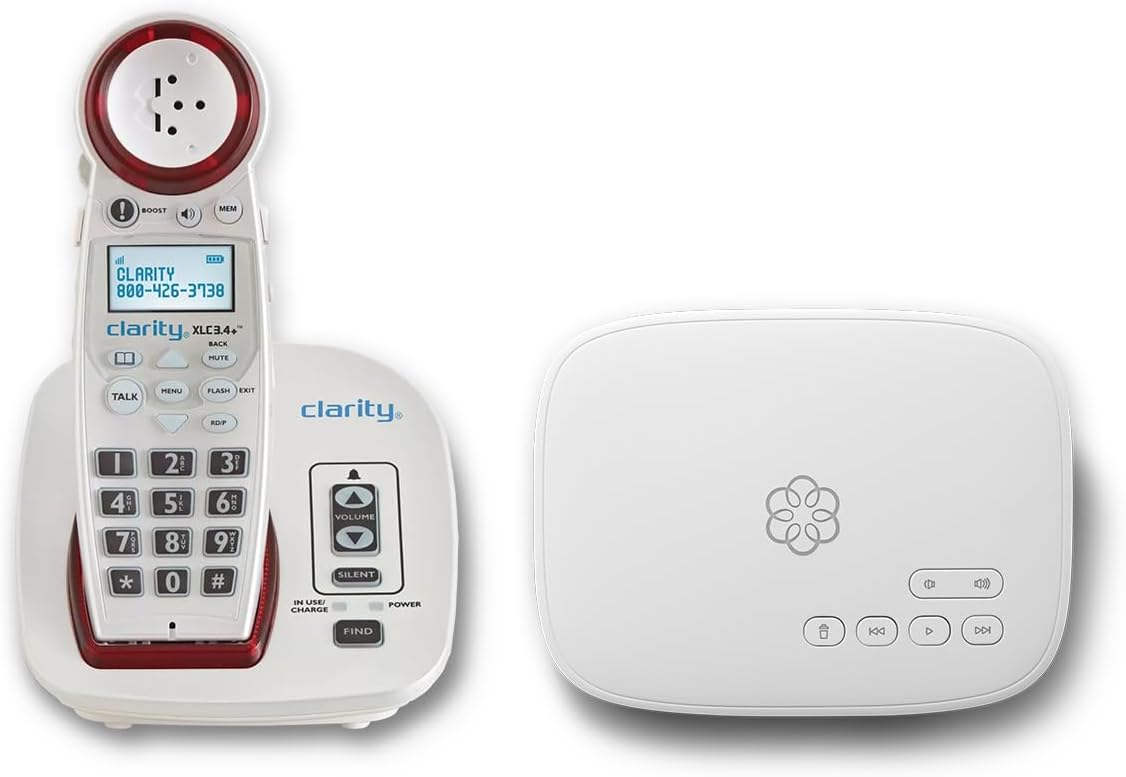
The Ooma Telo bundle combines a premium amplified cordless phone with a robust VoIP service designed for clarity. With a 4.5 rating, it offers features like hearing aid compatibility and text alerts when 911 is dialed. This bundle is ideal for those wanting modern technology with senior-friendly adjustments.
We may earn a commission when you buy through this link, at no additional cost to you.
Its advanced robocall blocking ensures users are not harassed by unwanted calls, while the visual ringer prevents missed connections. The service allows unlimited calling across the U.S., Canada, and Mexico, providing peace of mind for families. Personal setup assistance is included to help with installation.
The main trade-off is the monthly subscription cost and the need for internet connectivity to run the VoIP system. Users must confirm their home internet is stable before committing. However, the value of unlimited calling and enhanced safety features often justifies the expense.
This bundle is perfect for tech-savvy seniors or families looking for a complete communication solution. It balances high-tech convenience with accessibility features like adjustable volume and talking keypad. Choose this if you want reliable service and advanced protection for your loved ones.
Advanced blocking and text alerts keep users safe from spam and ensure emergency responders know their location.
Unlimited calling and international options provide extensive connectivity for family communication.
We may earn a commission when you buy through this link, at no additional cost to you.
The VTech SN5147 is a hybrid phone offering both a corded base and a cordless handset for maximum flexibility. Rated 4.0, it is designed for seniors who need mobility without losing reliability. The base unit operates even during power outages, ensuring consistent service.
We may earn a commission when you buy through this link, at no additional cost to you.
It features 90dB extra-loud ringer and a one-touch volume boost up to 50dB. The oversized high-contrast buttons and large display help users with arthritis or low vision. Photo dial slots simplify connecting with loved ones through quick access buttons.
While it offers good amplification, it lacks the specialized captioning features of dedicated captioned phones. Users might find the hybrid setup slightly complex compared to simple landlines. However, the combination of mobility and reliability makes it a strong contender for active seniors.
This phone is best for those who need to move around the house while staying connected. The visual indicators and loud ringer ensure calls are never missed. Consider this if you value cordless convenience alongside the security of a corded base.
The corded base ensures calls can be made and received even when the power is out.
Oversized buttons and displays make dialing easy for users with limited dexterity or vision.
We may earn a commission when you buy through this link, at no additional cost to you.
This unique home telephone allows users to answer, dial, and hang up using only their voice. It is designed for those with significant mobility or vision difficulties who struggle with physical buttons. The device uses an active listening mode to recognize commands instantly.
We may earn a commission when you buy through this link, at no additional cost to you.
Its key strength is the hands-free nature, which eliminates the need to touch the phone during use. Users can issue simple commands to manage calls, making it accessible for individuals with tremors or weakness. It relies on the home phone line for connectivity.
However, the product lacks user reviews and has an N/A rating on Amazon. Users must have clear speech for reliable operation, which may not suit everyone. Additionally, it does not offer specialized captioning features found in other models.
This phone is suitable for those prioritizing hands-free convenience over other features. It offers a novel approach to calling for seniors with physical limitations. Consider it if voice interaction is the most important factor for daily use.
Complete voice control removes the need to hold or touch the device, aiding those with weak grip.
We may earn a commission when you buy through this link, at no additional cost to you.
This big button phone combines amplification with picture buttons to simplify calling for seniors. Rated 4.2, it features adjustable volume up to 40dB to meet varying hearing needs. The replaceable picture buttons allow users to store favorite contacts visually.
We may earn a commission when you buy through this link, at no additional cost to you.
Memory protection ensures stored numbers remain safe even if the phone line is unplugged. The design supports wall mounting or desktop placement with nonskid pieces to prevent slipping. It is specifically aimed at users with dementia or low vision.
While it provides essential accessibility, it lacks modern features like voicemail or caller ID. Users focused on simplicity and loud, clear audio will appreciate its straightforward operation. It is a robust tool for basic daily communication.
This model is best for those needing a visual aid for dialing and reliable volume. It ensures users can reach family without technical barriers. Consider this if you want a durable, simple, and accessible landline phone.
Picture buttons replace numbers with familiar faces, making dialing easier for memory-impaired users.
Stored numbers do not disappear during power loss, ensuring contacts are always available.
We may earn a commission when you buy through this link, at no additional cost to you.
The FLYINGVOICE FIP12WP is a highly rated VoIP phone designed specifically for seniors with dementia or visual needs. It features customizable image keys that display family photos to simplify dialing. Users give it a 5-star rating for its thoughtful design.
We may earn a commission when you buy through this link, at no additional cost to you.
Volume is amplified up to 110dB, ensuring clear calls in noisy environments. The dedicated help key provides instant access to emergency assistance, adding safety for users in nursing homes. Visual alerts warn of incoming calls through a bright red light.
However, this phone requires an active VoIP service and cannot connect to a standard phone wall jack. Users must have an internet telephony setup ready before purchasing. This requirement limits its use to those with specific internet configurations.
This phone is best for tech-enabled homes needing high accessibility features. The photo keys and help button make it ideal for care facilities or family homes. Choose this if you have VoIP ready and want a highly accessible communication device.
Photo keys allow quick dialing by simply tapping a family member's image.
A dedicated help button offers immediate access to assistance without searching contacts.
We may earn a commission when you buy through this link, at no additional cost to you.
Serene Innovations offers a high definition amplified phone designed for performance and clarity. While specific features are minimal in the listing, the focus is on delivering superior audio quality for seniors. It is intended to make conversations clearer through high definition sound.
We may earn a commission when you buy through this link, at no additional cost to you.
The amplified volume helps users with hearing loss hear every word. Its design caters to senior needs, though specific details like screen size or photo dialing are not detailed. Users looking for pure audio quality might find this suitable.
However, the 3.5 rating suggests mixed user experiences or limited features compared to competitors. Those needing advanced captioning or visual dialing may find it basic. It is a straightforward option for those prioritizing sound over complexity.
This phone is best for users seeking a simple, sound-focused device without extra apps or buttons. It ensures audio clarity without the cost of advanced digital features. Consider this if sound quality is your primary concern.
High definition sound aims to improve voice intelligibility for those with hearing challenges.
We may earn a commission when you buy through this link, at no additional cost to you.
This voice dialer phone allows users to make calls using voice commands without touching the device. It features 17 programmable voice memories to dial numbers by saying a name. The phone includes a talking caller ID to announce who is calling.
We may earn a commission when you buy through this link, at no additional cost to you.
While it offers unique accessibility tools like voice dialing, the 2.1 rating suggests usability challenges. Users may find the voice setup complex or the recognition accuracy inconsistent. It is a niche tool for those needing hands-free interaction.
Additional features include a redial button and flash capabilities for line control. The LED ring indicator adds visual support for those with hearing difficulties. Despite these features, reliability may be an issue compared to standard phones.
This phone is best for specialized needs where voice interaction is critical. It offers a distinct approach to calling but may require patience during setup. Consider this if you need specific voice commands over standard dialing.
Speaking names to dial reduces physical effort, aiding those with mobility issues.
We may earn a commission when you buy through this link, at no additional cost to you.
This final landline option offers simple photo dialing for seniors with memory loss. Rated 4.2, it features nine photo memory keys to make calling family effortless. The loud ringer exceeds 110dB to ensure no calls are missed.
We may earn a commission when you buy through this link, at no additional cost to you.
Hands-free calling supports users with limited mobility, allowing calls without holding the handset. It runs on a standard RJ11 line without batteries, ensuring reliability. The design focuses on ease of use for daily communication.
While it lacks smart features, its simplicity makes it highly practical for dementia care. The redial and flashback functions add minor conveniences for number correction. It is a reliable bridge to family bonds without technical complexity.
This phone is best for seniors needing a simple, visual, and loud communication tool. It ensures family connections remain strong through easy dialing. Choose this if you need a no-fuss phone for daily home care.
Photo memory keys allow instant dialing by touching a picture, removing the need for number memory.
We may earn a commission when you buy through this link, at no additional cost to you.
Choosing the right captioned telephone involves understanding your specific hearing needs, home connectivity, and ease-of-use preferences. We explore key factors to ensure you select a device that provides clear communication and lasting value.
Some captioned phones require high-speed internet to function, while others work on standard landlines. Check if your home has stable Wi-Fi or Ethernet to support internet-dependent captioning services. If you need reliability during power outages, a corded landline option may be more suitable.
Always verify connectivity requirements before purchasing to avoid setup issues and ensure the device works with your existing infrastructure.
Accurate real-time captions are critical for hearing loss users to understand conversations fully. Look for models with established captioning services that offer high accuracy and minimal delays. Some devices allow switching between assisted and automated captioning modes for flexibility.
Prioritize models with proven caption accuracy to ensure you do not miss important words during calls.
Different users have varying degrees of hearing loss, so volume control is essential. Check for amplification ranging from 20dB to 40dB or higher to accommodate your needs. Adjustable volume settings help avoid discomfort while ensuring clear audio.
Select a phone with sufficient amplification to match your hearing ability without causing audio distortion.
Large buttons, bright displays, and photo dialing options help seniors with vision or memory challenges. Ensure the screen font size and contrast are readable and that buttons are easy to press. Some models include visual alerts like flashing lights to indicate incoming calls.
Choose a device with visual features that align with the user's physical and cognitive capabilities.
Many captioned services are free due to federal programs, but some VoIP bundles require monthly subscriptions. Review any fees associated with the phone or the captioning service to budget appropriately. Check if the service requires registration or specific eligibility criteria.
Always confirm all costs upfront to avoid unexpected fees and ensure the service is accessible in your region.
A complicated setup process can discourage use, especially for seniors. Look for models with straightforward instructions, phone support, or setup assistance. Devices with plug-and-play functionality reduce frustration during initial configuration.
Opt for a phone with clear setup steps to ensure a smooth and stress-free experience.
Many users with hearing aids need phones that work without feedback or static. Check for T-coil or hearing aid compatibility to ensure seamless integration. Some models offer specific settings to optimize sound for users with assistive devices.
Confirm compatibility with your specific hearing aid model to avoid noise and interference issues.
Emergency features like programmable SOS buttons or text alerts for 911 add peace of mind. Some devices allow family members to receive notifications when an emergency call is made. These features are critical for those living alone or with health conditions.
Consider safety features that allow quick access to help and keep loved ones informed during emergencies.
Start by connecting the phone to a standard power outlet and the appropriate line or internet source. Ensure all cables are securely plugged in to maintain stable service. Follow the manufacturer's setup guide to register for captioning services if required.
Test the volume controls and button functions to ensure everything works as expected. Adjust amplification levels to match your hearing needs and set the ring tone to an audible level. Familiarize yourself with the caption display or visual alerts to ensure clear communication.
Keep the device clean by dusting the screen and buttons regularly with a soft cloth. Avoid placing the phone near water or extreme temperatures to protect its components. Perform periodic checks on cables and connections to maintain consistent performance over time.
Many captioned telephone services are funded by federal programs in the U.S. and are free for eligible users. However, you may need to register for the service and have access to internet or landline infrastructure. Check your local program eligibility to confirm costs.
Some captioned phones require high-speed internet to function because they rely on VoIP services for real-time captioning. Others operate on traditional landlines and may not need internet. Verify the model's requirements before purchase to match your home setup.
Yes, many models include features like photo dialing and large buttons that simplify use for seniors with dementia. These visual cues help users remember who to call and how to dial. Look for devices designed with memory loss in mind.
If you need a phone without physical connections, consider VoIP options that use internet. However, standard captioned phones typically require a landline or internet. Wireless or cordless options exist but may still rely on base connectivity.
Activate captions by following the setup guide provided with your phone. This usually involves registering for the service online and linking your phone number. Once set up, captions appear automatically on incoming and outgoing calls.
Many captioned telephones are hearing aid compatible to reduce feedback and improve sound clarity. Look for models with T-coil compatibility or specific settings for hearing aids. Check the specifications to ensure compatibility with your device.
We reviewed ten models including the Hamilton CapTel 2400iSPNBT, Ooma Telo bundle, and simple landline options. Each offers unique strengths for users needing clarity, simplicity, or advanced connectivity. Your choice depends on specific needs like internet access and amplification levels.
Prioritize features that match the user's daily life and physical abilities. Models with visual cues and reliable captioning ensure effective communication for those with hearing loss. Consider both the device capabilities and any service subscriptions required.
Always check current availability and pricing before purchasing as these details change frequently. Verify compatibility with your home network to avoid setup issues. With the right phone, staying connected with loved ones becomes easier and more confident.