
GIGABYTE B550 Gaming X V2
4.5Editor score
Affordable AM4 socket support
Reliable PCIe 4.0 connectivity
Simple DIY friendly features
This guide compares the top Gigabyte motherboards for AMD and Intel platforms, covering power delivery, connectivity, thermal performance, and value for every
Choosing the right motherboard is crucial for any computer build. Gigabyte offers a wide range of options that balance performance, features, and price for different user needs.
We analyzed ten top models across various chipsets and sockets. Our comparison focuses on power design, thermal solutions, connectivity options, and user-friendly features for DIY builders.
Each pick highlights specific strengths like budget value or premium networking. Prices and availability change frequently, so check current listings before making your final purchase decision today.
4.5Editor score

4.4Editor score

4.2Editor score
The following table provides a quick side by side overview of all ten selected models. It highlights key specifications like socket type, memory support, and major connectivity features.


The Gigabyte B650 AORUS Elite AX stands out as a top choice for AMD AM5 builders. It earns high marks for its robust power design and modern connectivity options.
We may earn a commission when you buy through this link, at no additional cost to you.
Its twin 14+2+1 power phase design ensures stable performance even with high end Ryzen processors. The 8 layer PCB and VRM heatsinks help keep temperatures in check under load.
Connectivity is well covered with PCIe 5.0 and USB-C rear ports. The only real trade off is the reliance on software for RGB control which some users may prefer to avoid.
This board is ideal for gamers and creators building a new PC. It balances premium features with a reasonable price point making it a highly recommended pick.
The VRM design handles high core count CPUs efficiently without throttling.
PCIe 5.0 and USB-C ensure your system stays ready for future devices.
We may earn a commission when you buy through this link, at no additional cost to you.
The X870 AORUS Elite WIFI7 brings cutting edge features to the AM5 platform. It is designed for users who want the fastest networking and data transfer speeds available.
We may earn a commission when you buy through this link, at no additional cost to you.
Its standout features include dual USB4 ports and the newest WIFI7 standard. This ensures you can take advantage of future peripherals and wireless speeds immediately.
While the cost is higher, the future proofing justifies it for enthusiasts. The power delivery is also upgraded to handle top tier Ryzen processors with ease.
Buy this if you want the latest tech in an AMD build. It offers excellent connectivity and thermal performance for a high end gaming rig.
Dual USB4 ports provide extreme speed for external storage and docking.
Next gen wireless ensures lower latency and higher throughput for gaming.
We may earn a commission when you buy through this link, at no additional cost to you.
The X870E AORUS PRO ICE is a premium choice for those building a white themed PC. It combines top tier performance with a striking visual design.
We may earn a commission when you buy through this link, at no additional cost to you.
Features include the X870E chipset which supports full PCIe 5.0 speeds and USB4. The power stage is rated at 80A for maximum stability under heavy loads.
The white PCB and heatsinks create a clean look without sacrificing function. It is perfect for open cases or white components where style matters deeply.
This board is best for enthusiasts who want both looks and power. It delivers everything a high end AMD system needs in a unique package.
The white theme is consistent across the board for a cohesive look.
X870E ensures maximum lane support for GPU and storage devices.
We may earn a commission when you buy through this link, at no additional cost to you.
The Z890 AORUS Master is the ultimate choice for Intel Core Ultra Series 2 users. It offers the most comprehensive feature set on any LGA 1851 board.
We may earn a commission when you buy through this link, at no additional cost to you.
Key strengths include dual Thunderbolt 4 ports and 10GbE LAN. These features make it ideal for professional workstations or power users needing high throughput.
The VRM design is robust enough to handle overclocking with ease. Five M.2 slots provide ample space for fast NVMe storage arrays.
Buy this for a high end professional or enthusiast Intel build. It justifies the cost with unmatched connectivity and power delivery options.
Integrated Thunderbolt 4 provides 40Gbps speeds for external GPUs and drives.
10GbE onboard LAN eliminates the need for expensive add-in cards.
We may earn a commission when you buy through this link, at no additional cost to you.
The B650 Eagle AX offers excellent value for budget conscious AMD builders. It provides the essential features needed for a modern gaming PC at a lower cost.
We may earn a commission when you buy through this link, at no additional cost to you.
It supports PCIe 5.0 and has three M.2 slots for storage. The power design is solid enough for mid to high range Ryzen processors without issues.
The main trade off is the gigabit LAN instead of 2.5GbE. However for most home users the WIFI6E provides sufficient high speed connectivity options.
This board is perfect for a first AM5 build. It balances price and performance effectively for gamers on a budget.
Three M.2 slots allow for fast storage expansion without extra costs.
Affordable pricing makes it accessible for new Ryzen system builders.
We may earn a commission when you buy through this link, at no additional cost to you.
The B550 AORUS Elite AX V2 is a great choice for upgrading an existing AM4 system. It supports the powerful Ryzen 5000 series with ease.
We may earn a commission when you buy through this link, at no additional cost to you.
It features a solid power design and modern connectivity like WIFI6. Q-Flash Plus allows you to update the BIOS without installing a CPU first.
While it lacks future upgrade paths it offers great performance for the price. It remains a top pick for budget and mid-range builds.
Buy this if you are upgrading from an older Ryzen system. It provides a reliable and feature rich platform for gaming.
Fully supports high core count Ryzen 5000 processors for gaming.
Q-Flash Plus simplifies BIOS updates to new CPU generations.
We may earn a commission when you buy through this link, at no additional cost to you.
The Z790 Eagle AX provides a cost effective route to Intel DDR5 builds. It supports up to 14th gen processors with a solid power design.
We may earn a commission when you buy through this link, at no additional cost to you.
It includes PCIe 5.0 support for future graphics cards. The WIFI6E and 2.5GbE LAN keep networking performance competitive for modern apps.
The main trade off is the simpler thermal design. It is suitable for most use cases though extreme overclocking may require care.
This board is best for budget focused Intel users. It delivers essential Z790 features without the premium price tag.
Enables faster memory speeds compared to older DDR4 platforms.
USB-C and WIFI6E ensure your system connects to modern devices.
We may earn a commission when you buy through this link, at no additional cost to you.
The Z790 AORUS Elite AX offers a balanced feature set for Intel users. It provides strong power delivery for high end Core processors.
We may earn a commission when you buy through this link, at no additional cost to you.
Four M.2 slots and PCIe 5.0 make it future proof for storage. The VRM design includes covered heatsinks for better thermal management.
It is slightly more expensive than the Eagle but offers better features. This makes it a strong choice for performance oriented builders.
Buy this for a reliable mid to high end Intel system. It combines robust power and storage options well.
The VRM handles high power CPUs with stability during load.
Four M.2 slots allow for extensive fast storage configuration.
We may earn a commission when you buy through this link, at no additional cost to you.
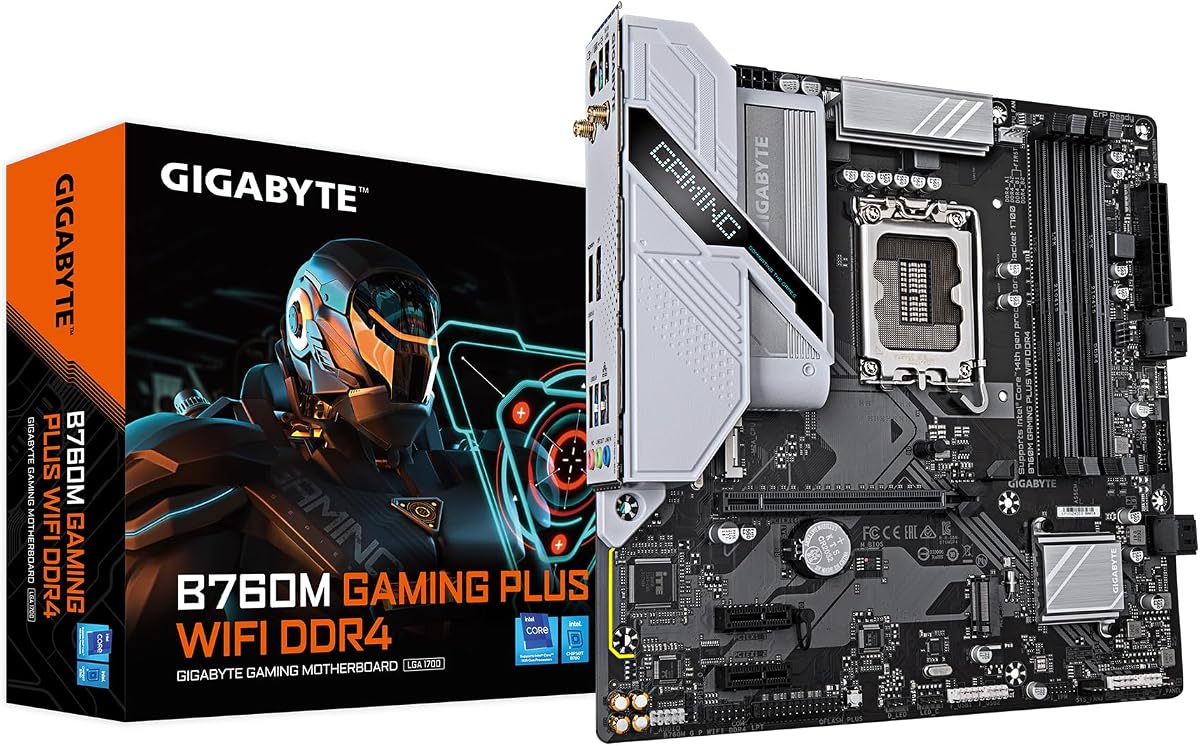
The B760M Gaming Plus WiFi is ideal for smaller PC builds. Its M-ATX form factor fits into compact cases easily.
We may earn a commission when you buy through this link, at no additional cost to you.
It supports DDR4 memory which can lower overall build costs. The WIFI module ensures you can connect wirelessly without extra adapters.
Expansion is limited compared to larger boards. This is acceptable for users focusing on compact gaming systems without many peripherals.
This board is best for small home theater PC builds. It offers essential features in a space saving design.
Fits well in small cases where space is limited.
DDR4 support allows for cheaper memory kits.
We may earn a commission when you buy through this link, at no additional cost to you.
The B550 Gaming X V2 offers the most affordable entry into modern AMD gaming. It supports Ryzen 5000 processors with a reliable power system.
We may earn a commission when you buy through this link, at no additional cost to you.
It includes Q-Flash Plus for easy BIOS updates. The VRM is sufficient for gaming loads though it lacks extra cooling features.
You must add your own WIFI card or use LAN. However for pure budget builds it delivers great performance per dollar.
This board is best for tight budget gaming PCs. It covers all essential bases without unnecessary extra costs.
Provides modern AM4 features at a very low cost point.
Includes necessary tools like Q-Flash for hassle free updates.
We may earn a commission when you buy through this link, at no additional cost to you.
Selecting the right motherboard involves considering several key factors beyond just price. This guide outlines the most important aspects to evaluate.
Ensure the motherboard matches your CPU socket type. For example AM5 is for Ryzen 7000 and above while AM4 supports older models.
Check processor support lists before purchasing to avoid compatibility issues.
Decide between DDR4 and DDR5 memory. DDR5 offers faster speeds but costs more than DDR4 kits.
Newer boards support DDR5 exclusively while older models use DDR4.
Look for robust VRM designs if using high end CPUs. More power phases ensure stability under load.
Mid-range boards usually have sufficient power for average gaming chips.
Count the M.2 slots needed for your NVMe SSDs. PCIe 5.0 support is great for future proofing.
Some boards limit total lanes so check specs if planning many drives.
Evaluate LAN speed and USB ports. 2.5GbE or 10GbE LAN is useful for fast file transfers.
USB-C ports on the rear save space and improve usability.
Choose boards with built-in WIFI if you prefer wireless networking. WIFI6E and WIFI7 offer better performance than older standards.
Ethernet remains more reliable for competitive gaming though.
Better heatsinks keep components cool during long sessions. Look for covered MOSFETs and heatpipes.
Proper cooling ensures the system runs consistently without throttling.
Determine your price range early. Higher prices buy better features and build quality.
Balance cost with the features you truly need for your usage.
Always ground yourself before handling components to avoid static damage. Install the CPU gently ensuring the pins are not bent during placement.
Apply thermal paste correctly to the CPU and mount the cooler securely. This helps dissipate heat and keeps the system stable.
Keep the area free of dust and liquids. Clean vents occasionally to maintain airflow and prevent overheating.
The Gigabyte B650 AORUS Elite AX is highly recommended. It supports AM5 sockets and offers strong power delivery for these processors.
Many newer models like the B650 and Z790 support DDR5. However older boards use DDR4 so check compatibility carefully.
It allows BIOS updates without installing a CPU. This makes it easier to update for new processor support.
The X870 AORUS Elite and Z890 AORUS Master include WIFI7 support. These are the latest models with this wireless standard.
Not always. New boards like AM5 only support newer CPUs. You need the correct socket for compatibility.
It varies by model. Some have two while premium boards offer up to five slots for storage.
Yes especially the AORUS series. They feature strong power designs and cooling to handle overclocking safely.
The B550 Gaming X V2 is excellent for budget builds. It offers solid features at a low price point.
The Gigabyte B650 AORUS Elite AX stands out as the best overall choice for AMD AM5 systems today.
Prioritize power delivery and storage needs when choosing a model to ensure long term satisfaction.
Always check current pricing and availability as deals change frequently for these components.