
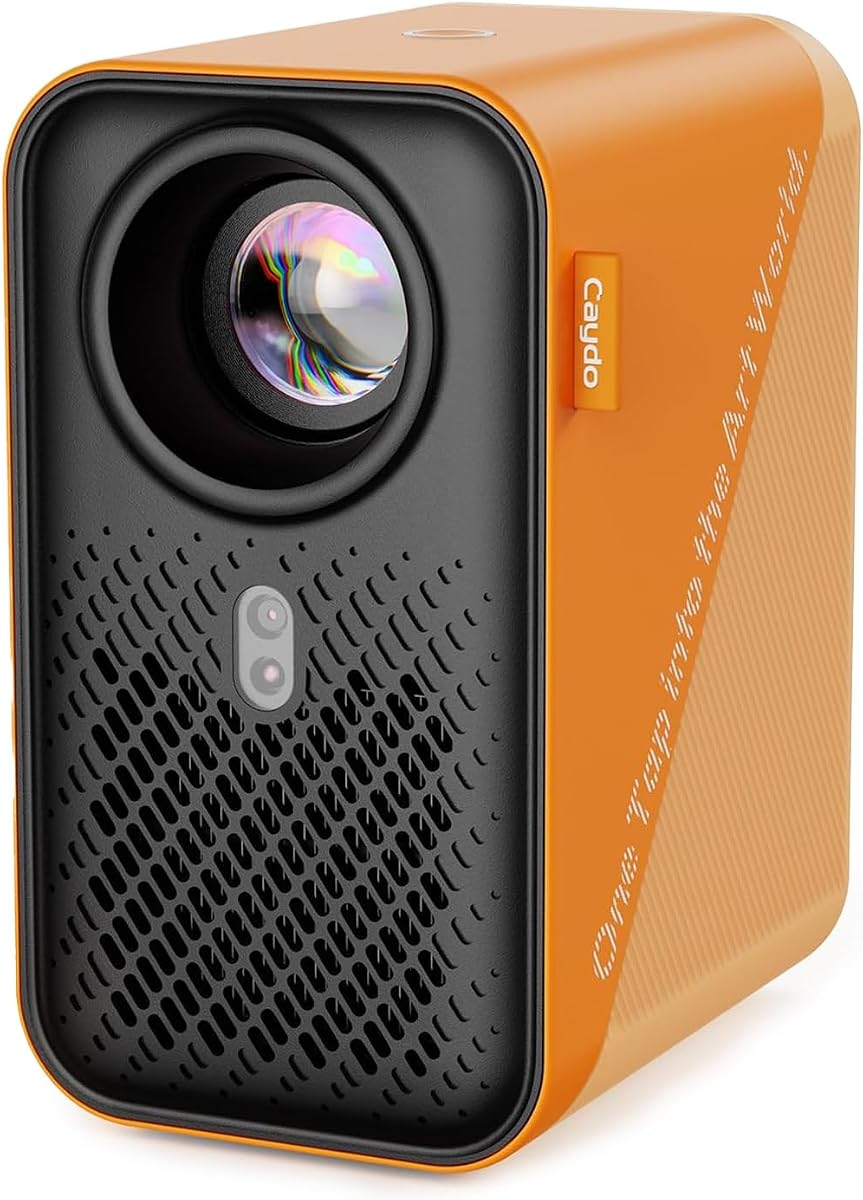
Caydo P3 Art Projector
4.0Editor score
400 ANSI lumens brightness
Exclusive Drawing Assistant tools
Auto Focus and Keystone
This guide compares the top art tracing projector models for accuracy, brightness, and ease of use to help you choose the right tool for your creative projects.
Choosing the right art tracing projector can transform your creative process by allowing you to project images onto various surfaces for accurate tracing. Whether you are a professional artist, a hobbyist, or a teacher, finding a device with clear projection, flexible connectivity, and easy controls is essential for achieving precise results in your artwork.
We have evaluated ten leading art tracing projectors based on their resolution, brightness, connectivity options, and user-friendly features. This comparison covers models ranging from dedicated optical projectors to versatile digital units with WiFi and app control. Each product was analyzed for its ability to handle different surfaces, projection sizes, and workflow needs to ensure you get the best performance for your specific use case.
Each pick in this list highlights specific strengths such as brightness, portability, or advanced drawing tools to help you make an informed decision. Please note that prices and availability can change frequently, so check the current listings before purchasing. We aim to provide honest insights based on the provided specifications to guide you toward the ideal projector for your artistic endeavors.
4.0Editor score

4.5Editor score

5.0Editor score
The following table provides a side-by-side look at the key specifications and features of each art tracing projector model to help you quickly identify the right fit for your needs.



This Art Projector for Tracing and Drawing stands out with a solid 4.5 rating and a user-friendly design that caters to both beginners and professionals. It offers dual-band WiFi for real-time tracing with low latency, ensuring intricate lines are mirrored accurately from your device.
We may earn a commission when you buy through this link, at no additional cost to you.
The app-free web control is a major advantage as it allows you to manage projection settings directly from your browser without installing extra software. Its versatile stand supports multiple angles for horizontal or vertical surfaces, making it adaptable for various creative environments.
While it relies on WiFi for mirroring, it also functions offline which adds flexibility for remote use. The FCC ID certification ensures safety and performance standards are met which gives peace of mind during extended creative sessions.
This projector is ideal for artists needing precise real-time tracing without complex setup steps. We recommend it for anyone looking for a reliable tool that balances connectivity with straightforward operation for everyday art projects.
The dual-band chip reduces latency significantly compared to standard models ensuring smooth real-time tracing of complex sketches from phones or tablets.
By using a QR code to access web controls you can adjust rotation and scaling without downloading dedicated apps which simplifies the workflow.
We may earn a commission when you buy through this link, at no additional cost to you.
The Caydo P3 Art Projector earns its premium status with 400 ANSI lumens of brightness that deliver crisp images even in daylight. Its 360-degree swivel base allows for flexible placement on walls or easels without needing extra stands.
We may earn a commission when you buy through this link, at no additional cost to you.
The Exclusive Drawing Assistant offers intuitive tools like zoom and grids along with unique artistic modes such as Gridify and Sketchify. These features enhance the creative process by adapting the projection to your specific workflow needs seamlessly.
While the price is higher, the auto focus and keystone correction ensure sharp images quickly which saves setup time. The 30000-hour lamp life also means long-term reliability without frequent bulb replacements.
Artists seeking high brightness and advanced drawing tools will find this model worth the investment. It is best suited for professionals who need versatile performance and durability in their art studio.
With 400 ANSI lumens the projector maintains clarity during the day eliminating the need for darkened rooms during creative sessions.
The built-in tools provide options like 3×3 grids and artistic modes which help artists scale and compose reference images with precision.
We may earn a commission when you buy through this link, at no additional cost to you.
The Caydo S1 Art Projector is a dedicated optical tool designed for tracing physical artwork with simple plug-and-play ease. It eliminates complex wireless setups and focuses on delivering clear outlines from printed images directly.
We may earn a commission when you buy through this link, at no additional cost to you.
Its 20000-hour LED provides long-lasting power without needing subscriptions or updates. The manual focus knob allows quick adjustments for sharpness making it efficient for artists working on various surfaces.
While it needs a darker room for optimal performance this simplicity is a strength for those who prefer a distraction-free environment. The built-in handle and tray add portability and convenience for on-the-go projects.
This projector is perfect for beginners or those wanting a no-fuss tracing solution. We recommend it for students or hobbyists seeking reliable performance without technical complications.
This optical projector does not rely on WiFi or digital inputs ensuring a stable connection that requires no internet for tracing physical art.
The built-in LED lasts up to 20000 hours providing years of use without the need for bulb replacements or firmware updates.
We may earn a commission when you buy through this link, at no additional cost to you.
The Caydo P1 Art Projector offers a built-in drawing app that supports zoom and rotation tools to enhance your workflow. It works well for projecting images onto various surfaces like walls or blackboards for creative use.
We may earn a commission when you buy through this link, at no additional cost to you.
Its dual-band WiFi provides faster data transmission which helps in mirroring content smoothly. The sealed optical core helps prevent dust entry ensuring long-lasting high-quality performance over time.
While the rating is modest the features like auto focus make it practical for casual users. It also supports 4K video playback which adds value beyond just tracing.
This projector is suitable for artists who want an all-in-one solution without extra hardware. It is a good option for those needing versatility in a portable device.
The exclusive app includes tools like zoom and grid modes which help adapt the projector to different artistic styles seamlessly.
A sealed design reduces dust entry and prevents screen degradation ensuring consistent image quality throughout the device's lifespan.
We may earn a commission when you buy through this link, at no additional cost to you.
This Art Projector features 5G dual-band WiFi for stable connections and real-time tracing. It also includes web control to adjust settings directly from a browser making it easy to use.
We may earn a commission when you buy through this link, at no additional cost to you.
The online and offline flexibility means you can work in various environments without internet dependency. The adjustable stand allows you to position the projector on different surfaces with ease.
Although the rating is lower the core functionality remains solid for basic tracing needs. The FCC ID certification adds a layer of safety and reliability to the device.
It is a good choice for users prioritizing connectivity and simple controls. We suggest it for projects needing straightforward mirroring without extra apps.
The upgraded 5G dual-band chip ensures consistent high-speed connections for fluid real-time tracing of professional sketches.
Web-based control simplifies the setup process allowing users to manage projection settings without installing additional software.
We may earn a commission when you buy through this link, at no additional cost to you.
The HI-REEKE Art Projector offers native 720P resolution with a large projection range up to 150 inches. Its sturdy metal stand allows flexible positioning for overhead or angled placements.
We may earn a commission when you buy through this link, at no additional cost to you.
Connections via HDMI or USB provide versatility for content transfer. The keystone correction helps align images accurately for controlled tracing work.
While it lacks advanced digital features it serves well for basic drawing and DIY projects. The lightweight design makes it easy to move around the workspace.
Artists needing a flexible stand and reliable connections will find this useful. It is best for tasks requiring larger projected sizes.
The projector scales photos from 9.5 to 150 inches supporting projects from small details to large compositions easily.
The three-section metal stand rotates for overhead or angled placement making it suitable for various creative workspaces.
We may earn a commission when you buy through this link, at no additional cost to you.
The Caydo P2 Art Projector delivers 250 ANSI lumens of brightness with accurate color and contrast. Its rotating base allows seamless adaptability across different angles and surfaces.
We may earn a commission when you buy through this link, at no additional cost to you.
The Exclusive Drawing Assistant includes tools like zoom and grids which help scale reference images. Dual-band WiFi supports high-speed connections for smooth operation.
While offline drawing tools work without internet the model is designed for versatile use cases. Auto focus and keystone correction ensure sharp images quickly.
Artists seeking balanced brightness and drawing tools will appreciate this unit. It is suitable for those needing reliable performance in varied lighting.
The built-in drawing app provides tools like 3×3 grids and 360-degree rotation to help compose reference images accurately.
With 250 ANSI lumens the projector produces clear images that work well for tracing without needing overly dark rooms.
We may earn a commission when you buy through this link, at no additional cost to you.
This Art Projector supports 720p HD resolution and offers four connection options including phone mirroring and HDMI. Its smart image processing tool provides features like line art extraction and keystone correction.
We may earn a commission when you buy through this link, at no additional cost to you.
The adjustable telescopic stand reaches up to 40 inches making it suitable for desktop use. It works well for various creative tasks like mural painting and sewing patterns.
The bright projection is clear without closing curtains which adds convenience. USB support allows offline use without needing constant internet.
It is ideal for artists needing diverse connection methods and tools. We recommend it for varied projects requiring flexibility.
The developed image processing tool supports line art extraction and keystone correction which makes tracing easier and more precise.
The four-section stand adjusts from 15 to 40 inches providing flexibility for different workspace heights and surface types.
We may earn a commission when you buy through this link, at no additional cost to you.
The KODAK Luma 150 Mini Projector Kit features wireless streaming and a 2.5-hour battery for portable art tracing. It includes an adjustable overhead tripod for precise image alignment.
We may earn a commission when you buy through this link, at no additional cost to you.
Its DLP engine provides stunning visual clarity in both bright and dim environments. HDMI and USB inputs support various media formats seamlessly.
While the brightness is lower the battery and mounting tools add value for mobile use. It is suitable for quick creative sessions on the go.
Artists needing a portable solution with wireless support will find this useful. We suggest it for those prioritizing mobility over brightness.
With up to 2.5 hours of battery life you can create without needing a constant power source during sessions.
The included overhead tripod and arm clamp ensure precise image alignment ideal for art tracing presentations.
We may earn a commission when you buy through this link, at no additional cost to you.
This Art Tracing Projector supports iPhone and iPad Airplay for wireless projection. It features an adjustable focus lens and height stand for flexible use.
We may earn a commission when you buy through this link, at no additional cost to you.
The 480P resolution is suitable for beginners needing clear images. USB and HDMI inputs provide wired options for other devices.
While it is iPhone-specific it works well for home projects and kids. The lightweight design makes it easy to carry and store.
It is an ideal gift for beginners wanting simple tracing. We recommend it for families using Apple devices.
Designed specifically for iPhone and iPad users this projector supports Airplay for easy screen mirroring.
Foldable and lightweight design makes it easy to carry and store for storage when not in use.
We may earn a commission when you buy through this link, at no additional cost to you.
Selecting the right art tracing projector involves evaluating several key factors to ensure it meets your creative needs.
Brightness measured in ANSI lumens determines how well the projector works in different lighting conditions. Higher brightness allows you to project images clearly even in lit rooms which is essential for productivity.
Look for at least 250 ANSI lumens for better visibility during the day or in studios with ambient light.
Resolution defines the sharpness of the projected image. Higher resolutions like 720P or 1080P ensure details remain crisp for precise tracing work.
Choose a model with native resolution suitable for your project size to avoid pixelation or blurry outlines.
Modern projectors offer various connection methods including WiFi USB and HDMI. Ensure the device supports your preferred devices for seamless image transfer.
Dual-band WiFi ensures stable streaming while USB or HDMI provide reliable offline options for consistent performance.
Auto focus and keystone correction features help adjust image sharpness and alignment automatically. These tools save time and reduce manual effort during setup.
Manual options are also available but auto functions offer greater convenience for frequent adjustments.
Some projectors include built-in drawing apps with grids zoom or artistic modes. These tools enhance creativity by adapting the projection to specific workflows.
Look for models with exclusive drawing assistants if you need advanced control over image scaling and composition.
Consider the size weight and stand design if you plan to move the projector often. Portable models often include handles and compact stands for easy transport.
Adjustable stands allow for versatile placement on tables walls or easels depending on your workspace.
LED lamps often provide longer life up to 20000 or 30000 hours reducing maintenance costs. Durable optical cores prevent dust and ensure consistent image quality over time.
Check lamp life specs to choose a model that offers long-term reliability without frequent replacements.
Prices vary significantly based on features and brightness. Determine your must-have features before purchasing to balance cost and functionality.
Entry-level models offer simplicity while premium units provide advanced drawing tools and higher brightness.
First ensure the projector is placed on a stable surface and connected to your device properly. Allow a few seconds for the device to boot up and stabilize before projecting.
Second adjust the focus and keystone settings to align the image correctly with your drawing surface. Use the zoom tools if available to scale the reference to your desired size.
Third clean the lens with a soft cloth to remove dust that may affect image clarity. Store the projector in a cool dry place when not in use to maintain its longevity.
Not all models require internet. Some optical projectors work offline completely. Digital models with WiFi allow offline USB transfer for tracing without internet.
For clear line art a native 720P or 1080P resolution is recommended. Lower resolutions may make details harder to trace accurately.
Yes most projectors support vertical surfaces like canvas. Ensure the stand is stable and the focus is adjusted for the distance.
Many projectors come with built-in drawing apps. Some require scanning QR codes for control but often no downloads are needed for basic functions.
Brighter projectors work better in lit rooms. For lower brightness units dimming lights or curtains helps improve projection clarity.
Yes they are safe when used as directed. Ensure lenses are not exposed to direct eye contact for long periods.
Yes you can project photos from phones or USB drives. Ensure the photo is high quality for best tracing results.
Use keystone correction to fix distortion. Adjust the stand angle and focus knob to straighten and sharpen the image.
We have reviewed ten art tracing projectors highlighting models with standout features for various needs. The top picks include high brightness optical simplicity and versatile connectivity options.
Prioritize brightness resolution and connectivity based on your workspace. Choosing the right tools ensures smoother tracing and better creative outcomes.
Prices and availability change regularly so verify current details before buying. We hope this guide helps you find the perfect projector for your art projects.