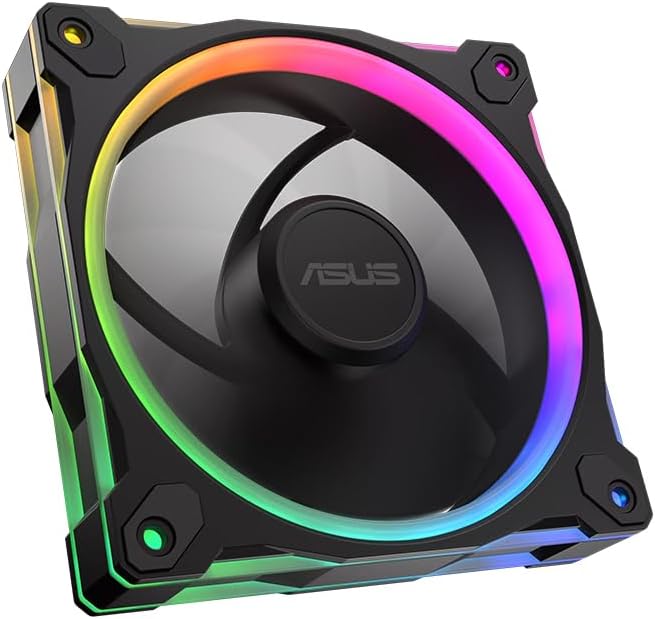
ASUS Prime MR120 ARGB Reverse Fan
4.6Editor score
Extra-thick 28mm frame
Quiet operation up to 23dB
Double-sided frame lighting
This guide compares the top 10 ASUS case fans for cooling and aesthetics. We review airflow, noise, RGB features, and build quality to help you choose the best
Choosing the right case fans is critical for maintaining optimal thermal performance in your computer system. ASUS offers a wide range of cooling solutions designed to balance airflow, noise levels, and aesthetic appeal. Whether you need quiet operation or vibrant lighting, there is a model suited to your needs.
We evaluated each fan based on its airflow capacity, static pressure, noise output, and build quality. The list includes various models from the Prime, TUF Gaming, and ProArt series. Each product was analyzed for its compatibility with modern motherboards and ease of installation.
Every pick highlights specific strengths such as PWM control, RGB integration, and unique frame designs. Prices and availability may change frequently so please verify details before purchasing. Our goal is to provide clear insights to simplify your decision-making process.
4.6Editor score

4.7Editor score

5.0Editor score
The following table provides a side-by-side comparison of all ten fans featured in this guide. It highlights key specifications like frame thickness, lighting options, and control types to help you identify the best fit for your build.


This fan stands out as the premium option in the lineup with a perfect user rating. It is designed for professionals who demand reliability and peak cooling performance from their system components.
We may earn a commission when you buy through this link, at no additional cost to you.
The fan blades are made from liquid crystal polymer which offers high resistance and stability at high speeds. The CNC milled brass bearing housing ensures tight tolerances and long-term operational reliability.
While the price is higher than standard models the durability and performance justify the investment for critical builds. The 3-phase motor delivers smooth power with minimal noise and vibration during operation.
Professionals and enthusiasts who prioritize long-term reliability should choose this fan. It represents the highest standard of quality available in the current ASUS case fan portfolio.
The 3-phase 6-pole motor ensures robust performance with minimal noise and vibration during high-speed operation.
CNC milled brass bearing housing guarantees manufacturing accuracy and strict tolerances for extended lifespan.
We may earn a commission when you buy through this link, at no additional cost to you.
This triple pack offers exceptional value by combining high performance with robust lighting features. It is an ideal choice for gamers wanting to upgrade multiple intake or exhaust points efficiently.
We may earn a commission when you buy through this link, at no additional cost to you.
The extra-thick 28mm frame supports superior cooling performance with a static pressure rated at 3.3mm H2O. The dual-layer LED matrix provides vivid lighting effects controlled easily via Aura Sync software.
The flexible side pattern on the frame adds a personalized look that matches TUF Gaming system themes. However you need a motherboard that supports addressable RGB headers to unlock the full lighting potential.
Gamers building a complete system will find this pack balances cost and performance effectively. It delivers the reliability of the TUF series with the visual flair needed for modern builds.
The 3.3mm H2O static pressure rating ensures optimal cooling performance across a variety of workloads.
Aura Sync compatibility allows you to coordinate colours and lighting effects with a variety of compatible devices.
We may earn a commission when you buy through this link, at no additional cost to you.
This reverse fan offers an excellent entry point into premium cooling without a high cost. It features a double-sided lighting design that creates an uninterrupted visual aesthetic across your chassis.
We may earn a commission when you buy through this link, at no additional cost to you.
The 28mm thick frame ensures ideal cooling performance while maintaining a low noise level of up to 23dB. It includes 20 addressable RGB LEDs in a circular shape that illuminate your system vividly.
PWM control allows fan speeds up to 1600 RPM which provides optimal cooling for a variety of workloads. While not as fast as professional models it is sufficient for most standard gaming and office PCs.
Budget conscious users who still want RGB effects should consider this model. It provides a strong balance of performance and price for basic system cooling needs.
Double-sided frame lighting provides crisp uninterrupted writing on both sides of the fan frame.
Quiet operation up to 23dB(A) ensures the fan does not disrupt your workspace environment.
We may earn a commission when you buy through this link, at no additional cost to you.
This triple pack provides a reliable standard option for upgrading three case points at once. It features the same double-sided frame lighting as the single reverse models for consistent aesthetics.
We may earn a commission when you buy through this link, at no additional cost to you.
Quietly operating at up to 21 dB(A) this fan focuses on low noise performance alongside cooling. The 20 Addressable RGB LEDs with a circular design illuminate the system effectively.
Control is handled via standard PWM which offers a fan speed of up to 1600 RPM. This speed is ideal for general ventilation but may not suit high static pressure applications.
Users looking for a straightforward RGB upgrade should pick this pack. It balances performance and cost well for standard case cooling tasks.
Extra-thick 28mm fan frame provides ideal cooling performance and structural rigidity.
Dual-sided frame lighting provides seamless and vivid lighting aesthetic across the chassis.
We may earn a commission when you buy through this link, at no additional cost to you.
This white version of the TUF TR120 pack allows for cohesive white or light themed builds. It matches the performance of the black edition while offering a distinct colorway.
We may earn a commission when you buy through this link, at no additional cost to you.
Higher cooling performance with an extra-thick 28mm fan frame ensures stability and airflow. The best in class static pressure at 3.3mm H2O with high airflow makes it effective for radiators.
Exclusive double layer LED matrix with 16 individually addressable RGB LEDs provides rich lighting. Personalized aesthetic with a flexible side pattern on the frame adds unique visual appeal.
White builds often struggle to find matching fans so this pack is a strong solution. It delivers the full TUF performance with the specific color needed for a clean look.
This pack offers a standard blade white finish suitable for light themed PC builds.
Aura Sync compatibility allows you to coordinate colours and lighting effects with a variety of devices.
We may earn a commission when you buy through this link, at no additional cost to you.
This white edition single pack is perfect for users needing to replace one specific fan. It combines low noise performance with the advanced dynamic plain bearing for longevity.
We may earn a commission when you buy through this link, at no additional cost to you.
Best air flow and low noise level are achieved through its efficient design. The advanced dynamic plain bearing allows an operating time of up to 250000 hours for extended reliability.
Anti vibration pads reduce fan noise by dampening rattling and vibration during high load use. A double layer LED array produces high color saturation and more lighting effects than traditional RGB fans.
Those needing a quiet replacement fan for a white build should consider this model. It offers a reliable single unit option with strong performance features.
The advanced dynamic plain bearing allows an operating time of up to 250,000 hours.
Anti vibration pads reduce fan noise by dampening rattling and vibration effectively.
We may earn a commission when you buy through this link, at no additional cost to you.
This white reverse fan offers a clean look with uninterrupted lighting from both sides. It delivers a solid airflow of 58 CFM for effective general case ventilation.
We may earn a commission when you buy through this link, at no additional cost to you.
The extra thick 28 mm fan frame ensures cooling performance while keeping noise levels low. Quiet operation with a noise level of up to 23 dBA makes it suitable for quiet systems.
20 addressable RGB LEDs with circular design that illuminates the system add visual value. The double-sided frame lighting provides a vibrant lighting aesthetic without obstructions.
White builds often need specific fans to match this model fits that need perfectly. It is a great choice for adding a single high quality intake or exhaust.
The white edition reverse fan features double-sided lighting on the frame for a seamless look.
Air flow 58 CFM provides adequate cooling for standard case environments.
We may earn a commission when you buy through this link, at no additional cost to you.
This single pack TR120 offers higher RPM capabilities than standard Prime models for intense cooling. It balances high airflow with the TUF aesthetic and RGB features effectively.
We may earn a commission when you buy through this link, at no additional cost to you.
Higher cooling performance with an extra-thick 28mm fan frame ensures stability. Best in class static pressure at 2.75mm H2O with high airflow ensures efficient heat dissipation.
Exclusive double layer LED matrix with 16 individually addressable RGB LEDs offers rich color. Personalized aesthetic with a flexible side pattern on the frame adds unique visual appeal.
If you need to replace one fan with higher performance this is a strong pick. It provides a balance of speed and style for a single spot in your build.
The fan delivers 76.3 CFM airflow for strong heat dissipation capabilities.
PWM control with an extremely wide speed range allows for up to 2000 RPM operation.
We may earn a commission when you buy through this link, at no additional cost to you.
This ProArt model is designed for professionals who need consistent high performance cooling. It features patented daisy-chain connectors which enable seamless installation and reduce clutter.
We may earn a commission when you buy through this link, at no additional cost to you.
The 28mm fan frame provides strong airflow and static pressure for demanding scenarios. A 3-phase 6-pole motor features an enhanced sound profile through the use of a low operating frequency.
Liquid crystal polymer blades provide high-speed operation with stable precise performance. A smaller 0.5mm gap between fan blade and frame reduces turbulence and optimizes performance.
Those needing a high performance single fan for radiators should consider this option. It offers a professional grade alternative to standard gaming fans.
Patented daisy-chain connectors enable seamless installation of multiple fans with fewer cables.
The motor features an enhanced sound profile through the use of a low operating frequency.
We may earn a commission when you buy through this link, at no additional cost to you.
This Corsair triple pack offers an alternative if you prefer specific lighting protocols. It features streamlined fan connections allowing you to control all three through one connector.
We may earn a commission when you buy through this link, at no additional cost to you.
Lighting is made easy with eight LEDs per fan that shine bright with customisable lighting. Precise PWM speeds allow settings up to 2100 RPM while providing up to 72.8 CFM airflow.
High static pressure of 2.8mm-H2O ensures these fans work well as radiator fans too. The magnetic dome bearing supports long life and low noise operation across various workloads.
If your motherboard supports standard ARGB this is a strong competitive option. It provides reliable cooling and a simple installation process for multiple fans.
Daisy-chain multiple fans together and control them all through just one 4-pin PWM connector.
Anti-vortex vanes direct airflow at your hottest components for concentrated cooling.
We may earn a commission when you buy through this link, at no additional cost to you.
Selecting the right case fan involves considering several technical and aesthetic factors. This section breaks down the key elements you should evaluate before making a purchase.
ASUS fans like the Prime MR120 and TUF TR120 often feature a 28mm thick frame. This extra thickness adds structural rigidity which can reduce vibration and improve durability.
Look for fans with thicker frames if you prioritize durability and long-term performance over standard designs.
Most modern ASUS fans include addressable RGB LEDs. The Prime series uses a circular design while TUF models use a dual-layer LED matrix for richer effects.
Ensure your motherboard supports addressable RGB headers to fully utilize these lighting features.
RPM ratings vary across models. The ProArt PF120 reaches up to 3000 RPM while the Prime MR120 typically tops out at 1600 RPM.
Higher RPM fans offer better cooling potential but may generate more noise at maximum speeds.
Static pressure is critical for fans mounting to radiators or restrictive filters. The TUF TR120 series offers high static pressure up to 3.3mm H2O.
Choose a high static pressure fan for radiators or tight spaces to maintain airflow efficiency.
Noise is measured in decibels or dBA. Quiet models operate around 21dB to 23dB which is suitable for office environments.
Prioritize lower dB ratings if you need a silent workstation or gaming setup.
The ProArt PF120 uses a CNC milled brass bearing housing for long-term reliability. The TUF TF120 uses a dynamic plain bearing with a rated lifespan of 250000 hours.
Select bearings with high rated lifespans to ensure your cooling system remains effective for years.
Some models feature daisy-chain connectors which reduce cable clutter on the motherboard. This is common in the ProArt PF120 and Corsair RS120 options.
Opt for daisy-chain designs if you prefer clean cable management and simplified connections.
White fans like the TUF TF120 and Prime MR120 Reverse White provide options for light builds. The TUF TR120 also includes a flexible side pattern on the frame.
Choose colors and patterns that match your existing system theme for a unified look.
Install the fans in the correct orientation to ensure proper airflow intake or exhaust. Most ASUS fans have markings on the frame indicating the direction of airflow arrows.
Connect the PWM headers to your motherboard to enable speed control. Use the provided cables to connect the RGB ports if you plan to use lighting features.
Clean the fan blades periodically with compressed air to prevent dust buildup. Dust accumulation can restrict airflow and increase noise levels over time.
Most ASUS fans use standard PWM headers and 4-pin connectors which are compatible with the majority of modern motherboards. Ensure your board has available SYS_FAN headers for connection.
Yes most ASUS RGB fans including Prime and TUF models support Aura Sync. This allows you to sync lighting effects with other compatible ASUS devices via software.
The ASUS ProArt PF120 supports speeds up to 3000 RPM. This is significantly higher than the standard Prime MR120 which caps at 1600 RPM.
The 28mm frame adds extra thickness to the fan structure. This improves stability and reduces vibration which helps maintain quieter operation over time.
Triple packs offer better value if you need to upgrade multiple case points. They simplify installation by ensuring consistent color and performance across all fans.
Reverse fans maintain the same performance specs as standard models. The blade orientation is flipped to hide cables while keeping airflow and noise levels identical.
Yes you can mix different models as long as the connectors match. Using different PWM controllers will let you manage speeds separately or through the BIOS.
Some models like the Prime MR120 come with a 2 Year Warranty. Always check the product details for specific warranty terms before purchasing.
We reviewed ten top options ranging from budget friendly single fans to premium triple packs. Each model brings unique features whether it is high static pressure or seamless RGB integration.
Prioritize performance factors like RPM and pressure if you need cooling power. For aesthetics focus on lighting and frame designs that match your build theme.
Always check current prices and stock before making a final decision. The right fan can significantly improve your system health and visual appeal.