
Ostrich Charger Compatible with Dell Laptop Computer 65W 45W Round Tip Power Adapter
4.5Editor score
65W Output Max Power
Compatible with Round Tip
Safety Mechanisms Included
Compare the top 10 Battery Backup for Dell Laptop solutions to find the right portable power or UPS system for your specific Dell model needs.
Finding a reliable Battery Backup for Dell Laptop is essential for professionals and students who face frequent power outages or need mobile flexibility during critical tasks.
We evaluated ten top-rated products including power banks, chargers, and UPS systems to determine which offers the best compatibility and performance for your Dell device.
Each pick highlights unique features and compatibility notes so you can choose the right solution while keeping in mind that availability and pricing may change over time.
4.5Editor score

4.3Editor score

4.4Editor score
The following comparison table outlines the key specifications and features of each product to help you quickly identify which solution fits your specific Dell laptop power needs.




The CyberPower EC850LCD Ecologic UPS serves as a robust battery backup solution designed to protect your Dell laptop and peripherals from power fluctuations and outages. With a 4.4 rating it stands out for its comprehensive outlet configuration and user-friendly LCD panel that provides immediate insight into power conditions. This device is ideal for users who need a stationary backup solution at their desk or workstation.
We may earn a commission when you buy through this link, at no additional cost to you.
This UPS features twelve NEMA outlets including six that provide full battery backup and surge protection. The multifunction LCD panel displays detailed information allowing you to monitor voltage and battery status at a glance. A key advantage is the ECO Mode which automatically turns off power to connected peripherals when the computer is in sleep mode reducing energy consumption and lowering costs effectively.
While this unit offers excellent protection and energy efficiency it is larger and heavier than portable power banks which may limit its mobility. The ECO mode is beneficial but requires specific outlet configurations to work as intended. Despite these minor limitations its comprehensive warranty and software support make it a reliable choice for permanent setups.
If you are looking for a dependable Battery Backup for Dell Laptop that also protects your monitor and other peripherals this unit is a strong candidate. It is best suited for home offices or workspaces where consistent power delivery is critical. Its high rating reflects user satisfaction with its performance and reliability over time.
The LCD panel provides immediate detailed information on battery health and power conditions for informed decision making.
ECO Mode automatically shuts off peripherals during sleep reducing power usage and lowering energy costs.
We may earn a commission when you buy through this link, at no additional cost to you.
The Ostrich Charger is a cost-effective alternative to OEM power adapters offering a solid 65W output suitable for many Dell laptops. It has achieved a 4.5 rating due to its safety certifications and reliable performance. For users needing a replacement charger without breaking the bank this option provides excellent value while maintaining essential safety standards.
We may earn a commission when you buy through this link, at no additional cost to you.
This adapter outputs 65W with 19.5V and 3.34A which matches the requirements of many Inspiron and XPS models. The safety testing lab certification ensures it meets industry standards reducing the risk of damage to your device. It also comes with a converter cable to support different connector sizes enhancing its versatility across various Dell laptop series.
Although it is a third-party product it includes strong guarantees like a lifetime exchange policy for defective items which adds confidence to the purchase. The main limitation is that it may not include the longer cord lengths found in some premium OEM packages. However the safety features and warranty make up for these minor drawbacks.
If you are searching for a Battery Backup for Dell Laptop solution or simply a replacement charger this unit fits well for budget-conscious buyers. It works well with most 65W or 45W Dell laptops with round connectors. Its high rating suggests that it performs reliably enough for daily charging needs.
Certified by consumer product testing laboratories to meet electrical safety standards in the United States and Canada.
Works with all 65W and 45W Dell laptops with round power connectors including multiple XPS and Inspiron models.
We may earn a commission when you buy through this link, at no additional cost to you.
The UGREEN Power Bank stands out as a top portable solution for keeping your Dell laptop charged on the go with its massive 25000mAh capacity. It has earned a 4.3 rating for its ability to deliver up to 145W of power making it suitable for high-performance laptops. This model is perfect for professionals who travel frequently and need reliable backup power.
We may earn a commission when you buy through this link, at no additional cost to you.
With a single USB-C port capable of delivering up to 140W it can recharge a 16 inch laptop from 0 to 56 percent in just 30 minutes. The massive capacity allows you to fully recharge most laptops up to 1.3 times which is impressive for a portable unit. It also supports bi-directional fast charging allowing the power bank itself to recharge quickly in about two hours.
While it is compact and convenient the requirement to use a separate 65W charger for recharging the pack adds a small inconvenience. The digital display is helpful for monitoring battery life but does add a bit of bulk to the design. Overall the performance benefits outweigh these minor cons for most mobile users.
If you need a Battery Backup for Dell Laptop that you can carry in your backpack this power bank is an excellent choice. It is compatible with Dell XPS and other USB-C laptops making it versatile for various setups. Its high capacity and power output make it a reliable companion for long work sessions away from outlets.
Deliver up to 145W total power with a single port capable of 140W for rapid laptop charging speeds.
A huge 25000mAh battery fits in a sleek compact design ensuring you stay powered while traveling easily.
We may earn a commission when you buy through this link, at no additional cost to you.
The Omni 20C+ is designed as an all-in-one power solution combining high-powered charging with a functional USB hub for versatile connectivity. It holds a 4.2 rating for its ability to charge laptops via a 100W USB-C port while supporting other devices wirelessly. This is a great option for users who want a single unit to manage multiple device needs simultaneously.
We may earn a commission when you buy through this link, at no additional cost to you.
This device features 20000mAh or 71Wh capacity which is sufficient for charging most smart devices and laptops like the MacBook Pro or Surface Book. A unique feature is the USB Hub Mode which allows you to connect USB devices through the power bank transferring files without needing a separate dock. Wireless charging capabilities add another layer of convenience for smartphones.
One drawback is that the wall charger is not included meaning you need to source a compatible high-wattage adapter separately. The capacity is also slightly lower than some competitors which might limit full recharges for larger laptops. Despite these points its multifunctional design makes it a valuable tool for tech enthusiasts.
For those seeking a Battery Backup for Dell Laptop that doubles as a travel hub this power bank is worth considering. It works well for Dell XPS models with USB-C connections and supports pass-through charging to keep your setup efficient. Its premium features justify the cost if you need extensive connectivity options.
Transfer files and connect USB devices directly through the power bank using its USB Hub Mode feature.
Utilize 100W USB-C power to charge most smart devices and laptops quickly and efficiently.
We may earn a commission when you buy through this link, at no additional cost to you.
This genuine Dell AC adapter offers a reliable charging option for specific Latitude and XPS models with a USB Type C tip. With a 4.0 rating it provides a straightforward solution for those seeking original equipment manufacturer quality. It is ideal for users who need a direct replacement for their existing charger to ensure compatibility.
We may earn a commission when you buy through this link, at no additional cost to you.
The adapter supports multiple wattages including 65W 45W 27W and 15W which covers a range of Dell laptop requirements. It comes with a 3ft power cord and non-retail packaging making it a clean and direct replacement. The compatibility list is quite specific ensuring it fits models like Latitude 3340 and XPS 9350 perfectly without issues.
While it is genuine the shorter cord length may require an extension for some desk setups. It is also limited to specific models so checking compatibility is crucial before purchase. However for those who prioritize original quality over cost this adapter delivers the expected performance and safety.
If you are looking for a Battery Backup for Dell Laptop that ensures original specifications this genuine charger is a safe choice. It maintains the integrity of your laptop's charging system and reduces risks associated with third-party adapters. Ensure your model matches the list before ordering for the best experience.
New genuine original Dell AC adapter ensuring reliable performance and safe operation with your device.
Supports 65W down to 15W output covering various Dell laptop power requirements efficiently.
We may earn a commission when you buy through this link, at no additional cost to you.
The Dell External USB Slim DVD RW Drive allows you to read and burn discs on modern laptops that lack internal optical drives. It has a 4.5 rating for its convenience and ease of use. This device is useful for installing software or playing media that still relies on physical discs requiring a simple connection.
We may earn a commission when you buy through this link, at no additional cost to you.
It features a slim profile weighing only 200g making it easy to carry in a bag for on-the-go access to discs. The drive is powered directly by your laptop's USB port so no extra cables are needed. It comes with CyberLink Media Suite pre-loaded which simplifies playing and burning DVDs and CDs instantly.
While it is a niche product for those needing optical access it requires an available USB port which might be scarce on newer ultrabooks. The limited utility means it is not a primary battery backup solution but rather a supplemental tool. However its design matches contemporary notebooks nicely.
If you need to access optical media while using your Dell laptop this drive provides a clean and reliable way to do so. It is an excellent addition for workstations where physical media is occasionally required for data or software installation. Its lightweight design makes it practical for travel.
A lightweight 200g drive that fits easily in bags for portable access to CD and DVD discs.
Includes pre-loaded CyberLink Media Suite for easy play and burn of disc-based media and programs.
We may earn a commission when you buy through this link, at no additional cost to you.
This 65W AC Charger is a versatile replacement option for a wide range of Dell Inspiron models. With a 4.4 rating it offers a solid balance of performance and affordability. The long cord and safety certifications make it a practical choice for users needing a durable replacement charger for daily use.
We may earn a commission when you buy through this link, at no additional cost to you.
It outputs 19.5V and 3.34A delivering 65W of power which matches the requirements of many Inspiron laptops. The cord length of 8.8 feet is a notable advantage providing flexibility in desk placement. Safety certificates like CE and FCC ensure it meets essential standards for electrical safety and reliability.
As a third-party product it may lack the premium finish of OEM adapters but it performs reliably for standard charging tasks. The wide compatibility with various Inspiron models makes it a flexible solution for households with multiple devices. It is a practical choice for everyday charging needs.
If you need a Battery Backup for Dell Laptop alternative or a replacement charger this unit is a strong contender. It works well with 15-7000 and 17-5000 series models offering a reliable power source. The long cord and safety features add to its value for home or office setups.
Features an 8.8-foot cord allowing flexible placement of your laptop while charging.
Compatible with Dell Inspiron 11 13 15 17 series and various 3000 5000 and 7000 models.
We may earn a commission when you buy through this link, at no additional cost to you.
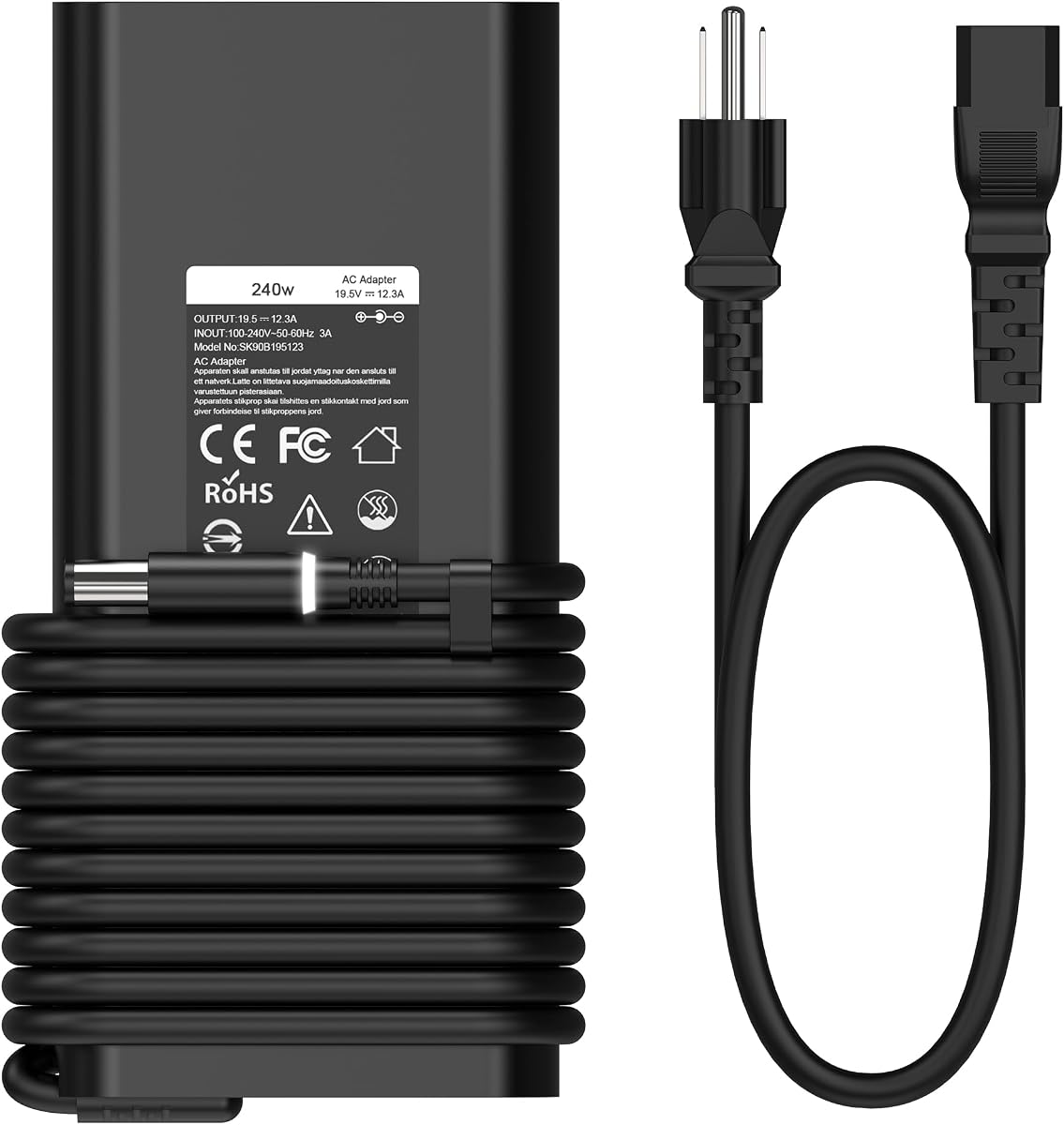
The 2025 New Slim 240W Charger is designed for high-performance laptops requiring significant power such as Alienware and Precision models. With a 4.4 rating it delivers up to 240W ensuring that demanding systems receive the energy they need. This charger is essential for users of gaming or workstation laptops where power limits can throttle performance.
We may earn a commission when you buy through this link, at no additional cost to you.
It supports 19.5V at 12.3A which is necessary for larger Alienware and Precision units to maintain optimal performance under load. The slim form factor helps manage the cable clutter while providing a robust power solution. It also supports 180W devices ensuring backward compatibility with slightly lower power requirements.
While it is bulkier than standard chargers due to the higher power handling it remains a necessity for these specific models. The slim design is a relative improvement but still requires adequate ventilation to prevent overheating during intensive use. For gaming and rendering this unit is critical for sustained performance.
If you need a Battery Backup for Dell Laptop setup for a gaming rig this charger ensures your system has stable power. It is the right choice for Alienware and Precision users who need more than standard 65W charging capacity. Its support for multiple models adds to its utility.
Outputs 240W to ensure stable power for demanding Alienware and Precision workstation laptops.
Also compatible with 180W devices providing versatility across various laptop models.
We may earn a commission when you buy through this link, at no additional cost to you.
This 330W charger provides stable power to the highest-end Alienware laptops ensuring smooth gaming and rendering performance. With a 4.7 rating it stands out for delivering full power without thermal throttling. It is a premium solution for users who need maximum output for their high-end gaming systems.
We may earn a commission when you buy through this link, at no additional cost to you.
The charger delivers 19.5V at 16.92A totaling 330W which prevents CPU and GPU throttling during intensive tasks. It is specifically compatible with newer M16 and M18 series laptops providing stable power for long sessions. The backward compatibility with 180W and 240W devices adds versatility for older systems.
While it is expensive compared to standard chargers the performance benefits justify the cost for gamers and professionals. The size is larger to accommodate the high power output requiring a dedicated outlet. However the reliability and safety features make it a strong investment for serious users.
If you need a Battery Backup for Dell Laptop setup for a powerful gaming machine this charger is ideal. It ensures your Alienware laptop runs at full potential without power limits. Its high rating reflects satisfaction with its performance and safety in real-world scenarios.
Delivers full 330W output to prevent thermal throttling during gaming and video rendering.
Compatible with latest M16 and M18 Alienware series and older 180W or 240W devices.
We may earn a commission when you buy through this link, at no additional cost to you.
The KFD USB C to DC Tip kit is a versatile solution that allows you to connect various laptop power supplies to a single USB-C adapter. With a 4.0 rating it offers great flexibility for users with multiple devices. This kit includes 15 different connector tips covering a wide range of laptop models and power requirements.
We may earn a commission when you buy through this link, at no additional cost to you.
It supports up to 100W PD power which is sufficient for most ultrabooks and portable laptops. The smart charging chip ensures the current is adjusted automatically for safety. It is important to note that it is for charging only and does not support data syncing through the cable.
While the versatility is a major benefit using multiple connectors can be cumbersome compared to a direct adapter. The connectors are handy for emergency charging or travel where different ports are needed. It is a practical tool for maintaining a variety of devices from a single power source.
If you need a Battery Backup for Dell Laptop solution that works with various brands this kit offers great flexibility. It is especially useful for travelers who carry multiple devices with different charging ports. Ensure your power source provides the correct voltage for your specific laptop.
Includes 15 different DC tips to connect most brand laptops to a single PD AC adapter.
Built-in PD and E-mark chip adjusts current automatically for safe charging.
We may earn a commission when you buy through this link, at no additional cost to you.
Choosing the right battery backup solution for your Dell laptop depends on your specific usage scenarios and laptop model requirements.
Ensure the power supply matches your laptop's wattage and voltage requirements to prevent performance throttling or damage.
Check the output specs like 65W or 240W against your model's original charger specifications.
Dell laptops use various connectors including USB-C barrel tips and proprietary plugs.
Verify the tip size and shape matches your specific Dell model exactly for a secure connection.
For portable power banks consider the capacity in Wh or mAh to estimate runtime for your device.
Larger laptops require higher capacity power banks to provide meaningful backup time.
Decide if you need a mobile power bank or a stationary UPS for home office use.
Portable options are lightweight while UPS systems offer surge protection for desktop setups.
Look for products with safety certifications like UL or CE to ensure electrical safety.
Avoid uncertified chargers that may risk overheating or short circuits.
Check for warranty periods that cover the battery and device protection.
Longer warranties indicate manufacturer confidence in product reliability.
Consider features like USB hubs LCD displays or ECO modes that add value.
These features can enhance usability and energy efficiency for your setup.
Balance the cost against the features and reliability offered by the product.
Investing in quality often saves money on replacements or repairs in the long run.
Always match the voltage and wattage of your power supply to your laptop's specifications before connecting it.
Store portable power banks in a cool dry place to extend battery life and maintain safety.
Regularly check connectors for wear and avoid bending cables sharply to prevent internal damage.
No, compatibility depends on the specific connector type and power requirements of your Dell model. USB-C models are more versatile with universal chargers, while older models require specific barrel tips. Always verify specifications before purchasing.
It depends on the capacity of the power bank and your laptop's battery size. A 25000mAh power bank might recharge a standard Dell laptop once or twice fully. Heavier workstations drain power faster and may not gain much runtime.
Only if you use an adapter kit that converts USB-C to the specific barrel tip your laptop uses. Otherwise, the connection will not fit or deliver power correctly.
Third-party chargers are safe if they carry reputable safety certifications like UL or CE. Avoid uncertified products to prevent risks of damage or electrical hazards.
A UPS provides surge protection and seamless power transition for desktop setups while a power bank focuses on portable charging. Choose based on your location needs and whether mobility is a priority.
Check your original charger's output rating which will list the wattage such as 65W or 45W. If you are unsure consult the user manual or Dell support for your specific model number.
The best Battery Backup for Dell Laptop depends on whether you need portable power or a stationary surge protector.
Prioritize safety certifications and power compatibility to ensure your device remains protected and functional.
Always check current product details and availability as options and pricing may change over time.