
Portable Printers Wireless for Travel
4.0Editor score
Inkless thermal technology
Multiple paper size support
Bluetooth and USB connectivity
Battery powered portable printers offer unmatched freedom for professionals and students who need to print documents anywhere without access to a wall outlet. These devices combine mobility with essential printing capabilities, ensuring you can handle urgent tasks on the go with ease and reliability.
We have analyzed ten top-rated models based on battery capacity, print quality, connectivity options, and overall portability. Our comparison focuses on real-world performance metrics to help you find the device that best fits your specific mobile printing needs and workflow requirements.
Each pick highlights unique strengths such as thermal efficiency, inkjet versatility, or photo printing capabilities. Please note that product availability and pricing can change frequently, so always verify the latest details on the retailer page before making your final purchase decision today.
4.0Editor score

4.4Editor score
4.5Editor score
As an Amazon Associate we earn from qualifying purchases.
The following table provides a side-by-side overview of key specifications for all ten portable printers featured in this guide. Use this data to quickly compare features like connectivity, paper handling, and print technology to narrow down your options effectively.



The HP OfficeJet 200 is a robust choice for those needing full color printing capabilities on the go. With a 4.4 rating and strong battery life, it stands out as a versatile tool for business travelers who require professional document output away from the office.
We may earn a commission when you buy through this link, at no additional cost to you.
Its ability to print on legal and letter sized paper makes it exceptionally useful for contracts and official documents. The HP Auto Wireless Connect feature ensures quick setup without a router, while the 90-minute fast charge keeps downtime to a minimum during busy travel days.
While it requires standard ink cartridges which add ongoing costs, the in-class page yields help offset this expense. The printer is slightly heavier than thermal models but remains light enough to fit comfortably into a backpack or briefcase for daily commute use.
If your priority is high-quality color output without tethering to a wall outlet, this model is the ideal investment. It balances performance and portability better than most competitors, making it a top recommendation for professionals who need reliability anywhere.
Uses Original HP 62 series cartridges to deliver sharp text and vibrant images on various paper types.
Supports a wide range of sizes from envelopes to legal documents for diverse mobile printing tasks.
We may earn a commission when you buy through this link, at no additional cost to you.
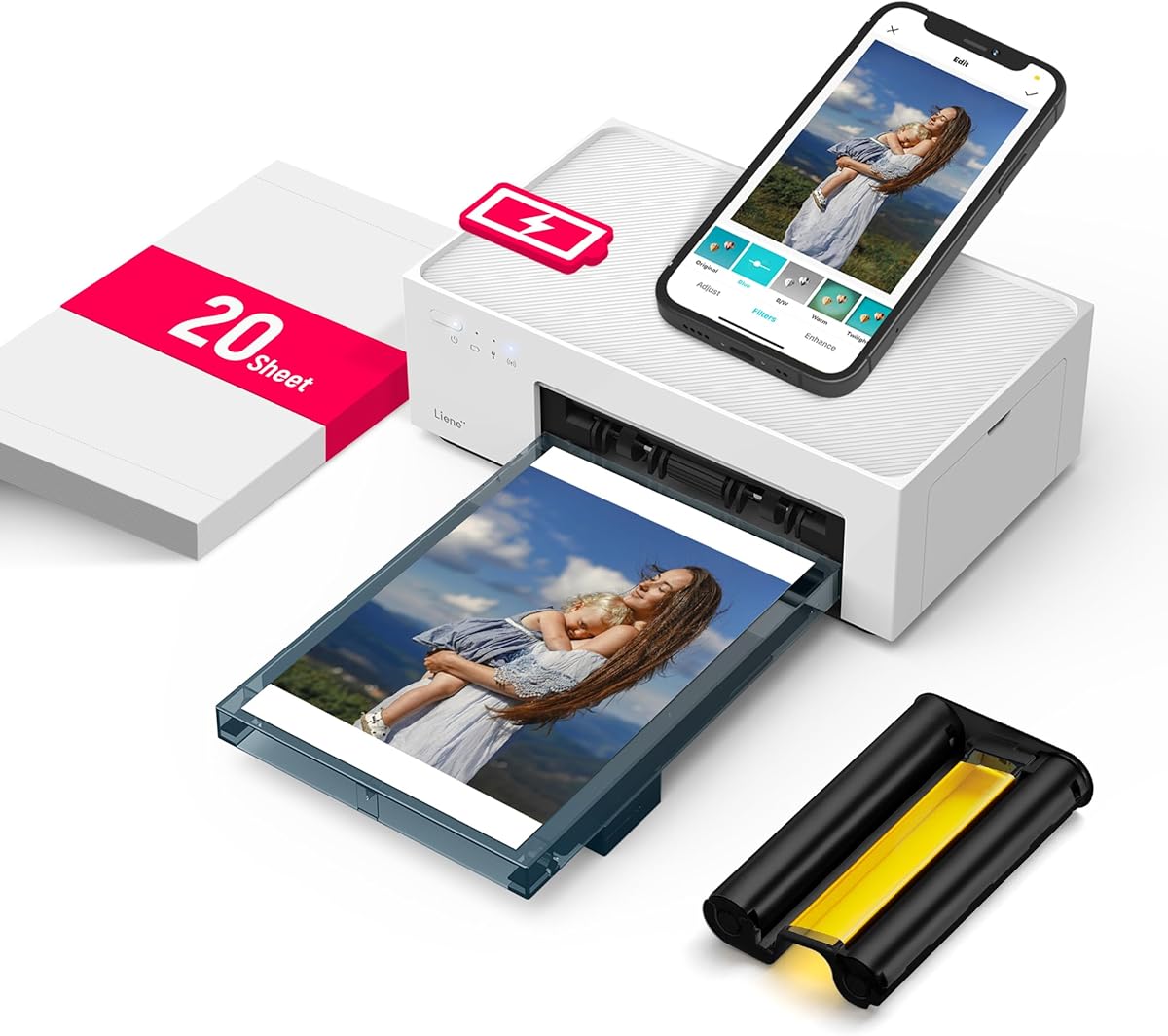
This Liene printer offers a specialized experience for users prioritizing high-quality photo prints in a compact form. Its dye sublimation technology ensures vibrant colors and durability, making it perfect for travelers who want to preserve memories instantly without a home lab.
We may earn a commission when you buy through this link, at no additional cost to you.
The built-in battery allows for up to 40 prints per charge, ensuring you can print throughout the day without hunting for outlets. The built-in WiFi hotspot provides a stable connection even in areas with poor network coverage, which is crucial for remote locations.
Although it is limited to 4×6 inch photos and requires specific consumables, the quality justifies the limitation for photo enthusiasts. The magnetic design on top keeps the photo cassette organized, and the app allows for creative editing before printing starts.
Choose this if you want a dedicated mobile photo printer that delivers studio-quality results anywhere. It is an excellent gift for creatives or families who value tangible photo memories over standard document printing capabilities.
Penetrates paper layer by layer with three colors for rich tones and water-resistant protection.
Built-in hotspot allows five users to connect simultaneously without needing an external router.
We may earn a commission when you buy through this link, at no additional cost to you.
This model offers an accessible entry point into mobile printing with its low cost and inkless functionality. Weighing only 1.5 pounds, it is easy to carry in any bag and suits students or workers who need occasional document prints on the move.
We may earn a commission when you buy through this link, at no additional cost to you.
The thermal technology eliminates the need for ink cartridges, making it cost-effective for simple black and white documents. It supports multiple thermal paper sizes from receipts to full letter pages, providing flexibility for various needs from invoices to study guides.
Users must download a specific driver for laptop connections and cannot use regular paper, which is a trade-off for the low price. However, the battery life and Bluetooth connectivity ensure it works seamlessly with phones, which are the primary printing source for most users.
If you are looking for a no-fuss portable printer that handles basic text documents efficiently, this is a solid choice. It avoids ongoing ink costs and fits easily into any travel routine without adding significant bulk or expense.
No ink or toner required reduces long-term expenses for frequent mobile printing tasks.
Works via Bluetooth with phones and USB-C with laptops to cover most device types.
We may earn a commission when you buy through this link, at no additional cost to you.
The Canon PIXMA TR160 shines with its ability to produce high-quality color documents and photos on the go. Its 5-Color Hybrid Ink System ensures sharp text and vibrant details, making it suitable for marketing materials or personal photos while traveling.
We may earn a commission when you buy through this link, at no additional cost to you.
The 1.44-inch OLED display provides clear visibility of ink levels and settings without needing a phone app. This feature adds a layer of convenience for users who want quick status checks at a glance before starting a print job.
While the printer is lightweight and fits in bags, it relies on standard ink cartridges which can add up over time. The Wireless Direct Mode allows connection without a router, but users should check battery performance before long trips away from chargers.
Choose this model if you need reliable color output and a clear interface for managing print tasks. It is an excellent tool for freelancers or students who need occasional high-quality prints without a full office setup.
5-Color ink system produces rich colors and sharp blacks for professional document quality.
Displays status and ink levels clearly for easy management without needing a separate app.
We may earn a commission when you buy through this link, at no additional cost to you.
This printer expands the traditional mobile experience by adding scanning and copying capabilities. It is designed for business professionals who need to manage both documents and copies without being tied to a fixed desk setup.
We may earn a commission when you buy through this link, at no additional cost to you.
The included battery ensures you can start using the device immediately without extra purchases. HP Auto Wireless Connect simplifies the setup process, allowing you to print from laptops or phones quickly whether or not a router is available.
The weight is slightly higher due to the all-in-one functionality, but it still fits into a car or briefcase easily. Users should note that ink costs are a factor, but the in-class page yields help maintain efficiency over time.
Select this if your workflow involves more than just printing and you need to digitize documents on site. It offers a complete office solution in a portable form factor that supports various paper types including legal sizes.
Prints, scans, and copies to handle multiple document tasks efficiently in one compact unit.
Charges in 90 minutes while turned off to minimize downtime and maximize printing availability.
We may earn a commission when you buy through this link, at no additional cost to you.
This Epson model offers flexibility for long-duration mobile work with its rechargeable lithium-ion battery and external options. It is well suited for professionals who need color printing capabilities for extended periods without access to wall outlets.
We may earn a commission when you buy through this link, at no additional cost to you.
The ability to choose charging options like AC adapters or USB provides practical freedom. You can charge at home, in the car, or at the office to ensure the device is always ready for the next job.
While it is designed for Epson cartridges, the print quality is generally sharp and reliable for business documents. The compact size fits into bags easily, but the external accessory battery adds to the overall cost if you need heavy usage.
Opt for this if you need a reliable color printer that can be easily recharged in various environments. It balances portability with performance, making it a good choice for field work or travel with demanding print needs.
An external accessory battery option is available for even greater printing volume on long trips.
Supports both USB and AC adapter charging so you can power up wherever you are.
We may earn a commission when you buy through this link, at no additional cost to you.
The Gloryang printer is designed for users seeking a lightweight and efficient solution for printing documents without ink. It uses thermal technology to produce clear text and images, making it ideal for students and professionals on a budget.
We may earn a commission when you buy through this link, at no additional cost to you.
Its compact design allows it to fit into backpacks easily, and the built-in paper bin helps keep the workspace tidy. The package includes extra paper rolls and a carry case, making it ready to use right out of the box.
Note that it requires specific thermal paper and does not support regular copy paper which may be a limitation. However, the seamless Bluetooth connection to iOS and Android devices ensures you can print from your phone with minimal setup.
Choose this if you need a reliable and portable printer that avoids ink costs entirely. It is a practical option for printing contracts, invoices, and personal notes while traveling without carrying bulky supplies.
Eliminates the need for ink, toner, or ribbons to reduce ongoing consumable expenses.
Weighing only 1.75 pounds it is easy to carry anywhere for instant printing needs.
We may earn a commission when you buy through this link, at no additional cost to you.
This JADENS model stands out for its powerful app that includes AI features like image generation and translation. It is a great tool for creative projects and students who need quick access to editing tools before printing.
We may earn a commission when you buy through this link, at no additional cost to you.
With a 1800mAh battery, it offers up to 3 hours of continuous printing which is excellent for travel. The 203 DPI resolution ensures clear text and images for worksheets and documents, maintaining high quality without extra effort.
Privacy is a key benefit since it allows local printing without uploading files to the cloud. This makes it suitable for sensitive documents or school assignments where data security is important to the user.
Select this if you want a feature-rich thermal printer with modern app capabilities. It balances performance, privacy, and creative tools effectively for a wide range of users from students to professionals.
Includes AI image generation, erasing, and translation tools directly within the printer app.
Prints directly from your device without cloud uploads to keep personal and sensitive data private.
We may earn a commission when you buy through this link, at no additional cost to you.
The D90E is a solid thermal printer designed for convenience with features like automatic paper jam ejection. This functionality saves time and frustration when you are in a hurry and need to keep printing moving.
We may earn a commission when you buy through this link, at no additional cost to you.
It connects via Bluetooth to mobile devices and USB to PCs, providing versatile options for different users. The package includes a travel case and ten sheets of paper which makes it a ready to use gift for students.
Users should be aware that it is not compatible with Chromebooks and requires specific thermal paper for printing. However, for standard laptops and phones, the driver download process is straightforward and reliable for daily use.
Choose this if you want a dependable printer with thoughtful design touches like auto-ejection and included accessories. It is ideal for emergency scenarios, contracts, and office documents that need to be printed on the go.
Solves paper jams automatically by popping up the paper when the power button is pressed.
Comes with a travel case and extra paper making it a perfect gift for on the go users.
We may earn a commission when you buy through this link, at no additional cost to you.
This printer offers broad versatility by supporting everything from standard documents to tattoo transfers. Its high-definition printing technology ensures clear results across different paper types which is rare in budget portable models.
We may earn a commission when you buy through this link, at no additional cost to you.
The 1500mAh battery provides enough power for around 160 sheets on a full charge ensuring you can handle a good volume of work. Weighing only 1.5 pounds it is light enough to carry in a backpack without adding extra burden.
While laptops require a driver and USB connection instead of Bluetooth this is a minor inconvenience for most users. It is an excellent choice for those who need one device for multiple tasks from office notes to creative art transfers.
Select this if you want a multifunctional thermal printer that is both affordable and reliable. It covers a wide range of scenarios from business needs to creative hobbies making it a versatile addition to any toolkit.
Supports tattoo transfer paper making it a unique tool for artists and tattoo studios.
Uses 203 DPI resolution to provide sharp text and images for various document needs.
We may earn a commission when you buy through this link, at no additional cost to you.
Choosing the right battery powered portable printer involves evaluating several key factors to ensure it meets your specific mobile needs. This section breaks down the most important considerations to help you make an informed decision.
The battery capacity determines how many pages you can print before needing a recharge. Look for models with at least 1000mAh capacity for decent usage. Some models also offer fast charging which reduces downtime when you are on the move and need to print quickly.
Always check the estimated number of prints per charge to understand the true runtime of the device in your typical workload scenarios.
Thermal printers are inkless and cost-effective but usually print only in black and white. Inkjet models offer color printing but require cartridges and can be more expensive. Consider what type of documents you need to print to select the right technology for your needs.
Higher DPI ratings generally result in sharper text and images so aim for at least 200 DPI for professional document quality.
Most portable printers connect via Bluetooth to smartphones which is convenient for quick prints. Some models also support USB-C or Wi-Fi Direct for laptop connections which adds flexibility. Ensure the printer supports the devices you plan to use for printing.
Verify if the manufacturer provides drivers for your operating system to ensure smooth connectivity and setup across all your devices.
Portable printers often support standard letter size but some are limited to smaller receipts or labels. Check if the device can handle legal or A4 paper if you need to print official documents. This determines the versatility of the printer for work or travel.
Ensure the printer allows you to load the specific paper type you need whether that is thermal rolls or standard sheets for your job.
Since the main advantage is mobility you want a device that is easy to carry. Look for models under two pounds that fit comfortably in a backpack or briefcase. A compact design ensures the printer does not become a burden during your daily commute.
Consider the dimensions as well to ensure it fits into your existing travel bags without taking up too much space or weight.
A good companion app simplifies the printing process with features like file scanning or editing tools. Some apps even include AI functions for image generation which adds value for creative users. Check app reviews to ensure it is user-friendly and regularly updated.
Verify if the app supports cloud printing or direct file imports to streamline your workflow and save time on mobile devices.
Portable printers face more wear and tear than stationary ones so a durable build is essential. Look for models with sturdy casing that can withstand minor bumps during travel. A reliable build ensures the device lasts longer in challenging environments.
Check for features like auto-ejection mechanisms for jams which help maintain the printer functionality without damaging internal components.
The initial price is just the start so consider the cost of ink or paper. Inkjet printers need cartridges which can add up over time. Thermal printers use specific paper which is often cheaper but still requires regular replenishment for extended use.
Calculate the cost per page based on the included paper or cartridges to understand the long term value of the printer.
To ensure optimal performance always fully charge your printer before first use. Connect it to your device via Bluetooth or USB following the app instructions to pair successfully. Install any necessary drivers for laptop connections to avoid compatibility issues during your first print job.
Use only the recommended paper or ink cartridges to maintain print quality and avoid jams. Keep the printer in a cool dry place when not in use to protect the battery and internal components from damage or degradation over time.
Regularly clean the print head if your model requires maintenance to prevent clogging. Check the battery levels frequently and avoid leaving the device discharged for long periods. This practice extends the life of the printer and ensures it is always ready for use when needed.
Most models require a mobile device or laptop for control though some have small built-in displays. You generally need to connect via Bluetooth or USB to send print commands. Always check the manual for standalone capabilities if you plan to use it without a phone.
Battery life varies by model but typically ranges from 50 to 300 prints per charge. Higher capacity batteries last longer and support fast charging to reduce wait times. Check the specific product specs to see the estimated page yield per charge cycle.
Yes inkjet models like the HP OfficeJet and Canon PIXMA support color printing. However thermal printers are usually black and white only. If color is essential ensure you select an inkjet model with the right cartridge support.
No thermal printers use heat to create images on special heat-sensitive paper. This means there is no ink or toner required reducing maintenance and consumable costs. You only need to stock up on compatible thermal paper rolls.
Most support standard letter size but some are limited to receipts or labels. Check the specifications for support of legal or A4 if you need larger formats. This is critical for business use where official document sizes are common.
Connect via USB-C cable or Wi-Fi if supported and install the specific driver software. Bluetooth is often limited to mobile devices so laptops typically need a cable connection. Follow the manufacturer app guide for proper setup steps.
They require specific apps provided by the manufacturer for printing. Some support standard protocols like AirPrint but others need a dedicated download. Check the app requirements to ensure it works with your device before buying.
Most models come with a one year limited hardware warranty for protection. Always register your product online to activate the warranty and keep the receipt. Contact customer support if you experience issues to get assistance quickly.
This guide highlights the top options for portable printing ranging from budget thermal models to premium inkjet and photo devices. Whether you need color capability, long battery life, or a compact design there is a fit for every use case.
Focus on your specific needs such as color requirements and paper size support when narrowing down your choice. The best printer is one that integrates seamlessly into your workflow without adding unnecessary complexity or cost.
Remember to check current availability and pricing as these details can change. Use the links provided to verify the latest offers and select the device that offers the best value for your mobile printing needs today.