
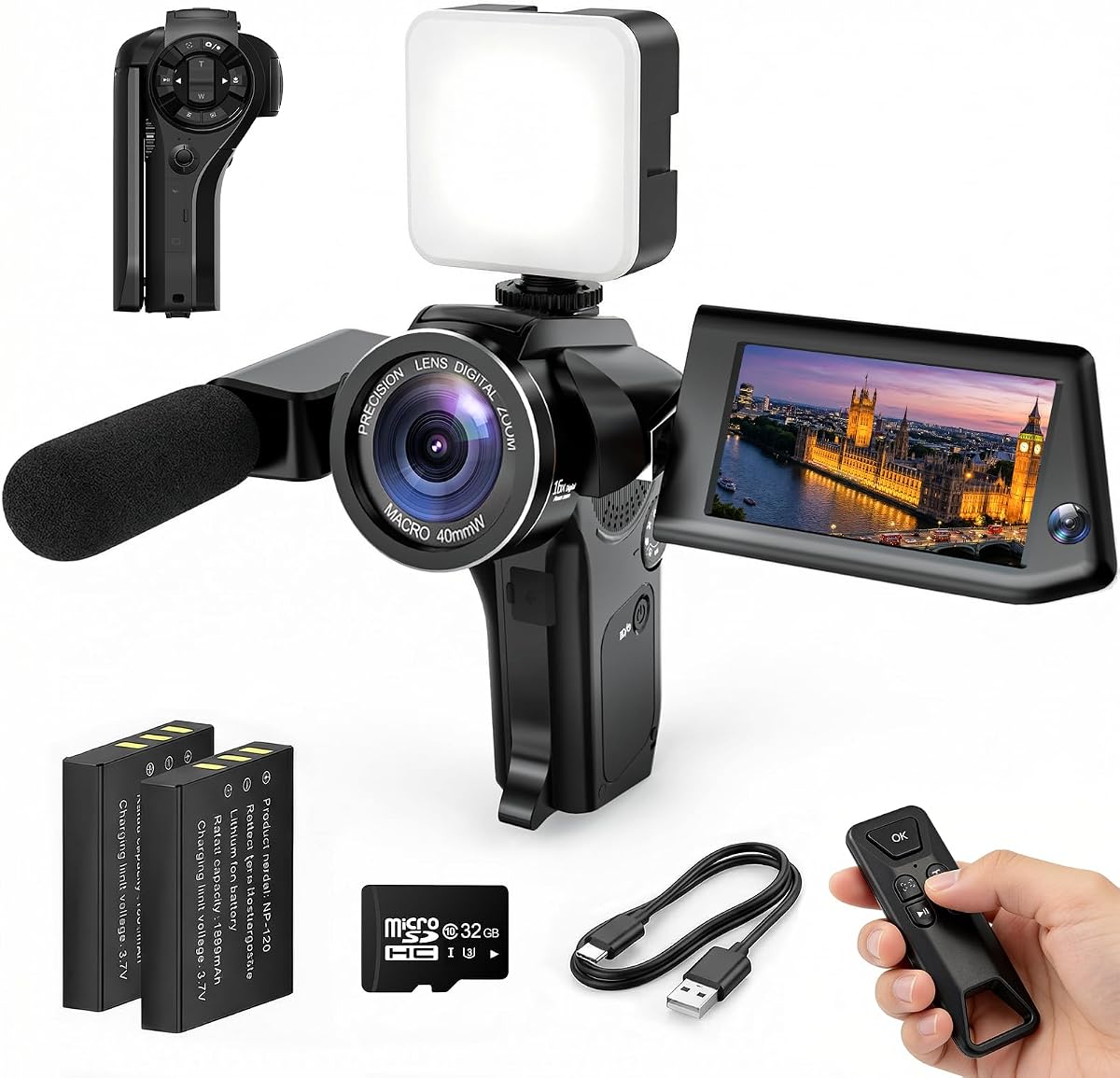
4K Vlogging Camera Pocket Digital Camera
4.4Editor score
4K video recording
330-degree rotating lens
WiFi connectivity
Lightweight portable design
Includes accessories kit
Discover the top 10 cameras for social media content creators in October 2026. This guide compares features, video quality, and portability to help you choose
Creating engaging content for social media platforms requires reliable and versatile equipment. Whether you are shooting on YouTube, TikTok, or Instagram, having the right camera makes a significant difference in your production quality and viewer engagement.
We have carefully evaluated ten top-rated cameras specifically designed for content creators. Our analysis focuses on video resolution, stabilization capabilities, ease of use, and portability to ensure you find a tool that fits your creative workflow perfectly.
Each pick in this list highlights unique strengths tailored to different creator needs. From budget-friendly point-and-shoot options to advanced gimbal systems, our selections offer a range of choices. Please note that product availability and details may change over time.
4.4Editor score

4.5Editor score
5.0Editor score
This side-by-side comparison highlights the core specifications of each camera to help you make an informed decision based on your specific social media needs.


The DJI Osmo Pocket 3 Creator Combo stands out as a top choice for creators needing professional quality in a small package. With a 1-inch CMOS sensor, it captures stunning 4K video at 120fps, ensuring smooth motion and clarity even in low light.
We may earn a commission when you buy through this link, at no additional cost to you.
Its 3-axis mechanical gimbal delivers incredibly steady footage, perfect for walking vlogs or action shots. The 2-inch rotating touchscreen allows for easy framing in both vertical and horizontal orientations, catering to different social media formats.
While it is more expensive than basic models, the advanced features like ActiveTrack 6.0 and D-Log M color profiling justify the investment for serious creators. The included DJI Mic 2 Transmitter ensures high-quality audio without extra gear.
This camera is ideal for those ready to elevate their content production. If you value image stability and portability, the Osmo Pocket 3 offers a balanced solution for daily vlogging and professional projects.
The 3-axis mechanical stabilization ensures smooth, shake-free videos even during movement.
The rotating screen makes it easy to switch between vertical and horizontal framing quickly.
We may earn a commission when you buy through this link, at no additional cost to you.
The FlyFrost 8K Video Camera offers impressive resolution capabilities for creators who want detailed visuals. While 8K is recorded at 15fps, it still provides excellent clarity for stills and slow-motion options. The 88MP photo mode allows for crisp imagery.
We may earn a commission when you buy through this link, at no additional cost to you.
Built-in IR night vision expands your shooting possibilities into darker environments without external lights. The included external microphone and stabilizer help reduce noise and shake, improving overall video quality for vlogs and tutorials.
WiFi connectivity enables quick file transfer to your smartphone for fast editing and posting. The 3-inch touchscreen makes navigation intuitive, though its rotation is limited to 270 degrees compared to some competitors.
This camera suits creators looking for high specs without a steep price tag. It is a versatile tool for travel or outdoor projects where light and resolution flexibility matter.
IR night vision lets you capture clear video in low-light conditions without extra lighting.
The included microphone and stabilizer provide immediate tools for better quality output.
We may earn a commission when you buy through this link, at no additional cost to you.
This 8K Digital Camera blends photography and video capabilities effectively. With 96MP photo resolution and HDR imaging, it delivers vibrant stills alongside 8K video options. The 3.5-inch flip screen simplifies self-recording for social media posts.
We may earn a commission when you buy through this link, at no additional cost to you.
The anti-shake feature ensures stability during handheld recording, while the 20X digital zoom helps capture distant subjects. Included dual batteries mean you won't miss moments due to power loss during long sessions.
WiFi transfer via the Viipulse app makes sharing content to platforms like Instagram or YouTube seamless. The compact design makes it travel-friendly for creators who need versatility on the go.
For beginners wanting a mix of stills and video without complex settings, this camera is a strong contender. It balances usability with high-spec features at an accessible level.
The 180-degree flip screen makes framing yourself for vlogs and selfies simple.
Two high-capacity batteries ensure extended recording time for daily content creation.
We may earn a commission when you buy through this link, at no additional cost to you.
The 4K Vlogging Camera is designed for beginners seeking a budget-friendly way to start creating. It records 4K video and captures 75MP photos, delivering clear content for platforms like TikTok and YouTube. The 330-degree rotating lens aids in flexible framing.
We may earn a commission when you buy through this link, at no additional cost to you.
Built-in WiFi lets you transfer files to your phone quickly for editing. The kit includes essential accessories like a mini tripod and 16GB TF card, so you can start immediately without extra purchases.
Its compact and lightweight build makes it easy to carry for travel or daily vlogging. While manual controls are minimal, the autofocus and wide-angle lens ensure stable footage without effort.
This camera is perfect for those testing the waters of content creation without a heavy investment. It offers essential features in a simple package ready for social media.
Includes a tripod and memory card so you can start shooting right out of the box.
The 330-degree lens helps you frame shots easily without adjusting camera angles.
We may earn a commission when you buy through this link, at no additional cost to you.
This Mini Camcorder focuses on convenience and portability. Its pocket size fits easily into bags or pockets, making it ideal for travel. With one-button recording and no app required, it simplifies the process of capturing moments.
We may earn a commission when you buy through this link, at no additional cost to you.
The battery supports up to 7 hours of continuous recording, reducing the need for frequent charging. A 180-degree rotating lens allows for various angles, from POV shots to self-recording.
While it does not match DSLR image quality, its charm lies in effortless use for daily content. It is a reliable backup or secondary camera for creators needing something light.
Choose this if simplicity is your priority. It is great for casual vlogs or capturing memories without complex setup.
One-button recording and no app downloads make this camera incredibly straightforward to operate.
Up to 7 hours of continuous recording ensures you can film all day without interruptions.
We may earn a commission when you buy through this link, at no additional cost to you.
Designed for travel and daily use, this 4K Vlogging Camera fits into any pocket. It offers 4K video recording and 75MP photos, ensuring clear content for social media. The rotating lens simplifies framing while on the move.
We may earn a commission when you buy through this link, at no additional cost to you.
WiFi connectivity allows wirelessly transferring files to your smartphone for quick edits. The included kit with a carrying bag and mini tripod makes it ready for trips without extra gear.
Fast autofocus and a wide-angle lens help capture sharp footage even in dynamic settings. It is a practical choice for hikers or vacationers wanting quality without bulk.
For creators prioritizing portability, this camera delivers excellent convenience. It is ready to use for daily recording and travel logs.
Comes with essential accessories like a tripod and bag for convenient travel use.
Built-in WiFi makes transferring photos and videos to your phone simple and fast.
We may earn a commission when you buy through this link, at no additional cost to you.
This camera stands out with its Picture-in-Picture mode, allowing you to record both a scene and your reaction simultaneously. It creates engaging content for family videos, tutorials, or reaction clips. The 8K resolution ensures clarity.
We may earn a commission when you buy through this link, at no additional cost to you.
The flip screen makes framing easy for vlogs, while WiFi helps with quick sharing to platforms. Its design focuses on storytelling, letting you stay part of the memory instead of behind the lens.
For creators who want to show their personality alongside their content, this tool is unmatched. It simplifies the process of capturing authentic and interactive media.
Ideal for family or tutorial creators, this camera adds a personal touch to every video. It elevates engagement through its unique dual-view capabilities.
Record both the moment and your reaction at the same time for more engaging content.
Designed to include the creator in the frame, making videos feel more personal.
We may earn a commission when you buy through this link, at no additional cost to you.
This Vlogging Kit provides all the essentials for phone-based content creation. It includes a wireless microphone for clear audio, an RGB fill light for better lighting, and tripods for stable shots. It elevates your phone's capabilities.
We may earn a commission when you buy through this link, at no additional cost to you.
The flexible tripod allows creative angles, while the camera tripod ensures steady ground shots. The phone clamp holds devices securely, and the remote control simplifies starting and stopping recordings.
Ideal for creators who already own a smartphone, this kit reduces the need to buy individual accessories. It offers a professional setup without the cost of a dedicated camera.
For those looking to upgrade their phone's recording quality, this bundle is highly practical. It covers audio, lighting, and stability needs in one package.
Wireless mic and RGB light ensure your phone videos look and sound professional.
Includes tripods, mic, and remote for a ready-to-use creator workflow.
We may earn a commission when you buy through this link, at no additional cost to you.
This kit features a smart tripod with auto face tracking, keeping you centered without extra work. It includes dual wireless microphones and LED lights, offering a complete solution for phone content creation. Gesture control simplifies starting and stopping.
We may earn a commission when you buy through this link, at no additional cost to you.
The tracking works without an app, making it quick to set up. The dual mics provide clear sound with noise reduction, ensuring your voice is heard clearly. It is perfect for live streaming or solo vlogs.
Ideal for creators who move around during recording, the tracking keeps the focus on you. The included lights help in low-light environments, improving video clarity instantly.
For hands-free recording needs, this kit provides reliable support. It is designed to streamline your setup for consistent and engaging content.
Use gestures like an OK sign to start tracking without needing to touch the device.
Two wireless mics with noise reduction ensure your audio is crisp and clear.
We may earn a commission when you buy through this link, at no additional cost to you.
The Logitech Brio 101 offers reliable Full HD streaming for creators using computers. Its auto-light balance adjusts brightness for better skin tones, and a privacy slide ensures security when not in use. It works seamlessly with most platforms.
We may earn a commission when you buy through this link, at no additional cost to you.
Plug and play simplicity means no complex drivers are needed. The compact design fits any desk setup, making it ideal for home studios or online classes. You can customize view settings via the app.
For streaming or meetings, this webcam delivers consistent quality without extra effort. It is a practical choice for those prioritizing privacy and ease of use.
Ideal for digital creators working from a desktop, this webcam provides a stable and reliable experience. It is ready for streaming and calls straight out of the box.
Boosts brightness by up to 50% to reduce shadows and improve image quality.
The integrated privacy slide ensures total control over when the camera is active.
We may earn a commission when you buy through this link, at no additional cost to you.
Selecting the right camera involves balancing resolution, portability, and features to match your content style.
Higher resolution like 4K or 8K ensures crisp visuals but requires more storage and processing power. Consider if your platform supports high-resolution playback.
Choose a resolution that balances quality with your current editing capabilities.
Optical or mechanical stabilization reduces shake during movement. Gimbal systems offer smoother footage for walking shots.
Prioritize stabilization if you film often while moving or outdoors.
Pocket-sized cameras are ideal for travel and quick recording. Heavier models may offer more features but are less convenient.
Assess how often you carry your gear to decide on size.
WiFi and Bluetooth allow quick file transfers to phones for editing. Direct upload features save time on social media.
Ensure your camera supports your smartphone OS for smooth workflows.
Built-in microphones vary in quality. External inputs allow for better audio during interviews or vlogs.
Look for models with external mic jacks if clear sound is critical.
Long battery life ensures uninterrupted recording sessions. Some cameras allow charging while in use.
Check battery specifications to match your daily shooting needs.
Flip or rotating screens help you frame shots for vertical or horizontal video. This is crucial for social media formats.
A versatile screen simplifies the shooting process for different platforms.
Beginners benefit from auto modes and simple interfaces. Advanced users may prefer manual controls.
Select a camera that matches your technical comfort level.
Start by charging your battery and inserting a memory card before your first shoot. Familiarize yourself with basic settings like resolution and stabilization modes.
Keep your camera clean by wiping the lens with a soft cloth and storing it in a protective case when not in use. Avoid exposing it to extreme weather conditions.
Regularly update firmware to access new features and improve performance. Back up your footage frequently to avoid data loss during projects.
1080p is widely supported and sufficient for most platforms, but 4K offers more detail for cropping. Higher resolutions ensure quality across devices.
Not always. Many modern cameras have built-in stabilization. However, a gimbal adds extra smoothness for active shots like walking or running.
Smartphones are excellent for casual use and have great stabilization. Dedicated cameras offer better optical zoom and low-light performance for more advanced needs.
Yes, it speeds up the editing process by allowing quick transfers to phones. It reduces the need for cables and card readers.
Very important. Clear audio often matters more than visuals. Consider external mics if built-in audio is poor for your environment.
Kits often include useful accessories like tripods and cards. Buying separately gives flexibility, but kits can be cost-effective for beginners.
The DJI Osmo Pocket 3 and Picture-in-Picture Camera lead with professional features and unique modes. For budget buyers, the 4K Pocket options provide solid entry points without breaking the bank.
Prioritize portability and ease of use if you focus on daily vlogs. Advanced creators might lean towards higher resolution or specialized kits for specific needs.
Remember to check current product details as availability may change. Select the option that aligns with your workflow and creative goals for lasting value.