
CMTECK USB Computer Microphone G009
4.5Editor score
Noise-cancelling chip included
360-degree gooseneck
Mute button with LED
Finding a reliable audio tool for your workspace often means searching for the best cheap desk microphone. Clear sound is essential for meetings, streaming, and content creation. You want something that captures your voice accurately without breaking the bank or cluttering your desk setup.
We reviewed ten highly rated USB microphones designed for desktop use. Each model was evaluated on audio clarity, build quality, ease of setup, and additional features like mute buttons or noise cancellation. Our goal is to highlight options that deliver professional results at affordable price points.
Every pick in this list shows a unique strength whether you need a gooseneck design for flexibility or a sturdy base for stability. Prices and availability can change over time so check current listings before buying. This guide helps you find the right balance of performance and value for your needs.
4.5Editor score

4.4Editor score

4.4Editor score
As an Amazon Associate we earn from qualifying purchases.
This side-by-side comparison highlights key specifications for all ten microphones. You can see differences in pickup patterns, connectivity options, and unique features to make an informed decision quickly.
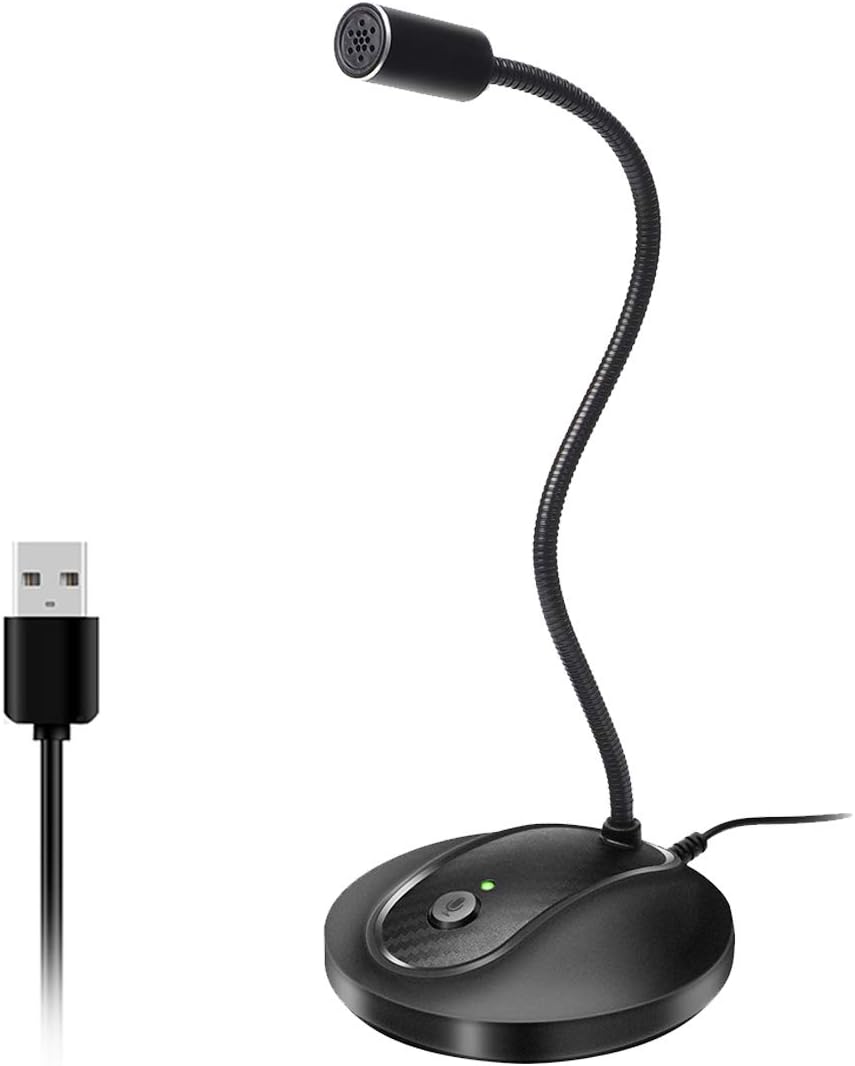


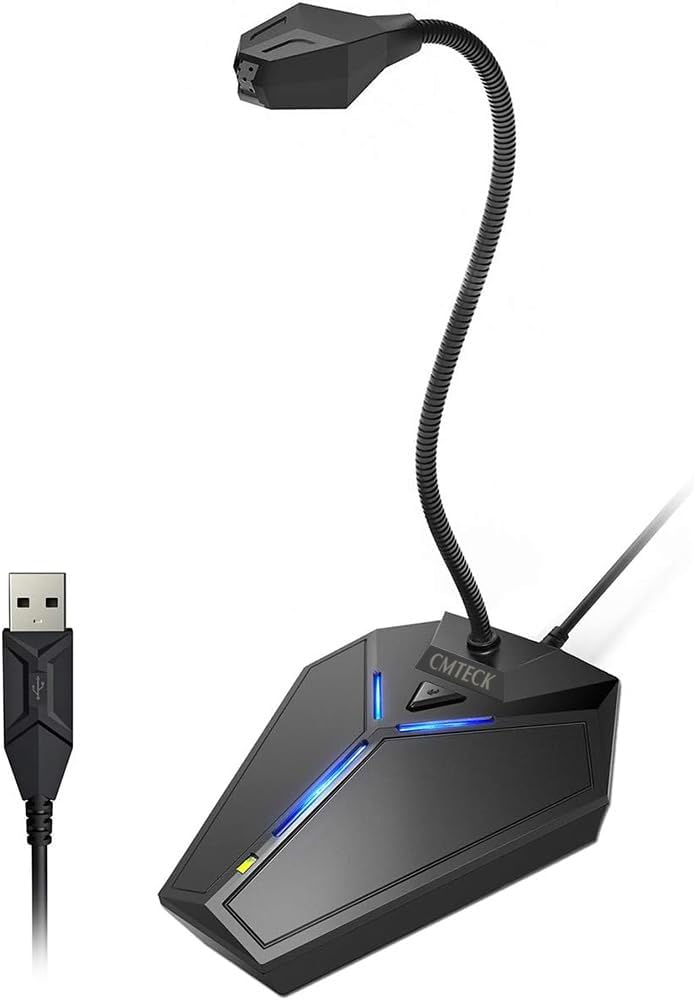

The CMTECK USB Computer Microphone G009 stands out as a top contender for anyone seeking a cheap desk microphone that does not compromise on core functionality. With a rating of 4.5 stars it has earned trust among users who need reliable audio for calls and content creation. Its omnidirectional pattern ensures your voice is picked up clearly from any angle.
We may earn a commission when you buy through this link, at no additional cost to you.
Key strengths include its active noise-cancelling technology which effectively blocks background noise like fan hums or keyboard clicks. The CCS2.0 smart chip enhances voice clarity making it suitable for home studios and podcasting. The flexible gooseneck allows you to position the mic exactly where you need it while the pop filter prevents plosive overloads.
Honest trade-offs involve limited OS compatibility as it does not work with Raspberry Pi or Linux systems. The base is stable but made of plastic which may not feel as premium as metal options. However for the price these compromises are acceptable for most users who prioritize sound quality and ease of use.
This microphone is ideal for students remote workers or casual streamers who need a reliable tool without spending much. If you want a straightforward setup with solid audio performance the CMTECK G009 is a highly recommended choice for your desk setup.
The built-in smart chip filters out ambient sounds ensuring only your voice remains clear during recordings or calls.
Adjust the metal gooseneck to 360 degrees to find the perfect angle for your desk environment or camera view.
We may earn a commission when you buy through this link, at no additional cost to you.
The Generic Gooseneck USB Mic offers a balanced mix of features that make it a strong choice for diverse desktop needs. Users appreciate its ability to pick up sound from any direction thanks to the omnidirectional design. The heavy-duty ABS stand ensures the mic stays put even if you bump your desk during intense gaming sessions.
We may earn a commission when you buy through this link, at no additional cost to you.
One of its main advantages is the intelligent noise-canceling technology which helps reduce background noise and echo. This is particularly useful for video chats or streaming where clarity matters. The one-click mute button with a built-in LED indicator provides quick control over your audio status without needing software.
While it performs well in quiet environments some users note that it may pick up echoes in rooms with hard surfaces. It is also not compatible with Xbox consoles limiting its use for console gamers. These limitations are minor considering the overall value and build quality it provides.
If you need a microphone that can adapt to different positions and setups this model is an excellent pick. It suits people who talk from various angles or need a reliable mic for both work and entertainment purposes.
Premium metal pipe and heavy-duty ABS materials ensure long-term durability and stability on your desk.
Advanced tech filters out unwanted sounds so your voice remains the focus during meetings or recordings.
We may earn a commission when you buy through this link, at no additional cost to you.
Rated highly by users this Plug Play Desktop Mic is designed for those who need reliable audio for gaming or streaming. The windproof fluffy caps help reduce breaking noise from wind or spray ensuring your voice stays smooth. Its compact design means it takes up minimal space on your workspace.
We may earn a commission when you buy through this link, at no additional cost to you.
The 360-degree omni-directional audio pickup captures your voice naturally within the optimal range. This feature is great for creators who move around while recording. The non-slip silicone pads keep the base stable even during passionate live broadcasts or busy gaming sessions.
It is important to note this is a microphone not a speaker so it will not output sound. While it is versatile it is limited to USB connections which may not suit all devices. Despite these factors the overall performance and durability make it a worthwhile choice.
This mic is perfect for YouTubers or streamers who want a setup that looks good and works well. Its ease of use and sturdy build ensure you can focus on content creation without technical distractions.
Fluffy caps on the mic reduce plosive and wind noise for cleaner audio during recordings.
Non-slip silicone pads ensure the mic stays firmly in place during active use or movement.
We may earn a commission when you buy through this link, at no additional cost to you.
As a trusted brand Amazon Basics delivers a high-quality condenser microphone that fits well in the cheap desk microphone category. Its low noise and low distortion performance make it suitable for music recording or professional streaming. The 14mm diaphragm ensures you capture detailed vocals with precision.
We may earn a commission when you buy through this link, at no additional cost to you.
The cardioid pickup pattern isolates your voice from background noise making it ideal for noisy environments. A built-in shock absorber and silicone rubber boot protect the mic from vibrations that could affect sound quality. The stand allows 360-degree rotation for flexible positioning.
While it comes at a slightly higher price than some competitors the build quality and sound clarity justify the cost. You need a standard 5/8 inch thread if you plan to mount it on a tripod or boom arm. This might be a small hurdle for some users.
If you want a microphone that feels like a professional tool but remains affordable this is a top choice. It is best for creators who need reliability and excellent sound reproduction for their projects.
The pickup pattern focuses on your voice to reduce background noise and echo effectively.
Standard thread allows easy connection to tripods or boom arms for custom setups.
We may earn a commission when you buy through this link, at no additional cost to you.
The ZealSound K66 is designed for podcasters and streamers who need detailed audio control without expensive software. It features zero-latency monitoring so you can hear yourself in real time without delays. The wide frequency response captures rich lows and clear highs for natural sounding vocals.
We may earn a commission when you buy through this link, at no additional cost to you.
You can adjust microphone gain and echo with physical knobs allowing quick on-the-fly changes. The intelligent noise reduction mode helps filter out keyboard clicks or fan hums. It also includes adapters for mobile devices making it versatile for cross-platform content creation.
The design is larger than standard desktop mics which might take up more desk space. Controls are manual so there is no software app to tweak settings remotely. However the tactile control is a benefit for those who prefer physical adjustments over digital interfaces.
This microphone is perfect for anyone serious about audio quality who wants a complete solution out of the box. The included windscreen and sturdy metal base add value and ensure a professional recording experience.
Headphone jack allows you to listen to your recording instantly without any audio lag.
Add or reduce echo with a dedicated knob to customize your vocal depth.
We may earn a commission when you buy through this link, at no additional cost to you.
Designed for group settings the TONOR G11 is excellent for conference calls or seminars. Its omnidirectional pattern captures sound from all sides within an 11.5 ft range. Participants can hear each other clearly without shouting which makes it ideal for virtual meetings.
We may earn a commission when you buy through this link, at no additional cost to you.
The microphone connects instantly to Windows or Mac systems without drivers. A blue indicator light confirms the mic is active during calls. The cable is shielded to eliminate signal interferences ensuring clean audio transmission during long sessions.
It is not designed for music recording or solo vocals as it lacks the refinement for those tasks. The design is functional but basic compared to more stylish desktop mics. For its intended purpose though it performs reliably.
If you host frequent online meetings or need a reliable tool for small teams this is a strong option. It simplifies communication by ensuring everyone is heard clearly with minimal setup effort.
Covers up to 11.5 feet allowing multiple people to be heard clearly.
Nylon shielded wire prevents interference to maintain consistent audio quality.
We may earn a commission when you buy through this link, at no additional cost to you.
This microphone stands out with its customizable breathing lights that add a tech aesthetic to your workspace. It offers studio-quality sound with an omnidirectional pattern that captures every detail of your voice. The weighted ABS base keeps it stable during energetic streaming sessions.
We may earn a commission when you buy through this link, at no additional cost to you.
Its intelligent noise reduction filters out keyboard clicks and fan noises for clear audio. The 5.7-inch gooseneck allows easy positioning for different angles. It is compact and lightweight so you can move it between office or home setups.
Some users might find the lighting distracting during serious work so it can be turned off. The gooseneck is shorter than other models limiting extreme positioning options. However the overall build and sound performance are impressive for the price.
This mic is great for streamers or gamers who want a visually appealing tool. It balances style with functionality delivering clear sound while enhancing your desk setup look.
Breathing lights enhance your workspace vibe and can be turned off if desired.
Filters background noise to ensure your voice remains the primary sound source.
We may earn a commission when you buy through this link, at no additional cost to you.
The LIANGSTAR USB Microphone includes a volume control knob which is a rare feature at this price point. The CCS3.0 smart chip helps reduce background noise automatically. You can adjust levels without touching software making it user-friendly for live sessions.
We may earn a commission when you buy through this link, at no additional cost to you.
It captures your voice from 360 degrees with high clarity. The built-in sound card means no drivers are needed for setup. It fits well in studios offices or for gaming and streaming.
It lacks mobile adapters which limits its use with phones or tablets. The cable is standard but not shielded like some premium options. Despite these it the core functionality and volume control make it a strong contender.
This microphone is ideal for users who want quick access to volume adjustments. It is a practical choice for podcasters or streamers who need tactile control during recordings.
A dedicated knob lets you adjust mic levels instantly without software.
CCS3.0 chip ensures your voice is captured clearly with noise reduction.
We may earn a commission when you buy through this link, at no additional cost to you.
This microphone offers a unique blue LED light that adds a sleek visual effect to your setup. It is equipped with a smart chip that suppresses background noise ensuring your voice comes through clearly. The gooseneck allows you to position it exactly where needed.
We may earn a commission when you buy through this link, at no additional cost to you.
With a sturdy ABS shockproof base it stays stable during use. The built-in sound card means no complex setup is required. It is compatible with Windows macOS and PS4 systems.
The LED light switch is separate which might be an extra step for some users. The cable is six feet which is standard but not long for large rooms. These factors do not detract from its overall value and performance.
If you like a modern look with functional audio this is a great pick. It is suitable for students professionals or gamers who need reliable sound.
Blue LED light adds a modern touch to your desktop environment.
Smart chip filters background noise to keep voice clear and focused.
We may earn a commission when you buy through this link, at no additional cost to you.
The KLIM Talk is one of the few microphones that explicitly supports Linux systems. It features a patented audio filter to record only your voice clearly. The five-year assurance shows the brand's confidence in its durability and quality.
We may earn a commission when you buy through this link, at no additional cost to you.
Its design balances elegance with robustness making it stable on any desk. The aerodynamic curves complement your workspace look. It is easy to set up with no software needed to work.
It is slightly heavier than others but provides excellent stability. There are no advanced features like echo or light controls. This simplicity suits users who want a straightforward tool without extra complexities.
This mic is ideal for open-source users or those needing a reliable tool without setup issues. Its long warranty ensures peace of mind for long-term use.
Works on Linux OS as well as Windows and Mac for broad support.
Five-year assurance reflects high confidence in product durability.
We may earn a commission when you buy through this link, at no additional cost to you.
Selecting the right microphone requires evaluating several factors beyond just price. This guide explains key aspects to consider for optimal performance.
Pickup pattern determines where the mic captures sound. Cardioid focuses on the front which is great for recording vocals. Omnidirectional picks up sound from all sides which suits meetings or group chats.
Choose cardioid for solo work and omnidirectional for multi-person use.
A stable mic prevents accidental drops. Look for metal components or weighted bases. Plastic models are cheaper but less durable over time.
Invest in a mic with sturdy materials to avoid frequent replacements.
Background noise can ruin recordings. Advanced chips or filters help isolate your voice from fan hums or keyboard clicks.
Prioritize models with active noise reduction if you work in noisy environments.
USB microphones are easiest to set up. Ensure the mic is compatible with your operating system. Some models support mobile devices via adapters.
Check OS compatibility before buying to avoid connection issues.
A physical mute button gives quick control during calls. Some mics have LED indicators for status. Software mute is slower and prone to errors.
Opt for hardware mute buttons for convenience and privacy.
Cable length determines placement flexibility. A six-foot cable is standard for desktops. Longer cables help if your PC is far away.
Measure your desk space to choose the right cable length.
Cheap microphones often lack advanced features. Balance your budget with needs like monitoring or echo control. Avoid overpaying for features you won't use.
Focus on core audio quality rather than extra gimmicks.
Customer support matters if issues arise. Some brands offer multi-year warranties. Check return policies before purchasing online.
Choose brands with reliable service to protect your investment.
Connect the microphone to a USB port on your computer. Select it as your input device in system settings. Test audio with a recording app to confirm it works.
Position the mic about six inches from your mouth for best results. Adjust the gooseneck or stand to face your voice. Keep it away from fans or windows.
Clean the mic with a soft dry cloth regularly. Avoid liquids or abrasive cleaners. Store it in a dry place when not in use to protect electronics.
Yes many budget models offer clear sound suitable for streaming. Look for options with good sensitivity and noise cancellation. They provide value without needing expensive setups.
Most USB microphones are compatible with macOS. Check the product details for specific OS support. Plug and play setup makes them easy to use on Mac systems.
Basic mics are fine for vocals or demos. For professional music work consider higher-end condenser mics. Cheap ones work well for home projects.
Cardioid picks sound from the front. Omnidirectional captures from all directions. Choose based on your recording environment and needs.
Use mics with built-in noise reduction. Position away from noisy areas. Software tools can also help filter unwanted sounds.
Many have sturdy bases and metal components. Avoid dropping or mishandling for longevity. Check reviews for build quality feedback.
Most are plug and play with no drivers. Just connect to USB and select in settings. Some require specific software for advanced features.
This guide highlights ten reliable options for affordable desktop audio. From the CMTECK G009 to the ZealSound K66 each has unique strengths for different users.
Prioritize sound quality and build durability when comparing models. Features like mute buttons and noise cancellation add significant value for daily use.
Remember to verify current prices and availability before purchasing. Your ideal mic depends on your specific workflow and budget constraints.