
Ergonomic Mouse & Keyboard Tray Under Desk, 20×11.8 in Board, Black
4.4Editor score
Affordable price point for users
Wide surface for keyboard and mouse
Easy installation without drilling tools
Discover the best clamp on keyboard tray options for ergonomic workspaces. This guide compares top models for space saving, durability, and ease of installation
Finding the right clamp on keyboard tray can transform your workspace into a more ergonomic and efficient environment. These versatile accessories free up valuable desk space while promoting better posture during long work sessions. Whether you work from home or manage a busy office, selecting the right tray is crucial for comfort and productivity throughout your day.
We have carefully evaluated the top models available on the market to bring you this comprehensive roundup. Our analysis focuses on build quality, ease of installation, adjustability features, and overall user satisfaction ratings. Each product listed here has been chosen for its ability to provide reliable support and enhance your daily typing experience effectively.
Each pick in this list highlights specific strengths that cater to different user needs and desk configurations. You will find options designed for corner desks, those with extra storage, and models offering unique rotating capabilities. Please note that product availability and pricing can change frequently, so verify details before making your final purchase decision.
4.4Editor score

4.4Editor score

4.3Editor score
This comparison table provides a side-by-side look at the key specifications and features of all ten selected products. Use this guide to quickly identify which model best fits your specific desk dimensions and ergonomic requirements.


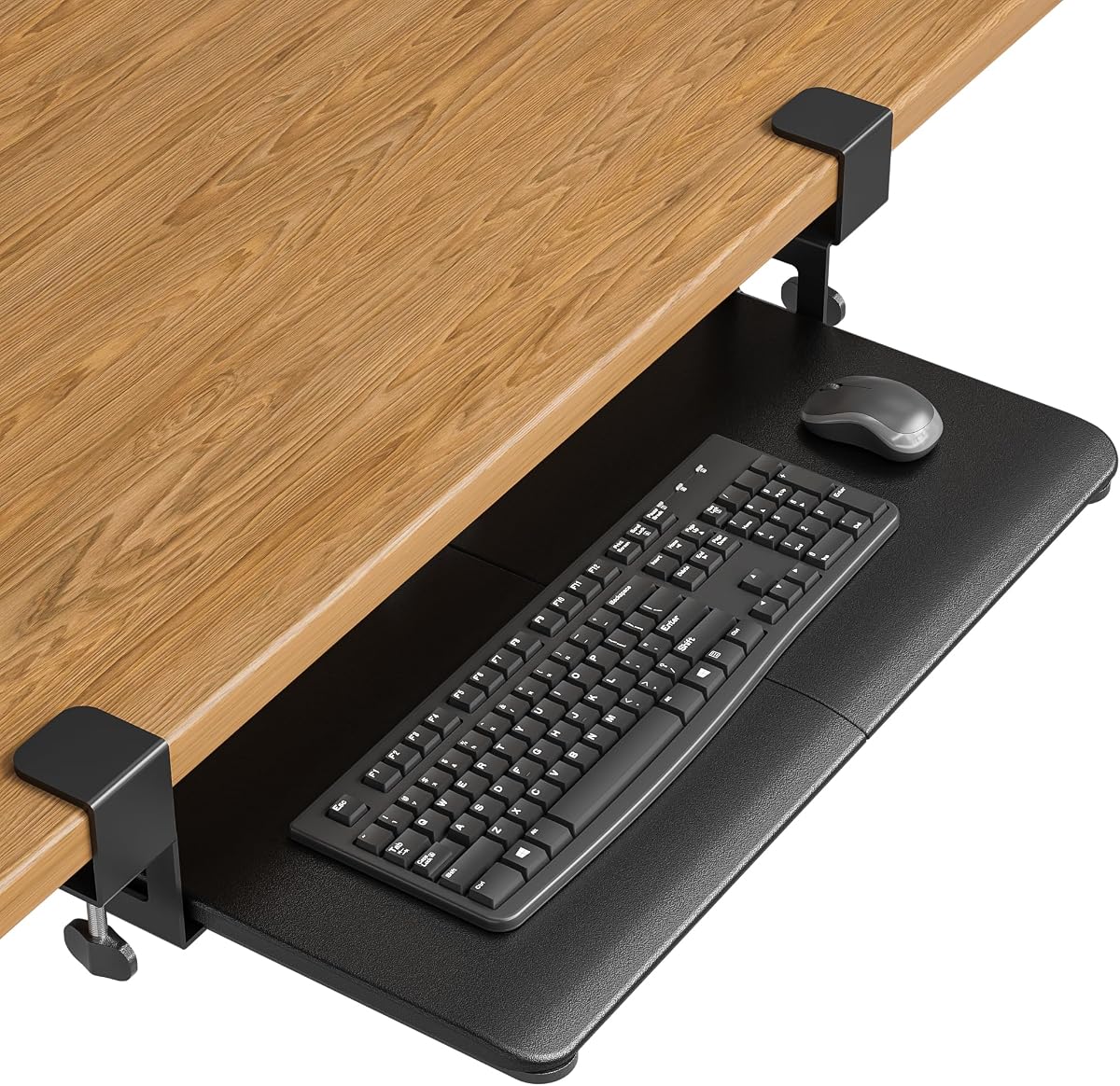


The VIVO Black Clamp-on keyboard tray stands out as the top choice for users seeking a reliable solution to organize their workspace. With a solid rating of 4.4 stars, this model consistently delivers on its promise to free up valuable desk space while maintaining stability during use.
We may earn a commission when you buy through this link, at no additional cost to you.
Its primary strength lies in its ergonomic design, which allows users to slide the tray in and out effortlessly. This feature helps relieve stress on wrists and shoulders by positioning the keyboard below the desktop. The C-clamps are sturdy and adjustable, ensuring the tray remains tightly in place without damaging the desk surface.
While the tray offers excellent performance, it does have limitations regarding desk compatibility. Users with beveled edges on their desks will find this model incompatible. Additionally, measuring the total length from clamp to clamp is essential to ensure you have enough space on your desk before purchasing.
If you are looking for a straightforward and effective way to declutter your desk, this VIVO model is highly recommended. It strikes a great balance between functionality and ease of use, making it an ideal choice for home offices and professional workspaces alike.
Positioning your keyboard below the desktop helps align your wrists and elbows at a natural height, reducing strain during long typing sessions.
By moving your keyboard and mouse under the desk, you reclaim valuable surface area for documents, monitors, and other essential office accessories.
We may earn a commission when you buy through this link, at no additional cost to you.
This VIVO model distinguishes itself with advanced adjustability features that cater to diverse user needs. With a rating of 4.3 stars, it offers a versatile solution for those who require more customization in their typing setup compared to standard trays.
We may earn a commission when you buy through this link, at no additional cost to you.
The standout feature is the height adjustment capability, which provides 2.4 inches of total adjustment across five set points. This allows users to find the perfect ergonomic angle to relieve stress on their wrists and shoulders. The width is also adjustable, ensuring a custom fit for different desk configurations.
However, the split design of the tray can make installation slightly more complex than single-piece models. Users need to ensure their desk width accommodates the total length from clamp to clamp. While the wrist pad is a nice addition, the overall setup requires careful measurement and alignment.
For users with thicker desks or those needing precise ergonomic adjustments, this tray is an excellent choice. It offers flexibility that many other models lack, making it a strong contender for specialized work environments where comfort is paramount.
The height and width adjustments allow you to tailor the tray to your specific body dimensions, promoting a healthier posture throughout the workday.
This model comes with a keyboard wrist pad and mouse wrist rest, providing immediate comfort benefits without needing additional purchases.
We may earn a commission when you buy through this link, at no additional cost to you.
The VIVO Rotating Keyboard Tray offers a unique approach to space management with its ability to pivot a full 360 degrees. This feature is particularly useful for users who need to access their keyboard from different angles or want to tuck it away when not in use.
We may earn a commission when you buy through this link, at no additional cost to you.
Its single desk clamp design simplifies installation while still providing a sturdy hold. The tray can be rotated under the desktop for discreet storage, effectively winning back space when you need to use the full desk surface for other tasks. This flexibility is unmatched by standard linear trays.
One consideration is the need for adequate clearance to rotate the tray fully, which may require around 32 inches of space around the desk. Additionally, the surface area is smaller than other models, which might not accommodate larger keyboards or additional accessories comfortably.
If you work in a shared space or need to frequently switch between using your desk for writing and computing, this rotating tray is a smart investment. It provides a clever solution to maximize utility without permanent modification to your furniture.
The 360-degree rotation allows you to move the keyboard to the side or back of the desk easily, adapting to your immediate workflow needs.
When finished typing, simply rotate the tray under the desk to clear your workspace completely for meetings or other activities.
We may earn a commission when you buy through this link, at no additional cost to you.
The BONTEC Under Desk Keyboard Tray is a popular choice for those seeking a simple and effective way to declutter their workspace. It offers a spacious platform that accommodates both keyboard and mouse, helping to create a cleaner and more organized workstation.
We may earn a commission when you buy through this link, at no additional cost to you.
Installation is straightforward with the no-drill C-clamp system, which secures the tray without damaging the desk surface. The protective pads included with the mounting system help prevent scratches and improve grip. The tray supports desks up to 1.97 inches thick, making it compatible with a wide range of office furniture.
While it performs well overall, users must ensure their desk has a flat, unobstructed underside for proper clamp installation. Curved or beveled edges can prevent the tray from fitting correctly. Additionally, checking the width requirements is crucial to avoid fitment issues upon delivery.
For budget-conscious buyers who still want quality and functionality, this tray is an excellent option. It provides all the essential features needed for ergonomic typing without unnecessary complexity or high costs.
The ergonomic position supports a more natural wrist and arm posture, reducing fatigue during long working hours at your computer.
Placing peripherals below the desktop frees up valuable space for monitors, documents, and other office accessories you use daily.
We may earn a commission when you buy through this link, at no additional cost to you.
The VIVO Premium Black Clamp-on Keyboard Tray takes ergonomic comfort to the next level with its advanced tilt adjustment features. Rated 4.3 stars, it is designed for users who demand precise control over their typing position to maximize comfort and minimize strain.
We may earn a commission when you buy through this link, at no additional cost to you.
Its most notable feature is the ability to adjust the tilt across nine different settings, ranging from positive to negative angles. This allows you to find the exact angle that suits your posture perfectly. The swivel clamps rotate independently, making it easy to install on corner or standard desk setups without damage.
The premium build quality is evident in the sturdy construction and high-quality materials used throughout the unit. However, the cost is higher than basic models, and the total length from clamp to clamp requires sufficient space on your desk. It is an investment in long-term comfort.
If you spend hours typing daily and are prone to wrist pain, this premium tray offers the flexibility needed to alleviate discomfort. It is an ideal choice for professionals who prioritize ergonomics and are willing to invest in a high-quality solution.
With nine adjustable tilt settings, you can fine-tune the keyboard angle to reduce strain on your wrists and shoulders effectively.
The swivel clamps rotate 90 degrees independently, making this model perfect for corner desks where standard trays might not fit.
We may earn a commission when you buy through this link, at no additional cost to you.
The VIVO Corner Desk Keyboard Tray is specifically engineered to fit L-shaped workstations seamlessly. With a rating of 4.2 stars, it addresses the unique challenges of installing trays on corner desks, ensuring a secure fit without compromising desk integrity.
We may earn a commission when you buy through this link, at no additional cost to you.
Its swiveling C-clamps rotate 90 degrees independently, allowing for custom placement that matches the geometry of corner desks. This feature makes it easy to secure the tray without causing damage to the desktop. The tray slides in and out smoothly, providing comfortable typing angles that relieve wrist stress.
Installation is straightforward with all hardware provided, but it is essential to check desk thickness limits as it supports up to 1.25 inches. Additionally, the model is not compatible with beveled edges, so standard flat desks are required. Despite these constraints, it fills a niche that few other models address.
For anyone struggling to find a suitable keyboard tray for their corner desk setup, this model is a reliable solution. It maximizes the utility of corner workspaces while maintaining ergonomic standards for daily computer use.
The design specifically caters to L-shaped desks, ensuring the tray stays stable even at the angled junction of the workspace.
Independent swiveling clamps allow for flexible mounting on corner desks, ensuring a tight and secure fit regardless of the angle.
We may earn a commission when you buy through this link, at no additional cost to you.
The VIVO Keyboard Tray with Pencil Drawer adds a practical storage element to the ergonomic benefits of under-desk trays. Rated 4.4 stars, it is perfect for users who want to keep their workspace organized without sacrificing desk space for accessories or documents.
We may earn a commission when you buy through this link, at no additional cost to you.
The 17-inch pencil drawer provides extra storage for small accessories, keeping pens, clips, and tools close at hand. The tray itself holds up to 11 lbs and slides smoothly for ergonomic typing. Sturdy C-clamps secure the unit tightly to the desk without causing damage or scratching.
While the addition of the drawer adds functionality, it does increase the overall weight and requires sufficient space for extension. You must measure your desk width carefully before purchasing to ensure both the tray and drawer can extend fully without obstruction. Compatibility with beveled edges is also a limitation.
If you frequently need quick access to writing tools or small office supplies, this combined unit is a logical choice. It simplifies your workflow by integrating storage directly into your typing setup efficiently and effectively.
The integrated pencil drawer keeps your writing tools organized and accessible, reducing clutter on your main desk surface significantly.
This model combines a stable typing platform with convenient storage, offering a two-in-one solution for a tidier workspace.
We may earn a commission when you buy through this link, at no additional cost to you.
This ergonomic keyboard tray offers a budget-friendly solution without compromising on essential features. With a 4.4-star rating, it provides a generous surface that accommodates your keyboard and mouse comfortably, making it an excellent choice for home offices with limited budgets.
We may earn a commission when you buy through this link, at no additional cost to you.
The adjustable dual C-clamps can securely attach to desks up to 2.76 inches thick, offering compatibility with a wide variety of desktop styles. The built-in back baffle prevents the keyboard from sliding, ensuring safe and efficient typing. The slide mechanism is upgraded to guarantee smooth extension and retraction.
While it may lack advanced features like tilt adjustments, it delivers solid performance for everyday use. The installation process is straightforward and can be completed in minutes. However, users should measure their desk to ensure compatibility with the required length before purchasing to avoid fit issues.
For those looking for a simple, effective, and affordable way to improve their workspace ergonomics, this tray is a top pick. It provides the core benefits of under-desk trays without unnecessary complexity or high costs.
You get the essential benefits of an ergonomic setup, such as reduced wrist strain, at a price point that is accessible to everyone.
The upgraded slide mechanism and back baffle ensure your keyboard stays stable and does not slide during intensive typing tasks.
We may earn a commission when you buy through this link, at no additional cost to you.
The VIVO Desk Extender is a versatile platform that can serve as a keyboard tray, printer stand, or extra storage surface. With a 4.2-star rating, it offers significant flexibility for users who need a robust solution to expand their workspace beyond standard keyboard needs.
We may earn a commission when you buy through this link, at no additional cost to you.
Its foldable design allows you to save desk space when not in use by folding it out of the way. The reinforced K-shaped brackets provide rigid support capable of holding up to 44 pounds, far more than typical keyboard trays. It installs easily with C-clamps compatible with desks up to 3.5 inches thick.
However, it does not slide in and out like traditional trays, which might be less convenient for frequent access. The setup is simple, but you must ensure your desk edges are not lipped or beveled for proper installation. The 3-year warranty adds peace of mind regarding durability.
If you need a heavy-duty platform that can adapt to different uses or accommodate heavier equipment, this extender is ideal. It is a multifunctional option that goes beyond simple keyboard storage to enhance your overall desk capacity significantly.
The 90-degree folding design lets you store the platform out of the way when not needed, keeping your workspace uncluttered and open.
With support up to 44 pounds, this platform can hold heavier items like printers or monitors, making it more versatile than standard trays.
We may earn a commission when you buy through this link, at no additional cost to you.
The Mount-It! Keyboard Tray offers a reliable and well-supported solution for under-desk setups. With a 4.4-star rating, it focuses on stability and user support, backed by a lifetime warranty that provides long-term peace of mind for buyers investing in their workspace ergonomics.
We may earn a commission when you buy through this link, at no additional cost to you.
Its clamp-on no-drill installation makes it ideal for renters or shared offices where permanent modifications are not allowed. The sturdy construction ensures a reliable sliding motion, keeping the drawer accessible while remaining stable during use. It is designed to support a neutral typing position for better posture.
While the tray offers excellent build quality, it is not compatible with glass desks due to the clamp mechanism. The price point is higher than average, reflecting the lifetime warranty and US-based product support available. These features justify the cost for those seeking long-term reliability and service.
If you value strong customer support and long-lasting durability, this tray is a solid investment. It provides the essential ergonomic benefits you need with the added reassurance of comprehensive warranty coverage and responsive support.
The lifetime warranty ensures that your investment is protected long term, offering peace of mind regarding the durability of your purchase.
The clamp-on design allows you to install the tray without drilling holes, making it perfect for renters and shared workspaces.
We may earn a commission when you buy through this link, at no additional cost to you.
Selecting the right keyboard tray depends on several factors related to your desk type and ergonomic needs. This guide outlines the key considerations to help you make an informed decision.
Before purchasing, measure the width of your desk to ensure it can accommodate the total length of the tray plus clamps. Check the thickness of your desktop as most trays have maximum limits ranging from 1.25 to 3.4 inches. Ensure your desk edges are flat and not beveled or rounded, as many clamps require a flat surface to secure properly.
Choose a tray size that comfortably fits your keyboard and mouse with room for movement. Most trays support up to 11 lbs, which is sufficient for standard equipment. If you have larger or mechanical keyboards, verify the surface dimensions to ensure they will fit without hanging over the edge.
Look for features like tilt adjustments and height settings to customize your typing position. Some models offer multiple tilt angles to reduce wrist strain. Adjustable trays allow you to find the perfect neutral posture, which is essential for preventing repetitive strain injuries during long work sessions.
Most trays use no-drill C-clamps to attach to the desk, which preserves the furniture. Some models may require specific tools or have more complex setups with multiple parts. Check if the package includes all necessary hardware and instructions before you buy to avoid delays.
If you use a corner desk, ensure the model is designed for L-shaped workstations with swiveling clamps. For those needing storage, consider models with built-in drawers. Rotating trays are useful if you need to clear the desk space frequently for other tasks.
Steel construction offers better durability than plastic options. A longer warranty period indicates manufacturer confidence in the product. Check if US-based support is available in case you encounter issues with installation or functionality after purchasing.
Swiveling or adjustable clamps provide more flexibility for different desk orientations. Ensure the clamps have non-slip pads to prevent scratching the desk. Strong grips are necessary to keep the tray from wobbling during typing.
Price varies based on features like tilt adjustments and storage. Basic models are affordable and functional, while premium options cost more for added ergonomics. Balance your budget with your specific needs to get the best value for your investment.
Keep the sliding mechanism clean by wiping away dust and debris. Use a soft cloth to clean the surface and avoid abrasive chemicals that could damage the finish. If the tray becomes stiff, apply a small amount of silicone lubricant to the slide rails to restore smooth movement.
Most clamp-on trays are not compatible with glass desks because the clamps may slip or damage the surface. You should look for models specifically designed for glass or use alternative mounting methods to ensure safety and stability. Check product specifications carefully before purchasing.
Many keyboards require flat surfaces and will not work with beveled edges. You may need to find a model that accommodates this or use a spacer to flatten the surface. Always verify compatibility details before buying to avoid returns.
Measure the thickness of your desktop at the edge where the clamp will attach. Compare this measurement with the maximum thickness listed in the product specifications. Most trays support between 1.25 to 3.4 inches of desk thickness.
Properly installed trays with protective pads should not damage your desk. Ensure the clamps are tightened securely but not over-tightened to avoid scratching. Using the provided rubber pads helps prevent abrasions.
Yes, most trays are easy to remove and reinstall without tools. However, frequent moving may loosen the clamps over time. Regularly check the tightness to ensure the tray remains stable during use.
Standard trays might be too narrow for split ergonomic keyboards. Measure your keyboard dimensions and compare them to the tray width. Some larger trays offer enough space, but check product details to confirm compatibility.
Ensure there is enough vertical space under your desk for the tray to slide in fully. Measure from the bottom of the desk to the floor to confirm sufficient height for the tray to operate smoothly without hitting the floor.
Most models come with all necessary hardware and can be installed with a basic screwdriver. Some clamps tighten by hand, while others require a small tool. Check the package contents before starting assembly.
Remember to check current availability and specifications before purchasing to ensure everything meets your requirements. With the right choice, you can transform your desk into a more organized and comfortable workstation today.