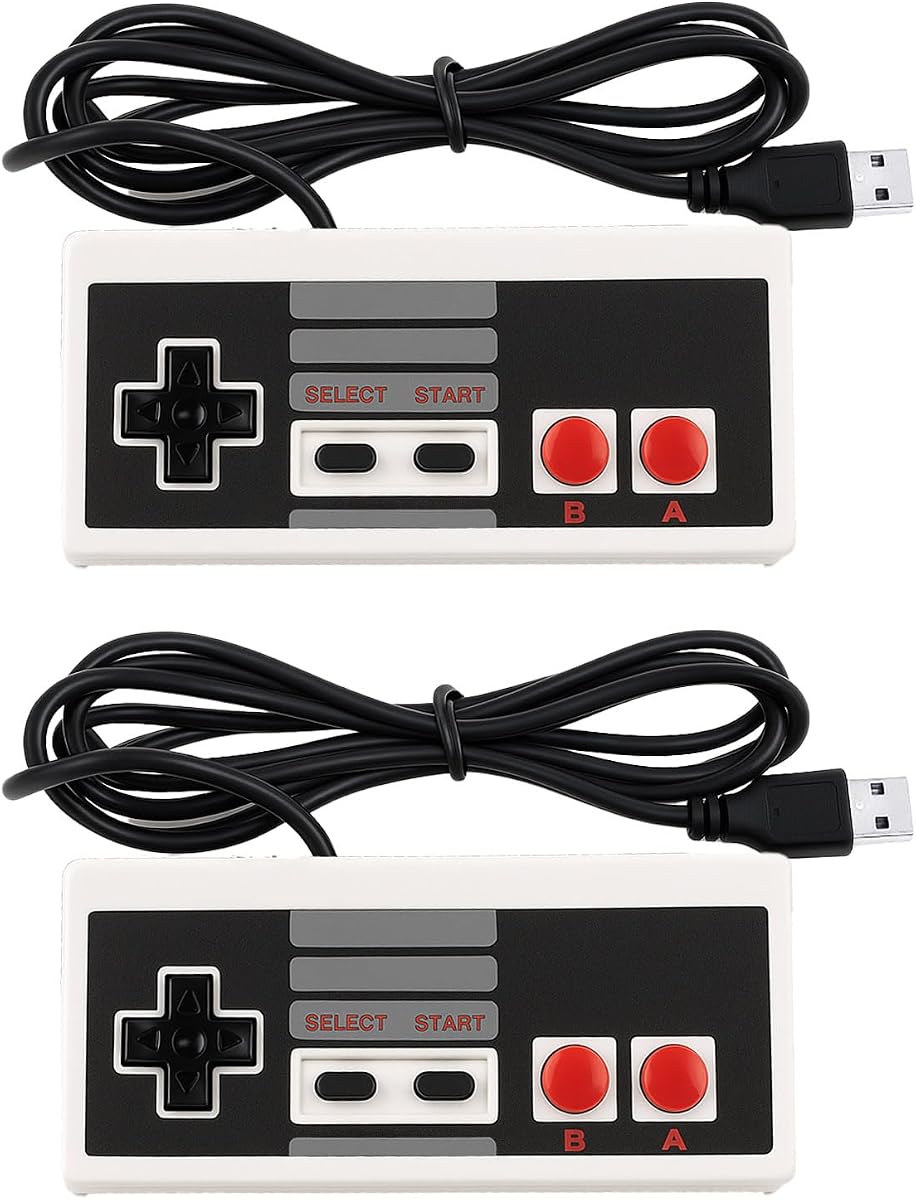
ZENANBiBi Usb Wired Controller 2-Pack for Nes Gamepad
3.8Editor score
USB Plug and Play Compatible
5.6ft Cable Length Included
Works on PC and Mac
This guide compares the best Classic Nes Controller Replacement options for gamers seeking reliable wired or wireless controllers to enhance their retro gaming
Finding the right Classic Nes Controller Replacement can transform your retro gaming setup into a seamless experience. Whether you need extra controllers for multiplayer sessions or replacements for worn out originals, quality matters greatly. Modern adapters and third party options offer varied features including long cables and wireless connectivity for convenience.
We compared ten top rated products based on compatibility, build quality, button response, and user feedback. Our analysis focuses on how well these controllers integrate with the NES Classic Mini and modern emulators. Each pick addresses different needs from budget friendly wired options to premium wireless solutions for PC gaming.
Every selection in this list highlights specific strengths and potential drawbacks to help you make an informed choice. Prices and availability change frequently so please verify current listings before purchasing. We aim to provide clear details on specs and performance to guide your decision for the best Classic Nes Controller Replacement today.
3.8Editor score

4.8Editor score

3.7Editor score
The following table provides a side by side comparison of all ten products reviewed in this guide. Each entry highlights key specifications and links to detailed reviews. Use this overview to quickly identify which Classic Nes Controller Replacement fits your specific console and gaming setup needs.


The NGHTMRE controller set offers a notable extension for Classic Mini gaming. With a 10ft cable per unit it allows players to sit further from the screen reducing eye strain. The set includes two controllers making it ready for multiplayer immediately. Ratings reflect mixed experiences regarding button sensitivity and connection stability over time.
We may earn a commission when you buy through this link, at no additional cost to you.
Its standout feature is the cable length which enhances physical comfort during long sessions. The buttons are described as sensitive providing quick response for retro titles. Both controllers can be plugged in simultaneously to the console enabling two player play without extra adapters. This makes it ideal for families seeking shared gaming moments.
While many appreciate the freedom the long cable provides some users note occasional signal loss. The build is sturdy but button feel may not match original Nintendo parts. For those prioritizing distance over premium feel this option delivers value. It suits casual play where cable reach is more important than tactile perfection.
Buy this if you need long cables for comfortable sitting distances. The two pack ensures you have spares for friends. It works best with HDMI socket models from 2016 onwards. Verify compatibility before purchase to avoid issues with older consoles or specific system versions.
The 10ft cable lets you sit back reducing glare and strain while playing classic titles comfortably on any setup.
Two controllers included mean instant two player support without needing extra purchases or adapter setups for shared gaming.
We may earn a commission when you buy through this link, at no additional cost to you.
This wireless set targets PC emulators rather than the Classic Mini console. It uses 2.4GHz technology for reliable connections without cables. The rechargeable battery lasts about 100 hours which minimizes charging interruptions. Users can set custom turbo keys for rapid fire actions in classic games. It is a solid choice for desktop retro setups.
We may earn a commission when you buy through this link, at no additional cost to you.
The wireless range allows movement across the room while playing on PC. Turbo functions add convenience for games needing rapid inputs like shooting titles. Since it works with Linux and Mac it offers broad system support. However it explicitly states incompatibility with Mini NES so buyers must check console models carefully before ordering.
Configuration may require downloading joystick mapper software to map keys properly. Some users find this extra step cumbersome but it enables customization. The lack of compatibility with Mini consoles limits its use for that specific Classic system. It remains best for PC based emulation enthusiasts who value wireless convenience.
Choose this if you play retro games on a computer or laptop. The wireless aspect removes cable clutter from your desk. Ensure your system supports the adapter and you are willing to configure software. It is not intended for the Classic Mini or Super Nintendo Mini consoles.
Enjoy playing without wires up to 10 meters away from your PC for a cleaner and more flexible gaming space.
Set rapid fire buttons easily for faster action in classic shooters or platformers requiring quick repeated inputs.
We may earn a commission when you buy through this link, at no additional cost to you.
This controller set stands out for its high satisfaction ratings among users. It features a 9 pin plug design for specific retro consoles like AV 620 and HD 821. The continuous fire button adds an edge for action games needing rapid inputs. Two controllers allow immediate sharing with friends or family for local multiplayer experiences.
We may earn a commission when you buy through this link, at no additional cost to you.
The plug and play nature means no drivers or complex setup are needed. Users appreciate the straightforward connection and reliable performance on supported systems. The continuous fire feature is a nice addition for certain game genres. It builds lasting memories for families looking to relive classic moments together without technical hurdles.
As a third party alternative it may not match original manufacturer build quality. Some users caution to confirm compatibility before purchase to avoid returns. This makes it best for owners of compatible retro consoles who need extra or replacement controllers. It is not designed for modern Mini systems or PCs directly.
Pick this if you own one of the supported retro consoles listed. The high rating indicates reliability and good user experience. The continuous fire function provides added value for specific game types. Check your console model against the compatibility notes to ensure it fits your setup correctly.
The built-in fire button lets you hold a key for rapid action without constant tapping during intense game moments.
Two controllers in the pack mean you can play together with family or friends immediately without buying extra items.
We may earn a commission when you buy through this link, at no additional cost to you.
This USB controller aims to bring retro style to modern PC and Mac setups. It features a plug and play design that avoids driver installation. The ergonomic shape and responsive buttons aim for comfort during extended gameplay. It is built with premium materials intended to last through regular use and collection display.
We may earn a commission when you buy through this link, at no additional cost to you.
The classic design evokes nostalgia for original NES play styles. It works with Windows and macOS for versatile gaming options. The 6-foot cable offers flexibility for desk setups. However current ratings suggest some users encountered issues with compatibility or build quality. Check recent reviews before purchase to gauge current performance.
While marketed for retro gaming on PC it may not suit all emulators equally. Users report mixed experiences with D-pad precision and button durability. It is a candidate for those prioritizing design aesthetics on desktop setups. Verify compatibility with your specific emulator before relying on it for serious play.
Consider this if you want a USB retro controller for desktop gaming. The no driver setup is convenient for quick starts. Ensure it matches your emulator requirements and operating system. It may be more suitable for collectors or casual play than competitive retro gaming sessions.
The nostalgic look and feel of this controller brings back memories of original retro gaming systems for modern use.
No drivers needed means you can plug it into your PC or Mac and start playing retro titles immediately.
We may earn a commission when you buy through this link, at no additional cost to you.
This pair of controllers targets PC and Raspberry Pi retro gaming specifically. It supports a wide range of operating systems including Windows Mac and Linux. The 5.6ft cable offers decent reach for most desk setups. Users can plug them into USB ports without drivers and start playing classic titles instantly on their machines.
We may earn a commission when you buy through this link, at no additional cost to you.
The design aims to replicate authentic NES feel with responsive buttons. Two units allow shared gaming with friends or family at home. It works well with Retropie systems for dedicated retro gaming consoles. However it does not support Nintendo Mini systems or Switch so compatibility must be checked carefully before purchase for those setups.
Users praise its smooth performance for iconic titles like Mario and Tetris. The two pack value makes it economical for multiplayer needs. While not intended for original consoles it bridges modern computers and retro software effectively. It suits hobbyists who want accessible controllers for emulated gaming experiences.
Choose this if you use Windows Mac Linux or Retropie for retro games. The wide compatibility covers most PC setups easily. Verify your system version to ensure support. It is a practical choice for emulators but not for physical Mini console hardware directly.
Works with Windows Linux and Mac so you can use it across different computers without needing special adapters or software.
Compatible with Retropie systems for seamless setup on dedicated retro gaming boxes or Raspberry Pi projects.
We may earn a commission when you buy through this link, at no additional cost to you.
This adapter enables Classic and SNES controllers on Nintendo systems. It allows users to play Classic and SNES games with familiar hardware. The plug and play design avoids driver installation. Built in turbo adds value for games needing rapid inputs. It connects directly to the Wii or Wii U for immediate use.
We may earn a commission when you buy through this link, at no additional cost to you.
The D-pad and stick can be exchanged to suit user preferences. This flexibility makes it useful for different game types. It is ideal for those who already own original controllers and want to reuse them. However it is not a replacement controller itself so additional hardware is needed for it to work.
While it adds versatility to Classic console use it only works on Wii U and Wii systems. Some users report mixed experiences with signal stability. It suits collectors who want to use authentic controllers on modern setups. Check console compatibility thoroughly before purchasing to avoid mismatched setups.
Consider this if you own original controllers and play on Wii U. It extends the life of older hardware effectively. Verify it matches your console model and controller type. It is a niche solution for reuse rather than a direct replacement controller.
Use your existing SNES or Classic controllers on newer systems without buying new ones or losing nostalgia.
Built in turbo allows rapid fire inputs for games that benefit from faster button pressing without custom software.
We may earn a commission when you buy through this link, at no additional cost to you.
This item is a replacement shell for Switch Joycons not a standalone controller. It brings a classic NES aesthetic to modern handhelds. The soft touch material offers a comfortable grip during play. It includes full buttons and tools for installation but requires moderate electronic skill to install correctly.
We may earn a commission when you buy through this link, at no additional cost to you.
The D-pad version improves left Joycon function for specific games. It allows customization of standard gray consoles with a retro look. Installation guidance is available through online videos to assist users. It is best for those who want visual updates rather than new controller hardware.
Since it is a housing case electronics must be sourced separately or transferred. The anti slip material helps during long sessions. While not a full controller it adds a unique flair to existing setups. Ensure you have experience with console modification before attempting installation.
Pick this if you want to customize your Switch Joycons with NES style. It appeals to collectors and modders. Check compatibility with your Switch model. It is a cosmetic upgrade rather than a functional replacement for the original controllers.
Bring back the 80s look with this custom housing that replaces boring standard colors with a classic aesthetic.
The ergonomic D-pad improves function for games that rely on directional inputs for better precision.
We may earn a commission when you buy through this link, at no additional cost to you.
This bundle offers basic accessories for the Classic system. It includes a controller, power supply, and two extension cables. This provides immediate setup capability for console owners. The cables add length for seating flexibility. However ratings indicate lower user satisfaction compared to specialized controller options.
We may earn a commission when you buy through this link, at no additional cost to you.
The power supply ensures the console can run without original hardware. Extension cables help position controllers at a comfortable distance. It suits users needing quick replacements for lost or broken parts. The controller included is standard without special features. It is a functional package rather than a premium upgrade.
Users report mixed experiences with build quality and reliability. Some feel it does not match official part standards. It may work for casual use but serious gamers may prefer dedicated controller replacements. Check if this bundle meets your needs before purchasing to avoid disappointment.
Consider this if you need a basic bundle for console power and one controller. It is economical for simple replacements. Verify all items are included in your needs. It is better suited for essential fixes than enhanced performance upgrades.
Includes essential items like power and extension cables to get your console running with minimal setup.
Longer cables provide flexibility to sit back comfortably while playing games on your screen.
We may earn a commission when you buy through this link, at no additional cost to you.
This controller is made by RDS an official Nintendo licensee. It features an action grip design for better precision and comfort. The textured silicone material enhances grip during play. It is designed to extend control and improve gameplay experience. Ratings are strong indicating satisfaction with its quality.
We may earn a commission when you buy through this link, at no additional cost to you.
The red color adds a visual distinction from standard options. It is compatible with Classic Mini systems for easy use. Build quality is considered superior to many third party alternatives. It works well for extended sessions without slipping. This makes it a reliable choice for serious retro gaming on official hardware.
Since it is a single controller you may need to buy another for two player. It does not include additional accessories beyond the unit. Some users note it adds to the official feel of the setup. Ensure it fits your color preference and control needs before purchase.
Choose this if you prefer licensed products for the console. The grip design improves handling. It is ideal for those valuing quality materials. Check availability of single vs multi pack options for multiplayer needs.
Made by an official Nintendo accessories manufacturer ensuring high quality and reliable compatibility with Classic systems.
Silicone material provides better grip for more precise control during gameplay.
We may earn a commission when you buy through this link, at no additional cost to you.
This two pack offers classic SNES style for PC and Mac emulators. It features a frosted concave cross key for anti-sweat grip. The 5ft cable ensures stable wired connections. It supports a wide range of operating systems for versatile retro gaming. Ratings indicate good user satisfaction for value and function.
We may earn a commission when you buy through this link, at no additional cost to you.
The controller is designed to fit hand contours for comfort. It works with most emulators for classic titles. However manual button mapping within emulators is required before play. This adds setup steps but allows full customization. It is ideal for enthusiasts who do not mind initial configuration.
Since it is not for the original SNES console compatibility is strictly for PC use. Some users report issues with Mac support that require contacting sellers. The value of two units at one price makes it economical for shared play. Verify emulator settings before purchasing to ensure smooth operation.
Pick this if you want SNES style on modern PCs. It is great for emulators like RetroArch or OpenEmu. Ensure your emulator supports mapping. It is a solid budget option for multiple users on one system.
The classic look and feel of a SNES controller brings nostalgia to modern desktop gaming setups.
Works with most PC emulators so you can play a wide range of retro games without restrictions.
We may earn a commission when you buy through this link, at no additional cost to you.
Selecting the right controller requires understanding your console model and gaming needs. This section outlines key factors to consider.
Verify the controller supports your specific console model such as the 2016 HDMI Classic Mini or PC emulators. Some products are designed exclusively for PC Linux or Mac and not for physical Mini consoles. Always check the product description carefully to ensure it lists your system as compatible to avoid purchasing the wrong item.
Decide between wired and wireless options based on your preference. Wired controllers offer reliable connections without battery concerns while wireless units provide freedom of movement. USB controllers need plug and play support and some may require additional adapters for certain systems. Choose the type that fits your setup best.
Consider how far you sit from your screen when selecting cable length. Some controllers come with 5.6ft cables while others offer 10ft for extended reach. Longer cables reduce strain during long sessions but may create clutter. Measure your seating distance to determine the ideal length for comfort.
Look for sturdy materials and quality construction to ensure durability. Premium options often use stronger plastics and better button mechanisms. Third party products vary so reading reviews can help gauge reliability. Investing in higher quality may prevent frequent replacements and improve overall gaming experience.
Check for special features like turbo or continuous fire buttons if needed. These can provide advantages in action games requiring rapid inputs. Standard A and B buttons should be responsive and sensitive for precision control. Some models offer customizable mappings for enhanced versatility on PC systems.
If you plan to play with others ensure you get enough controllers. Two packs are often more economical than buying individually. Verify that each controller works simultaneously without interference. This ensures seamless multiplayer experiences without additional hardware purchases or adapters.
For PC retro gaming confirm support for your emulator software. Some controllers work with RetroArch OpenEmu or VirtuaNES without drivers. Others need manual mapping or configuration tools. Ensure compatibility with your software stack to avoid setup issues when playing classic titles.
Set a budget range based on what features you prioritize. Basic wired controllers cost less than wireless sets or specialized bundles. Third party options often offer better value than official items but may vary in quality. Balance cost with desired features to find the best fit.
Connect your controller to the console or PC via USB or appropriate port. If using a PC emulator map the buttons in settings before playing for accurate controls.
Store controllers in a cool dry place to prevent wear. Avoid excessive bending of cables and keep them away from sharp objects to maintain durability.
Regularly clean the surface with a soft dry cloth. For wireless models charge batteries as needed and avoid using during low charge to ensure consistent performance.
Most products in this guide are designed for the 2016 Classic Mini or PC emulators and not the original 1985 NES console. Check product descriptions to confirm compatibility with older hardware if you need it.
Some options are designed for PC or Mini systems and not Switch. One item is a housing for Switch Joycons not a full controller. Verify system compatibility before purchase to ensure it fits your hardware.
The maximum cable length available in this selection is 10ft which provides extended reach for comfortable seating. Other options offer 5.6ft or 6ft cables so choose based on your distance needs.
Most controllers listed are plug and play with Windows Mac and Linux requiring no driver installation. Some may need configuration software for emulator mapping but standard operation typically works immediately.
The ZAMPAM 2.4GHz wireless controllers are the best wireless option supporting PC and Mac with rechargeable batteries and 100 hour life. They provide freedom of movement but are not for Mini consoles.
Several controllers including ZENANBiBi are compatible with RetroPie systems for seamless setup on Raspberry Pi. Always verify system requirements before purchase to ensure smooth operation.
We have reviewed ten options ranging from budget friendly to premium choices. The NGHTMRE, ZAMPAM, and happymaxplus models stand out for their unique features and reliability across different needs.
Prioritize compatibility and cable length to match your setup and seating preference. For PC gaming wireless units offer convenience while wired sets provide stable performance. Ensure you select the type that fits your console and play style.
Prices and availability change frequently so check current listings before purchasing. Verify all specifications to avoid mismatches. We hope this guide helps you find the perfect Classic Nes Controller Replacement for your gaming setup.