
Calibrite Display 123
4.0Editor score
Easy one two three workflow
Supports two displays
Compact USB C connection
Find the best colorimeter for monitor calibration with our detailed guide comparing top tools for accuracy, speed, and compatibility across all display types.
Calibrating your display is essential for creators who need true colors. A reliable colorimeter for monitor calibration ensures your edits match the final output across devices.
We compared ten leading tools based on sensor quality, software ease, and support for modern panels like OLED and Mini LED to help you choose confidently.
Each pick shows unique strengths for different workflows. Prices change frequently, so check current listings for the most up to date availability and value.
4.0Editor score
4.5Editor score

4.0Editor score
This side by side comparison highlights key specifications and features across all ten tools to help you find the right fit for your setup.


The Calibrite Display 123 is a straightforward colorimeter for monitor calibration designed for creators who need reliable color without complexity. It holds a solid rating and stands out for its easy setup and quick workflow that minimizes learning curves.
We may earn a commission when you buy through this link, at no additional cost to you.
Its Easy 1 2 3 software workflow guides you through calibration steps so you can achieve accurate tones quickly. The USB C connection ensures compatibility with modern laptops while the compact body fits easily in travel bags for on the go editing.
While it lacks advanced HDR or OLED specific features the built in before and after check helps verify improvements instantly. This trade off is acceptable for users focused on standard photo editing where basic color accuracy is the primary goal.
Photographers and hobbyists seeking an affordable entry point will find this kit ideal for maintaining consistent colors across sessions without spending on high end tools.
The guided workflow removes guesswork allowing anyone to calibrate confidently regardless of technical experience.
Supporting two displays ensures consistent color across your workspace for seamless editing experiences.
We may earn a commission when you buy through this link, at no additional cost to you.
The Calibrite Display Plus HL is a top tier colorimeter for monitor calibration built for professionals working with bright HDR OLED and Mini LED displays. Its advanced HL sensor measures up to 10000 nits ensuring accuracy even on the most demanding screens.
We may earn a commission when you buy through this link, at no additional cost to you.
Included PROFILER software offers both basic and advanced modes giving you full control over white point gamma and contrast ratios. Validation tools like Quick Check and Uniformity Check help you trust the results while broadcast standards support ensures video workflows stay consistent.
The advanced feature set may be more than casual users need and the price reflects this premium positioning. However for video editors and colorists the ability to maintain consistent highlights and blacks is invaluable for professional output quality.
If you work with high brightness displays or require precise video grading this tool delivers the performance and reliability needed for studio environments.
Measuring up to 10000 nits allows accurate calibration for HDR content creation and monitoring.
Custom patch sets and shared presets help teams maintain unified color standards across devices.
We may earn a commission when you buy through this link, at no additional cost to you.
The datacolor Spyder offers a balanced mix of speed and accuracy making it a strong choice for creators who value workflow efficiency. It receives high marks for its DevicePreview Beta feature that simulates how images will appear on other devices directly on your screen.
We may earn a commission when you buy through this link, at no additional cost to you.
The ambient light sensor tracks room conditions and adjusts brightness to maintain optimal viewing levels automatically. This adaptability ensures your edits remain accurate even as lighting changes throughout the day without requiring manual recalibration sessions.
While it excels in ease of use some advanced users may find the preset options limiting compared to more configurable competitors. Still the fast 90 second start time and modern display compatibility make it accessible for a wide audience.
Hybrid photographers and designers needing quick reliable color adjustments without complex settings will appreciate this tool smart approach to everyday calibration needs.
Previewing device output on your calibrated screen reduces guesswork before final export or delivery.
Automated brightness adjustments based on ambient light keep color consistency throughout the day.
We may earn a commission when you buy through this link, at no additional cost to you.
The Calibrite Creator Kit combines monitor calibration with capture control making it perfect for hybrid creators who handle both photos and video. With a perfect user rating this kit simplifies color management from shooting to final edit through its included ColorChecker Passport Video 2.
We may earn a commission when you buy through this link, at no additional cost to you.
Passport Video 2 helps set accurate white balance and exposure on set ensuring footage matches your calibrated display later. The Display 123 ensures your screen shows true colors so grading decisions remain consistent across different viewing environments and devices.
If you only edit photos this kit might include more tools than needed but for videographers it eliminates guesswork during color grading. The unified system reduces trial and error and helps maintain professional results across multiple sessions.
Content creators who want reliable color standards from capture through post production will find this comprehensive kit worth the investment for streamlined workflows.
Combining capture and calibration tools reduces errors and speeds up the entire production pipeline.
Accurate white balance at capture time makes grading easier and more consistent in post.
We may earn a commission when you buy through this link, at no additional cost to you.
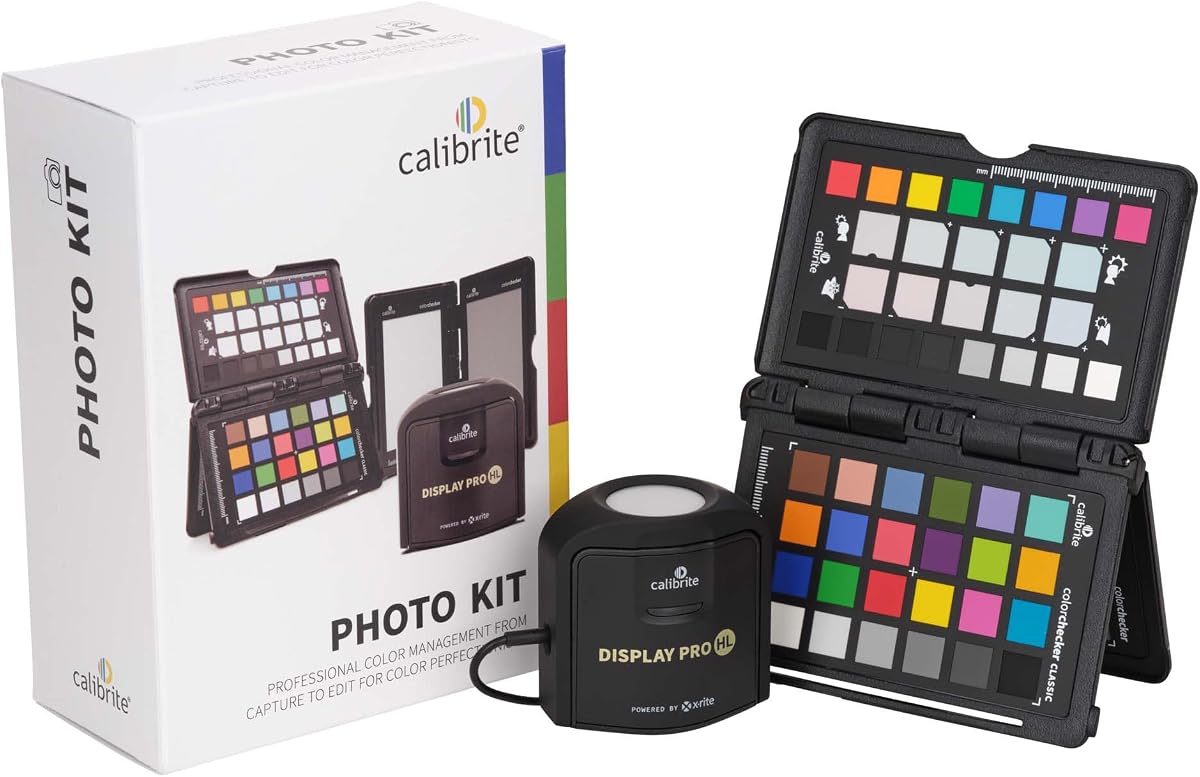
The Calibrite Photo Kit merges high end monitor calibration with camera profiling to create a seamless workflow for photographers. Featuring the Display Pro HL it handles modern mini LED OLED displays ensuring you see true tones while editing RAW files.
We may earn a commission when you buy through this link, at no additional cost to you.
The included ColorChecker Passport Photo 2 enables custom camera profiles that improve white balance and exposure consistency before you start editing. This reduces unwanted color shifts and ensures your edits match the intended look from capture to delivery.
While the kit is tailored toward photography the display calibration alone is powerful enough for video or design work. Photographers will appreciate how it reduces guesswork and maintains reliable results across different locations and lighting conditions.
Those seeking a complete solution for capturing and editing accurate colors will value the combined capabilities and professional control this kit provides.
Custom profiles from Passport Photo 2 ensure RAW files start from a reliable color baseline.
Display Pro HL ensures modern screens show accurate highlights and shadows for precise editing.
We may earn a commission when you buy through this link, at no additional cost to you.
The Calibrite ColorChecker Display Pro is a trusted tool known for its high repeatability across different display types. Its optical design ensures consistent color profiling whether you are calibrating laptops or desktop monitors which is essential for shared workspaces.
We may earn a commission when you buy through this link, at no additional cost to you.
The rotatable diffuser arm serves multiple purposes including projector profiling on top of tables and ambient light measurement. An integrated tripod mount extends its utility to larger venues making it a versatile choice for presenters or educators managing multiple displays.
While it lacks modern ambient light sensors the hardware reliability and software flexibility with ccProfiler make it a solid option for many users. Those needing dependable profiling across varied setups will appreciate its consistency.
Professionals managing mixed display environments or requiring projector calibration will find this tool delivers trustworthy results without unnecessary complexity.
High repeatability ensures your calibration data remains stable across different devices and sessions.
The rotatable arm and tripod mount allow accurate projection calibration in larger meeting spaces.
We may earn a commission when you buy through this link, at no additional cost to you.
The Datacolor Spyder5PRO remains a favorite for photographers prioritizing print matching and display analysis. With full calibration taking about five minutes it offers quick turnaround while room light monitoring ensures brightness settings suit your environment.
We may earn a commission when you buy through this link, at no additional cost to you.
Its before and after evaluation lets you assess improvements using your own images helping you focus on details that matter. The display analysis feature compares performance across monitors which is useful when managing multiple setups for different clients or tasks.
While newer models offer OLED support this veteran tool still delivers reliable results for standard LCD displays. For those with existing printers or workflows built around its software the familiarity and print focus remain valuable.
Photographers and designers seeking a proven tool for print accuracy and quick calibration sessions will find this model continues to perform well.
Room light monitoring helps ensure edited images match printed outputs by adjusting brightness appropriately.
Compare multiple monitors to ensure consistency across your entire workspace.
We may earn a commission when you buy through this link, at no additional cost to you.
The ASUS ProArt CaliContrO stands out for combining color calibration with hardware OSD control and an ASUS Dial for software shortcuts. Measuring up to 10000 nits it supports high brightness displays making it a unique all in one tool for ASUS workstation users.
We may earn a commission when you buy through this link, at no additional cost to you.
The 5-way navigator and shortcut keys provide intuitive control without reaching for menus while the reversible USB-C connection simplifies setup. Integration with the ASUS Dial allows customized shortcuts for creative software enhancing workflow efficiency.
However the low user rating suggests potential compatibility or reliability issues that may affect some users. Those already deep in the ASUS ecosystem may find value but others should consider more established alternatives.
ASUS workstation owners seeking hardware OSD control and custom shortcuts may appreciate this tool while potential buyers should weigh reviews carefully.
Built-in hardware control simplifies monitor adjustments during calibration and daily use.
ASUS Dial integration provides custom shortcuts that can speed up editing workflows significantly.
We may earn a commission when you buy through this link, at no additional cost to you.
The Datacolor Spyder4Pro brings improved accuracy and stability to budget conscious users needing reliable calibration. Double-shielded color filters align closely with CIE standards offering consistency across units that ensures predictable results regardless of which device you use.
We may earn a commission when you buy through this link, at no additional cost to you.
Its ReCAL assistant makes it quick and easy to recalibrate your display to compensate for changes over time without running a full calibration. This feature extends the useful life of your settings while saving time between sessions.
While newer models offer faster speeds the Spyder4Pro remains a solid entry level choice for those with standard displays. The stability and recalibration features provide long term value despite being an older generation.
Budget focused creators who need dependable color without high costs will find this tool delivers consistent results with minimal fuss.
Double-shielded filters ensure accuracy matches CIE standards for reliable color reproduction.
ReCAL feature allows fast adjustments to compensate for gradual display changes over time.
We may earn a commission when you buy through this link, at no additional cost to you.
The Datacolor Spyder X Pro is designed for first-time users who want professional results without mastering complex settings. Its groundbreaking lens-based color engine provides precise shadow detail and white balance across multiple monitors ensuring accurate color for photographic work.
We may earn a commission when you buy through this link, at no additional cost to you.
Wizard workflow with 12 predefined targets simplifies the process so you don need need to be a color expert. SpyderProof functionality lets you evaluate results using your own images making it easy to see the difference after calibration.
Room light monitoring ensures your screen brightness adapts to your environment improving comfort and accuracy over time. While it sits at a mid-range price the ease of use and accuracy make it a strong contender for beginners.
New photographers and designers seeking an intuitive yet accurate tool will appreciate how quickly this device improves their color workflow.
Intuitive wizard and presets make professional color calibration accessible to anyone.
SpyderProof allows you to see calibration improvements using your own actual images.
We may earn a commission when you buy through this link, at no additional cost to you.
Selecting the right colorimeter depends on your display technology, software needs, and workflow complexity. This guide outlines key factors to help you make an informed decision.
High quality sensors with multi-channel or lens-based designs provide better accuracy across different color spaces. Look for tools that support modern CIE standards and offer repeatable results to ensure your edits match outputs reliably.
Prioritize sensors with proven stability to avoid drift over time.
Modern displays like OLED, Mini LED, and XDR panels often require higher luminance measurement capabilities. Ensure the colorimeter supports your display type to capture accurate highlights and blacks especially for HDR content.
Check product specs to confirm support for your specific monitor technology.
Intuitive software with guided workflows helps beginners achieve accurate results quickly. Professionals may need advanced options like custom white points, gamma settings, or preset sharing for team consistency.
Select software that matches your technical comfort level and workflow requirements.
Tools with built-in ambient light sensors adjust brightness to match your environment, reducing eye strain and color shifts. This feature is crucial for creators working in variable lighting conditions throughout the day.
Opt for devices with automatic light adjustment for consistent viewing.
If you use multiple monitors for editing, choose a colorimeter that calibrates more than one screen to maintain color consistency across your workspace. This is vital for split-screen editing or reference setups.
Verify the tool supports dual or multi-monitor profiling.
For photographers, kits including camera profiling tools create a seamless capture to edit workflow. This ensures that what you shoot matches what you see on your calibrated display.
Consider bundles if you need both capture and display calibration.
Compact designs and travel pouches are beneficial for on-location work. A small footprint and USB C connectivity make it easier to carry the tool to different workstations.
Look for rugged builds if you frequently travel with your gear.
Balance cost with features to find the best value. Basic models offer sufficient accuracy for standard editing while premium tools provide advanced capabilities for specialized workflows.
Invest in a device that meets your current needs without unnecessary extras.
Start by installing the companion software and connecting the colorimeter via USB. Allow your monitor to warm up for at least thirty minutes before calibration to ensure stable color output and accurate readings.
Place the device gently on your screen ensuring it covers the sensor area without tilting. Follow the software prompts to select your target settings such as white point or gamma and run the calibration sequence.
Store the colorimeter in its protective case when not in use to prevent dust or damage. Recalibrate every few months or when your lighting environment changes to maintain consistent color accuracy over time.
A colorimeter ensures your screen displays accurate colors so edits look consistent across devices. Without calibration, monitors can show incorrect tones leading to surprises during printing or sharing.
Most professionals recalibrate every month to maintain accuracy. Home users may find quarterly calibration sufficient unless their lighting conditions change frequently.
Not all devices support every display technology. Check product specs to confirm compatibility with OLED, Mini LED, or high brightness panels before purchasing.
Software calibration adjusts system settings while hardware calibration modifies the monitor's internal LUT for more precise control. Hardware is preferred for professionals needing high accuracy.
Yes, many colorimeters support laptops with USB connections. Ensure the software is compatible with your operating system for full functionality on portable displays.
Yes, changing light can alter perceived brightness and color. Tools with ambient light sensors help adjust your display to maintain consistency in varying room conditions.
Most leading brands offer cross-platform software. Always verify system requirements on the product page to ensure your device runs the necessary calibration tools.
A color profile defines how colors appear on your display ensuring consistency. It helps translate colors accurately across different devices so your work looks the same everywhere.
Our top picks highlight a range of options from budget friendly tools to professional grade solutions. Whether you need simple speed or advanced control, there is a colorimeter for monitor calibration that fits your workflow.
Prioritize sensors that match your display technology and software that suits your comfort level. Accuracy and repeatability should guide your choice over price alone for long term satisfaction.
Check current listings for availability and ensure you select a tool that meets your specific creative or technical needs today.