
Yamaha MGX12
5.0Editor score
Versatile I/O and Bluetooth audio
Built-in DSP processor
USB HDMI interface for video
This guide compares the top ten digital mixing consoles for live sound and studio use, evaluating performance, features, and reliability for professional audio
Digital mixing consoles have revolutionized the way audio engineers handle sound in both live and studio environments. These sophisticated devices offer precise control over multiple audio channels, allowing for complex routing and processing that analog boards simply cannot match. Whether you are managing a small worship team or a large concert venue, finding the right console is crucial for achieving professional sound quality.
We have carefully selected ten of the most highly rated digital mixing consoles available on the market today. Each product has been evaluated based on its input capacity, sound quality, ease of use, and connectivity options. Our goal is to provide you with a comprehensive overview that helps you make an informed decision based on your specific audio mixing needs and budget constraints.
Every pick in this list highlights unique strengths that cater to different user scenarios and technical requirements. You will find detailed breakdowns of features, pros, and cons for each model to ensure transparency. Please note that availability and pricing can fluctuate over time, so we recommend checking the latest details before making your final purchase decision.
5.0Editor score

4.7Editor score

4.2Editor score
This side-by-side comparison highlights the key specifications of each digital mixing console to help you quickly identify the model that fits your workflow.



The Behringer X32 stands out as a leading choice in the digital mixing console market. It boasts an impressive 40 input channel capacity and 25 bus system which makes it ideal for complex live sound environments. With a rating of 4.7 stars users appreciate its robust features and reliable performance over time.
We may earn a commission when you buy through this link, at no additional cost to you.
Its standout quality lies in the 32 MIDAS designed fully programmable mic preamps. These provide audiophile sound quality that is often found in much more expensive consoles. The 25 fully automated motorized 100 mm faders allow for instant overview and powerful scene management which is critical during live shows.
While the X32 is powerful it does have a learning curve for those new to digital mixing. The sheer number of controls and options can be overwhelming at first. However the individual and dynamic LCD Scribble Strips on all channels and buses creating easy assignment and intuitive channel distinction which helps mitigate this issue.
This console is best suited for professional audio engineers and advanced users who need deep control over their mixes. It is perfect for churches theaters and live music venues. If you prioritize sound quality and flexibility the X32 is a top recommendation.
The MIDAS preamps ensure every microphone input is captured with clarity and minimal noise floor.
Motorized faders and recall scenes allow for quick setup changes between different shows.
We may earn a commission when you buy through this link, at no additional cost to you.
The Yamaha DM3 Standard brings renowned Yamaha sound quality to an ultracompact form factor. It features a 96kHz sample rate that ensures high fidelity audio processing. With a rating of 4.4 stars it is well regarded for its size and performance capabilities.
We may earn a commission when you buy through this link, at no additional cost to you.
This console offers 22 channels consisting of 16 mono and 1 stereo plus 2 stereo FX returns. The 16 Professional Yamaha Preamps provide clean gain and low noise. The Best in Class 9 inch Touch Screen makes navigation intuitive and easy even for those new to digital boards.
The main trade-off is the limited channel count compared to larger consoles. It may not suit very large venues with many inputs. However the 18×18 USB Audio Interface for playback and recording and 2×2 USB recorder make it a versatile choice for smaller setups and recording tasks.
Ideal for smaller live bands and installed systems the DM3 Standard balances power and portability. Its compact design fits easily into tight spaces. If you need high quality sound without the bulk this is a strong contender.
The 96kHz sample rate captures audio with exceptional detail and clarity.
The large touch screen simplifies routing and effect adjustments.
We may earn a commission when you buy through this link, at no additional cost to you.
The Behringer WING represents the pinnacle of digital mixing with its 48 channel and 28 bus architecture. It features 8 award-winning Midas PRO mic preamps and 8 Midas PRO outputs onboard for top tier sound. The rating of 4.2 reflects its advanced capabilities and professional appeal.
We may earn a commission when you buy through this link, at no additional cost to you.
This console stands out for its Plug and play remote I/O connectivity for up to 144 input and output signals over 3 AES50 ports. This utilizes Klark Teknik s SuperMAC technology for ultra-low jitter and latency. The 24 motorized 100 mm faders in 3 separate fully configurable sections offer precise control.
The primary downside is the cost and complexity involved in setting up the remote I/O. It requires understanding network protocols which might be challenging for some users. The Large main display with capacitive touch screen and adjustable display swivel helps manage this complexity effectively.
The WING is designed for large scale productions and professional audio engineers. If you need extensive routing and high channel counts this console delivers. Its unique touch-sensitive channel editing section with 11 rotary controls ensures you stay on top of all channel properties.
Supports up to 144 signals via AES50 for massive setups.
Touch sensitive controls with TFT display for quick parameter changes.
We may earn a commission when you buy through this link, at no additional cost to you.
The Yamaha MGX12 is an affordable digital mixing console that does not compromise on features. It features a 4.3 inch touchscreen with 5 control knobs for easy operation. With a perfect 5.0 rating it is highly praised for its value and functionality.
We may earn a commission when you buy through this link, at no additional cost to you.
Its versatile I/O includes new MGX preamps with 86 dB gain range and Bluetooth audio input. The Built-in DSP processor ensures professional sound and latency-free monitoring. A standout feature is the USB-HDMI interface featuring 4K video capture and pass-through making it unique for streamers.
The main limitation is the channel count compared to higher end models. It may not suit large events. However Assistive features like Simple/Standard Mode Auto Gain Clip Safe Scene Recall make it incredibly user-friendly. This is ideal for those entering digital mixing.
For small events and streamers the MGX12 offers great value. The included software bundle like Cubase Al and WaveLab Cast LE adds to its appeal. If you want a capable budget console with modern connectivity this is a top pick.
Video capture and USB-C make streaming setups seamless.
Simple and Standard modes help beginners get started quickly.
We may earn a commission when you buy through this link, at no additional cost to you.
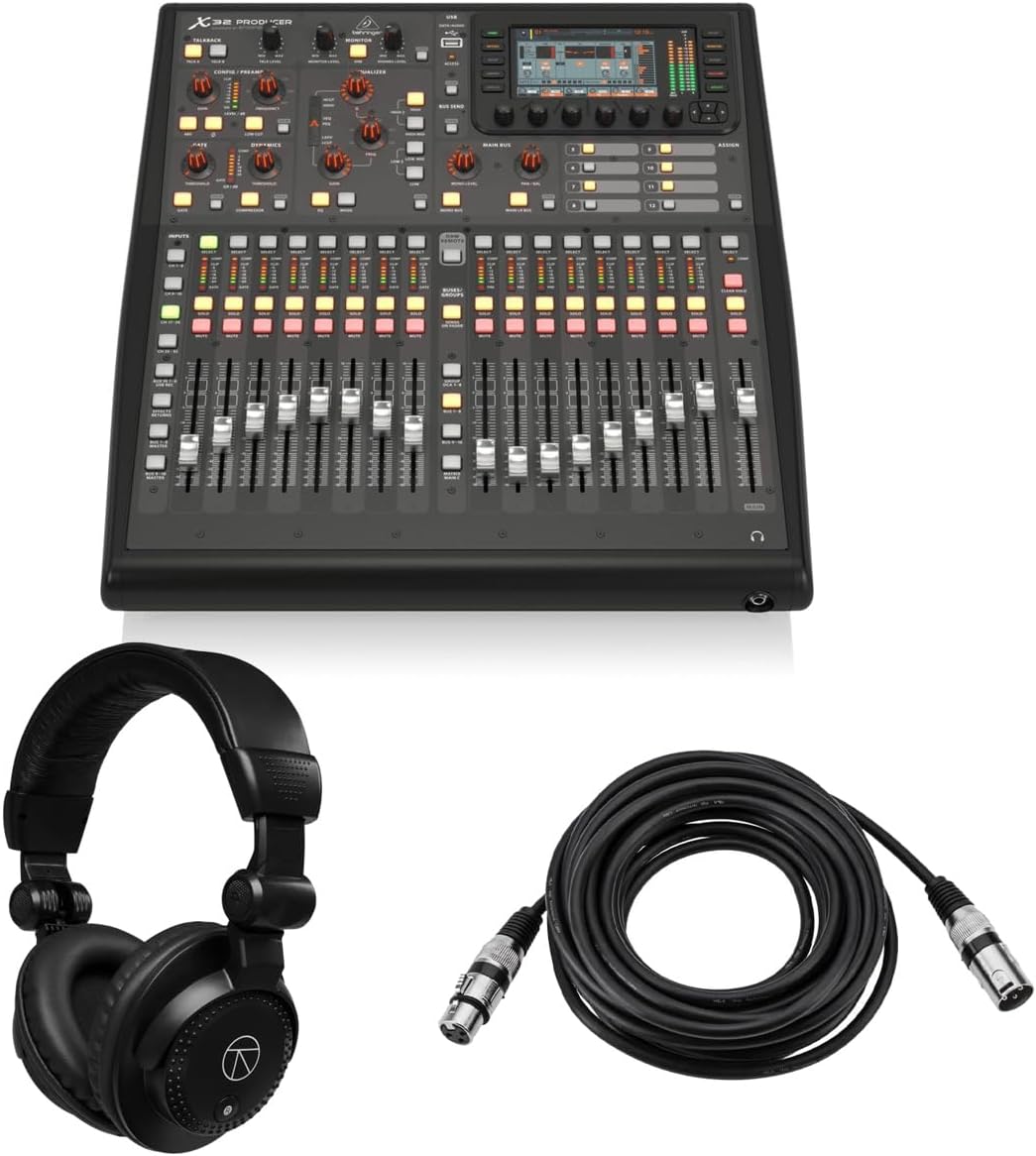
The Behringer X32 PRODUCER brings the power of the X32 into a rack mountable form. It includes 16 programmable MIDAS Preamps and 24-bit/48 kHz conversion for pristine audio. The 5.0 rating highlights its reliability and value especially with included accessories.
We may earn a commission when you buy through this link, at no additional cost to you.
This bundle includes closed-back studio monitor headphones and a 25 foot XLR microphone cable. It manages complex audio setups with 40 input channels 25 buses and 16 XLR balanced mic inputs. The Powerful built-in effects feature 8 true-stereo and 16 mono internal effects engines.
The lack of motorized faders is a trade-off compared to the full X32. However the high-resolution 5 inch day-viewable Color TFT makes navigation easy. The Robust durability ensures consistent performance for live and studio applications in demanding environments.
Ideal for touring and small production spaces the Producer saves rack space without losing power. The 17 motorized faders and 100 total recall scenes ensure efficient operation. If you need a portable X32 experience this is the best choice.
Headphones and cables included save additional purchasing costs.
Compact design fits into standard racks for mobile setups.
We may earn a commission when you buy through this link, at no additional cost to you.
The BEHRINGER X32 COMPACT is a compact version of the popular X32. It offers 40 input channel and 25-bus digital mixing console for Studio and Live application. With a rating of 4.7 it retains the core features in a smaller form factor.
We may earn a commission when you buy through this link, at no additional cost to you.
It features 16 MIDAS-designed fully programmable mic preamps for audiophile sound quality. The 17 Fully automated motorized 100 mm faders allow for instant overview and powerful scene management. The Individual and dynamic LCD Scribble Strips on all channels and buses creating easy assignment and intuitive channel distinction.
The compact size reduces the footprint but also reduces some physical controls. This can be a learning curve for those used to the full model. However the core routing and sound engine remain identical to the larger version ensuring professional results.
Best for small venues or mobile setups the Compact is efficient and powerful. It fits easily in smaller transport cases. If you need the X32 power but have space constraints this console is a solid option.
Same sound engine as the full X32 for consistent quality.
Reduced width makes it ideal for small stages.
We may earn a commission when you buy through this link, at no additional cost to you.
The PreSonus StudioLive Classic 16.0.2 is a trusted digital console known for its Fat Channel signal processing. It includes 16 channel inputs with 60 mm faders. With a rating of 3.9 it offers a classic mixing experience at a competitive price point.
We may earn a commission when you buy through this link, at no additional cost to you.
Its key feature is the Fat Channel on all channels and buses with 3-band semi-parametric EQ compressor downward expander and limiter. The 18-in/16-out USB 2.0 audio interface records all channels and main L/R mix. Software includes PreSonus Studio One Artist DAW and Capture live-recording software.
The main con is its age compared to newer models. It may lack some modern connectivity options like Wi-Fi or high sample rates. However the Scene and individual settings store and recall provide quick workflow adjustments. This makes it reliable for consistent sound.
Ideal for home studios and small venues the Classic is a workhorse. If you prefer physical control over touchscreens it fits well. The included software adds significant value for recording and mixing.
Comprehensive EQ and dynamics on every channel.
Includes DAW and recording tools for a complete setup.
We may earn a commission when you buy through this link, at no additional cost to you.
The Behringer X AIR XR18 is an iPad and Android tablet controlled mixer for studio and live application. It features 16 award-winning MIDAS-designed fully programmable mic preamps. With a rating of 4.6 it is highly appreciated for its remote control capabilities.
We may earn a commission when you buy through this link, at no additional cost to you.
Its Built-in Tri-mode Wi-Fi router allows direct operation without external routers. This offers great flexibility. The 18 x 18 channel bidirectional USB interface supports direct recording on iPad. Outputs include Main 2 x XLR and 12 buses for routing.
The main trade-off is the lack of physical faders and controls on the unit itself. You must use a tablet to control it. However this makes it incredibly portable. Revolutionary Dugan-style Auto-mixing will help manage microphone gain sharing in future firmware.
Perfect for mobile setups and small stages the XR18 saves space. It allows mixing from anywhere in the room. If you prefer wireless control and portability this is a top choice.
Built-in Wi-Fi removes the need for extra hardware.
USB connection allows direct recording without an interface.
We may earn a commission when you buy through this link, at no additional cost to you.
The Allen & Heath Qu-5 delivers exceptional audio quality with 96kHz XCVI FPGA Processing. It provides the power and performance needed for professional live sound and recording. The rating of 4.5 reflects its robust build and high performance.
We may earn a commission when you buy through this link, at no additional cost to you.
It features a flexible mixing architecture with up to 38 inputs to mix and 12 configurable mixes. The 16 XLR/TRS combi mic-line inputs and 12 XLR outputs offer extensive connectivity. Integrated Recording and Effects include 6 multi-FX engines and dedicated returns.
The main con is the higher price compared to entry-level consoles. However the ultra-low latency and superior sound justify the cost. The Intuitive Workflow and Control featuring a 7-inch capacitive touchscreen and 17 motorized faders ensure efficient operation.
Ideal for professional audio users the Qu-5 is a high-performance choice. If you need high fidelity and reliability for installed audio this console excels. Its USB-C multitrack recording supports modern workflows.
Ultra-low latency processing for real-time performance.
USB-C supports 32-channel capture for complex sessions.
We may earn a commission when you buy through this link, at no additional cost to you.
The QSC TouchMix-16 is a compact digital mixer with a bag included for transport. It features 20 Full Function Inputs including mic and line options. With a rating of 4.4 it is valued for its ease of use and bundled accessories.
We may earn a commission when you buy through this link, at no additional cost to you.
It offers 6 Aux XLR outputs and 2 stereo TRS outputs for flexible monitoring. The 4-band full parametric EQ and variable high-pass and low-pass filters on all input channels ensure precise sound shaping. Each channel includes gate and compressor for dynamic control.
The main limitation is limited outputs compared to larger models. However it is perfect for smaller setups. The TRS Aux outs drive wired In Ear Monitors directly which is convenient. The carrying bag protects the console during travel.
Ideal for small events and solo musicians the TouchMix-16 offers convenience. If you need a ready-to-go solution with essential processing this bundle is perfect.
Parametric EQ and dynamics on every channel.
Included bag ensures safe travel for events.
We may earn a commission when you buy through this link, at no additional cost to you.
Choosing the right digital mixing console depends on several key factors that align with your specific audio needs.
Determine how many inputs you need based on your setup. For small bands a 16 to 22 channel console may suffice. For larger events 32 to 48 channels are often required to handle multiple instruments and microphones simultaneously.
Always choose a console with more channels than you currently need to allow for future expansion.
The mic preamps dictate the initial sound quality. Look for consoles with branded preamps like MIDAS or Yamaha. These provide cleaner gain and lower noise which is crucial for professional audio.
High quality preamps reduce the need for external processing later in the signal chain.
Check for USB audio interfaces for recording and MIDI I/O for software control. Modern consoles should support high sample rates like 96kHz for studio quality. Network connectivity like AES50 allows for remote stage boxes.
Versatile connectivity ensures you can connect to computers and digital audio workstations seamlessly.
Decide between touchscreens and physical knobs. Touchscreens are efficient for routing but physical faders are essential for live mixing. Some consoles offer both hybrid options.
A balanced interface reduces learning time and improves workflow during live performances.
DSP processing allows for onboard EQ dynamics and effects. Look for consoles with ample processing per channel to avoid external gear. Real-time processing ensures zero latency monitoring.
Strong DSP capabilities enable you to shape sound directly on the console.
Consider the size and weight of the console. If you tour frequently a rack mountable or compact design is beneficial. Ensure it fits in your existing vehicle and case setup.
Lightweight consoles are easier to transport and set up at different venues.
Set a realistic budget that includes accessories like cables and headphones. Entry level models offer great value while premium models offer high channel counts. Balance features against your financial limits.
Invest in a console that offers the best value for your specific application.
Check if the console comes with recording software and mobile apps. Good customer support and active user communities help troubleshoot issues. Regular firmware updates improve performance and add features.
Robust software support extends the life and utility of your investment.
Start by organizing your inputs clearly using the Scribble strips or digital labels. Connect your microphones and line inputs ensuring cables are secure. Adjust gain on each channel using the preamp gain knob to maximize level without clipping.
Use the scene memory features to save different configurations for various songs or segments. This allows you to recall specific mixes instantly during live shows. Regularly test your setup in a quiet environment to catch any issues before going live.
Store the console in a cool dry place away from direct sunlight. Cover it when not in use to prevent dust accumulation. Clean the screen and faders with a soft cloth and avoid harsh chemicals to maintain the hardware.
Digital mixing consoles process audio signals numerically allowing for precise editing and recall. Analog consoles use electrical signals which are less flexible but often simpler. Digital consoles save scenes and settings which is impossible on analog boards.
Most modern digital mixing consoles have built-in USB audio interfaces. This allows you to connect directly to a computer for recording. However high-end setups may still use external converters for ultimate quality.
Connect the console to your computer via a USB cable. Install the necessary drivers and software on your computer. Ensure the audio settings in your DAW match the sample rate and channel settings of the console.
For most live applications 48kHz is standard and efficient. For high fidelity studio work 96kHz may be preferable. Check the specs of your console to ensure it supports high rates if needed.
Yes many digital consoles have internal recording capabilities. You can record to an SD card or USB drive. This is useful for archiving live performances without needing a computer.
Scene memories save the state of all faders knobs and routing settings. You can store different scenes for different songs or events. This allows you to load a full mix instantly during a show.
We have reviewed ten top digital mixing consoles including the Behringer X32 and Yamaha MGX12. Each option offers unique benefits ranging from high channel counts to compact designs.
Prioritize what matters most to your workflow whether it is sound quality portability or connectivity. A console that fits your specific needs will improve your production quality significantly.
Always check current pricing and availability before purchasing as deals can change quickly. We hope this guide helps you find the perfect tool for your audio projects.