
Digital Calendar 10.1 Touchscreen
4.4Editor score
Affordable price point
Full feature access
Easy setup process
A Digital Touchscreen Organizer transforms chaotic household management into a streamlined digital experience. These smart displays centralize calendars, chores, and photos on one vibrant interface. Modern families rely on them to coordinate busy schedules without paper clutter.
We evaluated ten leading models based on sync capabilities, screen clarity, and usability. Each product was assessed for real-time calendar integration and intuitive chore tracking. Our analysis highlights devices that offer lasting value without hidden subscription costs.
Every pick showcases specific strengths for different household needs and budgets. You will find detailed breakdowns of features like meal planning and photo modes. Please note that prices and availability change frequently across retailers.
4.4Editor score

4.4Editor score

4.6Editor score
As an Amazon Associate we earn from qualifying purchases.
The following comparison table presents key specifications for all ten reviewed models side by side. This overview helps you quickly identify differences in screen size, mounting options, and unique features like voice control or dual mode interfaces.


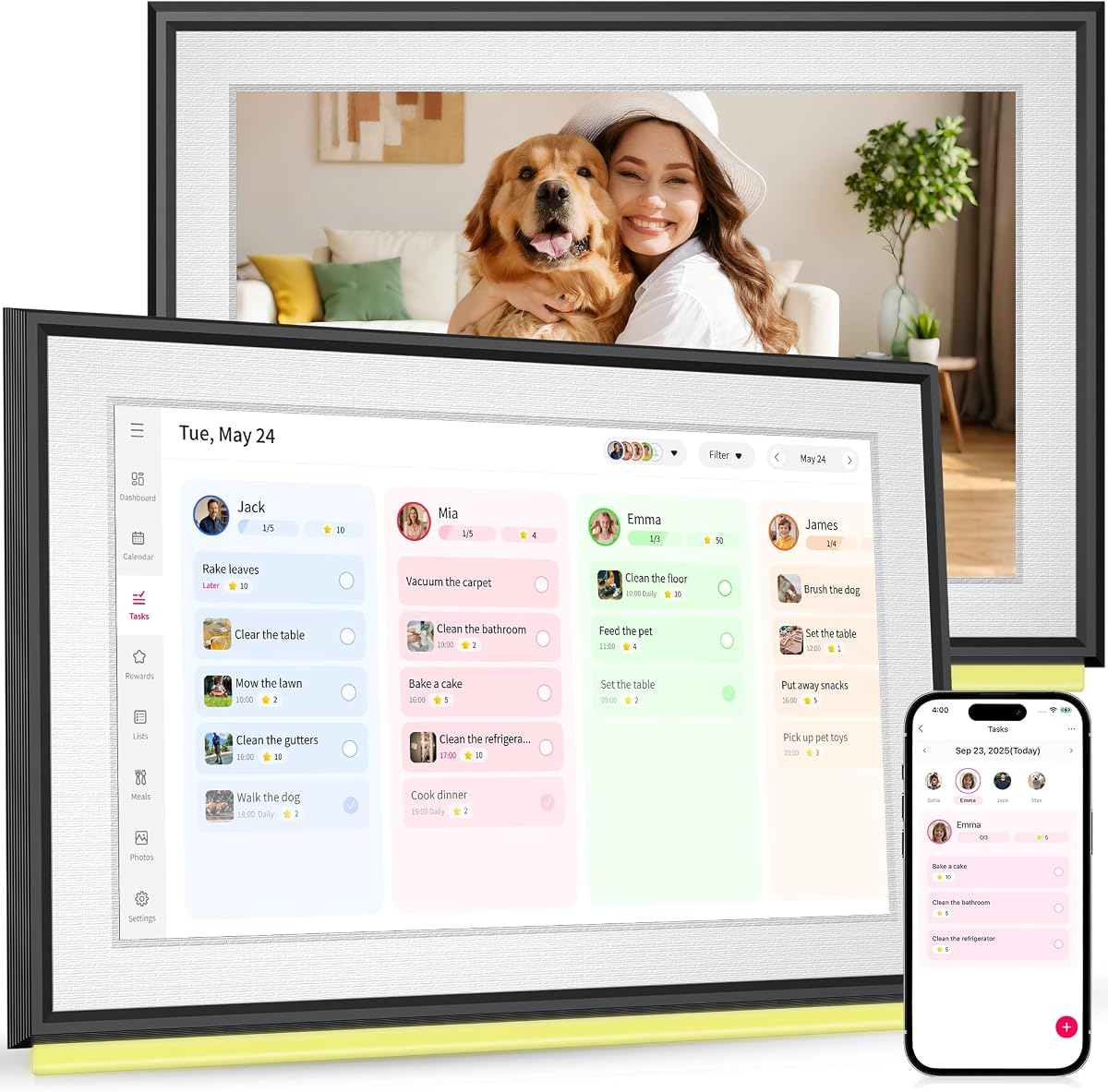

This 15.6-inch Digital Touchscreen Organizer stands out as our top choice for its balance of size and functionality. It offers a comprehensive family command center without hidden monthly costs. Users appreciate the seamless sync with major calendar platforms.
We may earn a commission when you buy through this link, at no additional cost to you.
The real-time sync feature ensures everyone sees updates instantly on Google or iCloud. The interactive chore chart gamifies responsibilities for children using a reward system. When idle, the screen transforms into a vibrant photo frame with AI restoration.
While the setup takes a few minutes to configure Wi-Fi and accounts, the result is a stable hub. Some users noted mounting hardware requires separate purchase for wall installation. These minor issues do not detract from its core utility.
It is ideal for households needing a central coordination tool that keeps all family members aligned. The combination of visual planning and photo display makes it a valuable long-term investment.
The device integrates meal planning and calendars into one cohesive view reducing daily stress.
Children earn points for tasks encouraging independence and responsibility through positive reinforcement.
We may earn a commission when you buy through this link, at no additional cost to you.
Skylight offers a polished experience with unique Disney Mode features that engage younger users. The display quality is sharp and the white finish fits modern kitchens well. It provides robust syncing with Yahoo and Cozi calendars.
We may earn a commission when you buy through this link, at no additional cost to you.
The meal planning tool is highlighted for reducing dinner time confusion. Users can upload recipes directly to the device for easy reference. However some advanced features require a plus subscription plan.
This model is best for families who want a visually appealing device with fun customization options. The premium feel justifies the cost for those prioritizing design and specific entertainment features.
Animated characters and themes make daily check-ins fun for children keeping them motivated.
Integrated menus help households organize weekly eating schedules efficiently without extra paper.
We may earn a commission when you buy through this link, at no additional cost to you.
This compact model delivers essential smart features at a very affordable price point. It includes meal management and sync capabilities without requiring subscriptions. The screen is bright and responsive for daily tasks.
We may earn a commission when you buy through this link, at no additional cost to you.
The automatic grocery list generation is a standout feature for busy shoppers. It saves time by converting meal plans into ready-to-buy lists. Users find it simple to set up and use for basic scheduling.
For those on a tight budget, this device provides excellent utility without compromising core functionality. It is perfect for smaller spaces like apartments or dorms where a large wall unit is not practical.
The visual display helps plan dinners ahead reducing last minute decisions and stress.
All features including sync and chore tracking are included without ongoing monthly charges.
We may earn a commission when you buy through this link, at no additional cost to you.
This 10.1-inch device focuses on reliability with solid storage and HD visuals. It supports multiple calendar syncs and includes weather updates for planning. The star reward system encourages children to complete chores.
We may earn a commission when you buy through this link, at no additional cost to you.
Users appreciate the ability to store thousands of photos locally on the 32GB drive. This ensures memories are displayed even if internet access is temporarily lost. The setup is straightforward via the companion app.
It is a practical choice for households needing a straightforward organizer without complex extra features. The compact size fits easily on desks or smaller kitchen walls.
Built-in weather data helps families plan outdoor activities based on current conditions.
The large internal memory allows for extensive family archives without cloud dependencies.
We may earn a commission when you buy through this link, at no additional cost to you.
This model boasts a perfect rating from users who value its straightforward design. The color coding feature helps differentiate family schedules visually on the large screen. It includes weather info to aid daily planning.
We may earn a commission when you buy through this link, at no additional cost to you.
Sleep wake mode saves energy by dimming the screen when not in use. The lack of subscription fees makes it a budget friendly option for families. It connects easily to Wi-Fi and syncs standard calendar apps.
It is recommended for users who want a dependable organizer that performs all basic tasks well. The intuitive interface means even seniors can learn it quickly.
Assigning colors to tasks makes it easy to see who is doing what.
The sleep feature reduces power usage while keeping the device ready to wake.
We may earn a commission when you buy through this link, at no additional cost to you.
This unit shines with robust sync capabilities for various platforms including Yahoo and Cozi. The recipe saving function allows you to store and view menus easily. Remote sharing lets family members view photos instantly.
We may earn a commission when you buy through this link, at no additional cost to you.
Users enjoy the color classification system which organizes tasks scientifically by person. This visual aid helps everyone understand their responsibilities at a glance. The setup is handled through the Wanmine app.
It is a great choice for families who prioritize remote connection and recipe management. The device works well in kitchens where food planning is a daily necessity.
Saving recipes directly on the screen helps reduce paper clutter in the kitchen.
Grandparents can receive and view photos of grandchildren instantly from anywhere.
We may earn a commission when you buy through this link, at no additional cost to you.
The massive 21.5-inch screen makes this the most immersive option on the market. It offers dual mode functionality allowing you to run Android apps alongside the calendar. Voice control with Gemini helps manage tasks hands-free.
We may earn a commission when you buy through this link, at no additional cost to you.
Users appreciate the flexibility to use it as a smart home dashboard. It can control lights and show widgets alongside family schedules. The premium hardware supports smooth touch interactions.
This is the best choice for tech savvy families who want a central smart home hub. The size demands wall space but offers unmatched visibility and utility.
Accessing Google Play apps turns the calendar into a versatile smart hub.
Built-in voice tools let you check schedules without touching the screen.
We may earn a commission when you buy through this link, at no additional cost to you.
Similar to the larger model this 15.6-inch version includes a sturdy stand for desks. It provides the same dual mode flexibility for apps and family planning. The voice assistant helps manage tasks efficiently.
We may earn a commission when you buy through this link, at no additional cost to you.
Users find the smart home controls useful for managing devices from the display. The white finish matches many modern interiors. It syncs smoothly with iCloud and Google calendars.
It is ideal for home offices where you need a desktop organizer with smart capabilities. The included stand adds convenience for non-wall setups.
The built-in stand allows flexible placement on desks without needing wall mounts.
Control lights and cameras directly from the calendar interface for convenience.
We may earn a commission when you buy through this link, at no additional cost to you.
This model is designed primarily for desk use and does not support wall mounting. It offers a live screensaver mode and auto time sync for accuracy. Users can manage it via the mobile app.
We may earn a commission when you buy through this link, at no additional cost to you.
The software update feature ensures the device stays current with new improvements. It works well for those needing a simple organizer on a counter. The photo display helps memories when idle.
It is a solid choice for users who prefer a desktop device over a wall unit. The lag after startup is manageable once you wait for the system to process.
Designed specifically for flat surfaces it fits naturally on kitchen counters.
The dynamic display keeps the screen active with moving family photos.
We may earn a commission when you buy through this link, at no additional cost to you.
This large display offers custom themes and font sizes to help those with vision needs. The IPS screen provides vibrant colors and wide viewing angles for all. A stand is included for easy desk placement.
We may earn a commission when you buy through this link, at no additional cost to you.
Users like the ability to adjust font sizes for better readability. The reward system works well to encourage kids to complete tasks. It syncs with Google and iCloud for standard planning.
It is a great option for households needing large text visibility for grandparents. The customizable themes let you match the device to your home decor.
Adjustable fonts make it easy for older family members to read clearly.
Changing themes allows personalization to fit business or family styles.
We may earn a commission when you buy through this link, at no additional cost to you.
Selecting the right organizer requires understanding your family size and specific needs. We break down the key factors to ensure you choose a device that fits your home.
Screen size determines visibility from different distances in your home. Larger screens like 21.5 inches work well for kitchens while 10.1 inches fit desks.
Choose a size that allows everyone to read schedules without squinting.
Verify that the device supports the specific calendar apps your family uses like Google or Cozi. Real-time sync ensures updates appear instantly across devices.
Strong sync capabilities prevent missed appointments and ensure everyone stays informed.
Many devices charge monthly fees for advanced features. We recommend looking for models with full access to ensure value and cost predictability.
Always check if all features work without a premium plan before buying.
Interactive tools that gamify tasks help children stay motivated. Look for star or point systems that track progress visually.
A good system turns daily chores into a positive family activity.
Many organizers double as digital photo frames. Ensure it supports remote sharing from phones so you can update photos easily.
This feature helps display family memories when the screen is not in use.
Check if the device includes mounting hardware for wall installation or if it comes with a stand. Some models are desk only while others are designed for walls.
Select the mounting style that fits your available space and layout.
Models with Android modes offer extra apps and widgets. This allows for weather and smart home integration directly on the screen.
Decide if you need advanced app support or just basic calendar functions.
Long warranties and US-based support add value and peace of mind. Check if the seller offers 24/7 assistance for setup issues.
Good support ensures you can fix any technical problems quickly and easily.
Start by connecting the device to Wi-Fi and downloading the companion app. Create accounts for each family member to enable shared editing and permissions.
Regularly update the software to access new features and security improvements. Check for settings that optimize sleep mode to save energy when the screen is idle.
Clean the screen with a microfiber cloth to avoid scratches. Avoid using harsh chemicals that could damage the surface or touch sensitivity.
Most models in this guide offer core features without subscriptions. However some specific tools like advanced photo screensavers may require a premium plan. Always check the product description for included services.
Yes most devices support syncing with Google Calendar, iCloud, Outlook, and Cozi simultaneously. This ensures all family appointments are visible on one screen.
Many models are designed with simple interfaces and adjustable font sizes. Those with customizable settings like large text make it easier for older adults to navigate.
You can upload photos via the companion mobile app using Wi-Fi. This allows you to share new images instantly from your phone to the calendar screen.
High-end models with voice assistants or Android support can control lights and cameras. Check if the specific device includes smart home integration features.
The device will usually display local data and photos. Syncing will resume once the connection is restored but real-time updates may pause temporarily.
The Digital Touchscreen Organizer market offers diverse options for every budget. Our top picks balance size and features to meet various household needs efficiently.
Prioritize devices with strong calendar sync and no subscription fees for best value. Consider your space and family size before choosing a screen size.
Remember to check current prices and warranty details before purchasing. A good organizer can streamline your family routine for years to come.