
GE BigEZ OneTouch Big Button Universal TV Remote
4.3Editor score
Backlit buttons for visibility
Preset buttons for five brands
Simple one-touch setup
This guide compares the top easy to use TV remote for seniors featuring large buttons and simple layouts designed to help elderly users navigate entertainment
Finding the right television remote can be a challenging task for older adults who may struggle with small buttons or complex menus. A good remote should offer large, clearly labeled controls that are easy to press and see in various lighting conditions without causing frustration.
We have evaluated ten top-rated universal remotes designed specifically for seniors and individuals with limited dexterity. Each product was chosen based on its button size, setup simplicity, compatibility with major brands, and overall user feedback from caregivers and family members.
Each pick in this list highlights unique strengths such as backlit keys, color-coded functions, or pre-programmed channels to suit different needs. Please note that product availability and pricing may change frequently so verify current details before making your final purchase decision.
4.3Editor score
4.2Editor score

4.4Editor score
The following comparison table provides a side-by-side look at all ten products to help you quickly identify the right remote for your specific needs and TV brand.


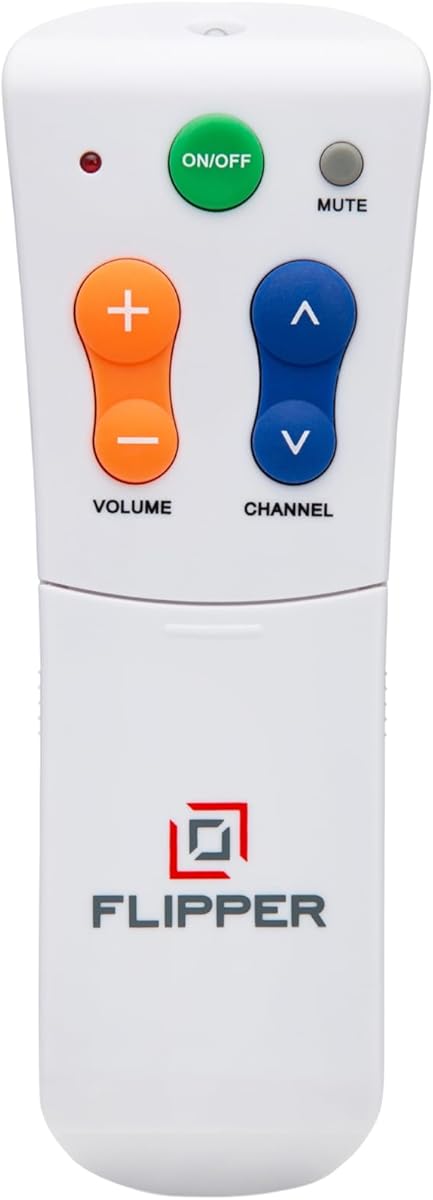
The Flipper Big Button TV Remote for Seniors is a standout choice for those seeking simplicity and independence. It holds a solid 4.2 rating based on positive feedback from families who value its focused design for elderly users.
We may earn a commission when you buy through this link, at no additional cost to you.
This remote was born from a personal mission to help an elderly loved one with Alzheimer's. It features a clean face with only four color-coded buttons for power volume and channel control. Hidden buttons slide out for customizing up to twenty-five favorite channels which reduces the need to navigate complex menus.
While it excels at basic functions it does not support navigation within streaming apps like Netflix or YouTube. This limitation is acceptable for households using traditional broadcast or cable where the primary goal is effortless channel switching without confusion.
Caregivers and seniors who prioritize ease of use will find this remote invaluable. It eliminates the clutter of multiple remotes and provides peace of mind through its intuitive layout that minimizes frustration during daily entertainment.
The use of green orange blue and gray helps distinguish functions instantly reducing the likelihood of accidental presses or confusion in low light conditions.
Caregivers can program frequently watched channels so seniors can cycle through them easily with simple up and down arrows without needing to remember numbers.
We may earn a commission when you buy through this link, at no additional cost to you.
The GE BigEZ OneTouch Big Button Universal TV Remote offers an affordable solution for seniors needing a reliable replacement remote. With a 4.3 rating it is praised for its easy setup and clear visibility features.
We may earn a commission when you buy through this link, at no additional cost to you.
This remote is designed to be back to lose with a white body and large tactile buttons. The volume and channel buttons are color-coded blue and orange respectively which helps users identify them quickly. The backlit buttons ensure visibility during evening viewing without requiring external light sources.
Setup is straightforward as it includes preset buttons for five major TV brands. Users simply insert batteries select their brand and press power to begin using it. While it lacks advanced features like streaming navigation it covers the essentials effectively for a low cost.
For those seeking a budget-friendly remote with proven reliability this is a strong contender. The inclusion of U.S. based technical support adds value for families who may need assistance with initial programming or troubleshooting.
The fully backlit keypad allows users to see controls clearly in dark rooms which is essential for evening TV watching without straining the eyes.
Distinct colors like blue and orange help differentiate volume and channel controls even for those with color vision deficiencies ensuring easy identification.
We may earn a commission when you buy through this link, at no additional cost to you.
The Backlit Big Button TV Remote Replacement for Samsung TV delivers a premium experience tailored for Samsung owners. Its 4.4 rating reflects satisfaction with its unique lighting feature and included accessories that enhance daily usability.
We may earn a commission when you buy through this link, at no additional cost to you.
This remote stands out with its backlit buttons that stay lit for thirty seconds after pressing. This feature helps seniors with poor vision find and use the remote in the dark. It also comes with a soft silicone protective cover and a mount hook to prevent loss or damage.
It requires no setup for Samsung smart TVs as it works right out of the box. The upgraded chip ensures a quick response time and long range for smooth operation. The ergonomic design ensures it fits comfortably in the hand for easy grip.
Seniors with Parkinson's or vision issues will appreciate the thoughtful design and included hook. While it is specific to Samsung it offers a high level of convenience and durability that justifies the higher price point compared to basic models.
The buttons light up when pressed and remain visible for thirty seconds helping users locate controls quickly in dark environments without needing a light source.
The package includes a soft silicone case and wall hook to protect the remote from drops and keep it within easy reach to prevent losing it on furniture.
We may earn a commission when you buy through this link, at no additional cost to you.
The EZclicker Big Button Universal TV Remote is a straightforward option for seniors needing a reliable universal remote. It has a 4.2 rating for its easy big button design that caters to those with limited dexterity.
We may earn a commission when you buy through this link, at no additional cost to you.
This remote features a large enter button and tactile feedback to help users feel when a button is pressed. It is compatible with many top TV brands but does not support cable boxes or streaming devices like Firestick. The compact size makes it easy to handle and store.
Programming is simple as it involves holding specific buttons until the remote syncs with the TV. It aims to provide a comfortable user experience for grandparents or those with visual impairments who need to avoid complex menus.
This remote is a great gift for seniors who want independence without hassle. While it has limitations with streaming it effectively covers traditional TV needs with a design focused on physical usability and clarity.
The buttons provide tactile feedback so users can feel a click when pressed reducing uncertainty and making operation smoother for those with hand weakness.
Measuring seven by two inches the remote is lightweight and easy to hold which helps seniors with arthritis or limited grip strength use it comfortably.
We may earn a commission when you buy through this link, at no additional cost to you.
The Big Button Universal Remote for All TV is designed for ease of use with no programming needed. Its 4.4 rating highlights its reliability and simplicity for seniors who want to avoid complex setup steps.
We may earn a commission when you buy through this link, at no additional cost to you.
This remote works right out of the box for Samsung LG Vizio Sony and many other brands. It includes an extra-large enter button and tactile feedback for a better user experience. It is not compatible with streaming devices but covers standard TV functions well.
The warranty service offers free replacement within ninety days which provides peace of mind for buyers. The focus on simplicity makes it an excellent choice for those with vision or mobility challenges who need immediate functionality.
If you need a remote that starts working immediately without pairing this is a top choice. The large buttons and broad compatibility ensure it meets basic needs for a wide range of TV owners with minimal effort.
Users simply insert batteries and start using the remote without any pairing or programming steps which removes frustration for those unfamiliar with technology.
The inclusion of a ninety-day warranty service allows users to contact the company directly for issues or replacements ensuring a risk-free purchase experience.
We may earn a commission when you buy through this link, at no additional cost to you.
The Large Button TV Remote Control for Seniors focuses on a traditional layout that minimizes confusion. With a 4.4 rating it is praised for its clear button layout and dependable performance for everyday use.
We may earn a commission when you buy through this link, at no additional cost to you.
This remote features large clearly marked buttons that reduce the chance of misclicks. The ergonomic body is lightweight and comfortable to grip. It is designed for traditional TV brands and does not support cable boxes or voice remote controls.
The simplicity of this remote makes it ideal for elderly users who find modern remotes too complex. It provides effortless control of power volume and channels without unnecessary steps or menus to navigate.
This remote is a solid choice for families looking for a straightforward replacement option. Its design promotes independence for low vision users by focusing on essential functions that are easy to locate and press.
The simple layout with clearly marked buttons makes it easy to find controls without confusion reducing stress for low vision users watching TV.
The lightweight body is designed to fit comfortably in the hand reducing fatigue and making it easier to hold for extended periods of use.
We may earn a commission when you buy through this link, at no additional cost to you.
The Philips BigEZ OneTouch Big Button Universal TV Remote offers a patented setup process that simplifies pairing. It holds a 3.8 rating indicating mixed but generally positive feedback regarding its ease of use.
We may earn a commission when you buy through this link, at no additional cost to you.
This remote features a backlit keypad with blue and orange buttons for easy visibility. It uses a OneTouch setup that allows pairing with five major TV brands in one press. It also includes a directional pad for basic navigation on smart TVs.
While it has a lower rating than some competitors its unique setup process is a strong selling point for users who struggle with standard pairing instructions. The inclusion of technical support adds value for troubleshooting.
If you need a remote with specific brand compatibility this is a viable option. The backlit keys and color-coded buttons help mitigate common issues with small controls in dim lighting.
The OneTouch feature allows users to program the remote with just one button press for supported brands which removes complex steps and reduces setup frustration.
The fully backlit keypad ensures all buttons are visible in dark rooms making it easier to find controls without needing to turn on a light.
We may earn a commission when you buy through this link, at no additional cost to you.
The Big Button Universal TV Remote for Seniors provides a basic solution for those needing simple controls. With a 3.0 rating it serves specific needs for traditional TV setups without advanced features.
We may earn a commission when you buy through this link, at no additional cost to you.
This remote features large buttons and a simple layout to reduce confusion. It is not compatible with streaming devices or cable boxes but works with most standard TV brands. The tactile feedback helps users feel the buttons when pressed.
While the rating is lower it may suit users who only need power and volume control. It avoids complex menus that could overwhelm elderly users or those with dementia looking for essential functions.
For households that rely on traditional broadcast this remote offers basic usability. The focus on simplicity helps reduce stress during daily use for those with limited tech experience.
The clear layout with large buttons helps seniors avoid confusion by presenting only essential functions without cluttered menus or unnecessary options.
Extra large buttons reduce the chance of accidental presses making it easier to control volume and channels accurately without frustration.
We may earn a commission when you buy through this link, at no additional cost to you.
The Large Button TV Remote Control for Seniors is designed for simplicity and reliability. It scores a 4.4 rating for its clear layout and effective button design that supports elderly users.
We may earn a commission when you buy through this link, at no additional cost to you.
This remote features large clearly marked buttons that reduce the chance of misclicks. The ergonomic body is lightweight and comfortable to grip. It is designed for traditional TV brands and does not support cable boxes or voice remote controls.
The simplicity of this remote makes it ideal for elderly users who find modern remotes too complex. It provides effortless control of power volume and channels without unnecessary steps or menus to navigate.
This remote is a solid choice for families looking for a straightforward replacement option. Its design promotes independence for low vision users by focusing on essential functions that are easy to locate and press.
The simple layout with clearly marked buttons makes it easy to find controls without confusion reducing stress for low vision users watching TV.
The lightweight body is designed to fit comfortably in the hand reducing fatigue and making it easier to hold for extended periods of use.
We may earn a commission when you buy through this link, at no additional cost to you.
The Anderic RR1004 Big Button TV Remote Control offers a learning function that allows customizing from another remote. It holds a 4.0 rating for its minimalist design and utility in care facilities.
We may earn a commission when you buy through this link, at no additional cost to you.
This remote features glow-in-the-dark keys for low-light use. It works with IR TVs and allows learning input functions from existing remotes. It is pre-programmed for LG TVs but requires setup for others. It lacks Bluetooth support.
The minimalist design reduces confusion by limiting buttons to essential functions. This makes it suitable for seniors or facilities where simplicity is key to daily operation without clutter or complex menus.
For users who need to replicate specific remote functions this learning feature is valuable. The glow-in-the-dark keys ensure visibility in the dark which helps maintain independence during evening hours without needing additional light.
The infrared learning technology allows copying functions like input selection from an existing remote which expands control without adding complex new buttons to the device.
Keys that glow in the dark help seniors locate controls without needing a light source reducing stress during late-night TV watching.
We may earn a commission when you buy through this link, at no additional cost to you.
Selecting the right remote involves considering vision needs physical abilities and TV compatibility to ensure stress-free entertainment.
Large buttons with clear spacing prevent accidental presses which is vital for those with limited dexterity or tremors. A minimalist layout with essential functions helps reduce cognitive load and frustration.
Look for remotes with large tactile buttons and minimal clutter for optimal usability.
Seniors often watch TV in low light so backlit or glow-in-the-dark buttons help locate controls easily without needing extra lights. High contrast colors between buttons and body also aid visibility.
Prioritize remotes with backlit keys or high-contrast designs for evening use.
Simple setup processes like one-touch pairing or pre-programmed brands eliminate technical barriers. Complex programming steps can discourage use especially for those unfamiliar with technology.
Choose remotes that work out of the box or have minimal setup requirements.
Ensure the remote supports your specific TV brand to avoid frustration. Some remotes work universally while others are tailored to Samsung LG or other major manufacturers.
Verify compatibility with your TV model before purchasing to ensure functionality.
Features like learning modes or favorite channel programming can add value. Consider if the remote supports cable boxes or just the TV depending on household needs.
Evaluate extra features based on actual usage needs to avoid unnecessary complexity.
Standard battery types like AA or AAA are easy to replace and widely available. Long battery life ensures consistent performance without frequent replacements which can be a hassle for seniors.
Select remotes using standard batteries with good battery life for convenience.
A solid warranty and accessible technical support provide peace of mind if issues arise. U.S. based support can be crucial for troubleshooting setup or technical problems.
Check warranty terms and support availability to ensure long-term reliability.
A sturdy lightweight build with ergonomic design ensures comfortable handling without strain. Materials that resist wear and tear help the remote last longer in daily use.
Look for ergonomic designs and durable materials to prevent damage and fatigue.
Insert the required batteries ensuring correct polarity before first use and test basic functions like power and volume immediately. If the remote requires programming follow the instructions in the user guide to match your TV brand.
Keep the remote in a designated spot like a tray or hook to prevent loss and protect it from spills or drops by using a silicone cover if available. Regularly clean buttons and the surface with a soft dry cloth to prevent dust buildup.
If the remote starts behaving erratically check the battery level and try replacing them with fresh ones. Resetting the remote by removing batteries for a few minutes can also resolve minor electronic issues or sync problems.
Most of these remotes are designed for traditional TV functions like power volume and channels. Only specific models support streaming device functions but many explicitly exclude cable boxes and streaming sticks to maintain simplicity for elderly users.
Some remotes like Flipper allow customizing favorite channels to simplify navigation. Others offer learning functions to copy input buttons from existing remotes while most focus on essential fixed controls to avoid confusion.
Most remotes require inserting batteries pressing a setup button and following a simple sequence to sync with your TV brand. Some models offer one-touch setup that automatically detects and programs the TV with minimal effort.
Not all remotes support every brand so check the compatibility list before purchasing. Many work with major brands like Samsung LG Vizio and Sony but some have specific brand limitations designed for easier usability.
Most of these remotes use standard AA or AAA batteries which are easy to find and replace. Always check the product details to confirm the battery type needed for your selected model before buying.
Some brands offer warranties like a ninety-day replacement service for defective units. Check the specific product details for warranty coverage and support options as they vary between different remote models.
Several models include backlit buttons or glow-in-the-dark keys that remain visible in dark rooms. This feature helps seniors locate controls easily without needing to turn on lights during TV watching.
The Flipper Big Button TV Remote is often recommended for dementia care due to its simple four-button layout and color-coded design. Its focus on essential functions helps reduce confusion and supports independence.
We have reviewed ten top-rated remotes offering options from basic universal models to specialized premium remotes with backlit keys. Each model brings unique benefits to help seniors and caregivers manage TV viewing with less stress.
When choosing prioritize large buttons clear layouts and simple setup features that match the user's specific needs. Also consider whether the remote supports your TV brand or requires additional setup steps before use.
Prices and availability may change so verify the current details and warranty information before purchasing to ensure you get the best value for your household requirements.