
EPOMAKER TH99 PRO
4.6Editor score
96 Percent Compact Layout
Screen And Knob
Tri Mode Wireless
This guide compares the top ten Epomaker keyboards of 2026 featuring wireless options gasket mounts and custom screens to help you choose the perfect model.
Finding the right mechanical keyboard can transform your daily computing experience into something truly enjoyable and efficient. Epomaker has emerged as a leading brand offering feature-rich devices that balance premium build quality with accessible pricing for enthusiasts and professionals alike.
We have carefully analyzed the current market offerings to identify the most compelling models available right now. Each selection was evaluated based on connectivity options acoustic performance build materials and the level of customization they provide to users seeking a tailored typing experience.
Every pick in this list highlights unique strengths whether it is a unique form factor advanced features or exceptional value. Please note that product availability and specific pricing can shift frequently so always verify the latest details before making your final purchasing decision today.
4.6Editor score
4.7Editor score
4.5Editor score
The following comparison table breaks down the core specifications of each model so you can quickly see which features align with your specific workflow and gaming requirements.


The EPOMAKER TH108 PRO stands out as the premier full size option in the current lineup offering a perfect blend of utility and customization. With a high 4.7 rating from users it delivers a robust typing experience that satisfies both gamers and office workers alike.
We may earn a commission when you buy through this link, at no additional cost to you.
Its standout feature is the integrated smart screen which allows you to display GIFs monitor battery life or toggle settings without leaving your game. The 10000mAh battery ensures you can work for days on a single charge while the gasket mount provides a plush acoustic profile.
While the keyboard is undeniably large and heavy which might not suit smaller desks the stability it offers is unmatched during intense gaming sessions. The weight prevents sliding and the sound dampening layers ensure a creamy thocky sound that is pleasing to the ear.
This model is ideal for users who want a complete solution with all the bells and whistles including a rotary knob and full wireless tri mode connectivity. If you need a full layout with premium features the TH108 PRO is the top recommendation for 2026.
The display allows real time status updates and creative expression via customizable GIFs and images managed through web based software.
With a massive 10000mAh battery the keyboard supports cable 2.4GHz and Bluetooth modes for seamless switching between up to five devices.
We may earn a commission when you buy through this link, at no additional cost to you.
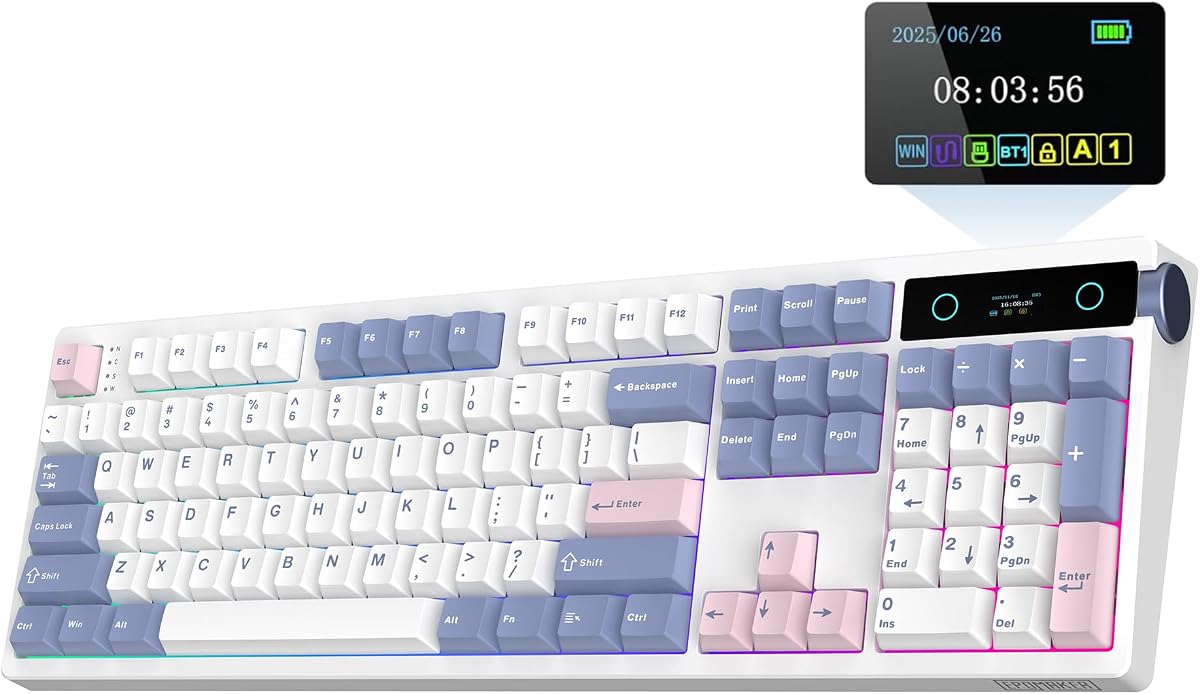
The EPOMAKER TH99 PRO brings the beloved screen and knob feature to a more space efficient 96 percent layout making it perfect for users who need a numpad but want to save desk space. It maintains high quality standards with a solid 4.6 rating from satisfied customers.
We may earn a commission when you buy through this link, at no additional cost to you.
Its design focuses on productivity and efficiency with a screen that can show system stats or custom animations while the knob handles volume or macro shortcuts. The 10000mAh battery ensures you can use it wirelessly for extensive periods without worrying about constant recharging interruptions.
The only real compromise is that keeping the RGB lighting on full blast will reduce battery life significantly compared to turning it off. However for a budget friendly board with these high end features the trade off is minimal and the value proposition remains strong for most users.
Buy this if you want a powerful wireless tool that fits well in a mixed work and play environment without taking up the entire desktop. It is the best choice for those seeking premium features at a more accessible price point in the current market.
The 96 percent layout keeps the number pad and function keys while reducing the overall footprint compared to full size keyboards.
Users can map complex macros and change key functions easily using the intuitive web based driver compatible with multiple operating systems.
We may earn a commission when you buy through this link, at no additional cost to you.
The EPOMAKER Galaxy100 represents the premium tier of the brand with a solid aluminum shell that adds weight and a luxury feel to the desk. With a 4.5 rating it appeals to enthusiasts who value open source customization through QMK and VIA support for ultimate control.
We may earn a commission when you buy through this link, at no additional cost to you.
It stands out by offering a full aluminum construction that feels incredibly sturdy and premium while maintaining a gasket mounted internal structure for a soft typing feel. The 8000mAh battery ensures reliable wireless performance across multiple devices without frequent charging breaks during long work sessions.
The main drawback is the higher price compared to plastic alternatives and the need to spend time setting up VIA macros to unlock its full potential. However for users who want a keyboard that lasts years and can be tweaked to exact preferences this investment is well justified by the quality.
Choose this model if you prioritize build quality and deep software customization over having extra features like a screen or knob. It is a professional grade tool that delivers a superior tactile and auditory experience for those willing to engage with its advanced features.
The aluminum alloy shell provides a weighty stable platform that resists flex and adds a sophisticated look to your workspace.
VIA compatibility allows advanced key remapping and macro creation that works across different devices and operating systems seamlessly.
We may earn a commission when you buy through this link, at no additional cost to you.
The EPOMAKER TH108 V2 PRO is the latest iteration of the full size model bringing refined features like dedicated Mac modifiers and improved latency performance. With a strong 4.7 rating it is designed for users who demand high speed response and robust build quality for competitive gaming.
We may earn a commission when you buy through this link, at no additional cost to you.
It offers the same beloved screen and knob interface which can be customized to show GIFs or system data using a lightweight Chrome based software. The 10000mAh battery provides extended wireless use and the gasket mount cushions keystrokes for a smooth satisfying acoustic profile.
While it lacks the heavy physical weight of the aluminum alternatives the thick plastic body ensures it stays put during intense use. The browser based software means you do not need to install bloatware but it does require an internet connection for some initial setup features.
This keyboard is perfect for hybrid users who switch between Windows and Mac environments regularly and need a reliable full size board. It balances modern features with traditional layout needs making it a versatile choice for a wide range of daily computing tasks.
Dedicated Mac modifier keys allow seamless switching between operating systems without remapping essential shortcuts like Command and Option.
With a 2ms latency and 1000Hz polling rate the keyboard ensures that keystrokes are registered instantly for precise gaming actions.
We may earn a commission when you buy through this link, at no additional cost to you.
The EPOMAKER TH108 offers a straightforward approach to full size wireless typing without the complexity of a screen or knob. With a 4.5 rating it is a reliable workhorse that focuses on the core essentials of a good typing experience and solid battery life.
We may earn a commission when you buy through this link, at no additional cost to you.
It features the same gasket mount and sound dampening layers found in the PRO models delivering a creamy acoustic profile that feels premium. The 10000mAh battery is a standout feature that allows for weeks of use on a single charge making it ideal for office environments.
The lack of a screen means you cannot display custom GIFs or system stats but this simplifies the user experience and reduces costs. The keyboard is heavy and stable which is great for a permanent setup but it will dominate the available space on a smaller desk.
Select this model if you want a no fuss high quality full size keyboard that delivers excellent performance and battery life. It is a perfect fit for users who value simplicity and reliability over advanced customization features like screens or volume knobs.
Five layers of foam and silicone inside the case reduce vibration and echo for a softer and quieter typing sound.
The hot swappable PCB allows you to change switches without soldering to personalize the feel and sound of the keyboard.
We may earn a commission when you buy through this link, at no additional cost to you.
The EPOMAKER X Aula F75 MAX is a compact 75 percent layout that saves space while keeping the function row and arrow keys. With a 4.6 rating it brings the popular screen and knob feature to a smaller form factor that fits well on crowded desks.
We may earn a commission when you buy through this link, at no additional cost to you.
Its TFT screen adds a layer of personalization allowing you to show GIFs or track status without cluttering the workspace. The gasket mount and flex cut PC plate work together to provide a soft and flexible typing feel that reduces fatigue during long work sessions.
The smaller size means some keys are packed closer together which might take time to adjust to if you are used to full size layouts. However the inclusion of the function row ensures you do not lose essential shortcuts making it a highly efficient choice for productivity.
This keyboard is great for users who want to reclaim desk space for a larger mouse area while still having access to essential function keys. It balances modern features with a compact design making it a top contender for laptop users and office workers.
The 75 percent layout removes the numpad but keeps arrow keys and function row for better ergonomics and mouse space.
Factory tuned stabilizers and multiple foam layers create a smooth and consistent sound that reduces unwanted rattle.
We may earn a commission when you buy through this link, at no additional cost to you.
The EPOMAKER G84 HE is a specialized gaming tool designed for competitive users who need the fastest possible response times from their peripheral. With a 4.7 rating it uses Hall Effect switches that allow for adjustable actuation points to suit different play styles and preferences.
We may earn a commission when you buy through this link, at no additional cost to you.
Its 8K polling rate ensures that every movement is registered almost instantly which is a massive advantage in fast paced shooters. The keyboard also includes advanced features like SOCD logic to prioritize inputs and prevent movement conflicts during complex maneuvers.
The software required to set up the actuation points and macros is powerful but may feel complex for casual users who want a plug and play experience. Additionally the 80 percent layout is unique and might not have all the keys some users expect compared to standard sizes.
This model is a perfect choice for FPS gamers or rhythm players who prioritize speed and precision over traditional layout comfort. It offers a cutting edge performance that justifies the extra cost for serious players who need every millisecond advantage possible.
Magnetic switches allow you to adjust the exact point where a keypress registers which can reduce fatigue and increase speed.
The 8000Hz polling rate sends data to your PC eight thousand times a second for nearly zero latency input.
We may earn a commission when you buy through this link, at no additional cost to you.
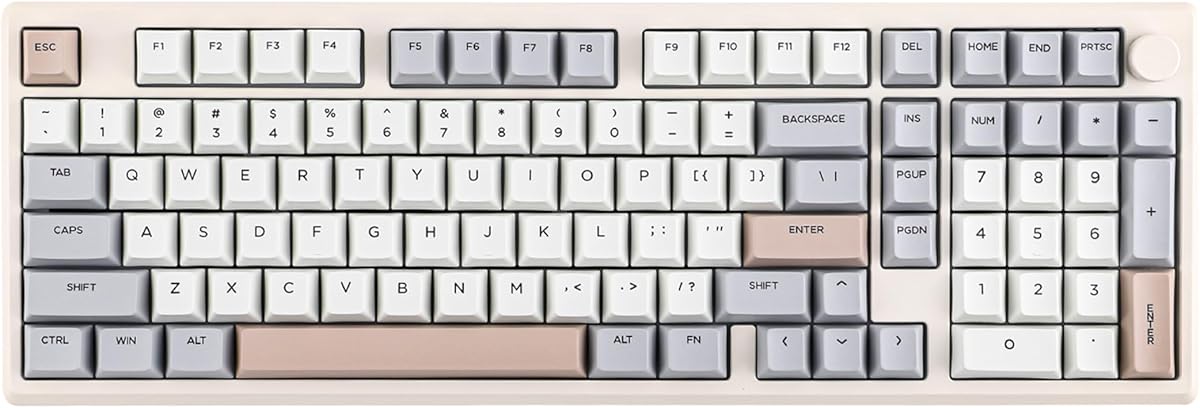
The EPOMAKER TH99 is a no frills 96 percent wireless keyboard that focuses on delivering a solid typing experience without extra bells. With a 4.6 rating it is an excellent option for those who want the numpad and space efficiency but do not need a screen.
We may earn a commission when you buy through this link, at no additional cost to you.
Its gasket mount structure and sound dampening layers provide a creamy and comfortable typing feel that reduces hand fatigue during extended use. The 8000mAh battery offers a massive 800 hours of life when lights are off ensuring it stays useful for long periods between charges.
Lacking a screen or knob means you rely on standard shortcuts for volume and brightness but this keeps the price accessible for everyone. The south facing LEDs also allow for better RGB shine through which looks great on darker keys in low light environments.
This keyboard is ideal for budget conscious users who need a reliable wireless tool for both work and gaming. It delivers the essential features like battery life and wireless connectivity without unnecessary extras that might drive up the cost.
With up to 800 hours of use with backlight off the battery ensures you rarely need to recharge the device.
A two stage kickstand and ergonomic keycap profile help maintain a natural hand position to reduce strain.
We may earn a commission when you buy through this link, at no additional cost to you.
The EPOMAKER Ajazz AK820 Pro offers the popular screen and knob feature at a very accessible price point for those new to custom keyboards. With a high 4.7 rating it proves that you do not need to spend a fortune to get a modern feature rich experience.
We may earn a commission when you buy through this link, at no additional cost to you.
Its TFT display acts as an interactive interface for showing battery stats system info or custom visuals to match your mood. The gasket mount and flex cut plate provide a comfortable typing feel that is stable and responsive for both writing and gaming tasks.
The 4000mAh battery is smaller than some competitors meaning you may need to charge it more often if you use the screen frequently. However the compact 75 percent layout and high connectivity make it a versatile portable option for users on the go.
Choose this model if you want to try out the screen and knob feature without breaking the bank. It is a great entry level option for enthusiasts who want to explore customization and modern features in a compact form factor.
The TFT screen allows you to view real time information and customize visuals easily through the built in menu system.
The smaller 75 percent size makes it easier to transport in a bag compared to full size models for remote work.
We may earn a commission when you buy through this link, at no additional cost to you.
The EPOMAKER x Aula F99 is a practical choice for those who want a compact wireless keyboard with a numpad and solid build. With a 4.5 rating it focuses on core performance and durability offering a reliable experience for daily typing and gaming tasks.
We may earn a commission when you buy through this link, at no additional cost to you.
Its unique single key slotted PCB enhances the feel of each key by isolating them slightly for a more responsive and crisp sound. The gasket mount and multi layer dampening ensure that the keyboard feels soft and consistent without any harsh or rattling vibrations.
While it lacks the visual flair of a screen it delivers on the essentials like long battery life and hot swappable switches for future upgrades. The 8000mAh battery supports extensive wireless use and the tri mode connectivity allows seamless switching between devices.
This keyboard is best suited for users who value stability and battery life over flashy customization features. It is a dependable workhorse that fits well in any office or home setup where efficiency and comfort are the top priorities.
The slotted PCB design isolates each key switch to reduce noise and improve the individual feel of every keystroke.
Supports Bluetooth 2.4GHz and wired USB C to ensure you can connect to almost any device easily.
We may earn a commission when you buy through this link, at no additional cost to you.
Choosing the right keyboard involves balancing layout preference connectivity and specific features to match your workflow needs.
Layout size determines how many keys you have and how much desk space the board occupies. Full size boards offer all keys but take up room while compact sizes like 60 or 75 percent save space by removing numpads or function rows. Consider whether you use a number pad daily or need arrow keys separately to decide on the best fit for your setup.
Measure your desk space and list your daily workflow needs to select the correct layout size for your comfort.
Wireless performance is critical for a clean desk setup and freedom of movement. Look for boards offering tri mode connectivity like Bluetooth 2.4GHz and wired USB C to ensure compatibility across devices. Polling rate and latency specifications indicate how fast your keystrokes are registered with higher rates being better for gaming.
Check battery capacity and supported connection types to ensure stable wireless operation without frequent interruptions.
Switch type defines the feel and sound of your keyboard influencing your typing experience significantly. Mechanical switches can be linear for smoothness tactile for feedback or clicky for auditory confirmation. Hot swappable boards allow you to change switches later so you can customize the feel over time.
Choose switch types based on your preference for feedback and sound or pick hot swappable options for flexibility.
Build materials affect durability and acoustic quality with aluminum offering premium weight and plastic being lighter. Heavier cases often prevent sliding on the desk while sound dampening foam layers improve the acoustic feel. Consider how long you plan to keep the keyboard to decide on material durability.
Prioritize aluminum shells for longevity or thick plastic with padding for a lighter portable alternative.
Battery capacity determines how long you can use the keyboard wirelessly between charges. Larger capacities like 10000mAh allow days of use while smaller ones like 4000mAh may need weekly charging especially with RGB on. Evaluate your daily usage time to select a battery that fits your routine.
Check mAh ratings and RGB impact on battery life to avoid frequent recharging during critical work hours.
Software support is key for customizing macros remapping keys or changing lighting effects. Some brands offer cloud based tools while others use local installers or open source options like QMK. Compatibility with your operating system and web based tools can make setup easier for non technical users.
Review software compatibility and features to ensure you can customize the keyboard to your exact preferences easily.
Special features like screens or knobs add utility but may increase cost or complexity depending on needs. Screens allow custom GIFs or status display while knobs can handle volume or macro control. Decide if these extras add value to your workflow before paying for them.
Assess if screens or knobs provide meaningful productivity gains or if standard layouts meet your needs.
RGB customization allows you to personalize the look of your board to match your style or theme. Some models offer per key lighting while others have zone based effects. Ensure the software allows easy color selection and dynamic effects if lighting is important to you.
Choose models with bright and customizable RGB if visual style is a key factor for your setup.
Begin by connecting the keyboard via USB C or Bluetooth to ensure you can pair it with your preferred device settings.
Download the official web based software or app to map keys and adjust RGB lighting to suit your workflow needs.
Clean the keycaps regularly with a soft brush or compressed air to prevent dust buildup inside the switches and body.
Yes most Epomaker keyboards are fully compatible with Mac and Linux systems offering dedicated key mapping and dual mode switching. You can usually toggle between operating modes using a simple shortcut or software setting to match your OS requirements.
Most modern Epomaker models support hot swapping allowing you to change switches without soldering or technical tools. This feature gives you the flexibility to upgrade switches later if you prefer a different feel or sound profile.
Battery life depends on RGB usage and connection mode but capacities like 10000mAh can last for weeks on a single charge with lights off. Models with screens and RGB enabled will drain the battery faster than standard boards with minimal lighting.
Gasket mount isolates the PCB from the case with foam pads to create a softer more flexible typing feel. Tray mount attaches the PCB directly to the base which can be more rigid and louder during keystrokes.
Yes most models offer 2.4GHz wireless modes with low latency suitable for gaming. While wired mode is fastest the 2.4GHz wireless connection is stable enough for most casual and even competitive gaming sessions.
Most Epomaker keyboards use a Chrome based web application for configuration to avoid installing bloatware. This software allows you to remap keys record macros and adjust RGB effects directly in your browser.
We have reviewed ten distinct models ranging from full size workhorses to compact gaming tools to help you find the perfect match for your setup.
Consider whether you value battery life and layout or advanced features like screens and knobs when narrowing down your final selection.
Remember to check current pricing and availability as these options are constantly updated to reflect the latest technology trends.