
10Gb/s SFP+ Fiber Port Ethernet Adapter
4.3Editor score
Intel 82599ES Controller
PCIe x4 Interface Support
Compatible with NAS Systems
This guide compares the top 10 fiber optic network interface cards for speed, compatibility, and reliability to help you upgrade your server or desktop network
Finding the right fiber optic network interface card can transform your network performance significantly. These devices enable high-speed data transmission over long distances while resisting electromagnetic interference common in busy office environments.
We evaluated ten leading models based on chipset quality, port configuration, operating system support, and value for money. Our analysis focuses on real-world performance metrics and compatibility with common server and desktop architectures.
Each pick below highlights key strengths and limitations to help you match hardware to your specific infrastructure needs. Please note that pricing fluctuates regularly so check current listings before finalizing your purchase decision today.
4.3Editor score

5.0Editor score

4.9Editor score
The following table provides a side-by-side overview of all ten models to help you quickly compare core specifications and compatibility features before making a final selection for your infrastructure.


This StarTech card stands out with its Intel I350 chipset ensuring enterprise-grade reliability for server environments. It features two open SFP slots allowing flexible connection options without vendor lock-in constraints.
We may earn a commission when you buy through this link, at no additional cost to you.
The built-in heatsink ensures sustained performance under load while LED indicators simplify troubleshooting during installation. Support for link aggregation and jumbo frames enhances throughput for demanding network tasks.
While it requires purchasing SFP modules separately the flexibility outweighs the initial cost for many administrators. It lacks 10GbE speeds which limits future-proofing compared to newer standards.
IT managers upgrading legacy infrastructure will find this card delivers stable gigabit connectivity with robust virtualization support. Its comprehensive compatibility makes it a dependable choice for mixed OS environments.
The Intel I350-AM2 chipset provides proven stability for critical workloads including virtualization and storage traffic handling.
Open slots accept any MSA-compliant SFP modules giving you freedom to choose fiber or copper based on distance needs.
We may earn a commission when you buy through this link, at no additional cost to you.
This adapter brings 10GbE connectivity to desktops and NAS systems at a competitive price point using the trusted Intel 82599ES controller. It handles high-speed storage applications and virtualization workloads effectively.
We may earn a commission when you buy through this link, at no additional cost to you.
Its wide system support covers modern Windows versions and multiple Linux distributions making it versatile for mixed environments. The included brackets ensure fit in both full tower and compact server cases.
Users must install drivers on Windows 10 and 11 which adds setup time compared to plug-and-play models. The PCIe 2.0 interface may bottleneck bandwidth in multi-card scenarios.
Home labs and small offices seeking fast network storage without enterprise costs will appreciate this adapter. It balances performance and affordability well for entry-level 10G deployments.
The Intel 82599ES offers mature drivers and solid throughput for single-port 10GbE connections in desktop and NAS scenarios.
Support for SR-IOV and VMQ enables efficient traffic management when running multiple virtual machines on the same host.
We may earn a commission when you buy through this link, at no additional cost to you.
Asus delivers a visually striking card with a sophisticated aluminum heatsink that keeps components cool during intensive data transfers. It supports both fiber optic and direct-attach copper connections for flexibility.
We may earn a commission when you buy through this link, at no additional cost to you.
Built-in QoS technology automatically prioritizes critical traffic streams which helps maintain gaming or streaming performance on shared networks. The card operates reliably across a broad temperature range.
Documentation lacks specific chipset details which may concern enterprise buyers needing driver transparency. It offers fewer virtualization offload features compared to Intel-based counterparts.
Enthusiasts building custom water-cooled or high-airflow workstations will appreciate the aesthetic and thermal design. It provides reliable 10GbE access for users prioritizing build quality.
The integrated aluminum heatsink dissipates heat efficiently ensuring stable performance even during sustained high-throughput operations.
QoS features help reduce lag for time-sensitive applications like video calls and online gaming by prioritizing bandwidth.
We may earn a commission when you buy through this link, at no additional cost to you.
Equipped with the Intel 82599EN controller this card provides stable I/O virtualization essential for server and VM environments. It supports storage protocols like iSCSI and FCoE for unified network storage.
We may earn a commission when you buy through this link, at no additional cost to you.
The single SFP+ port connects to 10 Gigabit modules or DAC cables meeting data center requirements for moderate speed upgrades. Low profile brackets make it suitable for small form factor chassis.
Win10 driver installation can be tricky requiring careful setup to ensure functionality which might frustrate less technical users. Single port design restricts total throughput compared to dual-port models.
Small businesses needing reliable virtualization network access will find this card offers enterprise features at accessible cost. Its warranty support adds peace of mind for production use.
Native support for FCoE and iSCSI allows consolidation of LAN and storage traffic over the same network infrastructure.
A three year warranty with lifetime technology support provides long-term assurance for business deployments.
We may earn a commission when you buy through this link, at no additional cost to you.
This Realtek-based card leverages PCIe Gen4 architecture for faster data lanes which benefits high-throughput single-port applications. RealWoW technology enhances data transmission stability and diagnostics.
We may earn a commission when you buy through this link, at no additional cost to you.
Its single SFP+ port supports 10G modules and DAC cables delivering ten times standard gigabit speeds. Comprehensive protocol support includes VLAN tagging and flow control for complex networks.
Linux users are restricted to kernels up to 6.15 limiting compatibility with newer distributions. FreeBSD and ESXi are not supported narrowing its use in specific virtualization stacks.
Modern workstations with Gen4 slots seeking cost-effective 10G upgrades will benefit from this card's interface speed. It balances new technology with broad OS support.
Using PCIe Gen4 x1 provides higher theoretical bandwidth than older gen cards reducing potential bottlenecks for single port use.
IEEE 802.1Q and 802.1ad VLAN support allows detailed traffic segmentation and priority handling within enterprise setups.
We may earn a commission when you buy through this link, at no additional cost to you.
Genuine Intel 82599EN silicon ensures stable throughput without vendor restrictions on transceiver modules making it versatile for mixed networks. It connects seamlessly with Proxmox TrueNAS and ESXi systems.
We may earn a commission when you buy through this link, at no additional cost to you.
The passive heatsink requires good case airflow to manage heat during sustained transfers. Dual brackets ensure compatibility with both full height towers and compact rack setups.
Users must ensure case airflow is adequate to avoid thermal throttling during long transfers. Single port limits redundancy options for high-availability clusters.
Homelab enthusiasts and NAS users wanting flexible optics choices will find this card ideal. It delivers solid performance without the brand markup.
Third-party DAC and AOC cables work without rejection which lowers total cost of ownership for large deployments.
Detection by multiple NAS OSes without extra drivers simplifies setup for DIY storage solutions.
We may earn a commission when you buy through this link, at no additional cost to you.
This dual-port card offers 25GbE speeds per port ideal for high-density cloud and analytics workloads. Mellanox ConnectX-4 Lx EN controller delivers intelligent RDMA for low latency storage traffic.
We may earn a commission when you buy through this link, at no additional cost to you.
Auto-negotiation adapts to available PCIe lanes ensuring compatibility with varied host boards. It supports advanced overlay networks like VXLAN and NVGRE for modern data center segmentation.
Setup requires OFED or WinOF packages which adds complexity compared to basic drivers. High throughput demands robust cooling and sufficient power supply headroom.
Data centers needing massive bandwidth scaling will find this card essential. It future-proofs infrastructure with support for next-generation cloud protocols.
RDMA over RoCE reduces CPU load during storage operations allowing faster data transfer with less host overhead.
VXLAN and NVGRE support enables scalable virtual network overlays across physical infrastructure boundaries.
We may earn a commission when you buy through this link, at no additional cost to you.
This kit arrives with a multimode optical module simplifying initial deployment for users needing quick fiber connections. Gold-plated fingers improve contact reliability and reduce corrosion risk over time.
We may earn a commission when you buy through this link, at no additional cost to you.
It auto-adapts transmission rates ensuring smooth integration with varying switch ports. The SFP+ port accepts both fiber and DAC options though the included module is multimode only.
Limitation to multimode may restrict distance compared to singlemode alternatives. Driver details for newest Windows versions are less explicit in documentation.
Users needing an out-of-box solution for short-reach fiber links will appreciate the included module. It removes initial hardware sourcing steps.
The bundled multimode module allows immediate connectivity without additional purchases for typical rack-to-rack distances.
Gold plating on connection fingers protects against oxidation ensuring stable PCIe slot contact over years of use.
We may earn a commission when you buy through this link, at no additional cost to you.
This card uses 10GBase-T over copper enabling 10Gbps without specialized fiber modules making setup simpler for existing wired networks. It includes a CAT6A cable to guarantee performance levels.
We may earn a commission when you buy through this link, at no additional cost to you.
QoS technology prioritizes gaming traffic reducing congestion during heavy use. Backwards compatibility negotiates speeds automatically when connecting to older 1G switches.
Copper links have higher latency than fiber which impacts real-time applications. Cat6A cabling is mandatory for 10G speeds limiting reuse of older cables.
Gamers and home users upgrading existing Ethernet infrastructure will prefer this copper approach. It provides fast speeds with minimal new wiring.
Using standard RJ45 connectors simplifies installation for users avoiding fiber optic patch panels and transceivers.
QoS ensures low latency for gaming streams maintaining responsive play even when downloading large files.
We may earn a commission when you buy through this link, at no additional cost to you.
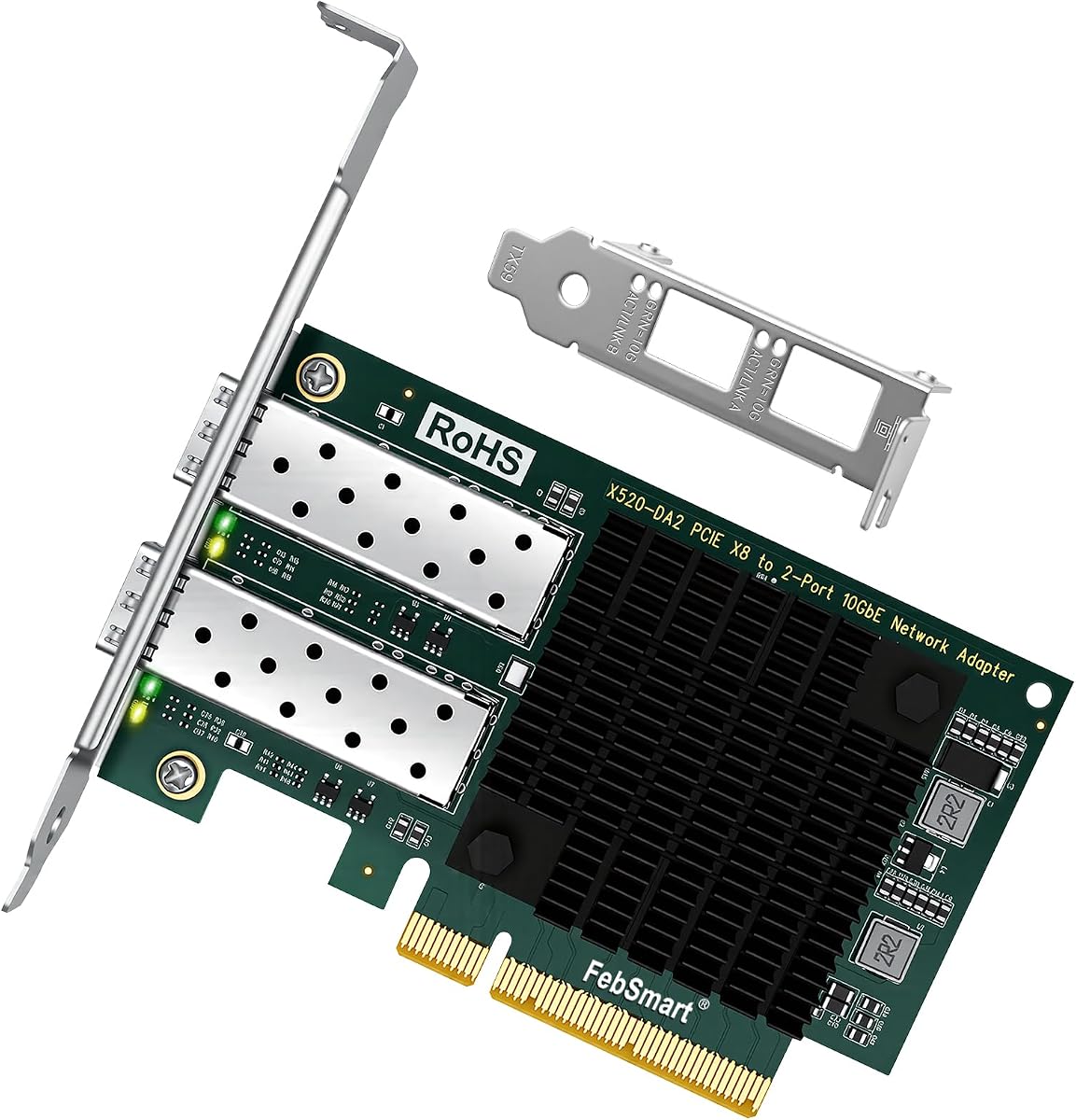
This dual-port adapter offers reliable 10GbE access on both ports using Intel 82599ES controller ensuring consistent throughput. It supports virtualization and storage protocols including VXLAN and iSCSI for flexible network design.
We may earn a commission when you buy through this link, at no additional cost to you.
Drivers must be installed manually on Windows 10 and 11 adding setup steps for newer systems. PCIe 2.0 x8 provides ample bandwidth for single-port loads but less total capacity than Gen3.
Dual ports enable link aggregation or failover configurations improving network reliability for servers. Cost per port remains low compared to branded equivalents.
Small data centers needing dual 10G connections will find this card cost-effective. Its broad compatibility supports mixed server fleets efficiently.
Two active ports allow link aggregation for doubled bandwidth or failover setups increasing overall network reliability.
FCoE and iSCSI support consolidates storage traffic on the same cards reducing hardware and cabling complexity.
We may earn a commission when you buy through this link, at no additional cost to you.
Selecting the right card depends on your speed requirements hardware compatibility and desired features like redundancy or advanced traffic management.
Determine whether you need 1Gbps 10Gbps or 25Gbps speeds based on your network switch and planned use cases. Higher speeds like 25Gbps demand more PCIe lanes and better cooling.
Match the card speed to your switch capabilities to avoid bottlenecks and ensure full utilization of purchased hardware.
SFP+ ports accept removable transceivers offering flexibility between fiber and copper depending on distance needs. Direct Attach Copper DACs provide cheaper short-range solutions.
Choose SFP+ for modular flexibility or fixed copper ports if you prefer simplicity and reduced component count.
Verify driver availability for your specific OS version especially for newer Windows or Linux kernels. Virtualization stacks often require specific driver packs for proper functionality.
Prioritize models with documented driver support for your environment to avoid installation headaches.
Cards supporting SR-IOV VMQ and VLAN offloading improve performance in virtual machines. Look for explicit VMware ESXi or Hyper-V compatibility if running hypervisors.
Ensure the card enables hardware offloads to reduce CPU load during VM traffic handling.
Check your available PCIe slot size and shape to match the card interface. Most include both full height and low profile brackets for flexible installation.
Confirm the bracket type fits your chassis to avoid modification or return complications.
High-speed cards generate heat so passive heatsinks require adequate airflow in your case. Active cooling may be needed in compact enclosures.
Plan for sufficient cooling to maintain stable performance during long data transfers.
Price varies significantly between branded enterprise models and third-party solutions. Weigh cost against warranty and support needs for your use case.
Invest in reputable brands for production use while third-party options suit budget-conscious labs.
Single port cards suffice for simple upgrades while dual-port cards enable redundancy or link aggregation. Consider future needs when selecting port count.
Dual ports offer more flexibility for server workloads needing higher reliability.
Install the card in a compatible PCIe slot ensuring it seats firmly. Secure the bracket to your case and attach fiber or DAC cables to the SFP ports.
Install required drivers from the manufacturer website before connecting network links. Verify device manager shows the card recognized without errors.
Monitor temperatures and airflow around the card regularly to prevent overheating. Clean dust from heatsinks periodically to maintain optimal thermal performance.
Most fiber SFP cards ship without transceivers so you must buy compatible modules separately unless listed as included. Check your link distance and fiber type when selecting modules.
Yes many SFP+ cards support Direct Attach Copper DAC cables for short distances without transceivers. This saves cost for rack-to-rack connections under 5 meters.
Most require available PCIe x4 or x8 slots with sufficient physical clearance. Ensure your BIOS supports PCIe 3.0 or higher for 10G performance.
Intel controller cards typically support Windows Server Windows 10/11 Linux and VMware ESXi. Always download the latest driver pack for your specific OS version.
Some third-party cards require manual driver installation on Windows 10 and 11 whereas Server OSes may detect automatically. Check the product details before purchase.
Fiber optics provide lower latency and immunity to electromagnetic interference over long distances. Copper SFP+ DACs have minimal latency differences for short runs.
Quality cards last many years if kept cool and dust-free. Active components like heatsinks wear slower than moving parts making them reliable for long-term use.
Yes many models work with Synology QNAP and TrueNAS systems for fast storage access. Verify your NAS OS supports the required drivers before upgrading.
The top picks cover diverse needs from budget 10G upgrades to enterprise 25G solutions. Each option delivers reliable performance suited to specific infrastructure scenarios.
Prioritize chipset compatibility and OS support to ensure smooth deployment. Consider future bandwidth needs to avoid premature hardware replacement.
Check current listings and pricing before purchasing as costs fluctuate regularly. Select the model that best fits your performance budget and connectivity goals today.