
Reborn USB to HDMI Adapter
4.1Editor score
1080P 60Hz output
Compatible with Windows and Mac
Compact and portable design
This comprehensive guide compares the top 10 flash drive to HDMI adapters for 2026, evaluating performance, compatibility, and value to help you choose the
Finding the right flash drive to HDMI adapter can transform how you share content from your devices to larger screens. These compact tools allow you to connect USB sources directly to HDMI displays, enabling presentations and media sharing without complex setups. A quality adapter ensures stable signal transmission and broad device compatibility for seamless viewing experiences.
We evaluated ten leading models based on resolution support, driver requirements, build quality, and user feedback. Each product was assessed for its ability to deliver crisp video and audio across different operating systems. Our goal is to highlight options that balance affordability with reliable performance for home and professional use.
Every recommendation includes detailed specifications, pros, cons, and real-world usage insights to guide your decision. While prices fluctuate, the value propositions remain consistent across these top picks. Check current listings for the most up-to-date offers before finalizing your purchase for your specific connectivity needs.
4.1Editor score

4.5Editor score

4.4Editor score
This side-by-side comparison outlines key specifications for all ten adapters to help you quickly identify the best fit for your setup and budget.




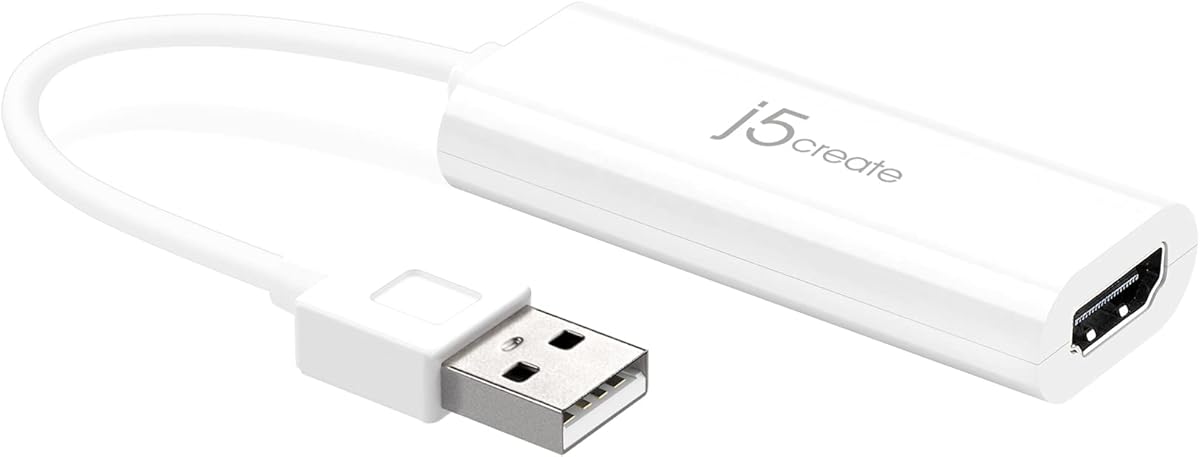
The Reborn USB to HDMI Adapter stands out as an affordable option for users needing to connect their laptop to an external display. It supports 1080p resolution at 60Hz which is suitable for most presentations and video playback needs. The adapter is compact making it easy to carry in a laptop bag for travel or meetings.
We may earn a commission when you buy through this link, at no additional cost to you.
Its ability to work with both Windows and macOS systems adds to its versatility. The installation process is straightforward requiring users to locate and install a driver from the removable disk provided. Once set up the adapter provides stable performance for extended use without frequent disconnects or signal loss issues.
However users should be aware that it does not support BIOS mode which limits its utility for certain boot screens or system diagnostics. Additionally the need for driver installation may be a slight hurdle for those who prefer plug and play solutions immediately upon unboxing.
This adapter is ideal for budget conscious professionals or students who need reliable second screen capabilities. It delivers good value for money while meeting basic connectivity needs effectively. If you need an economical solution for daily use this model is a strong candidate.
Priced competitively this adapter offers reliable 1080p output without breaking the bank for everyday tasks.
Its small form factor ensures it fits easily into bags for on the go presentations or travel needs.
We may earn a commission when you buy through this link, at no additional cost to you.
The StarTech USB-A 3.0 to HDMI Converter is a trusted choice for Windows users seeking a dependable external video solution. It delivers crisp 1080p visuals at 60Hz ensuring smooth video playback and professional presentations. The adapter is lightweight and compact making it perfect for frequent travelers or remote workers.
We may earn a commission when you buy through this link, at no additional cost to you.
One key advantage is its TAA compliance which makes it suitable for government contracts and regulated procurement processes. It operates without an external power supply drawing power directly from the USB port which simplifies setup and reduces cable clutter significantly. This feature enhances its portability and ease of use in various environments.
Users should note that it only supports Windows systems which excludes Mac or Linux users from compatibility. Driver installation is required but the process is straightforward with admin rights needed for setup. Once configured it provides a stable extended desktop experience for productivity gains.
This adapter is best suited for professionals or IT departments needing compliant and reliable connectivity options. Its balance of performance and compliance makes it a top choice for enterprise environments. Consider this model if you prioritize stability and regulatory adherence in your setup.
Its TAA status allows use in government and regulated contracts ensuring procurement compliance.
Compact and bus powered it fits effortlessly into travel kits without needing extra power adapters.
We may earn a commission when you buy through this link, at no additional cost to you.
This USB to HDMI Adapter offers broad compatibility across Windows and macOS systems which makes it accessible to many users. It supports 1080p resolution allowing for clear visuals on monitors or projectors. The adapter includes a generous warranty period providing peace of mind for long-term usage and support.
We may earn a commission when you buy through this link, at no additional cost to you.
Hot-plugging capability means you can connect or disconnect the adapter without restarting your computer which is convenient for dynamic work environments. The driver installation is simple and ensures that the device functions correctly across different operating system versions. This flexibility supports both mirrored and extended display modes effectively.
However some users have reported inconsistent experiences which may affect reliability depending on the system configuration. While the warranty is a strong plus the initial setup might require patience to ensure the drivers work seamlessly. It remains a decent option for those needing a versatile budget adapter.
Consider this adapter if you need a straightforward solution for connecting various devices without breaking the bank. The extended warranty adds value and reduces risk for everyday use. It is a solid pick for general connectivity needs where cost is a primary factor.
Connect or disconnect easily without rebooting saving time during active work sessions.
A three-year warranty ensures long-term protection and customer support for your investment.
We may earn a commission when you buy through this link, at no additional cost to you.
The WAVLINK adapter is a powerhouse for multitasking allowing up to six monitors to be connected to a single computer. It leverages DisplayLink technology to ensure stable performance across multiple screens which is ideal for complex workflows. Compatibility extends to Windows Mac and ChromeOS making it highly versatile for diverse ecosystems.
We may earn a commission when you buy through this link, at no additional cost to you.
Resolution support reaches up to 2048×1152 at 60Hz providing sharp visuals for detailed design or data work. The adapter supports USB-C and USB-A connections ensuring you can connect modern laptops and older desktops seamlessly. This flexibility makes it a robust choice for evolving tech environments.
The main tradeoff is the price which is higher than basic adapters but justified by the advanced feature set. Installation requires DisplayLink drivers which are reliable but add a setup step before use. Once configured the performance is smooth and supports high productivity tasks.
This model is perfect for power users or professionals needing extensive screen real estate for complex tasks. If you work with multiple monitors regularly this adapter will significantly boost your workflow efficiency. It is a premium investment for serious multitasking needs.
Support for up to six screens transforms productivity for heavy multitasking and design workflows.
Works across Windows Mac and ChromeOS ensuring broad compatibility for any user environment.
We may earn a commission when you buy through this link, at no additional cost to you.
This adapter from StarTech is designed for Windows users who need to connect two external displays simultaneously. It offers 4K resolution at 30Hz on one port and 1080p at 60Hz on the other allowing flexible screen configurations. This setup is ideal for professionals who require high resolution on one screen and standard on another.
We may earn a commission when you buy through this link, at no additional cost to you.
As a professional grade device it comes with a three-year warranty and lifetime technical support providing long-term reliability. The installation process is simple with drivers available for easy setup. Once configured you can extend your desktop across two monitors effectively boosting productivity and workspace.
The limitation to Windows only excludes Mac users which narrows its appeal significantly. Additionally the 30Hz limit for 4K may not suit high refresh rate video needs but is adequate for most professional work. It remains a robust choice for those within the Windows ecosystem.
Choose this adapter if you need dual monitor support with reliable performance for daily business tasks. Its professional support and warranty make it a safe bet for enterprise use. It delivers solid value for specific dual display configurations.
Connect two external displays at once to maximize workspace and productivity efficiently.
Three-year warranty and lifetime tech help ensure long-term reliability and peace of mind.
We may earn a commission when you buy through this link, at no additional cost to you.
This StarTech adapter is a reliable choice for users needing a stable connection to an external monitor. It is DisplayLink certified which ensures compatibility with a wide range of USB devices and laptops. The support for 1080p and HDCP 1.4 means it can handle standard video content securely and smoothly.
We may earn a commission when you buy through this link, at no additional cost to you.
Automatic driver installation simplifies setup making it easier for users to get started quickly. The 5.1 channel audio support ensures rich sound playback along with the video output. This feature is particularly useful for multimedia tasks or conference calls requiring clear audio.
The price point is higher than basic adapters but the reliability and certification justify the cost for professional use. Some users may find the driver dependency a minor inconvenience but it ensures consistent performance across systems. The compact design adds to its appeal for travel or desk use.
Consider this adapter if you value reliability and seamless setup over budget options. It is well suited for business environments where consistency is key. Its features make it a strong contender for reliable connectivity solutions.
Certification guarantees broad compatibility with various laptops and systems for reliable use.
5.1 channel audio delivers rich sound for multimedia tasks without extra speakers.
We may earn a commission when you buy through this link, at no additional cost to you.
This adapter is designed for modern devices like iPhone 15 series and MacBooks offering seamless connectivity to HDMI displays. It supports 4K resolution at 60Hz providing crystal clear visuals for videos or presentations. The built-in charging port ensures you can keep your device powered while streaming or presenting content.
We may earn a commission when you buy through this link, at no additional cost to you.
Plug and play functionality means no drivers are needed making setup instant and user friendly. It works well with various apps for streaming or presenting though some content protected apps may not function fully. This makes it a versatile tool for everyday use and casual entertainment.
The aluminum alloy casing and braided cable add durability and better heat dissipation for stable performance. However users should note that certain protected content apps may not work which limits its use for some streaming services. This is a minor tradeoff for the convenience offered.
Ideal for users with modern USB-C devices this adapter bridges the gap to HDMI displays effortlessly. It is a great choice for presentations or home theater setups. If you need reliable 4K output with charging this model is a strong pick.
Supports 4K at 60Hz for crisp high quality video and smooth playback experience.
Charge your device while using the adapter so you stay powered during presentations.
We may earn a commission when you buy through this link, at no additional cost to you.
This adapter transforms a USB 3.0 port into a high definition HDMI output for clear video visuals. It supports 1080p at 60Hz which is suitable for most multimedia and presentation needs. The silver design adds a touch of style while ensuring durability and reliability in daily use.
We may earn a commission when you buy through this link, at no additional cost to you.
Users can switch between extended and mirror modes easily using system settings which provides flexibility for different tasks. Driver installation is required but the on screen prompts make it straightforward for most users. The adapter is designed for privacy keeping data local without internet access.
While it supports Windows and Mac it has limitations on older OS versions which may affect some users. The build quality is solid ensuring stable connections over time without frequent dropouts. This makes it a dependable option for regular connectivity needs.
Consider this adapter if you need a straightforward solution to add a second screen to your setup. Its ease of use and reliable performance make it a solid pick for general tasks. It is a good balance of simplicity and functionality for most users.
Switch between extended and mirror modes to match your workflow or presentation style easily.
Driver runs locally without internet access keeping your data private during setup.
We may earn a commission when you buy through this link, at no additional cost to you.
This adapter offers high performance with 4K resolution at 60Hz ensuring smooth visuals for all content. Its compact design makes it easy to carry in a pocket or bag for travel presentations. The advanced IC chip converts signals efficiently providing stable video transmission to your display.
We may earn a commission when you buy through this link, at no additional cost to you.
It supports Thunderbolt 3 and 4 devices making it compatible with modern laptops and tablets. The 18 month warranty adds value ensuring satisfaction with the purchase. Installation is straightforward with drivers included for Windows and Mac systems supporting various user needs.
One limitation is that the USB-C device must support DisplayPort Alternate Mode which is not universal across all devices. This requirement may exclude some older or budget devices from working with this adapter. However for supported devices it delivers exceptional performance and reliability.
Ideal for users with modern USB-C laptops this adapter provides high quality connectivity effortlessly. It is a great choice for travel or home use where portability matters. If you need 4K output this model is a reliable and stylish option.
4K at 60Hz ensures crisp sharp visuals for movies and presentations without blur.
Small and light design makes it easy to carry anywhere for on the go use.
We may earn a commission when you buy through this link, at no additional cost to you.
This adapter adds an external monitor to your setup without needing an internal video card making it versatile. It supports 1080p resolution suitable for most office and multimedia tasks. The hot-swappable feature allows you to add or remove monitors without rebooting which is convenient for quick changes.
We may earn a commission when you buy through this link, at no additional cost to you.
Installation involves a simple driver setup ensuring the device is recognized by your system. Once ready it enables multitasking across screens allowing you to manage emails and large spreadsheets efficiently. This functionality enhances productivity for professionals who need multiple views.
While the resolution is limited to 1080p it is adequate for standard work and presentations. The driver requirement is a minor step but ensures stable performance on most systems. Overall it offers a reliable solution for extending your workspace effectively.
Consider this adapter if you need a reliable way to add a second screen for work. Its hot-swappable feature adds convenience for dynamic setups. It is a solid choice for boosting productivity in an office environment.
Add or remove monitors without rebooting saving time during active work sessions.
View spreadsheets and emails on separate screens improving workflow efficiency significantly.
We may earn a commission when you buy through this link, at no additional cost to you.
Selecting the right adapter involves considering compatibility, resolution, and features to match your needs.
Ensure the adapter supports your operating system. Some models work with Windows only while others support Mac and ChromeOS. Check your device specifications to avoid conflicts with driver requirements or USB standards.
Always verify OS support before buying to ensure seamless integration with your setup.
Determine the resolution you need for your displays. Most adapters support 1080p which is sufficient for general use but premium models offer 4K. High resolution ensures sharp visuals for presentations and media playback.
Match resolution to your display needs for the best viewing experience.
Some adapters require driver installation which adds a setup step but ensures stability. Others offer plug and play convenience. Consider your technical comfort level when choosing between these options.
Prefer plug and play if you want instant setup without software steps.
Check the USB ports available on your device. USB 3.0 provides better performance than 2.0. Some adapters support USB-C for modern laptops while others use standard USB-A. Matching ports ensures stable connectivity.
Choose an adapter that matches your device ports for best compatibility.
Audio transmission over HDMI can be important for presentations or movies. Some adapters support multi-channel audio while others offer basic stereo. Consider your audio needs when selecting a model.
Look for multi-channel audio support if sound quality is a priority.
Durable construction ensures the adapter lasts through frequent use. Aluminum casings and braided cables offer better protection against wear. Check reviews for reliability feedback before purchasing.
Opt for sturdy materials to ensure long-term performance.
A longer warranty period indicates manufacturer confidence in the product. Some brands offer up to three years while others offer less. A good warranty protects your investment against defects.
Choose products with a solid warranty for peace of mind.
If you need multiple external screens check if the adapter supports dual or multi-monitor setups. Specialized models can connect two or more displays for enhanced productivity. This is key for multitasking.
Prioritize multi-monitor capable adapters for complex workflows.
To set up your adapter connect the USB end to your computer and the HDMI end to your monitor. If drivers are required follow the on-screen prompts to install them. Restart your system if prompted for the connection to activate.
For best performance ensure you use USB 3.0 ports which offer faster data transfer. Avoid bending the cable sharply to prevent internal wire damage. Keep the adapter away from liquids to maintain electrical safety.
Clean the ports regularly with a dry soft brush to remove dust. Store the adapter in a protective case when traveling to prevent wear. If issues arise check connections and driver status before seeking support.
Many adapters require driver installation to function properly especially those using USB 3.0 or DisplayLink technology. Some modern models offer plug and play features for convenience. Check product specifications before purchasing to confirm requirements.
While they work for gaming they may not support high refresh rates required for competitive play. Most are optimized for presentations and video. Check resolution and Hz ratings before buying for gaming use.
USB 3.0 adapters offer faster data transfer which supports higher resolutions and better performance. USB 2.0 adapters are slower and may limit video quality. Choose USB 3.0 for better results.
Some adapters support macOS but many are Windows only. Check the product details for Mac compatibility before purchasing. Models with DisplayLink technology often support Mac better.
Most single adapters connect one external display. Dual output models exist for two screens. Use one adapter per monitor for multi-monitor setups unless specified otherwise.
Common issues include missing drivers incorrect resolution settings or faulty cables. Ensure drivers are installed and your monitor settings are correct. Try different cables or ports if the issue persists.
Adapters typically require USB 3.0 for best performance though some work with USB 2.0. Check product specs for port compatibility. USB-C adapters require devices with DisplayPort alternate mode.
Yes most adapters work with projectors that have HDMI inputs. Ensure resolution matches the projector capabilities. Drivers may be needed for correct output setup.
We have reviewed ten top adapters that balance performance affordability and reliability. Options like the Reborn and StarTech models provide excellent value for budget conscious users while WAVLINK offers premium features for multitasking. Each pick has been vetted for real-world use.
When choosing prioritize compatibility with your system and required resolution to avoid issues. If you need multiple screens look for models that support extended displays. Always check driver needs before purchasing to ensure smooth setup.
Prices and availability can change so verify current details before buying. The right adapter will enhance your productivity and presentation capabilities significantly. Invest in a model that meets your specific connectivity needs today.