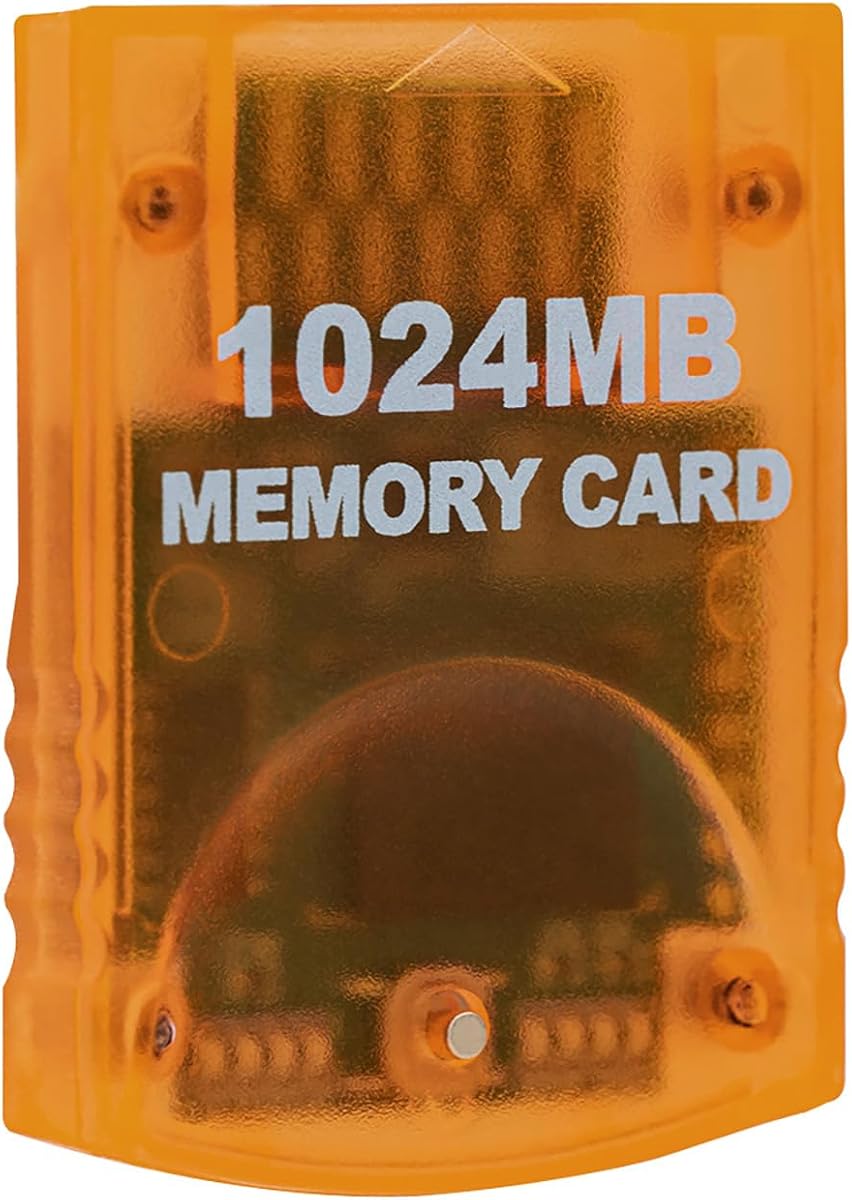
Mcbazel 1024MB
4.7Editor score
16344 non-compress blocks
Eight switchable 128MB parts
High speed efficient product
This guide compares the top GameCube Memory Card options for saving game data on original consoles and compatible Wii models.
Preserving your gaming progress is essential for any retro console enthusiast. A reliable GameCube Memory Card ensures your save files remain intact across multiple gaming sessions. Without proper storage, hours of effort in classic titles can vanish instantly.
We analyzed ten top-rated memory cards to find the most reliable options for gamers today. Our selection process focused on compatibility, storage capacity, and build quality. We reviewed user feedback and technical specifications to ensure each pick meets high standards.
Each product in this list highlights specific strengths for different gaming needs. Whether you need massive storage or a budget-friendly option, we have you covered. Please note that prices and availability may change frequently on Amazon.
4.7Editor score

4.7Editor score

4.8Editor score
This comparison table provides a side-by-side overview of all ten memory cards. It highlights key specifications like storage capacity, block count, and specific compatibility notes to help you choose quickly.


The Tolesum 1024MB Card stands out as the premier choice for serious retro collectors. It offers a massive 16344 real blocks without compression, ensuring compatibility with all GameCube titles. Its design mimics official hardware while providing significantly more utility.
We may earn a commission when you buy through this link, at no additional cost to you.
This card divides storage into eight independent 128MB areas, each holding 2043 blocks. You can switch areas with a simple button press, making organization effortless. The indicator lights clearly show which area is active, reducing confusion during save management.
While it requires the console to be powered off for safety, this is standard for this hardware type. It is not compatible with Wii U or later models, so verification is key. The orange translucent casing looks great on any console shelf.
Collectors who play multiple games should definitely choose this card. It solves the space limitation problem common with smaller memory cards. We recommend it as the top pick for anyone serious about GameCube preservation.
The card holds 16344 real uncompressed blocks which is crucial for compatibility with specific game titles.
Eight storage areas allow you to separate saves for different games without losing progress on any single file.
We may earn a commission when you buy through this link, at no additional cost to you.
The Mcbazel 1024MB card offers exceptional value for gamers who need large storage. It features real 16344 blocks that are non-compress, meaning your save data fits perfectly. This option is perfect for budget-conscious buyers who do not want to sacrifice capacity.
We may earn a commission when you buy through this link, at no additional cost to you.
It divides storage into eight parts of 128MB each. You simply press the button on the card to switch between parts, which is intuitive and fast. The high speed and efficient product design ensures your saves process quickly without lag.
This product is made by a third party rather than Nintendo directly. While this lowers the price, it means you rely on community support. However, compatibility with RVL-001 and Gamecube consoles is confirmed by user reports.
We suggest this card for players who own several games and need to save progress for all of them. The price point makes it accessible for everyone. It is a practical tool for preserving your gaming history.
This card provides 16344 blocks at a price that fits most wallets without compromising on actual usable space.
Pressing the button on the card allows you to switch between eight storage parts with ease.
We may earn a commission when you buy through this link, at no additional cost to you.
MAYFLASH is known for quality gaming accessories. This 512MB memory card delivers a balanced mix of style and performance. With 8172 blocks total, it offers substantial space for most users. The bright blue color adds a nice touch to your setup.
We may earn a commission when you buy through this link, at no additional cost to you.
The card features four storage areas, giving you flexibility to organize your saves. Each area has slots for 2043 blocks. You press the button on the card to switch the storage areas, which is a standard and reliable feature for this device type.
While it offers less total space than the 1024MB cards, it is still sufficient for many collections. It is a third party product but maintains high quality standards. The plug and play functionality ensures you do not need drivers.
This card is ideal for casual gamers who want a reliable save solution. It is a great option if you prefer a slightly smaller card that still holds plenty of data. The design is modern and fits well with current hardware.
MAYFLASH products are known for durable construction and consistent performance over time.
Four storage areas provide good organization without overwhelming the user with too many options.
We may earn a commission when you buy through this link, at no additional cost to you.
The Tolesum 512MB is a solid option for users who prefer a lighter card. It offers 8192 non-compress blocks which ensures your game data is stored correctly. The blue color makes it easy to distinguish from other accessories in your drawer.
We may earn a commission when you buy through this link, at no additional cost to you.
This card features four data areas that you can switch between with a button press. It is a plug and play accessory that works seamlessly with your console. High speed performance ensures your saves load and write without delays.
It is made by a third party and is not an official item. However, it maintains compatibility with RVL-001 and standard Gamecube consoles. The price point is very competitive compared to larger capacity cards.
Buyers looking for a balance between size and utility will appreciate this card. It is suitable for those who do not need the massive space of a 1024MB card. It saves your hard work efficiently and reliably.
Four data areas allow for organized saves without taking up excessive physical space in the console slot.
High speed transfer rates ensure that saving your progress does not interrupt your gaming session.
We may earn a commission when you buy through this link, at no additional cost to you.
This 16MB Gamecube memory card is perfect for casual players who just need basic storage. It holds 251 blocks which is enough for a few save files. The black finish is simple and blends in with any console style.
We may earn a commission when you buy through this link, at no additional cost to you.
The card is designed to be a universal accessory for Nintendo GameCube and Wii consoles. It works seamlessly without any setup steps. The streamlined profile fits snugly in the slot to avoid the wobble common with generic options.
It is a budget-friendly third-party accessory but offers first-party performance. The shock-resistant build protects your files from accidental drops. This makes it durable enough for daily use even though it is not official hardware.
We recommend this card if you only play one or two games at a time. It is a great starter option for those new to retro gaming. The affordable price allows you to try it without risk.
This card works with both the original GameCube and compatible Wii models easily.
The streamlined design ensures a snug fit in the memory card slot to prevent connection issues.
We may earn a commission when you buy through this link, at no additional cost to you.
The Tomee 16MB Memory Card is a classic option for retro gamers. It provides 16 MB of memory which translates to 251 blocks. This size is ideal for storing levels and characters in a few key titles.
We may earn a commission when you buy through this link, at no additional cost to you.
You can load save copy and delete game saves with ease on this device. It is fully compatible with all GameCube games that have a save option. The interface is straightforward so you do not need to read a manual.
While it offers less space than newer cards, it is reliable and proven. It is a great backup option if you lose your main card. The price is very low making it easy to buy as a spare.
This card is best for gamers who have a specific game they play often. It is not suitable for large collections but works well for focused play. We trust it for preserving important game data reliably.
Users can easily load save copy and delete game saves with this reliable 16MB card.
Tomee is a known brand in the retro community offering consistent quality products.
We may earn a commission when you buy through this link, at no additional cost to you.
This Mcbazel card stands out with its bright pink translucent design. It offers 256MB split into two independent 128MB sections which is double the capacity of a standard card. It is a fun and functional accessory for your collection.
We may earn a commission when you buy through this link, at no additional cost to you.
The card features dual banks with individual LEDs showing the active section. You simply press the button to switch between banks. This organization tool is the ultimate for keeping your saves separate and easy to manage.
It is designed specifically as a memory card for GameCube and Wii Console. Make sure you use it only with RVL-001 models. It is not compatible with the Wii U console so verify your hardware first.
If you want a card that looks great and works well this is a top choice. The pink color is distinct and adds personality to your setup. We recommend it for users who value both function and style.
256MB memory is split into two independent sections allowing for better organization of saves.
The pink translucent design helps you quickly identify the card in your drawer or console tray.
We may earn a commission when you buy through this link, at no additional cost to you.
Suncala offers a compelling memory card with an impressive six-year warranty. This shows the company stands behind their product. It holds up to 16344 blocks in 8 improved storage sections. This capacity ensures you never run out of space.
We may earn a commission when you buy through this link, at no additional cost to you.
The upgraded innovation chip processes and saves games 20% faster than older versions. This means smoother gameplay without interruptions. The sleek package allows you to easily insert and remove memory card without struggle.
It is fully compatible with Gamecube and Wii Consoles with model RVL-001. You can change storage sections by pressing the switch button. The friendly customer service supports you if any issues arise after purchase.
Buyers who want peace of mind will love this card. The warranty is significantly longer than most competitors. We recommend it for anyone who values long-term reliability over initial cost.
60 months warranty provides strong protection for your investment in this memory card.
Upgraded innovation chip processes and saves games 20% faster than older versions.
We may earn a commission when you buy through this link, at no additional cost to you.
This card offers a classic look and feel for your GameCube system. It provides 16MB Flash Memory with 251 blocks. This is the standard size for basic saving needs. It is a great option if you need a replacement quickly.
We may earn a commission when you buy through this link, at no additional cost to you.
You can store levels characters and top scores on this card. It is designed to work seamlessly with titles that support saving. The price is low and it is often available on major platforms.
It is a third-party option but maintains compatibility with standard consoles. The design is simple so it does not stand out. This works well if you prefer a discreet accessory.
We suggest this card for users who need a quick and affordable solution. It is not the largest option but it works reliably for standard saves. It is a solid choice for basic gaming needs.
The card provides 16MB Flash Memory and 251 blocks for standard game saving needs.
This basic card is often available on major platforms making it easy to get quickly.
We may earn a commission when you buy through this link, at no additional cost to you.
This GC2SD adapter lets you use a Micro SD card on your console. It can support up to 512GB of storage. This is perfect for users who want to store many homebrew games or large saves. It offers flexibility beyond standard cards.
We may earn a commission when you buy through this link, at no additional cost to you.
You can easily use your idle micro SD card on GameCube and Wii hosts. The transparent design is simple and fits in the slot. It needs to be used with homebrew loaders like Swiss or xeno to work correctly.
This is not a standard card for regular saves but an advanced tool. It automatically loads the TF card game list when paired with a loader. It is ideal for enthusiasts who want to expand their console capabilities.
We recommend this for users comfortable with basic technical steps. It is the best option for high-capacity storage on these consoles. We suggest it for advanced users who want maximum flexibility.
Supports micro SD cards with up to 512GB memory for huge storage capacity.
This adapter can run on any version of Gamecube and Wii console with a compatible loader.
We may earn a commission when you buy through this link, at no additional cost to you.
Choosing the right memory card requires considering capacity, compatibility, and build quality.
The most critical factor is how much data you need to store. Standard cards offer 251 blocks while larger options reach 16344 blocks. If you play many different games, a larger card is essential to avoid deleting old saves.
Look for a card with at least 1024MB if you are serious about collecting. Smaller cards are fine for casual play but limit your flexibility.
Ensure the card is compatible with your specific console model. Most cards work with the original GameCube and Wii RVL-001. However, they do not work with Wii U or later models which lack the slot.
Always check your console's model number before purchasing. This prevents buying a card that cannot fit your hardware.
Some cards use compression to inflate block numbers. Real uncompressed blocks ensure better compatibility with all games. Compressed cards may fail to save correctly on certain titles.
Always choose a card that lists real blocks or uncompressed blocks. This is a key distinction for reliability.
The physical quality of the card matters for long-term use. Look for cards with durable plastic and stable connections. A card that wobbles in the slot may lose data during writing.
Third-party cards vary in quality so read user reviews. High ratings usually indicate better construction materials.
Modern memory cards often feature button switching for storage areas. This makes organizing your saves much easier than manual management. LED indicators also help you know which area is active.
Choose a card that offers simple switch mechanisms. This saves time and reduces errors when saving progress.
While official Nintendo cards are no longer sold, brands like Tomee and Suncala have a history. Established brands often provide better reliability and support. Newer brands may vary in quality control.
Check community feedback on the specific brand. A strong community reputation suggests a better product.
Higher capacity cards usually cost more. However, buying a larger card often offers better value in the long run. It prevents the need to buy multiple small cards.
Balance your budget with your needs. If you play often, investing in a larger card is usually worth it.
Some brands offer warranties even on third-party cards. This provides peace of mind if the card fails. Customer service quality can also be crucial if you face issues.
Look for cards that offer some form of support. This adds value beyond just the hardware itself.
Always power off the console before inserting or removing the memory card. This ensures your save data is not corrupted during the process.
Insert the card firmly into the slot until it clicks. If it wobbles it might not be seated correctly which can cause connection issues.
Store cards in a cool dry place when not in use. Avoid direct sunlight or extreme temperatures to prevent damage to the internal chips.
No these memory cards are not compatible with the Wii U console. The Wii U does not have a physical memory card slot. You must use original GameCube or specific Wii models like the RVL-001 to use these cards.
A 1024MB card holds 16344 blocks. Most games require between 5 and 50 blocks depending on the title. You can save progress for dozens or even hundreds of different games on one card.
Compressed blocks are a marketing trick where the total number is inflated. Real cards list uncompressed blocks which work with all games. Avoid cards that claim high numbers without specifying they are uncompressed.
Yes but you need two memory cards and a specific save manager program. You cannot transfer saves directly using the console menus. Homebrew tools are usually required for this process.
The button allows you to switch between storage areas. This helps organize saves so you do not overwrite important progress. It makes managing a large collection much easier.
Most third-party cards are safe and reliable if they are from reputable sellers. They have become the standard since official cards are discontinued. Always check reviews to ensure quality.
We reviewed the top memory cards including options from Mcbazel Tolesum and MAYFLASH. Each offers unique benefits for different players.
Prioritize real uncompressed blocks and compatibility with your specific model. Avoid cards that claim high numbers without verification.
Prices and availability change so check the latest listings before buying. This ensures you get the best deal on your chosen model.