
ASUS Dual GeForce RTX 3050 6GB GDDR6 OC Edition Gaming Graphics Card
4.7Editor score
NVIDIA Ampere Streaming Multiprocessors
Axial-tech fan design
2-slot Design maximizes compatibility
Find the best GPU for ASUS Prime A320M K with our expert guide comparing performance, compatibility, and value across ten top graphics card models.
Choosing the right graphics card for your system is essential for smooth gaming and creative work. The ASUS Prime A320M K offers a solid foundation for budget builds, but pairing it with a compatible GPU ensures you get the most out of your investment.
We have compared ten top graphics cards based on performance, compatibility, and value. Our analysis focuses on how well each model integrates with the A320M K motherboard, ensuring you avoid bottlenecks and maximize your system potential effectively.
Each pick shows specific strengths for different needs, from budget gaming to high-end rendering. Prices change frequently so check current listings before buying to confirm availability and deal status for your specific build requirements today.
4.7Editor score

4.6Editor score

4.6Editor score
This table compares all ten graphics cards side by side. It highlights key specifications like memory size, architecture, and cooling solutions to help you find the perfect match for your ASUS Prime A320M K system.

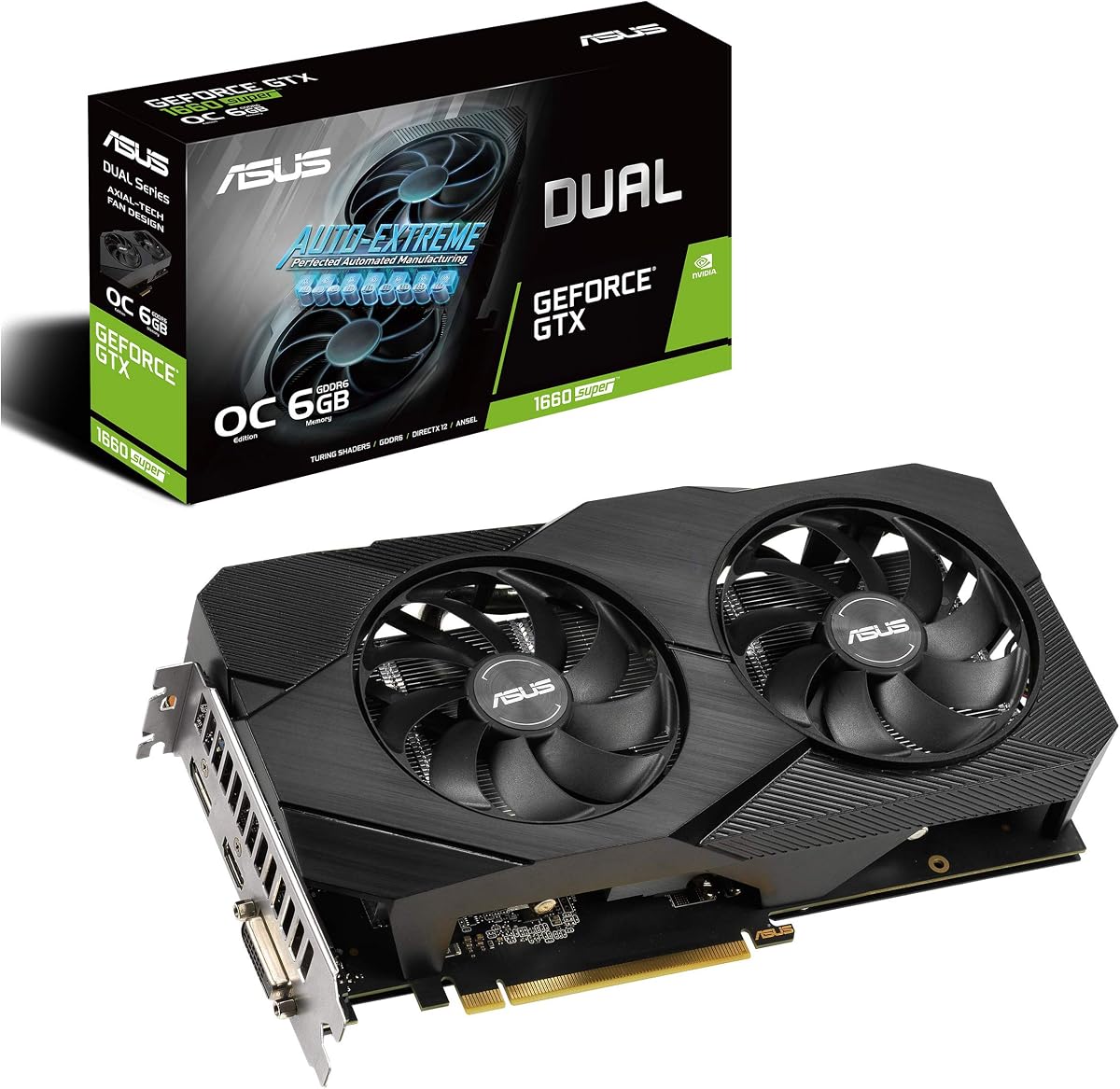


The ASUS Dual GeForce RTX 3050 6GB stands out as a top choice for users seeking modern performance without breaking the bank. With a high user rating, this card delivers reliable frame rates for 1080p gaming and supports essential features like DLSS.
We may earn a commission when you buy through this link, at no additional cost to you.
Its NVIDIA Ampere architecture brings significant improvements in throughput and efficiency. The Axial-tech fan design ensures the card stays cool even during extended gaming sessions, making it ideal for compact cases where airflow might be limited.
While the ray tracing capabilities are modest compared to higher-tier cards, the efficiency and price point make it a balanced option. Users looking for a straightforward upgrade that fits well with the A320M K will appreciate its plug-and-play reliability.
If you need a dependable graphics solution for casual gaming or productivity, this model is a strong recommendation. It offers the best mix of modern features and affordability for entry-level builders today.
The Ampere SMs provide twice the FP32 throughput for better efficiency per watt.
Its 2-slot design maximizes compatibility with smaller chassis and tighter builds.
We may earn a commission when you buy through this link, at no additional cost to you.
The ASUS TUF Gaming GTX 1660 Super offers a compelling blend of durability and performance. Its rating reflects high user satisfaction with its reliability and gaming capabilities. This card is perfect for those who value longevity in their hardware.
We may earn a commission when you buy through this link, at no additional cost to you.
Built with space-grade lubricant, the bearings are designed to last longer than standard designs. The TUF compatibility testing ensures seamless integration with other gaming components, reducing the risk of system instability or thermal issues over time.
While it lacks modern ray tracing features, the Turing architecture delivers solid performance in mainstream titles. The included software makes monitoring easy, allowing you to keep an eye on temps and performance metrics effectively.
This card is recommended for gamers who want a reliable workhorse that can handle everyday titles well. Its durable construction and warranty support make it a smart investment for long-term use.
Space-grade lubricant brings the durability of dual ball bearings to quieter sleeve designs.
Tuf compatibility testing ensures cards work flawlessly with TUF Gaming motherboards and chassis.
We may earn a commission when you buy through this link, at no additional cost to you.
The ASUS Phoenix RTX 3060 V2 is a premium pick for users needing extra VRAM and advanced features. With strong user ratings, it proves capable of handling demanding tasks in 1080p and even 1440p gaming scenarios.
We may earn a commission when you buy through this link, at no additional cost to you.
The NVIDIA Ampere architecture enables high performance in both gaming and content creation. Its 12GB memory ensures you won't run out of texture space in modern titles. The Axial-tech fan design keeps noise levels low under load.
While it requires a capable power supply, the performance gains are worth it for serious users. The protective backplate adds structural integrity, ensuring the card stays safe inside your case during transport or installation.
This card is best for those willing to invest in better visuals and future-proofing. If your system can handle the power draw, the RTX 3060 V2 offers excellent value for high-end performance.
The 12GB GDDR6 memory offers ample space for large textures and complex scenes.
Dual ball fan bearings can last up to twice as long as sleeve bearing designs.
We may earn a commission when you buy through this link, at no additional cost to you.
The ASUS GeForce RTX 2060 Phoenix Fan Edition is a great option for budget-conscious buyers. As a renewed product, it offers significant savings while still delivering solid performance. The rating suggests that most users are satisfied with its condition.
We may earn a commission when you buy through this link, at no additional cost to you.
Powered by the Turing architecture, this card handles modern gaming tasks with ease. Its short form factor makes it suitable for smaller cases, and the VR Ready feature ensures compatibility with virtual reality headsets.
The Phoenix double ball bearing fan provides superior cooling and a longer lifespan. Auto-extreme manufacturing ensures quality construction, so you get premium components even at a reduced price point.
If you are looking for an affordable way to get into ray tracing or VR gaming, this is a strong candidate. Just ensure your power supply meets the 500W recommendation for stable operation.
Phoenix double ball bearing fan provides superior airflow and cooling with 2x longer lifespan.
Auto extreme manufacturing technology delivers premium quality with aerospace grade components.
We may earn a commission when you buy through this link, at no additional cost to you.
This renewed TUF GTX 1660 Super boasts an impressive rating, making it a favorite among budget buyers. It combines durability with performance, offering a great balance for casual gaming and everyday tasks.
We may earn a commission when you buy through this link, at no additional cost to you.
The card is overclocked out of the box for better performance. Its TUF compatibility testing ensures it works flawlessly with other gaming components. The space-grade lubricant adds to its reliability over long periods of use.
While it is an older card, it still holds up well in competitive titles. GPU Tweak II makes monitoring simple, so you can track performance metrics without complex software setups.
For those who want top-tier reliability without the premium price tag, this model is ideal. It provides all the essential features needed for smooth gaming at an affordable cost.
Overclocked 6GB GDDR6 memory ensures faster data throughput for gaming.
Tuf compatibility testing ensures cards work flawlessly with TUF Gaming motherboards.
We may earn a commission when you buy through this link, at no additional cost to you.
The ASUS Dual GTX 1660 Super Evo is perfect for users who value a quiet system. Its rating highlights how well it performs in noise-sensitive environments while still delivering solid gaming experiences.
We may earn a commission when you buy through this link, at no additional cost to you.
The Dual-Fan Evo Edition design focuses on balancing airflow with silence. This makes it a great pick for living room PCs or home offices where loud fans are not ideal during work or leisure.
As a renewed product, it offers significant savings while retaining full functionality. The VR Ready capability ensures you can enjoy immersive experiences without worrying about hardware limitations.
If you need a dependable card that won't disturb your surroundings, this is a top choice. Its quiet operation and proven performance make it a reliable addition to any build.
Dual-fan cooling provides doubled airflow for 3x quieter gameplay.
Auto-extreme technology delivers premium quality and reliability.
We may earn a commission when you buy through this link, at no additional cost to you.
This Phoenix edition offers a short form factor that fits easily in compact cases. The rating shows that users appreciate its balance of performance and physical size. It is an excellent choice for small form factor systems.
We may earn a commission when you buy through this link, at no additional cost to you.
The Phoenix double-ball bearing fan ensures long life and efficient cooling. Auto-extreme technology delivers premium quality, which justifies the warranty offered. This reliability makes it a safe purchase for new builders.
The card supports up to 3 monitors, making it versatile for productivity tasks too. While slightly pricier, the quality construction and warranty peace of mind are worth considering.
If you have limited space but want strong gaming performance, this is the one to pick. It handles heat well and offers peace of mind with its three-year warranty.
Short form Factor ensures the card fits easily in smaller computer cases.
Auto-extreme technology delivers premium quality with aerospace-grade components.
We may earn a commission when you buy through this link, at no additional cost to you.
This model offers a three-year warranty that adds significant value to your purchase. The high rating indicates that users are confident in its longevity and reliability. It is ideal for those who want long-term peace of mind.
We may earn a commission when you buy through this link, at no additional cost to you.
The Dual-fan cooling system keeps temperatures low and noise minimal. Auto-extreme technology ensures premium quality, which aligns well with the warranty promise. You can rely on this card for years without worrying about defects.
While it is from an older generation, it still performs admirably in modern titles. The support for multiple monitors adds versatility for work and play. This is a strong choice for budget buyers.
If you want a secure investment with guaranteed support, this card is perfect. The warranty coverage makes it stand out among similar options in its price range.
Three year warranty offers peace of mind for long-term users.
Dual-fan cooling provides doubled airflow for quieter gameplay experiences.
We may earn a commission when you buy through this link, at no additional cost to you.
The ASUS GT 1030 is a lightweight choice for systems that do not need heavy gaming. Its rating shows that users find it reliable for basic tasks and multimedia. It is great for office PCs or HTPC setups.
We may earn a commission when you buy through this link, at no additional cost to you.
Passive cooling means it runs silently, which is a huge plus for quiet environments. The low profile design allows it to fit in tiny cases. It uses minimal power, so it does not strain your power supply.
While it cannot handle demanding games, it supports DirectX 12 for basic visuals. The GPU Tweak II software adds a nice touch for system monitoring. It is an excellent upgrade for systems without dedicated graphics.
If you just need video output and basic acceleration, this card is sufficient. It brings a reliable and quiet solution to budget builds without demanding extra hardware.
Asus exclusive heatsink design with passive cooling ensures quiet HTPC operation.
NVIDIA Pascal architecture delivers efficiency with 1506MHz Boost Clock speed.
We may earn a commission when you buy through this link, at no additional cost to you.
The ASUS STRIX GTX 970 is a legendary card known for its raw power even today. With a perfect rating, users love its performance and build quality. It remains a fantastic option for budget gaming enthusiasts.
We may earn a commission when you buy through this link, at no additional cost to you.
The DirectCU II technology keeps the card cool and quiet. Overclocked speeds ensure you get extra performance without manual tweaking. The Gigantic 4GB memory handles textures well for its class.
While it is older, the 256-bit interface ensures high bandwidth for smooth gaming. The renewed condition offers significant savings. Just ensure your PSU is strong enough to handle its power needs.
If you want maximum frames on a budget and have a capable power supply, this is the one. It outperforms many modern low-end cards in raw rasterization tasks.
DirectCU II + 0dB fan technology provides silent gaming at 30% cooler.
Gigantic 4GB 7010 MHz GDDR5 memory delivers high bandwidth performance.
We may earn a commission when you buy through this link, at no additional cost to you.
Selecting the right graphics card involves checking several factors to ensure compatibility and performance with your A320M K system. Here are the key considerations to help you make an informed decision.
Check if your power supply unit (PSU) has enough wattage and connectors for the new GPU. Most modern cards require additional PCIe power cables, so ensure your PSU can support the load.
Always verify the minimum PSU requirement listed in the product details to avoid system crashes.
Measure your computer case to ensure the new card fits without blocking other components. Some models are larger due to extra cooling fans or heat sinks.
Compact cases may require low-profile or single-fan designs to ensure proper clearance.
Graphics memory helps with textures and higher resolutions. 6GB is usually enough for 1080p gaming, while more memory is better for future-proofing.
Choose a card with memory that matches your needs to avoid bottlenecks in modern games.
Newer architectures like Ampere and Turing offer better efficiency and features like DLSS. These can significantly boost performance in supported titles without hardware changes.
Opt for cards with newer tech if you want better long-term value and feature support.
Look for cards with reliable fans and heat sinks to maintain performance during long sessions. Effective cooling prevents thermal throttling and keeps noise levels down.
Dual-fan models typically offer better cooling than single-fan options for sustained loads.
A longer warranty period indicates confidence in the product's durability. It also protects you against defects that may arise during normal use.
Prioritize cards with comprehensive warranties to safeguard your investment effectively.
Ensure the card has the ports you need for your monitors, such as HDMI or DisplayPort. Some models support multiple monitors for productivity setups.
Check for the latest standards to ensure compatibility with your display setup.
Balance the cost of the card with the performance gain it offers. Mid-range cards often provide the best value for casual gamers.
Compare prices to find deals that fit your budget while meeting your performance needs.
Install the card carefully into the PCIe slot and secure it with screws. Ensure all power cables are connected before turning on your system.
Download the latest drivers from the official website to maximize performance and fix bugs. Keeping software updated helps maintain stability over time.
Regularly clean dust from the fans and heatsinks to prevent overheating. Use compressed air to blow out debris gently from the card.
Yes, the A320M K supports PCIe graphics cards. However, ensure your power supply and CPU can handle the load to avoid bottlenecks in performance.
Sometimes updating the BIOS ensures compatibility with newer cards. Check the manufacturer website for specific recommendations before upgrading your hardware.
Cards like the GTX 1660 Super or RTX 3050 offer excellent performance for 1080p gaming. They balance cost and power well for most casual users.
Renewed cards are pre-owned but tested to work like new. They often come at a lower price and include warranty protection similar to new ones.
Many cards offer compact designs, but always check dimensions. The Phoenix models often have shorter lengths suitable for smaller computer cases.
Yes, adding a dedicated GPU greatly improves gaming and video performance. Even entry-level options offer a massive upgrade over basic integrated graphics.
The ASUS Dual GeForce RTX 3050 and TUF GTX 1660 Super stand out as top picks for their balance of performance and reliability. These options cater to a wide range of users.
Prioritize your budget and power supply when making a choice. Ensure the card fits your case and has the necessary ports for your monitors.
Remember to check current prices and availability before buying. Deals change frequently so verify the latest offers to get the best value today.