
H10 Android Terminal
4.2Editor score
Android 14 OS
Integrated thermal printer
Long battery life
Handheld Pos Systems have revolutionized how businesses process payments and manage transactions on the go. These portable devices offer flexibility, speed, and convenience for retailers, restaurants, and service providers who need to accept payments anywhere.
We evaluated ten leading models based on connectivity, battery life, payment acceptance, and user experience. Our analysis covers everything from sleek credit card readers to full-featured Android terminals with built-in printers and barcode scanners.
Each pick highlights specific strengths like durability, speed, or compatibility with popular software. Prices and availability change frequently, so check current listings before purchasing to ensure you get the best deal for your needs.
4.2Editor score

4.7Editor score

5.0Editor score
As an Amazon Associate we earn from qualifying purchases.
This side-by-side comparison breaks down key specifications for all ten models to help you quickly identify the right device for your specific business requirements and operational environment.




The Square Handheld stands out as a top contender for businesses needing mobility. With a 4.7 rating, it delivers reliability and ease of use. Its slim design fits easily in a pocket, making it perfect for service providers who move around.
We may earn a commission when you buy through this link, at no additional cost to you.
Key strengths include offline payment capabilities ensuring you never miss a sale due to connectivity issues. The built-in barcode scanner simplifies inventory checks and item lookups. Customers appreciate the lack of hidden fees and no long-term contracts.
Trade-offs involve the initial investment cost compared to simpler readers. You may need to pair it with specific card readers for full functionality depending on your setup. However, the robust feature set justifies the price for growing businesses.
This device is ideal for restaurants retail and beauty services needing flexibility. If you value portability and reliability above all else, this is the recommended choice. It empowers staff to complete transactions anywhere on the floor.
The lightweight and slim form factor allows staff to accept payments directly at tables or near customers without carrying bulky equipment.
Even when internet connections fail, the system allows you to queue transactions offline and process them once connectivity is restored.
We may earn a commission when you buy through this link, at no additional cost to you.
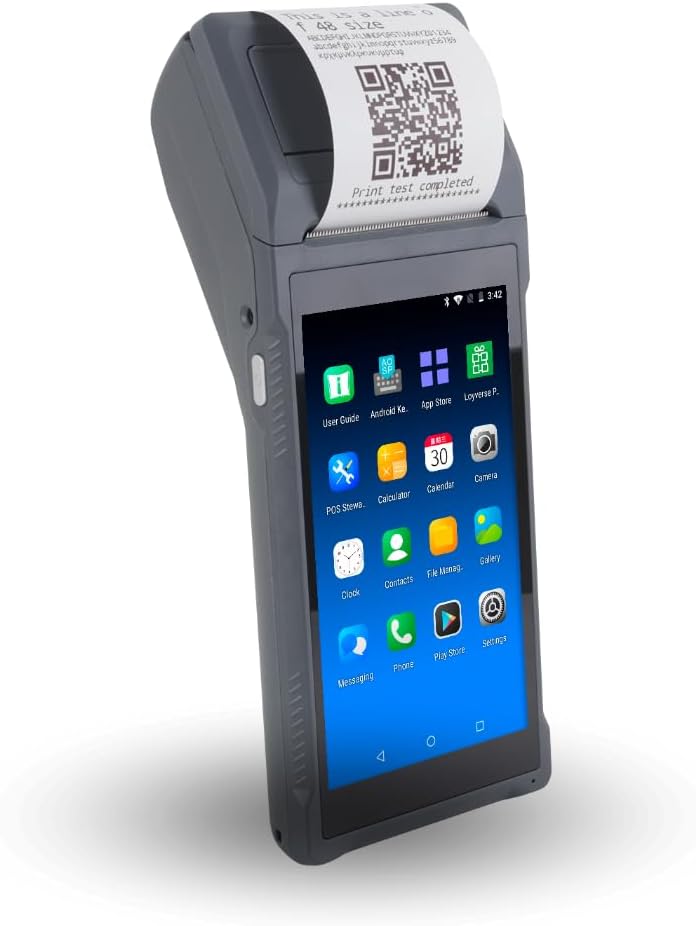
The H10 offers exceptional value for businesses on a budget. Running Android 14, it supports modern apps and provides a clear touchscreen interface. The integrated thermal printer eliminates the need for separate hardware, streamlining your checkout process.
We may earn a commission when you buy through this link, at no additional cost to you.
Its 14-hour battery life ensures it lasts through long shifts without interruption. The NFC reader supports contactless payments which are increasingly popular with customers. Connectivity options include Wi-Fi and 4G LTE for reliable network access.
While it has a slightly lower rating than top-tier models, it remains a solid performer for mobile retail. The printer uses standard thermal paper keeping ongoing costs low. Setup might take a bit of time to configure custom software.
This terminal is perfect for food trucks and small shops needing an all-in-one solution. If you need a printer and POS in one device without breaking the bank, choose this model. It balances cost and functionality effectively.
Having a 58mm thermal printer built directly into the handheld saves space and reduces the gear you need to carry around.
Android 14 ensures compatibility with the latest business applications and security updates for a safer transaction environment.
We may earn a commission when you buy through this link, at no additional cost to you.
The Alacrity PDA combines power and performance for demanding environments. With a perfect 5.0 rating, it offers a large 6.5 inch screen for easy navigation. The 80mm printer supports wider receipts and labels for versatile printing needs.
We may earn a commission when you buy through this link, at no additional cost to you.
Its scanning module handles both 1D and 2D barcodes efficiently, speeding up inventory tasks. The 6400mAh battery provides exceptional endurance for heavy use throughout the day. Connectivity includes dual-band Wi-Fi and 4G for stable networks.
While the cost is higher, the build quality and features justify the investment for professional use. The large screen improves user experience significantly compared to smaller devices. It is built to handle intensive daily operations reliably.
This device is best suited for logistics and retail needing maximum performance. If you want a robust machine that can grow with your business, this is the ideal choice. It offers a premium experience for staff and customers alike.
The 6.5 inch display provides ample space for complex applications and reduces eye strain during long operational shifts.
With 6400mAh capacity, this unit can run for extended periods without needing a recharge, maximizing uptime.
We may earn a commission when you buy through this link, at no additional cost to you.
The Bisofice POS offers a straightforward solution for small businesses needing basic mobile printing. It runs on Android 8.1 and includes a 58mm thermal printer for receipts. The design is compact making it easy to transport around stores.
We may earn a commission when you buy through this link, at no additional cost to you.
Connectivity options like 3G and Bluetooth ensure flexibility in different environments. The 5000mAh battery supports reasonable operating times for standard shifts. It is well-suited for simple sales tasks and basic inventory tracking.
While the Android version is older, it remains stable for essential functions. Compatibility with newer apps might be limited compared to newer models. However, the value proposition is strong for startups with tight budgets.
This model works well for cafeterias and bookstores needing a portable printer. If you need basic functionality without extra bells and whistles, consider this option. It provides a reliable entry point into mobile POS systems.
The built-in thermal printer uses standard 58mm paper rolls which are inexpensive and widely available.
Support for 3G and Bluetooth allows this device to work in areas without strong Wi-Fi coverage.
We may earn a commission when you buy through this link, at no additional cost to you.
This 4G PDA brings modern Android 13 performance to mobile retail. The 5MP camera functions as a barcode scanner for both 1D and 2D codes. Connectivity includes 4G LTE and GPS making it great for outdoor or mobile work.
We may earn a commission when you buy through this link, at no additional cost to you.
The 5-inch HD+ screen offers a clear view for transactions and inventory management. It comes with a roll of printing paper for immediate use upon delivery. The device supports Wi-Fi and Bluetooth for versatile connections.
While battery life is decent, it may not last as long as larger units on heavy days. The camera scanner is efficient but might struggle with poor lighting conditions. Overall it provides good value for tech-heavy operations.
This device is suitable for warehouses and logistics needing tracking capabilities. If you need GPS and 4G connectivity for remote locations, this is a strong choice. It balances modern features with practical utility for daily tasks.
4G LTE support ensures you stay connected even when Wi-Fi signals are weak or unavailable in remote locations.
The integrated 5MP camera scans codes quickly, reducing the need for external handheld scanners.
We may earn a commission when you buy through this link, at no additional cost to you.
The Square Terminal is a robust countertop device that offers mobility via battery. It accepts all major cards and prints receipts without needing extra hardware. Processing chip cards takes just two seconds ensuring fast checkout lines.
We may earn a commission when you buy through this link, at no additional cost to you.
Its design allows you to ring up customers anywhere in your store without cords. The battery life supports full day use which is convenient for busy shifts. It integrates seamlessly with Square's simple fee structure.
While not designed to fit in a pocket like smaller handhelds, it is portable on a counter. You might need to purchase a separate stand for vertical display if you prefer that setup. It remains a staple for small retail.
This terminal is great for retail and cafes needing a solid central payment point. If you want simplicity and speed without external peripherals, this model works well. It combines payment processing and receipt printing into one unit.
Combining payment acceptance and receipt printing in one device reduces clutter and simplifies your checkout counter setup.
Chip card transactions are processed in seconds, minimizing wait times for customers during peak hours.
We may earn a commission when you buy through this link, at no additional cost to you.
The Q2i terminal combines a touchscreen and thermal printer into a single handheld unit. Running Android 11, it supports popular apps like Square and Loyverse. The 1D barcode scanner is sufficient for basic retail UPC needs.
We may earn a commission when you buy through this link, at no additional cost to you.
Its battery and connectivity options support long operating times and reliable connections. The device comes with a complete retail kit including power adapter and paper. It weighs around 364 grams which is comfortable to hold.
Customer ratings are lower which suggests potential software or hardware limitations. The scanner does not read QR codes which limits flexibility for modern loyalty programs. It remains a viable option for very simple sales tasks.
This terminal works for small shops needing a budget friendly all-in-one device. If you do not need QR scanning and want a printer built-in, it is a contender. Ensure compatibility with your preferred software before buying.
Access to Google Play Store allows you to install various POS and business management tools easily.
Having both a payment terminal and printer in one unit reduces the physical gear you need to manage.
We may earn a commission when you buy through this link, at no additional cost to you.
The P1 terminal offers secure and reliable processing for fixed locations. It accepts tap chip and swipe payments on an Android HD touchscreen. The hybrid connectivity ensures stable transactions even in busy environments.
We may earn a commission when you buy through this link, at no additional cost to you.
With dedicated support and fast payouts it adds peace of mind for business owners. The physical keypad provides an intuitive experience for staff who prefer tactile feedback. It is designed specifically for retail and salons.
This model focuses on countertop stability rather than mobile portability. You need a merchant account which might require onboarding steps compared to all-in-one apps. The build quality and support are strong selling points here.
It is ideal for businesses needing a secure and stable checkout terminal. If you prioritize reliable processing and customer support over mobility, this is a good fit. The 5.0 rating indicates high satisfaction among users.
The device securely processes EMV chips and contactless payments ensuring customer data is protected.
Hybrid connectivity reduces the risk of dropped connections during peak business hours.
We may earn a commission when you buy through this link, at no additional cost to you.
This PDA is optimized for scanning and ticket printing but not payments. It reads 1D and 2D codes easily and prints receipts quickly with a zigzag cutter. The large screen displays order details clearly for queue management.
We may earn a commission when you buy through this link, at no additional cost to you.
The 10-core CPU ensures smooth performance during busy periods without slowdowns. Connectivity options include 4G and Bluetooth for flexible network use. It is designed for businesses needing to manage mobile orders efficiently.
You must pair it with a third-party card reader for payment acceptance. This adds an extra step to your setup but allows you to choose specific payment processors. The device excels at non-payment tasks like inventory.
This device is perfect for restaurants and cafes managing pickup orders. If you need to scan items and print tickets quickly, it is highly capable. Ensure you have a separate card reader for complete functionality.
The large screen and fast printing help staff process takeaway and mobile orders without creating bottlenecks.
The 2D scan engine handles scratched or folded codes effectively ensuring high accuracy.
We may earn a commission when you buy through this link, at no additional cost to you.
Clover GO pairs with your phone via Bluetooth to offer simple mobile payments. It provides end-to-end security for transactions and supports custom tip settings. Customers can receive receipts via email or text for convenience.
We may earn a commission when you buy through this link, at no additional cost to you.
The device allows you to manage employee permissions easily which adds control. It is lightweight and fits easily in a pocket for use at events. However it requires processing through SwyftPAY specifically.
This requirement means you must check compatibility with your current processor. It is limited to US businesses so international users cannot use it. Despite this, the interface and security features are straightforward and effective.
This reader is great for small US businesses wanting mobile flexibility. If you already use Clover or Swyft, it integrates well. The ability to send digital receipts helps reduce paper waste and keeps records clean.
Bluetooth pairing ensures your device connects directly to your smartphone for easy transactions without extra hardware.
Texting or emailing receipts offers customers a choice on how they prefer to receive their proof of purchase.
We may earn a commission when you buy through this link, at no additional cost to you.
Selecting the right handheld Pos System involves evaluating several key factors to match your operational needs and budget.
Ensure the device supports the networks your business needs such as Wi-Fi Bluetooth 4G or LTE. Reliable connectivity is crucial for processing payments smoothly without interruption in your working environment.
Prioritize models with multiple connectivity options to guarantee you can stay online regardless of your location.
Look for systems with enough battery capacity to last a full shift. This ensures you can accept payments continuously without needing to recharge frequently which can disrupt your business operations.
Consider devices with fast charging capabilities if you need to top up quickly between busy periods.
Decide if you need a built-in thermal printer for receipts or tickets. Integrated printers save space and simplify setup but add weight and cost to the device.
Choose models that support standard paper sizes to keep your supply costs manageable and accessible.
Check the Android version compatibility with the software you plan to use. Newer operating systems provide better security and support for the latest applications.
Opt for devices running updated OS versions to ensure long-term software support and security patches.
If you manage inventory check for 1D and 2D barcode scanning capabilities. High-quality scanners improve accuracy and speed when tracking items or processing orders.
Select a device with autofocus and good lighting support to ensure reliable scanning in different conditions.
Review the transaction fees and contract terms associated with the hardware. Some systems come with simple flat rates while others may have hidden fees or lock-in contracts.
Choose payment terms that align with your budget and avoid long-term commitments if flexibility is a priority.
Consider the physical build quality and resistance to water or dust if you work in demanding environments. A comfortable grip helps reduce fatigue during long shifts.
Invest in rugged or protected models if your device will be frequently dropped or exposed to elements.
Ensure the device supports encryption and meets PCI standards for secure card processing. Protecting customer data is essential for trust and compliance.
Look for end-to-end encryption and secure storage of card information to minimize risk.
To set up your system, connect it to your network via Wi-Fi or cellular and pair any necessary peripherals like card readers. Install your preferred POS application and configure settings such as tax rates and tip percentages.
Maintain your device by cleaning the screen and scanner lens regularly with a soft cloth. Keep firmware updated to ensure security and performance. Charge the battery when needed but avoid leaving it plugged in for days.
Handle the unit with care to avoid drops especially if it does not have a protective case. Store it in a dry and cool place when not in use to prevent damage to internal components and extend its lifespan.
Many handheld terminals have built-in readers but some require external Bluetooth readers. Always check if the device supports NFC and chip payments directly before purchasing. Using an external reader may add to the overall cost.
Some models support offline modes that queue payments to sync once reconnected. This feature prevents lost sales during internet outages. Confirm offline capabilities with your provider before relying on this function.
Yes secure modern systems use end-to-end encryption and comply with PCI standards. They protect customer data from interception during processing. Always keep your software updated to maintain maximum security.
Some devices are US only due to payment processor requirements. Others support global networks but may have different fees. Check regional compatibility and network support before buying for international use.
Most devices offer 8 to 14 hours of runtime depending on usage. Battery life can vary with screen brightness and connectivity usage. Carry a charger for long shifts to avoid running out of power.
Many modern systems offer month-to-month plans with no long-term contracts. Some providers may still require minimum terms depending on hardware financing. Review terms carefully to avoid unexpected commitments.
The Square Handheld leads as the top choice for overall portability and reliability. It balances features like offline payments and a compact design effectively for most businesses.
Prioritize battery life and connectivity if you work in remote areas. Choose Android versions that support your apps to ensure smooth operation.
Remember to check current prices and compatibility with your payment processors before buying. Selecting the right model ensures efficient transactions and customer satisfaction.