
SABRENT 74 in 1 3.5 Inch Internal Flash Media Card Reader/Writer with USB Port (CR-USNT)
4.0Editor score
Supports 74 card types
Includes extra USB 2.0 port
Internal power connector included
This guide compares the top internal media card readers for desktop PCs. Find the best model for your storage needs and transfer speeds today.
Internal media card readers provide a permanent solution for accessing flash memory without external cables. They fit directly into your desktop case, offering convenient front panel access for photographers and creators who need fast file transfers regularly.
We evaluated ten top models based on compatibility, speed, and build quality. Our analysis covers USB 3.0 options, multi-format support, and ease of installation. This list helps you choose the right reader for your specific workflow and hardware setup.
Each pick highlights key strengths and potential trade-offs to simplify your decision. These readers support various card types from SD to CompactFlash. Keep in mind that availability and pricing may change over time so check current listings before purchasing.
4.0Editor score

4.5Editor score

5.0Editor score
This table provides a side-by-side comparison of all ten selected internal card readers. Review the key specifications and features to identify the model that best fits your desktop build requirements.


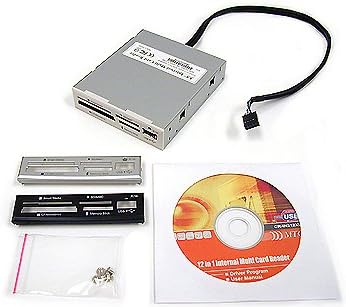
This StarTech model earns the Editor's Choice badge for its excellent balance of speed and versatility. It fits standard 3.5 inch bays and connects via a 20-pin header for reliable internal operation. The USB 3.0 support ensures fast data transfers for large media files.
We may earn a commission when you buy through this link, at no additional cost to you.
The standout feature is simultaneous slot access, allowing you to copy files between different card types without swapping. This is ideal for photographers and video editors who work with multiple cards daily. The TAA compliance makes it suitable for government and enterprise procurement needs.
While the requirement for a 20-pin header might complicate installation on some older motherboards, the performance gains justify this setup. The included screws and cable make assembly straightforward once you identify the correct ports on your system.
If you need a robust internal reader that handles high capacity cards and frequent transfers, this is the top recommendation. It offers professional grade reliability and speed that outperforms many cheaper alternatives on the market today.
Access multiple cards at once to streamline editing workflows and reduce downtime during busy production schedules.
Built for IT professionals with a two year warranty and lifetime support to ensure long term reliability in critical systems.
We may earn a commission when you buy through this link, at no additional cost to you.
The SABRENT reader is the clear Best Budget pick, offering incredible value with support for 74 different card types. It connects internally to ensure sufficient power and includes an extra USB 2.0 port for peripheral use. This makes it a versatile addition to any desktop PC.
We may earn a commission when you buy through this link, at no additional cost to you.
Its main strength lies in compatibility, handling formats from SD to XD and Memory Stick. The internal power connector is crucial for stable operation with high capacity cards that might draw more power than USB alone can provide.
The trade-off is slower USB 2.0 transfer speeds compared to modern USB 3.0 options. However for casual users transferring photos or documents occasionally, this speed is usually sufficient and keeps costs low.
For budget conscious builders or those with legacy card formats, this reader is the smart choice. It provides essential functionality without breaking the bank while ensuring all your old cards remain accessible.
Supports an impressive 74 card formats ensuring you can access nearly any memory card without needing external adapters.
Internal power connection guarantees stable read and write operations even with high capacity or power hungry memory cards.
We may earn a commission when you buy through this link, at no additional cost to you.
This Vantec reader achieves a perfect 5 star rating with its advanced Multi-LUN technology allowing simultaneous access to multiple cards. It supports massive capacities like 2TB SD cards and connects via USB 3.0 for top tier transfer speeds. This makes it a top tier option for professionals.
We may earn a commission when you buy through this link, at no additional cost to you.
The key strength is its ability to handle high capacity and high speed cards efficiently. It supports various SD and CompactFlash standards ensuring you can work with the latest media without compatibility issues. The Multi-LUN feature saves time by removing the need to swap cards frequently.
Installation requires a 20-pin header which might not be available on very old motherboards. Additionally, the specific technical requirements mean it is more suited for enthusiasts than casual users who need simple plug and play solutions.
If you demand premium performance and maximum compatibility for large files, this reader is the ideal choice. It offers the speed and reliability needed for professional video editing and high resolution photography workflows.
Read and write to multiple cards simultaneously to maximize efficiency when transferring large datasets from multiple sources.
Handles up to 2TB SD cards ensuring you can use high capacity media without worrying about size limits or compatibility.
We may earn a commission when you buy through this link, at no additional cost to you.
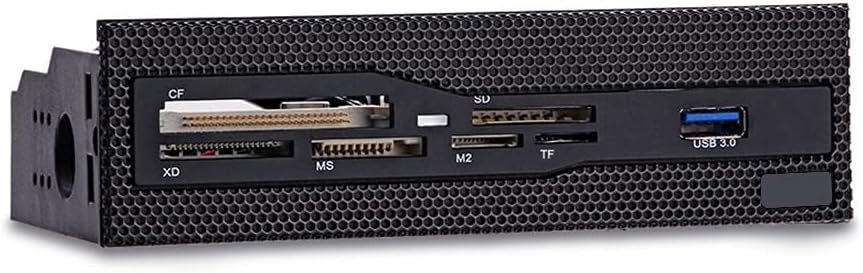
This 5.25 inch dashboard reader offers a robust solution for systems with larger drive bay space. It features USB 3.0 support for faster transfers and six card slots for versatile media access. The durable design with copper-plated slots ensures stable connections over time.
We may earn a commission when you buy through this link, at no additional cost to you.
The main advantage is the speed and durability provided by the copper-plated slots. This reduces signal loss and improves transfer rates compared to cheaper alternatives. The grid panel design allows it to blend well with mesh front panels on modern cases.
However, you need a 5.25 inch drive bay to install this unit. Many modern cases omit this size in favor of smaller drives or driveless designs, limiting compatibility with newer builds.
If your PC case has a 5.25 inch bay, this reader is a strong choice for performance and durability. It provides reliable access for various card types without compromising on transfer speed.
Utilizes USB 3.0 for efficient data transmission significantly speeding up file transfers compared to older USB 2.0 options.
Copper-plated slots ensure stable electrical connections which helps maintain consistent performance during heavy usage periods.
We may earn a commission when you buy through this link, at no additional cost to you.
This 5.25 inch media dashboard combines card reading with additional front panel features like audio jacks and extra USB ports. It supports eSATA and USB 3.0 providing multiple high speed transfer options for desktop builds. The included LEDs enhance usability in dark environments.
We may earn a commission when you buy through this link, at no additional cost to you.
The main benefit is the consolidation of multiple front panel functions into one unit. This reduces cable clutter and simplifies installation compared to sourcing separate components. It is a popular choice for PC builders looking for a comprehensive front I/O solution.
However the complex wiring requirements can be challenging for beginners. The mixed customer ratings suggest some units may have compatibility or durability issues. It is important to check specific motherboard compatibility before purchasing.
For tech enthusiasts who want to maximize front panel utility, this dashboard is a viable option. It offers a range of connectivity choices that cater to diverse hardware needs within a single installation.
Combines card reading with USB hubs and audio ports to provide a full front panel solution for versatile desktop use.
eSATA and USB 3.0 support accelerate data transfers making it suitable for moving large media files quickly.
We may earn a commission when you buy through this link, at no additional cost to you.
The TCC-QL5E dashboard provides extensive connectivity including SATA and eSATA ports alongside a five-in-one card reader. It fits 5.25 inch bays and offers both USB 3.0 and 2.0 ports for diverse peripheral support. This makes it a versatile choice for older workstation builds.
We may earn a commission when you buy through this link, at no additional cost to you.
Its strength lies in the broad range of ports available on a single panel. Users can connect drives, audio devices, and memory cards without needing separate expansion cards. The power and data cables ensure stable operation for all connected devices.
The main downside is the complexity of installation due to the numerous cables required. This might be overwhelming for first time builders. Additionally it is restricted to cases with 5.25 inch drive bays.
For users needing maximum front panel flexibility, this dashboard is an excellent investment. It simplifies system expansion by consolidating multiple I/O options into one convenient location.
Supports USB 3.0 2.0 eSATA and audio allowing you to connect a wide variety of devices easily.
Dedicated power connections ensure that all connected devices operate reliably without power interruptions.
We may earn a commission when you buy through this link, at no additional cost to you.
This Sony reader offers a classic solution for accessing 17 common memory card types internally. It includes drive letter recognition software to simplify setup and comes with multiple bezel colors to match your case. Its design is simple and straightforward for easy installation.
We may earn a commission when you buy through this link, at no additional cost to you.
The key benefit is reliable performance for everyday tasks. Sony is known for quality, ensuring this unit operates consistently over time. The software included helps avoid drive letter conflicts which can be a common issue with generic readers.
However this model is geared more towards legacy systems like Windows XP and Vista. Modern USB 3.0 speeds are not supported, which limits its utility for high speed data transfer needs.
If you are building a classic PC or need a simple reliable reader for older cards, this is a solid choice. It balances compatibility with basic functionality effectively for most casual uses.
Included software helps assign drive letters to avoid conflicts and ensures your system recognizes all inserted cards immediately.
Multiple bezel colors allow you to match the reader to your PC case for a polished and consistent look.
We may earn a commission when you buy through this link, at no additional cost to you.
This All-In-One reader is designed for 2.5 inch internal bays making it ideal for smaller cases or specific mounting spots. It features a high quality construction that ensures durability over time. The bezel color options help it blend seamlessly with your system design.
We may earn a commission when you buy through this link, at no additional cost to you.
The primary advantage is its compact size which fits into spaces larger readers cannot. This is useful for systems that do not have standard 3.5 or 5.25 inch bays available. The high quality materials contribute to stable card reading performance.
However, finding a 2.5 inch bay might be challenging in older PCs. Additionally it supports a standard internal format which might not support all card types like more specialized readers do.
If you have limited space or need a discreet reader, this is a practical option. It provides essential internal card access without taking up much room in your desktop chassis.
Designed for 2.5 inch bays ensuring it fits in tight spaces where larger readers cannot be installed.
Constructed with durable materials to ensure long term reliability and consistent performance during daily use.
We may earn a commission when you buy through this link, at no additional cost to you.
The Akasa reader provides a practical 6-port solution for accessing popular memory cards from the front panel. It includes dedicated adapter ports to simplify access to smaller card formats. LED indicators show power and data status for easy monitoring during use.
We may earn a commission when you buy through this link, at no additional cost to you.
Its main strength is the ability to read multiple cards without needing extra adapters. The included bezel options ensure it looks good on any PC. The LED lights add convenience by showing activity without opening the system.
While it supports standard 3.5 inch bays, the transfer speeds are moderate compared to USB 3.0 options. This makes it better suited for occasional use rather than high frequency large file transfers.
For users needing a straightforward internal reader with clear status indicators, this model is a strong contender. It offers a balance of functionality and ease of use for everyday desktop tasks.
Includes specific ports for adapters so you can access smaller cards easily without losing them inside the reader.
LED lights indicate power and data transfer status so you know exactly when your cards are being read.
We may earn a commission when you buy through this link, at no additional cost to you.
This MTG reader supports 22 different card formats and features a metal case for improved durability. It uses a standard USB 2.0 interface for reliable operation and supports hot swapping for ease of use. The bezel colors allow for easy customization of your desktop look.
We may earn a commission when you buy through this link, at no additional cost to you.
Its key benefit is the combination of durability and broad format support in a simple package. The metal casing helps dissipate heat and protects internal components. Hot swappable design means you can change cards without restarting your system.
While the metal build is strong, USB 2.0 limits the transfer speed. This is acceptable for most documents but less ideal for large video files. The cost is slightly higher than plastic alternatives but justified by the build quality.
For users needing a durable reader for diverse card types, this is a reliable option. It provides long term value with its robust construction and broad compatibility range.
Metal casing protects internal components and helps maintain stable performance during extended periods of use.
Supports hot swapping so you can insert or remove cards without turning off your computer for convenience.
We may earn a commission when you buy through this link, at no additional cost to you.
Selecting the right internal card reader involves considering your existing hardware and daily usage patterns. This guide outlines the key factors to ensure you pick a model that offers the best performance and longevity.
Internal card readers are designed for specific drive bay sizes such as 3.5 inch or 5.25 inch. You must check your PC case to ensure there is an open bay before purchasing. Installing a reader in the wrong size bay is not possible without an adapter.
Always verify your case specifications to confirm which bay sizes are available and free for new hardware.
Look for USB 3.0 or higher interfaces to ensure fast data transfers for large files like videos. USB 2.0 is acceptable for smaller files but will significantly slow down bulk transfers. The internal connection type such as 20-pin headers also affects stability.
Prioritize USB 3.0 models if you transfer large media files regularly to maintain workflow efficiency.
Different readers support varying numbers of card formats from SD and CF to XD and Memory Stick. Ensure the reader supports the specific cards you use most frequently to avoid needing external adapters. Some high capacity cards require specific protocol support to function correctly.
Choose a reader that explicitly lists compatibility with your preferred card types to prevent connection issues.
Metal cases provide better durability and heat dissipation compared to plastic models. High quality construction ensures that the card slots remain tight over time which prevents connection failures. Consider the brand reputation for support and warranty coverage as well.
Opt for metal build quality to ensure long term reliability especially in environments with frequent use.
Advanced models offer simultaneous access to multiple cards allowing you to copy files between them instantly. This feature saves significant time if you work with multiple memory cards daily. Check if the reader supports multi-LUN technology to enable this functionality.
Select a multi-card capable reader if you frequently transfer data between different memory cards simultaneously.
Some units include extra ports like USB hubs or audio jacks which can declutter your front panel. However additional features may require more complex wiring. Evaluate if these extra ports are necessary for your workflow before paying extra.
Only choose models with extra connectivity if you genuinely need those specific ports on your front panel.
Most readers draw power from the motherboard but some require internal power connectors for high capacity cards. Ensure your power supply and motherboard have the necessary connections to support the reader. Power instability can lead to data corruption or hardware failure.
Check if internal power connectors are needed and available before installing a reader that requires them.
Reputable manufacturers offer warranties ranging from one to two years to protect your investment. Good support can save you time if issues arise with installation or performance. Look for products with a track record of positive user feedback.
Prioritize brands that offer at least a one year warranty to safeguard against early hardware failures.
To install your internal card reader, power down your PC and open the case to find an available drive bay. Align the reader with the slots and secure it with screws to prevent movement. Connect the internal power and data cables to the appropriate motherboard headers.
When using the reader, insert memory cards gently until they click into place. Wait for the activity LED to indicate a stable connection before accessing files. Remove cards only after safely ejecting them from the operating system to prevent data loss.
To maintain longevity, avoid forcing cards into the slots and keep dust out of the case. If you transfer large files regularly, ensure your system stays cool to prevent overheating of the reader. Periodically check the cables for wear and replace if necessary.
Most internal readers draw power directly from the motherboard through a USB header. However high capacity cards may require an additional internal power connector to ensure stable operation. Always check the product specifications to see if extra power is needed for your setup.
Yes, USB 3.0 cards are backward compatible with USB 2.0 readers. However, the transfer speeds will be limited to USB 2.0 maximums. For fast performance, use a USB 3.0 reader to match the speed capabilities of modern cards.
If your case does not have a 3.5 inch bay you might consider a 2.5 inch model if available. Alternatively you can use an external USB reader instead of an internal one. Internal installation depends heavily on the physical space available in your PC chassis.
Most modern internal card readers are plug and play and work with built-in OS drivers. However some models may offer software for enhanced features like drive letter management. Check the manufacturer website to see if drivers are required for your specific operating system.
Always use the operating system safe eject function before removing the card to prevent file corruption. This ensures all write operations are complete before the connection is terminated. Removing cards without ejecting can lead to data loss or damaged files.
Many internal card readers are compatible with macOS but you must install the OS first. Ensure the reader supports the file systems used by your Mac such as APFS or HFS+. Some models may require specific drivers to function correctly on Macs.
We have reviewed ten top options for internal media card readers ranging from budget friendly models to high performance choices. The StarTech model leads for versatility while the Vantec offers premium speed for professionals.
Prioritize compatibility with your specific case and card types before focusing on speed. A reader that fits your setup perfectly will provide a better experience than a faster one that cannot be installed easily.
Remember to check current availability and prices before making your final decision. Technology changes quickly so verifying details ensures you get the right model for your desktop build today.