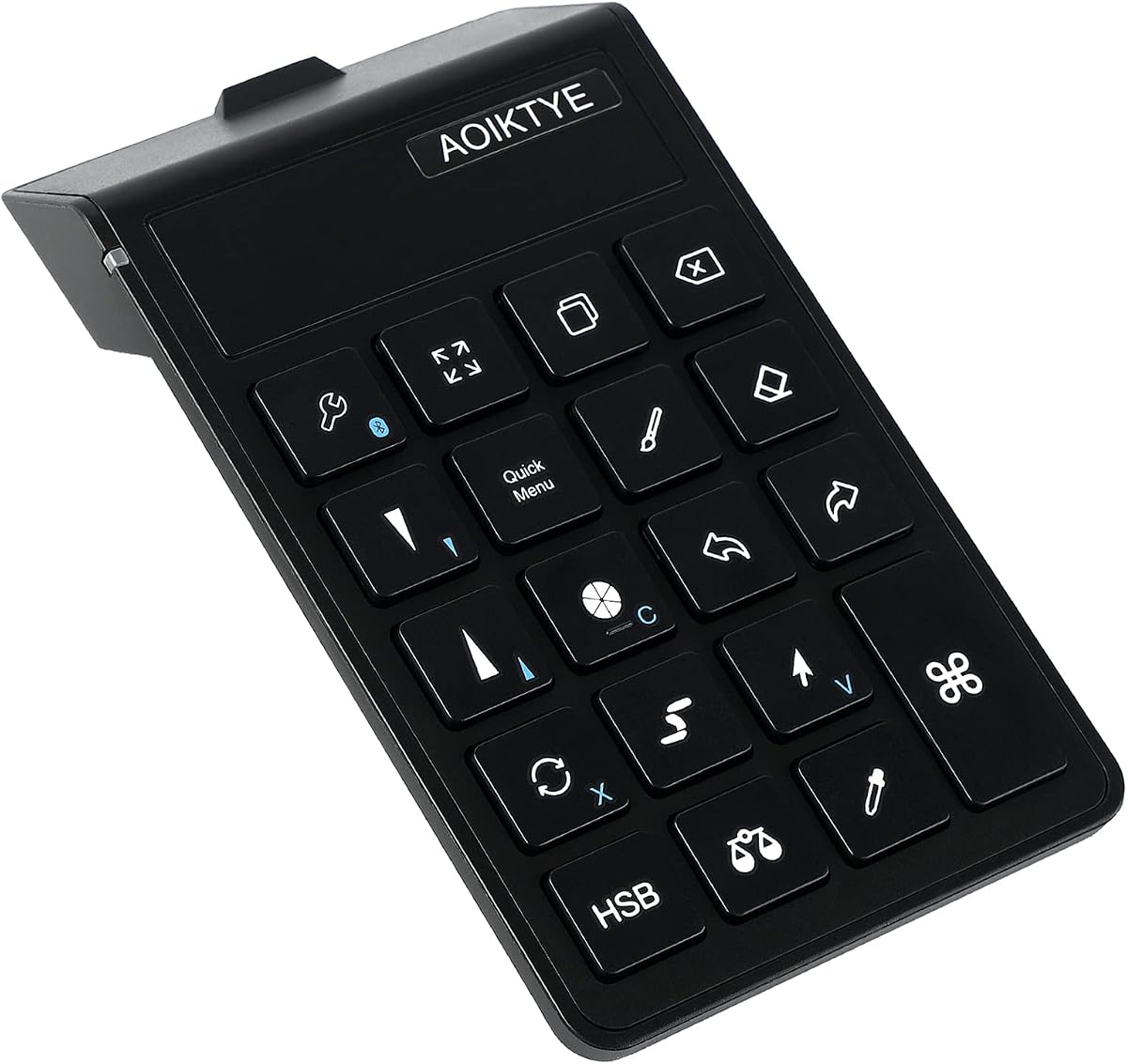
Keyboard for Procreate
4.5Editor score
22 Shortcut Keys
84H Battery Life
Procreate Optimized
Discover the top 10 iPad drawing Bluetooth controllers for digital artists. Compare features, compatibility, and efficiency to choose the perfect shortcut
Digital artists need efficient tools to enhance creativity on tablets. An iPad drawing Bluetooth controller offers shortcut keys and dials to streamline workflows without constant touch gestures.
We evaluated ten top models based on compatibility, battery life, customization options, and ease of use. Each device supports popular creative apps like Procreate and Photoshop for seamless integration.
Every review highlights key strengths and potential trade-offs to help you decide. Prices vary by features and brand, so check current listings for the best deals available today.
4.5Editor score

4.2Editor score

5.0Editor score
This table compares all ten models side-by-side to highlight key differences in features, compatibility, and design for informed decision-making.


The HUION Keydial Mini ranks highly with a 4.2 rating. It offers 18 programmable keys and a dial for efficient drawing control on iPad.
We may earn a commission when you buy through this link, at no additional cost to you.
Its Bluetooth 5.0 connection ensures stable communication up to 10m. Anti-ghosting allows multi-key shortcuts without delay during intense creative sessions.
Customization requires using the Huion driver app which may confuse some users. The small size helps but typing long texts remains impractical.
Ideal for digital painters needing quick access to brush tools. Its versatility makes it a top choice for artists seeking portable efficiency.
Rotating the dial adjusts brush size instantly without interrupting your drawing rhythm.
A full charge supports days of continuous use thanks to its 70-hour battery capacity.
We may earn a commission when you buy through this link, at no additional cost to you.
With a 4.5 rating this keyboard stands out for Procreate users seeking affordability. It delivers core shortcuts at a budget-friendly price point.
We may earn a commission when you buy through this link, at no additional cost to you.
Its 22 keys cover essential functions like undo copy paste and color selection. The 84-hour battery life ensures reliability throughout extended projects.
While optimized for Procreate compatibility with other apps may be limited. The simple design lacks advanced features found in higher-end models.
This is the go-to option for Procreate enthusiasts wanting efficiency. It balances cost and functionality well for beginners and hobbyists.
Keys are mapped specifically to streamline workflows within the Procreate app.
Over three days of use on one charge makes it perfect for travel.
We may earn a commission when you buy through this link, at no additional cost to you.
The DIGIDRAW K30 holds a perfect 5.0 rating making it a standout premium choice. It features dual dials for precise zoom and brush adjustments.
We may earn a commission when you buy through this link, at no additional cost to you.
Elev tactile markers allow you to find keys by touch keeping eyes on the canvas. This enhances focus during critical creative moments.
Its 40-hour battery is shorter than some rivals but still practical. The higher price reflects superior build quality and specialized features.
Perfect for professionals needing tactile feedback and compact control. It excels when comfort and precision are top priorities in the studio.
Two separate dials let you control zoom and brush simultaneously without switching modes.
At 82g it fits naturally in the hand reducing fatigue over long sessions.
We may earn a commission when you buy through this link, at no additional cost to you.
The ShanWan Portable Controller has a 3.4 rating but offers unique versatility across gaming and drawing. It supports custom mapping for various tasks.
We may earn a commission when you buy through this link, at no additional cost to you.
Built for long gaming sessions its ergonomic design reduces hand strain. Bluetooth connectivity ensures it works well on multiple platforms including iPad.
However drawing-specific features are less refined compared to dedicated devices. The lower rating suggests occasional connectivity issues or limited customization.
Consider this if you need both gaming and drawing support. It serves as a flexible all-in-one device for multi-purpose tablet users.
One device handles games and creative apps reducing the need for multiple accessories.
The grip fits comfortably for hours of use without causing fatigue.
We may earn a commission when you buy through this link, at no additional cost to you.
The TNP iPad Remote Control rates at 3.6 offering unique trackpad features. It enables cursor navigation useful for precise iPad screen tasks.
We may earn a commission when you buy through this link, at no additional cost to you.
The trackpad lets you move pointers like a laptop mouse while the Home button manages app switching easily. It also supports Siri voice commands.
It lacks dedicated drawing shortcuts making it less ideal for artists. Users focused on media playback or presentations will find it more suitable.
Good for general navigation and media control on iPads. It bridges the gap between tablet and laptop interfaces with simple controls.
The built-in trackpad mimics a mouse for precise cursor movement across apps.
Pause and skip media without touching the screen for seamless content viewing.
We may earn a commission when you buy through this link, at no additional cost to you.
The XPPen Mini Keydial earns a 4.3 rating with robust battery performance and connectivity options. It supports both wireless and wired modes.
We may earn a commission when you buy through this link, at no additional cost to you.
With a 1000mAh battery it offers extended use without needing frequent charges. The dial provides intuitive adjustment for brush size and zoom levels.
Setting up custom keys requires installing drivers which may be complex. Its weight is slightly higher than ultra-light competitors affecting portability.
Recommended for users prioritizing battery life and stable connections. It handles heavy editing workflows well with reliable input and control.
300 hours of use ensure uninterrupted creativity even during long trips.
Choose between Bluetooth or wired connections based on your environment.
We may earn a commission when you buy through this link, at no additional cost to you.
The TourBox Lite Bluetooth has a 4.4 rating offering a refined creative control layout. It uses an 8-key design for simplicity and speed.
We may earn a commission when you buy through this link, at no additional cost to you.
Its console detects active apps automatically switching controls to match software needs. The wireless freedom removes clutter from your workspace efficiently.
The higher cost might deter budget-conscious buyers seeking basic options. With only 8 keys you must prioritize frequently used shortcuts carefully.
Ideal for creators valuing streamlined workflows and premium build. It reduces mental load by simplifying complex shortcuts into easy touches.
Software automatically adjusts settings when you switch between creative apps.
Bluetooth connectivity allows seamless use across different creative environments.
We may earn a commission when you buy through this link, at no additional cost to you.
The Modded Tablet Controller G8 earns a perfect 5.0 rating for gaming and tablet use. It includes hall effect sticks ensuring precise inputs and durability.
We may earn a commission when you buy through this link, at no additional cost to you.
Motion sensing adds extra control for interactive apps requiring tilt or movement. Magnetic parts allow easy customization of buttons and external components.
It lacks dedicated drawing shortcuts limiting its appeal for artists. The price point is high for users needing only creative tools.
Best for gamers and power users wanting premium hardware. It provides robust control but requires extra setup for creative apps.
Advanced technology prevents stick drift ensuring consistent performance over time.
Magnetic parts let you swap buttons to suit your personal workflow style.
We may earn a commission when you buy through this link, at no additional cost to you.
The Clip Studio Tabmate 2 holds a 4.0 rating focusing on specific functionality for CSP artists. It integrates directly with Clip Studio Paint workflows.
We may earn a commission when you buy through this link, at no additional cost to you.
Supports iPadOS and iOS ensuring seamless connection for mobile drawing. Low energy Bluetooth extends battery usage between AA battery replacements effectively.
Requires AA batteries which may be inconvenient compared to rechargeable models. Functionality outside CSP software remains limited significantly.
Perfect for CSP users seeking streamlined workflows on iPad. It optimizes drawing speed by mapping critical commands to easy buttons.
Buttons map directly to Clip Studio Paint functions improving drawing speed.
Bluetooth Low Energy preserves battery life between frequent AA replacements.
We may earn a commission when you buy through this link, at no additional cost to you.
The Wacom Intuos Small earns a 4.4 rating as a complete drawing solution. It includes pen and software making it ready to create immediately.
We may earn a commission when you buy through this link, at no additional cost to you.
Bluetooth wireless allows seamless connection with your iPad or PC. Its small size fits easily on any desk while maintaining high precision.
It is a full tablet rather than a remote controller limiting portability. Users wanting a compact controller for iPad use may find it too large.
Best for artists needing a full tablet experience. It is reliable for home or studio work requiring high-quality pen precision.
Bluetooth lets you draw anywhere without cables connecting to your devices.
Creative software access comes with registration enhancing your toolkit instantly.
We may earn a commission when you buy through this link, at no additional cost to you.
Selecting the right controller requires analyzing compatibility and features. Here are key factors to consider for an efficient workflow.
Ensure the device supports your primary creative apps like Procreate or Photoshop. Some controllers are optimized for specific software while others offer broad compatibility.
Check if the controller connects via Bluetooth 5.0 or USB. Bluetooth offers freedom while wired connections provide stability during critical tasks.
Look for long-lasting batteries such as 70 hours or more. This ensures uninterrupted sessions whether you are working at home or traveling.
Determine how many keys and dials are programmable. High customization allows you to map complex shortcuts to single presses for speed.
Choose a design that fits your hand comfortably. Tactile markers and lightweight materials reduce fatigue during extended drawing marathons.
Balance cost with your needs. Premium devices offer more features but budget options may suffice for simpler creative workflows.
Consider how easy it is to install drivers or apps. Simple plug-and-play devices save time compared to those requiring extensive configuration.
Select models with strong build quality to withstand daily wear. Metal or high-grade plastic ensures longevity for frequent use.
First pair the device with your iPad through Bluetooth settings to establish a connection. Ensure the app you plan to use supports external controllers for full functionality.
Regularly charge the device or replace batteries to maintain performance. Cleaning the keys with a soft cloth prevents dust buildup over time.
Keep firmware updated to access new features and improve stability. Store the controller in a protective case to avoid physical damage when traveling.
Many models support Procreate through key mappings. Check product descriptions for specific compatibility before buying.
Some devices require drivers or apps to fully customize keys. Others work out of the box with default functions.
Yes most support editing apps like Premiere Pro. Customization enables timeline control and playback shortcuts.
Battery life varies from 40 to 84 hours depending on usage. Rechargeable models are convenient for daily work.
Yes they are lightweight and easy to carry. Some models weigh under 100 grams for maximum mobility.
Most support both iOS and Android. Check system requirements for compatibility with your device.
Some controllers have dual functions for games. Gaming features depend on the specific model's mapping options.
We reviewed top models offering unique advantages. The DIGIDRAW K30 leads in quality while the Procreate Keyboard offers great value.
Prioritize features that match your workflow needs. Consider battery life and customization as key decision points for your setup.
Prices fluctuate so verify current listings before purchasing. Choose the device that fits your budget and creative goals today.