
Logitech K120
4.6Editor score
Spill Resistant Design
Full Size Layout
USB Plug and Play
Durable Construction
Finding the right keyboard for your point of sale system is crucial for smooth operations. A good POS keyboard needs to be durable resistant to spills and comfortable for staff during long shifts at the register.
We evaluated ten distinct models based on their build quality connectivity options and specific features like relegendable keys or integrated touchpads. This list covers a range of choices from rugged industrial units to standard office friendly devices.
Each pick highlights key strengths and potential drawbacks to help you match the hardware to your specific environment. Please note that availability and pricing can change frequently so verify details before purchasing.
4.6Editor score
4.5Editor score

4.2Editor score
As an Amazon Associate we earn from qualifying purchases.
The following table provides a side by side overview of all ten selected keyboards. It highlights their core specifications and unique features to help you quickly compare options.


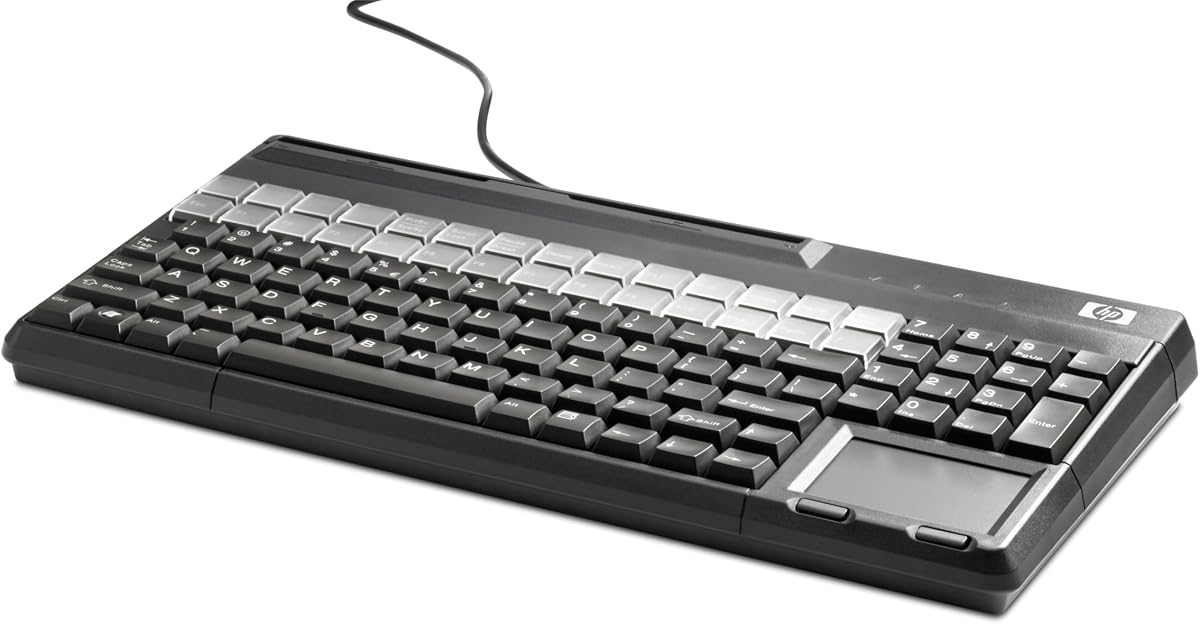
The HP POS Keyboard stands out as a comprehensive solution for retail environments. It combines a standard QWERTY layout with essential POS features like a built in magnetic stripe reader and a touchpad. This integration reduces cable clutter and simplifies the checkout process for staff.
We may earn a commission when you buy through this link, at no additional cost to you.
One of its strongest features is the set of 28 relegendable keys. These allow you to customize the keyboard to match your specific POS software shortcuts. The layout includes 106 keys which ensures all necessary characters and function keys are readily accessible during busy shifts.
While it is a robust piece of hardware the price is higher than standard office keyboards. However for a dedicated POS terminal this cost is justified by the specialized features. The touchpad adds convenience though some users might prefer a separate mouse for complex navigation.
This keyboard is ideal for retailers who need an all in one input device. It works well in grocery stores or clothing shops where card swiping and quick data entry are daily tasks. We recommend it for businesses looking to streamline their hardware setup without sacrificing functionality.
The 28 relegendable keys allow you to adapt the keyboard to your specific software needs without changing hardware.
The built in magnetic stripe reader eliminates the need for a separate card swiping device saving space on the counter.
We may earn a commission when you buy through this link, at no additional cost to you.
The Cherry G86-62401 is a compact keyboard designed to save space while maintaining functionality. It includes an integrated touchpad which makes it suitable for kiosks or tight counter spaces. The spill resistant build ensures longevity in environments where drinks or spills might occur.
We may earn a commission when you buy through this link, at no additional cost to you.
Cherry is a well known name in keyboard manufacturing known for durability. This model uses a standard USB interface for easy connectivity. The QWERTY US layout with 106 keys provides a familiar typing experience for staff trained on standard keyboards.
While it lacks specialized features like a card reader the space saving design is its main advantage. It is a good choice for mobile POS setups or areas where desk space is limited. The touchpad functionality helps reduce the need for a separate mouse.
Consider this keyboard for small shops or pop up stores where portability and space efficiency matter. It offers a balance of standard typing comfort and specialized POS hardware traits. We suggest it for users who prioritize a compact footprint over extra hardware integrations.
The compact form factor with an integrated touchpad minimizes the desk real estate required for your POS setup.
Spill resistant construction protects the internal electronics from accidental liquid exposure common in food service areas.
We may earn a commission when you buy through this link, at no additional cost to you.
The Logitech K120 offers a cost effective solution for basic POS needs. It is a full size keyboard with a spill resistant design that protects against minor accidents. The plug and play USB connectivity makes setup simple without requiring driver installations.
We may earn a commission when you buy through this link, at no additional cost to you.
Despite its low price it features deep profile keys and a standard layout that ensure comfort during long shifts. The keyboard includes a number pad which is essential for entry entry tasks. It is compatible with various Windows versions ensuring broad utility.
It lacks specific POS features like relegendable keys or card readers. However for businesses with a lower budget or simple entry requirements it performs well. The durability is solid for a standard office keyboard in a retail setting.
This keyboard is best suited for light retail tasks or secondary terminals where specialized functions are not needed. It provides reliable performance at a fraction of the cost of dedicated POS units. We recommend it for startups or small shops on a tight budget.
The K120 delivers standard typing comfort and durability at a price point accessible to almost any business budget.
Plug and play USB connectivity means you can get started immediately without complex configuration steps.
We may earn a commission when you buy through this link, at no additional cost to you.
The Cherry Lpos G86-71411 is designed for complex POS environments requiring extensive shortcuts. With 169 keys and 42 relegendable options it offers unmatched flexibility for staff. The included magnetic stripe reader adds another layer of convenience for transaction processing.
We may earn a commission when you buy through this link, at no additional cost to you.
This model is built for heavy use with a robust layout that accommodates many specific functions. The USB interface ensures stable connectivity for critical data transmission. It is a strong candidate for high volume retail or wholesale environments.
The large number of keys means it takes up significant desk space. Staff may require training to memorize the function of the relegendable keys. However the efficiency gains in specialized tasks can outweigh these drawbacks.
We recommend this keyboard for businesses with complex inventory or pricing systems. It allows for a fully customized input experience that speeds up operations. Consider it if your workflow benefits from having many dedicated function keys at hand.
With 42 relegendable keys you can map nearly every common action to a physical key for rapid access.
The integrated magnetic stripe reader allows for quick card processing without needing external hardware peripherals.
We may earn a commission when you buy through this link, at no additional cost to you.
The Perixx PERIBOARD-513III combines a full size keyboard with an integrated touchpad to save space. It uses quiet scissor switch keys which provide a laptop like feel suitable for shared workspaces. The multimedia hotkeys add convenience for system control.
We may earn a commission when you buy through this link, at no additional cost to you.
The touchpad allows for mouse navigation without extra hardware making it ideal for compact POS setups. It supports Windows systems easily with a plug and play USB connection. The design is sleek and professional looking for retail environments.
While it lacks specific POS features it offers a modern and efficient typing experience. The quiet operation is beneficial in open retail spaces where noise can be distracting. Durability is decent though scissor keys can be fragile if handled roughly.
This model is a good fit for businesses needing a clean and simple input device. It works well for data entry and general navigation tasks. We suggest it for offices or counters where space is at a premium and noise levels matter.
The combined keyboard and touchpad design eliminates the need for a separate mouse saving valuable counter space.
Scissor switch keys provide a quiet typing experience that reduces noise pollution in open retail environments.
We may earn a commission when you buy through this link, at no additional cost to you.
The Adesso Easy Touch 630Ub is built for environments where liquids and dirt are constant risks. It is rated IP67 for waterproof which means it can withstand submersion. This makes it ideal for kitchens or outdoor POS setups.
We may earn a commission when you buy through this link, at no additional cost to you.
The keys are large with high contrast printing for readability in low light or dirty conditions. The membrane switches are designed for long life even with rough handling. It connects via USB for standard compatibility with most POS computers.
Cleaning is straightforward due to the waterproof seal which prevents liquids from seeping inside. This reduces downtime for maintenance and keeps the workspace sanitary. It is a specialized tool rather than a general office keyboard.
We recommend this keyboard for hospitality or industrial retail settings. It ensures reliable operation in challenging conditions where standard keyboards would fail. Consider it if your primary concern is durability against spills and harsh environments.
The IP67 rating ensures the keyboard survives submersion and exposure to harsh substances without malfunctioning.
Large high contrast keys make input accurate even in dimly lit areas or dirty workspaces.
We may earn a commission when you buy through this link, at no additional cost to you.
The Cherry G86-71401 offers a balance of standard typing and POS features. It includes an integrated touchpad and a large number of programmable keys for customized workflows. The USB interface ensures easy connection to most POS terminals.
We may earn a commission when you buy through this link, at no additional cost to you.
Cherry is known for quality manufacturing though some users report mixed experiences with this model. The touchpad adds functionality without the need for a mouse. The key layout is standard which helps with user adoption.
While it has useful features like programmable keys it may lack some robustness compared to newer models. The build quality is generally good but checking specific user feedback is advisable before bulk purchase. It remains a viable option for many setups.
We suggest this keyboard for businesses needing basic customization without a high cost. It fits well in retail environments where touch navigation is useful. Consider it if you prefer a trusted brand with essential POS capabilities.
With 127 programmable keys you can assign specific actions to buttons for efficient workflow management.
The integrated touchpad provides mouse functionality in a single device simplifying your counter setup.
We may earn a commission when you buy through this link, at no additional cost to you.
The Cherry KC 1000 is a specialized keyboard designed for secure authentication. It includes a built in smartcard reader and supports secure PIN entry. This makes it ideal for environments requiring high security like government or financial institutions.
We may earn a commission when you buy through this link, at no additional cost to you.
It is FIPS 201 approved ensuring it meets strict security standards. The keyboard supports multiple operating systems including Windows and Linux. It allows for one handed operation of the smart card module which is convenient during transactions.
This is a highly specialized tool and may not be necessary for standard retail POS. However for security conscious businesses it provides essential protection against unauthorized access. The integration of security features into the keyboard saves space.
We recommend this keyboard for organizations handling sensitive data or requiring secure access. It offers a robust solution for card based authentication. Consider it if your business compliance requirements demand high level hardware security.
FIPS 201 approval ensures the keyboard meets rigorous government security standards for identity verification.
The dedicated secure PIN entry feature protects user credentials from potential keylogger attacks on the main keyboard.
We may earn a commission when you buy through this link, at no additional cost to you.
The Cherry G80-1800 is a compact mechanical keyboard built for industrial use. It uses Cherry MX Black switches which provide a tactile feel and long life. The compact design saves space while maintaining a full functionality set.
We may earn a commission when you buy through this link, at no additional cost to you.
It supports both USB and PS/2 connections offering flexibility for older POS systems. The mechanical switches are rated for millions of actuations ensuring durability. This makes it suitable for high volume environments where keyboard wear is a concern.
The mechanical switches can be noisy which may not be ideal for quiet retail spaces. However the reliability and responsiveness are top notch. It is a strong choice for businesses needing a robust long lasting input device.
We suggest this keyboard for warehouses or heavy use retail settings. It offers the durability of mechanical switches in a small form factor. Consider it if you prioritize key longevity over silent operation.
Cherry MX switches offer over 100 million actuations per key ensuring a long operational life.
The included PS/2 adapter allows connection to older POS computers that do not support USB only devices.
We may earn a commission when you buy through this link, at no additional cost to you.
The Logitech K270 offers wireless flexibility for POS setups. It uses a USB receiver for reliable connectivity up to 33 feet away. The battery lasts up to 24 months reducing the need for frequent changes.
We may earn a commission when you buy through this link, at no additional cost to you.
It is spill resistant and durable enough for daily use. The full size layout ensures all keys are available for data entry. Setup is simple with the plug and play USB receiver.
Wireless setups can be prone to interference though this model uses a robust 2.4 GHz connection. The battery life is excellent for a wireless device. It is suitable for environments where mobility is beneficial.
We recommend this keyboard for businesses wanting a clutter free workspace. It works well for POS terminals where cables are a nuisance. Consider it if you prioritize convenience and clean desk aesthetics over wired reliability.
A wireless connection of up to 33 feet allows you to place the keyboard away from the main unit.
With a 24 month battery life you can operate the keyboard for years without changing batteries.
We may earn a commission when you buy through this link, at no additional cost to you.
Selecting the right POS keyboard involves considering your specific environment workflow and budget. This guide outlines the key factors to help you make an informed decision.
In retail environments keyboards are often exposed to spills dirt and frequent use. Look for models with spill resistant designs or waterproof ratings like IP67. These features protect internal components from liquids extending the life of your equipment.
Durability is essential for reducing replacement costs and downtime. A rugged build ensures the keyboard survives accidental drops and constant handling without failure.
POS keyboards often include features like magnetic stripe readers relegendable keys or integrated touchpads. Decide which features align with your workflow. For example a card reader can simplify checkout by reducing peripheral clutter.
Customizable keys allow you to map shortcuts for specific software tasks. These features can significantly speed up transactions and improve staff efficiency during busy periods.
Most modern POS systems use USB connectivity but some older terminals may require PS/2 or wireless options. Ensure the keyboard you choose is compatible with your existing hardware. Wireless keyboards offer more freedom but require battery management.
A stable connection is critical for transaction processing. Wired connections generally offer more reliability than wireless ones which can be affected by interference or battery depletion.
Staff may spend hours typing on the keyboard so comfort is vital to prevent strain. Look for ergonomic designs deep profile keys and adjustable tilt legs. A full size layout with a number pad is useful for data entry tasks.
Consider the key spacing and tactile feel as well. Membrane keys are quieter while mechanical keys offer better feedback. Choose what fits your team's preference and environment noise levels.
POS keyboards range from standard office models to specialized industrial units. Determine how much you are willing to spend based on your needs. Budget options may lack durability or specialized features but can be cost effective for light use.
Investing in a higher end model may save money long term by reducing replacements. Balance upfront costs with expected lifespan and performance needs for your specific business.
Ensure the keyboard supports your POS operating system. Most modern keyboards work with Windows but verify Linux or Mac support if needed. Driverless plug and play functionality simplifies setup and reduces IT overhead.
Compatibility issues can lead to delays during installation. Choosing a keyboard with broad system support ensures it works seamlessly with your current setup and future upgrades.
To ensure your POS keyboard lasts longer clean it regularly using a soft cloth or compressed air. Avoid using harsh chemicals that might damage the surface or keys. If your keyboard is spill resistant wipe up spills immediately to prevent residue buildup.
Position the keyboard comfortably on your counter to reduce wrist strain. Adjust the tilt legs if available to find the right typing angle. Make sure all cables are securely plugged in to avoid connection issues during transactions.
If your keyboard has customizable keys take time to program them effectively for your workflow. Regularly check for firmware updates if available to maintain performance. Replace batteries promptly for wireless models to avoid sudden downtime.
A relegendable key allows you to remove the keycap and replace the legend or symbol on it. This customization lets you match the keys to your specific POS software functions. It improves efficiency by providing quick access to common tasks.
It depends on your POS setup. If your system handles card swiping externally a separate reader may suffice. A built in reader simplifies the workspace by reducing the number of devices on your counter.
Retail environments often involve drinks and food near the checkout. Spill resistant keyboards prevent liquid from damaging internal components. This feature reduces repair costs and keeps the equipment functioning during busy periods.
Modern wireless keyboards with 2.4 GHz connections are generally reliable for POS use. They offer the convenience of a clutter free counter. However ensure they have good battery life and stable connectivity to avoid transaction interruptions.
An integrated touchpad eliminates the need for a separate mouse. This saves counter space and simplifies navigation for staff. It is especially useful in compact kiosks or small retail setups.
Yes standard office keyboards can work for basic POS tasks if they are durable enough. However they lack specialized features like relegendable keys or card readers. Choose based on your operational complexity and budget.
We highlighted the HP POS Keyboard as the best overall due to its specialized features and integration. The Logitech K120 remains a top budget choice for those needing basic reliable functionality. For compact spaces the Cherry G86-62401 offers an excellent balance of size and capability.
When making your decision prioritize durability and layout based on your daily workflow. Specialized features like card readers or touchpads can streamline operations significantly. Ensure the keyboard is compatible with your existing POS system.
Remember to check current availability and pricing as hardware costs fluctuate. Investing in a quality input device pays off in staff efficiency and reduced downtime. Select the model that best fits your business needs for long term satisfaction.