
SteelSeries Apex 3 Gaming Keyboard – Black
4.6Editor score
IP32 water resistant coating
10-zone RGB illumination zones
Whisper quiet gaming switches
This guide compares the top Mac gaming keyboards for performance, compatibility, and comfort to help you choose the perfect mechanical or wireless option for
Finding the right Mac gaming keyboard means balancing macOS compatibility with high-speed performance. Gamers need responsive switches, durable builds, and seamless connectivity to dominate titles on Apple hardware.
We evaluated ten top-rated models based on switch type, layout efficiency, and wireless reliability. Each selection delivers solid performance for gaming while maintaining the clean aesthetic Mac users expect.
Every pick highlights standout features and potential trade-offs for informed decisions. Prices fluctuate frequently, so verify current deals before buying to ensure you get the best value available today.
4.6Editor score
4.3Editor score

4.0Editor score
This side-by-side comparison highlights the core specifications and unique strengths of each model to simplify your selection process.


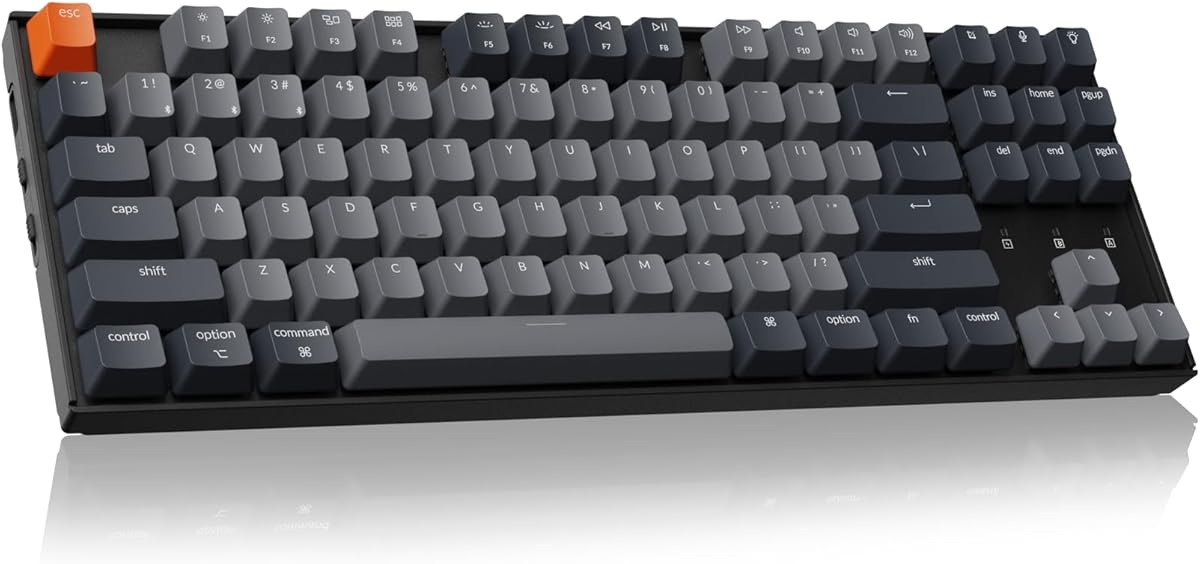
The Keychron K8 stands out as a top choice for Mac users seeking a reliable gaming experience. With a 4.3 rating, it balances functionality and aesthetics effectively. Its dedicated Mac layout simplifies workflows immediately.
We may earn a commission when you buy through this link, at no additional cost to you.
Dual connectivity modes ensure flexibility whether you are gaming or working. The 4000 mAh battery supports long sessions without interruption. Brown switches deliver satisfying tactile feedback ideal for precision inputs.
While limited to white backlighting, the design remains clean and functional. The TKL layout saves desk space while keeping essential navigation keys accessible. Switching between devices is seamless for multitasking.
Gamers valuing macOS integration will find this keyboard hard to beat. Its reliability and switch feel make it a standout for everyday play. This model offers a balanced package for most Mac setups.
The K8 includes specific keycaps for macOS ensuring command and option keys are perfectly mapped for native comfort.
A massive 4000 mAh battery allows for hundreds of hours of usage, making wireless gaming interruption-free for long periods.
We may earn a commission when you buy through this link, at no additional cost to you.
The SteelSeries Apex 3 offers impressive value for budget-conscious gamers needing a solid Mac compatible keyboard. Its 4.6 rating reflects strong performance despite being a membrane model. Durability and comfort are key highlights.
We may earn a commission when you buy through this link, at no additional cost to you.
IP32 water resistance protects against spills during intense gaming sessions. The RGB lighting zones add a vibrant aesthetic to any setup. Whisper quiet switches reduce noise for shared spaces or late-night use.
Although it lacks mechanical tactile feedback, the smooth keypresses ensure fast typing and gaming inputs. The included magnetic wrist rest provides excellent support for long hours of play without fatigue.
This keyboard is ideal for those prioritizing durability and affordability. Its compatibility with macOS makes it a versatile option for casual gamers. It delivers reliable features without breaking the bank.
The IP32 rating ensures liquids won't damage internal circuits, making the keyboard safer for daily use near drinks.
A dedicated magnetic wrist rest is included to reduce strain during marathon gaming sessions or long work periods.
We may earn a commission when you buy through this link, at no additional cost to you.
The EPOMAKER F75 MAX brings unique features like a TFT screen and volume knob to the Mac gaming niche. Rated 4.6, it appeals to users wanting a custom build without soldering. Sound and feel are highly tuned.
We may earn a commission when you buy through this link, at no additional cost to you.
Its gasket mount structure isolates the PCB for a soft typing experience. Hot-swappable sockets allow easy switching between switch types to suit personal preference. This flexibility enhances long-term usability significantly.
The TFT screen offers visual customization that few keyboards provide. While the layout is compact, it retains essential navigation keys. Sound dampening ensures a satisfying thocky tone ideal for enthusiasts.
Gamers seeking a personalizable experience will love this model. It combines productivity tools with gaming performance effectively. This keyboard is a top pick for those wanting to tailor their exact setup.
The small screen allows for custom GIFs and settings, adding a layer of personalization rarely found on standard keyboards.
Floating the PCB on gaskets reduces harshness, creating a premium, cushioned typing feel preferred by enthusiasts.
We may earn a commission when you buy through this link, at no additional cost to you.
The Logitech G915 X delivers flagship performance for gamers demanding premium materials and speed. Rated 4.0, it emphasizes build quality with aerospace-grade aluminum. The low-profile design fits modern Mac setups elegantly.
We may earn a commission when you buy through this link, at no additional cost to you.
Low-profile GL switches offer rapid actuation for quick in-game reactions. LIGHTSYNC RGB allows synchronization across other Logitech peripherals for a unified aesthetic. This keyboard feels robust and engineered for longevity.
Its full-size layout ensures every key is accessible without compromise. While the price is high, the durability and precision justify the investment for serious users. It supports macOS effectively for professional needs.
Premium builders will appreciate the sand-blasted finish and sleek aesthetics. This keyboard is best for those prioritizing quality over cost. It offers a polished experience suitable for both work and gaming.
Measuring only 23mm high, the keyboard saves vertical space while maintaining a luxurious tactile feel and sturdy frame.
LIGHTSYNC technology matches lighting effects across compatible gear, creating a cohesive visual setup for immersive gameplay.
We may earn a commission when you buy through this link, at no additional cost to you.
The Logitech G413 TKL SE focuses on durability and reliable performance for Mac users. With a 4.6 rating, it stands out for its strong build and clear tactile response. It is built to withstand heavy use.
We may earn a commission when you buy through this link, at no additional cost to you.
PBT keycaps resist wear and shine better than standard ABS plastic. The aluminum-magnesium alloy case provides a rigid platform with minimal flex during intense typing. White LED lighting offers a clean, non-distracting look.
Tactile switches ensure every keypress is confirmed with a satisfying bump. Anti-ghosting technology guarantees accurate inputs even when multiple keys are pressed. This model prioritizes function and longevity over flashy features.
Gamers needing a tough, no-nonsense keyboard will find this ideal. Its compatibility with macOS ensures seamless integration with Apple devices. It offers a robust solution for daily gaming and work tasks.
PBT material prevents shine and fading over time, ensuring the keys look new even after thousands of hours of typing.
The aluminum-magnesium top case acts as a rigid backbone, preventing the keyboard from flexing under pressure.
We may earn a commission when you buy through this link, at no additional cost to you.
The Redragon K742 offers tri-mode connectivity and advanced customization at a competitive price point. Rated 4.6, it appeals to users wanting a premium feel without the high cost. Its gasket design ensures a smooth typing feel.
We may earn a commission when you buy through this link, at no additional cost to you.
Hot-swappable switches and QMK/VIA support allow deep personalization of macros and keymaps. The volume knob adds convenience for adjusting audio levels during gaming. A large battery supports weeks of use on a single charge.
Although it lacks native Mac key labels, it functions well with standard shortcuts. The gasket mounting reduces harsh bottom-out sounds for a more enjoyable experience. It balances features and cost effectively.
Users seeking a versatile keyboard for gaming and productivity will find this valuable. Its compatibility with macOS makes it a great addition for hybrid workflows. It is a top choice for value-conscious customizers.
Open source software enables limitless key remapping and layer switching, making this keyboard adaptable to any workflow style.
Switching between Bluetooth, 2.4G, and wired USB allows seamless transitions between phone, tablet, and computer devices.
We may earn a commission when you buy through this link, at no additional cost to you.
The Keychron K4 balances compact size with essential keys like a numpad. Rated 4.4, it is perfect for desks needing space savings without losing number inputs. Its Mac-optimized layout ensures smooth operation.
We may earn a commission when you buy through this link, at no additional cost to you.
Bluetooth 5.1 provides a reliable wireless connection for up to three devices. A massive battery supports months of usage without frequent recharging. This layout is ideal for hybrid gaming and data entry work.
Brown switches offer tactile feedback suitable for both typing and gaming. White LED backlighting keeps the look clean and distraction-free. It is a solid choice for users needing number keys.
Gamers wanting a compact layout with full functionality will appreciate this model. It supports macOS natively and offers a reliable wireless experience. This keyboard is efficient for multitasking across screens.
The layout keeps essential number pad keys in a smaller frame, maximizing desk space while retaining critical input keys.
A 4000 mAh battery ensures the keyboard lasts for months of usage, reducing the need for constant charging.
We may earn a commission when you buy through this link, at no additional cost to you.
The Logitech MX Mechanical brings a refined touch for Mac users balancing work and play. Rated 4.2, it focuses on comfort with low-profile switches. Its smart illumination adapts to lighting conditions automatically.
We may earn a commission when you buy through this link, at no additional cost to you.
Tactile switches are designed to be quiet yet responsive for precise inputs. The multi-device pairing feature allows switching between Mac and Windows effortlessly. This keyboard shines in hybrid environments.
While not a dedicated gaming board, its precision supports competitive play well. The build quality is premium with recycled plastics for sustainability. It is expensive but offers a polished daily driver experience.
Professionals needing a versatile keyboard for Mac setups will find this ideal. It supports multiple operating systems seamlessly and offers a clean design. It is perfect for those valuing quality and ergonomics.
Backlights activate only when hands approach, saving battery and reducing glare in dim environments automatically.
Shorter key travel reduces hand strain, making long sessions easier on the wrists and fingers during intense gaming.
We may earn a commission when you buy through this link, at no additional cost to you.
The GravaStar Mercury K1 stands out with a futuristic aluminum exoskeleton design. Rated 4.7, it combines premium build quality with gaming performance. The linear switches offer smooth and consistent keypresses.
We may earn a commission when you buy through this link, at no additional cost to you.
Gasket mounting enhances the typing experience by softening impact and reducing noise. It supports tri-mode connectivity ensuring compatibility with Mac and other systems. The RGB lighting adds to its striking aesthetic.
Its compact 75% layout saves desk space while keeping all essential navigation keys. The switches are tuned for speed and accuracy making it suitable for gaming. Durability is a strong point of this model.
Gamers looking for a standout keyboard will love its unique look. It offers a solid typing experience suitable for daily use and play. This keyboard is an excellent choice for style-conscious Mac users.
The durable aluminum frame gives the keyboard a premium feel and ensures it withstands rigorous daily use.
Internal foam layers absorb vibration for a cleaner, quieter sound profile that reduces harsh echoes during typing.
We may earn a commission when you buy through this link, at no additional cost to you.
The Logitech G213 Prodigy offers an accessible entry point for Mac gamers needing reliable features. Rated 4.2, it provides a full-sized layout with customizable RGB zones. Its spill-resistant design protects against accidents.
We may earn a commission when you buy through this link, at no additional cost to you.
Media controls allow instant volume and playback adjustments without leaving your game. The integrated palm rest ensures comfort during long sessions. While membrane switches differ from mechanical, they remain responsive.
This keyboard suits casual gamers prioritizing comfort and customization over mechanical feedback. Its RGB zones can sync with other Logitech devices for a coordinated look. It is a practical choice for home use.
Users on a tight budget will find this model offers essential gaming features. It supports macOS for basic functionality. It is a solid pick for those seeking value and practicality.
The built-in wrist support helps maintain natural hand alignment reducing strain during extended typing or gaming.
Fluid-resistant design prevents liquid damage from spills making it safe for use near drinks or snacks.
We may earn a commission when you buy through this link, at no additional cost to you.
Selecting the perfect keyboard for Mac gaming requires considering compatibility, build, and features to ensure seamless integration and high performance.
Ensure the keyboard supports macOS specifically. Look for models that include Mac-specific keycaps or dedicated function keys to avoid frustration with Command and Option mappings.
A keyboard designed with Mac layouts ensures all special characters and system shortcuts function correctly without needing complex remapping software.
Choose between mechanical and membrane switches based on your preference. Mechanical switches offer tactile feedback and durability while membrane ones provide quieter operation and lower cost.
For gaming, tactile or linear mechanical switches often give faster actuation times and more consistent keystrokes compared to standard membrane options.
Wired keyboards deliver zero latency which is crucial for competitive play. Wireless options offer desk flexibility and cleaner setups with modern Bluetooth 5.1 providing stable connections.
Consider battery life when choosing wireless. High capacity batteries reduce interruptions and keep the keyboard powered during long gaming sessions without frequent charging.
Determine if you need a full-size layout with a numpad or a tenkeyless design to save desk space. Compact layouts leave more room for mouse movement during intense gaming.
A 60% or 75% layout may require learning new shortcuts but offers significant space savings. Ensure you are comfortable with the layout before purchasing.
Look for durable materials like aluminum or high-grade plastic that resist wear and tear. Solid frames reduce flex and improve overall typing feel.
Check if the keyboard includes a wrist rest or ergonomic features to reduce fatigue during long sessions. A sturdy build ensures longevity.
RGB customization enhances the aesthetic of your setup and can improve visibility in dark rooms. Look for software that allows easy profile switching for different games.
Some keyboards offer zone lighting while others feature per-key customization. Decide which level of control fits your style and budget.
Dedicated media keys allow quick access to volume and playback controls. This is especially useful when gaming without needing to alt-tab out of a game.
Check if the keyboard includes a volume knob for precise adjustments. These features improve convenience during both work and play.
Set a budget that aligns with your needs. Entry-level options offer essential features while premium models provide advanced customization and superior build quality.
Investing in a reliable keyboard pays off in longevity and daily comfort. Avoid cheap models that lack durability or key feedback.
Connect the keyboard to your Mac via Bluetooth or USB-C cable. Ensure macOS recognizes the device and that all keys function correctly before starting gameplay.
Install any companion software if provided. This allows you to customize lighting, remap keys, and update firmware to maintain performance.
Clean the keyboard regularly with compressed air to remove dust. Wipe the surface with a dry cloth to maintain hygiene and keep switches operating smoothly.
Yes, many gaming keyboards are compatible with Mac but you should verify macOS support. Look for models that explicitly mention Mac key layouts to avoid remapping issues.
Mechanical keyboards are excellent for gaming due to their tactile feedback and durability. They work seamlessly on Mac when paired with correct drivers or native support.
Modern wireless technology like Bluetooth 5.1 and 2.4GHz is highly reliable for gaming. Ensure the model has low latency modes to avoid input lag during fast-paced play.
Most Mac-compatible keyboards have a physical switch or specific key combinations to change layouts. Follow the manufacturer instructions to toggle between OS modes easily.
Choose a size based on desk space and usage. TKL layouts are great for gamers needing more mouse room while full-size is better for those who use a numpad.
Basic functions work without software but customization requires specific apps. Check if the software supports macOS before purchasing to avoid compatibility issues.
Quality mechanical keyboards can last years with proper care. Regular cleaning and avoiding spills will extend the lifespan of switches and keys significantly.
Budget keyboards often deliver solid performance without premium features. They are ideal for casual gamers or those prioritizing value over advanced customization options.
This guide highlights ten top picks that balance performance and macOS compatibility for diverse needs. Whether you want a premium build or budget-friendly option there is a choice for every user.
Prioritize switch type and connectivity based on your gaming style. Tactile feedback and wireless reliability can significantly enhance your experience during long sessions.
Remember to verify current availability and compatibility before buying. Prices and stock fluctuate regularly so checking recent updates ensures you get the best deal possible.