
ELUTENG Curved Monitor Light Bar
4.6Editor score
Affordable price point
Wireless remote control included
Stepless dimming and color temp
A good curved monitor light bar provides even desk lighting without screen glare. It helps reduce eye strain during long work or gaming sessions on ultrawide displays.
We compared ten top models based on optical design, clamp stability, color temperature range, and smart features like auto-dimming and RGB backlighting options.
Each pick shows key strengths and ideal use cases. Note that product availability and pricing may change over time so check current listings before buying.
4.6Editor score

4.7Editor score

4.7Editor score
As an Amazon Associate we earn from qualifying purchases.
This side-by-side comparison highlights the unique strengths and target users for each of the ten selected curved monitor light bars available today.


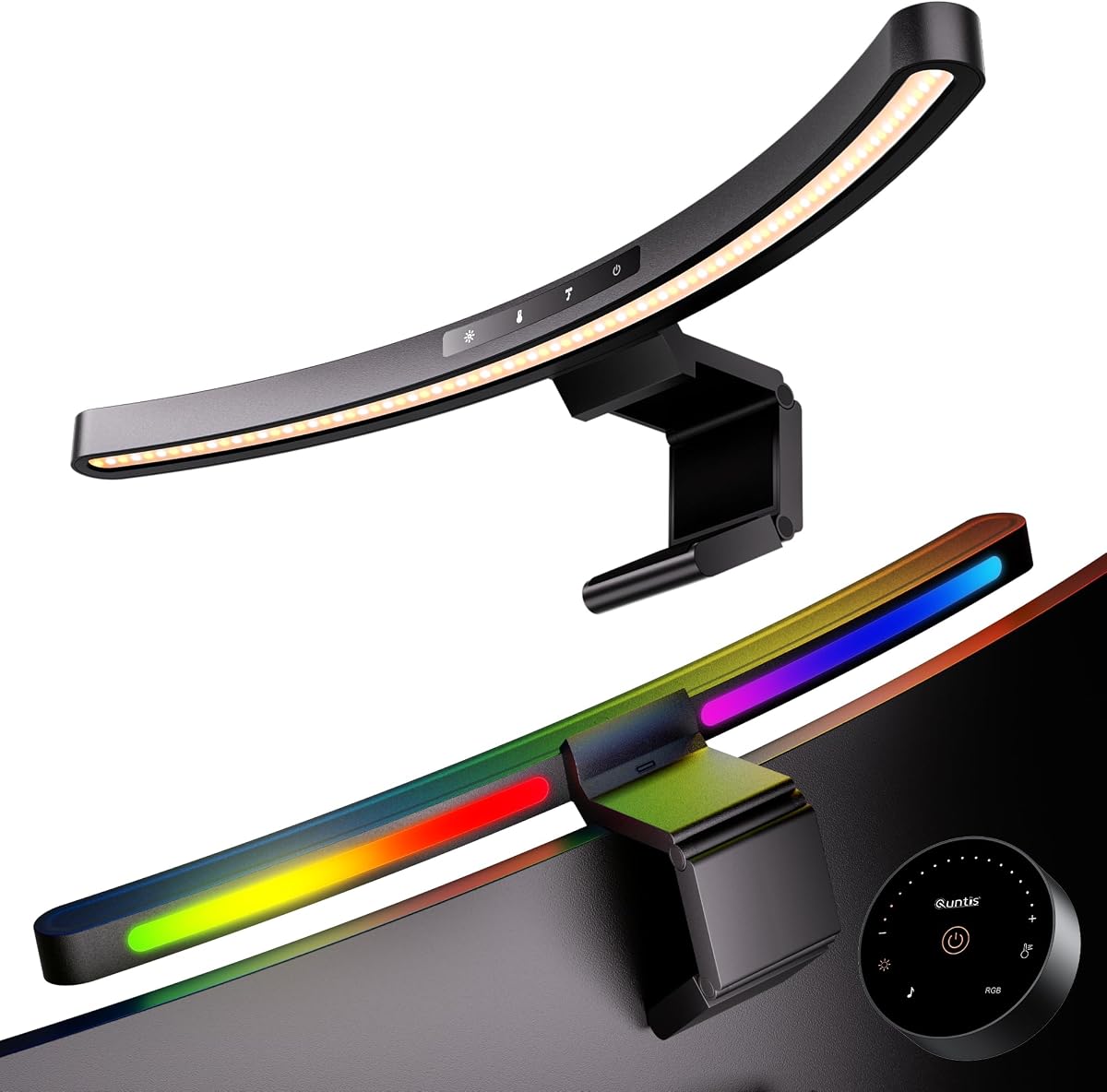


The Quntis Curved Monitor Light Bar stands out as the top choice for users with large ultrawide displays. It earns a solid 4.7 rating based on its ability to match complex screen curvatures while delivering bright, even desk lighting.
We may earn a commission when you buy through this link, at no additional cost to you.
Its patented clamp system accommodates monitors from ultra-thin to 3.35 inches thick, ensuring stability on diverse setups. The 45-degree asymmetrical optical design directs light precisely onto your workspace without reflecting on the screen. With up to 1400 lux at the center and an RA98 CRI, it provides professional-grade color accuracy for designers and creatives.
One trade-off is the complexity of the dual-light system, which might be overkill for simple flat monitors. However, for curved setups, the independent pivoting allows precise control over illumination zones. The auto-dimming sensor and memory function ensure consistent settings across power cycles.
This light bar is ideal for professionals who need reliable task lighting during long hours. Whether for deep work or gaming, its glare-free performance and high color fidelity make it the best overall pick for curved monitor users.
The 26-inch extended arc follows your monitor from side to side to eliminate the gaps that occur with straight bars on curved screens.
With an RA98 CRI, this bar ensures colors appear true to life which is essential for photo editing and graphic design workflows.
We may earn a commission when you buy through this link, at no additional cost to you.
The ONWAY Curved Monitor Light Bar offers excellent convenience through its wireless 8cm touch-sensitive remote. It holds a 4.5 rating from users who appreciate the ease of adjusting settings without reaching up to the monitor.
We may earn a commission when you buy through this link, at no additional cost to you.
Key strengths include the auto-dimming feature which adapts to ambient light changes automatically. The base doubles as a camera mount keeping your webcam centered while saving desk space. It supports a wide range of monitor curvatures from 1000R to 1800R.
However the remote requires battery power which may need occasional replacement. The color rendering index is solid at Ra95 but slightly below the industry leading RA98 of other models. These are minor drawbacks for the convenience provided.
Ideal for users who value ease of use and a tidy desk setup. The wireless control and webcam compatibility make it a strong contender for home office and hybrid work environments.
Control all functions including RGB and color temperature from a handheld remote that allows precise adjustments without touching the bar.
The integrated camera mount ensures your webcam stays centered and unobstructed during video calls which enhances professional presentation.
We may earn a commission when you buy through this link, at no additional cost to you.
The Quntis Glow 26 takes a unique approach with dual independently adjustable curved light bars. This flexibility allows you to customize coverage and intensity for different tasks or multi-monitor setups.
We may earn a commission when you buy through this link, at no additional cost to you.
Its optical design follows the monitor arc perfectly reducing side lighting gaps. With RA98 CRI and auto-dimming capabilities it ensures consistent eye comfort. The memory function saves settings so you do not have to reconfigure after power loss.
The pivoting mechanism adds complexity which may be unnecessary for single monitor users. It is priced higher than standard bars but the precision it offers is unmatched for ultrawide or multi-monitor workflows.
Best suited for power users who need specific lighting zones for different parts of their desk. The independent control makes it a standout for creative professionals and serious gamers.
Each bar pivots independently allowing you to adjust left and right lighting separately for focused or broad illumination.
Designed to fit from 800R to 3000R curvature it adapts to almost any large curved monitor available on the market.
We may earn a commission when you buy through this link, at no additional cost to you.
The Quntis Music Sync is designed for gamers who want immersive lighting that responds to their environment. It features 23 RGB effects including music reactive modes that enhance gameplay and movie watching.
We may earn a commission when you buy through this link, at no additional cost to you.
Its 17.7 inch bar is compact yet effective for standard monitors. The webcam friendly clamp design ensures you keep your desk organized while streaming or calling. Dual control via remote and manual buttons adds versatility.
While the RGB features are engaging they might be distracting for pure productivity users. The shorter bar length limits coverage on ultrawide screens. However for gaming setups it is a top-tier choice.
Perfect for gamers and media consumers who prioritize ambiance alongside task lighting. The auto-off timer helps manage usage while the music sync brings your setup to life.
Ten audio-reactive modes let the backlight dance to your music or sound effects creating a dynamic gaming atmosphere.
The flat top clip doubles as a camera base keeping your webcam centered and your desk space maximized for equipment.
We may earn a commission when you buy through this link, at no additional cost to you.
The Quntis Focus 20 features a unique triple-fold weighted clamp that naturally adapts to irregular and curved monitors. This makes it an excellent choice for users with non-standard screen shapes.
We may earn a commission when you buy through this link, at no additional cost to you.
It delivers over 1200 lux of focused illumination ideal for reading and detailed work. The auto-dimming function via remote simplifies brightness management. With a 15-degree adjustable pivot you can fine-tune beam direction easily.
A potential downside is the included hex key needed for hinge tightening which adds a step to setup. Remote batteries also need occasional replacement. Despite this it offers great flexibility.
Ideal for users with older or irregular monitors that struggle with standard clamps. Its high illumination and adjustable beam make it a reliable companion for home office tasks.
This patented clamp system adapts to monitors from flat to irregular backs without complex manual adjustments for secure placement.
With over 1200 lux it provides bright focused light that enhances focus and reduces strain during detailed work sessions.
We may earn a commission when you buy through this link, at no additional cost to you.
The ELUTENG Curved Monitor Light Bar offers exceptional value with its wireless remote and stepless dimming at a budget-friendly price. It earns a 4.6 rating for delivering core eye care features without extra cost.
We may earn a commission when you buy through this link, at no additional cost to you.
Its asymmetric surround lighting reduces eye fatigue by preventing glare on your screen. The base-free clamp design saves desk space and the remote simplifies usage. It fits standard 27 to 34 inch curved monitors perfectly.
Trade-offs include lower brightness compared to premium models and fewer automation features. For users seeking basic glare-free task lighting this is the most economical choice that still performs well.
Best for students and home office workers who need effective lighting on a tight budget. It proves you do not have to compromise on eye health to save money.
With asymmetric projection and stepless dimming it delivers essential eye comfort features at an accessible price for everyone.
The included remote allows easy adjustment of brightness and color temperature so you can optimize light without touching the bar.
We may earn a commission when you buy through this link, at no additional cost to you.
The Geisofu RGB Bar brings vibrant backlighting to curved monitors at a budget price. It includes seven RGB colors and dynamic effects to enhance gaming and entertainment setups.
We may earn a commission when you buy through this link, at no additional cost to you.
Touch sensitive buttons make it easy to cycle through modes and adjust brightness. A one-hour timer reminds you to take breaks which supports healthy habits. The clamp offers a wide adjustment range for stability.
It is not recommended for flat screens so curvatures limits its versatility. The RGB effects are fun but lack advanced controls compared to premium models. Still it is a solid entry-level choice.
Ideal for gamers on a budget who want visual flair alongside task lighting. The timer feature and touch controls make it a user-friendly option for casual users.
Seven colors and dynamic modes create a lively atmosphere perfect for gaming nights and movie viewing at home.
The one hour timer helps you remember to rest your eyes promoting better health during long work or gaming sessions.
We may earn a commission when you buy through this link, at no additional cost to you.
The LYMAX Sensor Bar delivers top-tier automation with its PIR motion sensor that turns lights on when you sit down. It holds a 4.9 rating for its intelligent features and eye care performance.
We may earn a commission when you buy through this link, at no additional cost to you.
The clamp is reinforced to hold thicker screens securely while the right-angle cable hides wires neatly. With Ra97 CRI it ensures true-to-life colors for creative work. Both touch and remote options provide flexibility.
The sensor might occasionally trigger unexpectedly if the environment is too active. The price is higher than basic bars but the automation adds real value. It saves energy and reduces daily friction.
Best for users who want a smart desk experience. The motion sensor and color accuracy make it a top pick for professionals who value convenience and quality.
High-sensitivity PIR detects your presence to turn lights on automatically and off when you leave saving power effortlessly.
Ra97 CRI ensures colors appear true and vibrant which is essential for photographers and designers who rely on accuracy.
We may earn a commission when you buy through this link, at no additional cost to you.
The BenQ ScreenBar Halo 2 is the premium standard for monitor lighting. It earns a 4.7 rating for its sophisticated wireless dial and Asym-Light technology that ensures zero glare on screen.
We may earn a commission when you buy through this link, at no additional cost to you.
Features like flicker-free LEDs and high color rendering protect eyes during long sessions. The motion sensor auto- adjusts brightness for ideal comfort. The clamp fits curved monitors securely without damage.
The premium price may be prohibitive for casual users but professionals appreciate the precision. It requires no calibration for color work but the build quality ensures longevity. This is the ultimate upgrade.
Best for creative professionals and enthusiasts who demand the highest quality. The wireless control and eye-care tech justify the investment for serious users.
The wireless dial controller lets you fine-tune brightness and color temperature with absolute precision using the dial interface.
This patent-pending design ensures light hits only the desk eliminating screen reflections and glare completely for clear viewing.
We may earn a commission when you buy through this link, at no additional cost to you.
The Laliled Touch Bar offers a straightforward solution with snap-on installation and three color temperature modes. It holds a 4.2 rating for its simplicity and ease of use on curved screens.
We may earn a commission when you buy through this link, at no additional cost to you.
Touch control makes adjustments quick and the timer function reminds you to rest. The clip is non-slip and secure without taking up desk space. It is powered conveniently via USB.
It lacks advanced automation and high color rendering found in premium models. However for users seeking a no-fuss lamp this is a practical choice. The installation is quick and secure.
Best for users who want a simple and affordable task light. The touch interface and timer provide basic smart features without complexity or high cost.
The clip allows effortless adjustment and placement on monitors without complex tools or lengthy setup procedures.
Touch-sensitive controls let you switch modes and adjust brightness easily making it user-friendly for all ages.
We may earn a commission when you buy through this link, at no additional cost to you.
Choosing the right curved monitor light bar requires considering your screen size, curvature, and specific lighting needs for work or play.
Ensure the light bar is designed for your monitor radius such as 1000R or 3000R. Mismatched bars may leave dark corners or fail to clamp securely.
Look for adjustable curved or dual light bars that can flex to match your screen shape for even illumination.
Prioritize asymmetrical designs that direct light onto the desk rather than the screen. This prevents reflections that distract during use.
A proper optical angle ensures light hits your workspace without shining into your eyes or causing screen glare.
For creative work choose a model with a high CRI like RA95 or above to ensure colors appear true to life on your screen.
A higher CRI reduces eye strain by providing more accurate and natural lighting compared to lower CRI alternatives.
Auto-dimming sensors adjust brightness based on ambient light reducing the need for manual changes throughout the day.
Motion sensors can turn lights on or off automatically helping you save energy and simplify daily routines.
Wireless remotes offer convenience for adjusting settings from a distance while touch panels provide immediate access on the bar.
Consider which interface suits your workflow best especially if you work in dim environments where physical buttons are hard to find.
Check the clamp thickness range and material to ensure it fits your monitor securely without damaging it.
Weighted clamps with silicone padding offer better stability and protection for thin or irregular screen edges.
If you prioritize gaming ambiance look for RGB backlight modes that sync with music or offer dynamic effects.
Note that RGB features may distract from productivity so choose based on whether you need entertainment or focus.
Right-angle USB-C cables help hide wires behind the monitor keeping your workspace clean and organized.
Ensure the power adapter is included and the cable length is sufficient to reach your USB port easily.
Mount the clamp securely on the top edge of your monitor ensuring it sits flat against the screen. Adjust the tilt to direct light downward onto your desk.
Use the remote or touch buttons to set your preferred brightness and color temperature. For eye comfort match the light color to the time of day.
Clean the light surface with a dry soft cloth to remove dust. Avoid touching the LEDs directly to prevent damage or oil residue.
Some curved bars may fit flat screens if the clamp allows but they might leave gaps. It is best to choose a model specifically designed for your monitor type to ensure even coverage.
No, quality bars use asymmetrical optical designs to direct light only on the desk. This prevents reflections on the screen and protects your eyes during long sessions.
Warm light around 3000K is better for relaxation while cool light near 6500K helps focus. Many bars allow stepless adjustment so you can switch based on your needs.
RGB modes enhance gaming and movie setups but may distract during work. Choose a bar with switchable RGB if you want both functionality and entertainment features.
Use a soft dry cloth to wipe the surface. Do not use liquids or cleaners directly on the light panel to avoid damaging the LEDs or electronics.
Most curved monitor light bars are USB powered. Ensure your monitor or dock has a free USB port or use the included adapter for consistent power.
Yes, most models allow you to pivot the bar up to 90 degrees to adjust the beam direction. This helps target specific areas on your desk.
Quality LED monitor light bars typically last over 50,000 hours with minimal degradation. Proper usage and avoiding heat buildup helps extend their life further.
The Quntis Curved Monitor Light Bar leads as the top pick for ultrawide setups due to its curve matching and high CRI performance.
Prioritize auto-dimming and glare-free design to protect your eyes during long sessions whether for work or gaming on curved displays.
Check current product listings before buying since availability and features can vary. Ensure you select the right model for your specific monitor size.