
MEKO Stylus Pen for Touchscreen
4.6Editor score
Universal 3-in-1 Stylus
Includes Protective Cap
Highly Sensitive Disc Tip
Discover the top fine point stylus options for 2026. Our guide compares precision, compatibility, and value to help you choose the best touchscreen pen.
Finding the right fine point stylus can transform how you interact with your touchscreen devices. Whether you are taking notes, sketching ideas, or navigating complex apps, a precise tool makes all the difference in your daily workflow.
We evaluated ten top-rated stylus pens based on tip precision, build quality, and universal compatibility. Our selection process focused on user reviews, design features, and overall value to ensure you get a reliable instrument for your needs.
Each pick highlights specific strengths like multi-tip versatility or long battery life. Remember that prices and availability can change frequently, so checking the current listings is always recommended before making your final purchase decision today.
4.6Editor score

4.5Editor score

4.4Editor score
This comparison table breaks down the key specifications for each model. Review the tip types, battery requirements, and compatibility notes to find the perfect match for your device setup.



This stylus pen stands out as a top contender for general touchscreen use. With a 4.5 rating, it offers a unique 3-in-1 design that adapts to writing, gaming, and navigation needs effortlessly.
We may earn a commission when you buy through this link, at no additional cost to you.
The transparent disc tip allows you to see exactly where your mark will land, enhancing precision for detailed tasks. The flexible angle ensures smooth motion without interruption during active use.
While it lacks palm rejection, the replaceable tip system extends the product life significantly. This design choice keeps costs low while maintaining high performance for daily activities.
Ideal for students and professionals who need a reliable pen without charging hassles. It serves as a perfect tool for kids learning, adults working, and seniors navigating devices.
The transparent disc tip provides clear visibility of the contact point for accurate line placement.
Switch between rubber and disc tips to match specific tasks like scrolling or detailed drawing.
We may earn a commission when you buy through this link, at no additional cost to you.
This 3-in-1 stylus offers incredible value with a high 4.6 rating. It meets daily needs like clicking icons, writing, and drawing without requiring batteries or complex setup.
We may earn a commission when you buy through this link, at no additional cost to you.
The dual-sized rubber tips and transparent disc tip provide a seamless transition between tasks. The included protective cap ensures the tip remains safe when not in use.
While the small tips might feel different from a finger, they offer precision that fingers cannot match. The replaceable nature means you never run out of functional points.
Perfect for budget conscious buyers seeking reliability. It handles browsing screens and playing games with ease, making it a great tool for everyday digital life.
Wear and aging resistant silicone tips ensure long lasting performance.
Simply unscrew the cap to use the disc tip without needing tools.
We may earn a commission when you buy through this link, at no additional cost to you.
This active pencil offers advanced features for those needing a premium experience. With a 4.4 rating, it supports magnetic attachment and quick charging for sustained creativity.
We may earn a commission when you buy through this link, at no additional cost to you.
The magnetic design securely attaches to the side of your iPad, ensuring it stays within reach. A one-touch switch allows you to turn it on or off instantly.
While it requires charging, the 9-10 hour battery life minimizes interruptions. The quick charge feature ensures you spend less time waiting and more time creating.
Best suited for Apple users wanting a Pencil alternative. It is perfect for those with restricted hand movement, offering a precise tool for writing and drawing.
Magnetic adsorption ensures your stylus stays safely attached to your device.
Works without delay or lag for a natural drawing experience.
We may earn a commission when you buy through this link, at no additional cost to you.
This active stylus is designed specifically for drawing and painting tasks. With a 1.5mm tip, it provides a precise and realistic feeling for creation on touch screens.
We may earn a commission when you buy through this link, at no additional cost to you.
Power on within 1 second without needing USB or Bluetooth connections. The 30-minute auto-off function conserves battery life during periods of inactivity.
Note that there is no pressure sensitivity, meaning all lines have the same thickness. Despite this limitation, the tip design supports high accuracy for sketches.
Ideal for users needing a dedicated drawing tool. It works with most popular tablets and smartphones, offering a reliable alternative to standard finger touch.
The 1.5mm diameter tip allows for detailed work and accurate input.
Automatic power off ensures your battery lasts longer during daily use.
We may earn a commission when you buy through this link, at no additional cost to you.
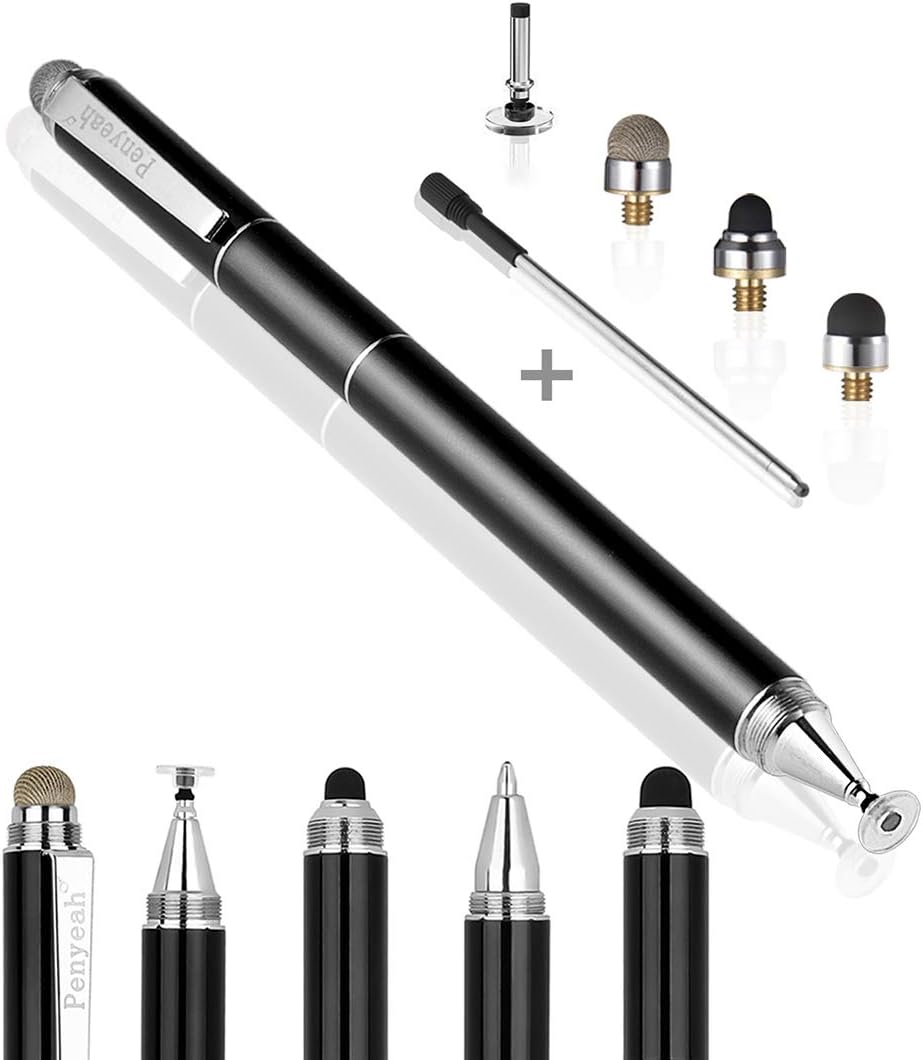
This unique 4-in-1 stylus combines digital tips with a real ink pen. It offers four different using experiences to suit a wide range of daily tasks.
We may earn a commission when you buy through this link, at no additional cost to you.
The screw type tips are interchangeable, allowing you to customize your pen according to preference. The high grade metal material ensures a comfortable feel and durability.
While you should not rest your hand on the screen due to lack of rejection, the pen is perfect for digital signing and browsing. The ink refill is a convenient backup.
Ideal for travelers who need a single tool for paper and digital notes. It provides a sturdy pocket clip for easy carry and access.
Works seamlessly with all capacitive touch screen devices for broad utility.
High grade metal material offers a sleek and durable aesthetic.
We may earn a commission when you buy through this link, at no additional cost to you.
This active stylus offers a fine, light design for artists and students. With a 4.2 rating, it provides smooth writing and drawing without Bluetooth connectivity.
We may earn a commission when you buy through this link, at no additional cost to you.
The upgraded chip supports iPad series 2018 and 2019 versions effectively. A buffer unit at the tip gives you more accuracy and control against screen touch.
While it uses a Micro USB port, charging takes only 60 minutes for 8 hours of use. Avoid fast chargers to prevent chip damage due to high currency.
Perfect for professionals needing an Apple Pencil alternative. It works as a pen for tablets and cellphones, offering a reliable touch experience.
Works with most touchscreen devices including iPad Pro, Mini, and Air.
Hold with a slight inclination for a better writing experience.
We may earn a commission when you buy through this link, at no additional cost to you.
This bundle includes six vibrant stylus pens for team or family use. With a 4.6 rating, it is a reliable choice for everyday touch screens.
We may earn a commission when you buy through this link, at no additional cost to you.
The built-in clip makes it easy to attach to pockets or bags for on-the-go lifestyles. It works immediately without apps or technical setup.
While it lacks active features, the high sensitivity rubber tip glides smoothly without lag. This design protects your screen from scratches and fingerprints.
Ideal for classrooms or offices needing multiple tools. The versatile kit makes it a great solution for shared digital life.
Six pens in vibrant colors allow for easy identification and sharing.
True capacitive stylus works the moment it touches the screen.
We may earn a commission when you buy through this link, at no additional cost to you.
This 4-pack set offers seamless transition from writing to sketching. With a 4.5 rating, it features both transparent disc and soft rubber tips on either end.
We may earn a commission when you buy through this link, at no additional cost to you.
The aluminum barrel adds a comfortable grip for extended use. Extra value comes with 12 replacement tips included in the package.
While the tips are easy to install, you may need to switch them often. This design is perfect for those looking to enhance their digital experience.
Best for artists and writers needing precision. It works flawlessly with any touchscreens including Chromebook and Surface.
Upgraded design features tips for both precision and responsive touch.
Pack provides extra tips to meet creative needs without frequent buys.
We may earn a commission when you buy through this link, at no additional cost to you.
This bulk set provides sufficient supply for long-term daily use. With a 4.7 rating, it features dual rubber tips for accurate control.
We may earn a commission when you buy through this link, at no additional cost to you.
Each package includes 10 dual-tip stylus pens plus 20 matching replacement nibs. The alloy metal body ensures balanced grip and durability.
While it lacks advanced tech, the premium soft rubber material protects your display. It offers a natural writing and drawing feel.
Perfect for classrooms and offices needing cost-effective tools. The vibrant mixed colors help distinguish pens for different users.
Bulk pack offers exceptional value for personal or school procurement.
Gentle rubber surface reduces fingerprint smudges and abrasion.
We may earn a commission when you buy through this link, at no additional cost to you.
This set blends functionality and elegance for a stylish digital experience. With a 4.6 rating, it features dual silicone rubber tips designed for smooth performance.
We may earn a commission when you buy through this link, at no additional cost to you.
Crafted with a sleek aluminum body, it ensures reliability for writing and gaming. The anti-scratch design safeguards your device from fingerprints.
While it requires no setup, the tips are replaceable for longevity. The design delivers pixel-perfect precision for seamless navigation.
Ideal for creative users wanting a reliable tool. It adapts to your needs across multiple platforms effortlessly.
No Bluetooth connection or charging required for instant creativity.
High sensitivity rubber tip delivers precision while safeguarding your screen.
We may earn a commission when you buy through this link, at no additional cost to you.
Selecting the perfect stylus involves considering several key factors. This guide outlines the most important aspects to evaluate for your specific needs.
The tip type determines how accurately you can interact with the screen. Transparent disc tips offer visibility of the contact point, while rubber tips provide friction and control.
Look for fine tips if you need detailed work like drawing or signing documents.
Passive styluses do not require batteries, making them lightweight and always ready. Active styluses need charging but often offer advanced features like magnetic attachment.
Choose passive for simplicity and active for added functionality.
Ensure the stylus works with your specific devices such as iPad, Android, or Nintendo Switch. Some models are universal while others are device specific.
Check compatibility lists to avoid connection issues.
Tips wear out over time, so consider models that include spare tips. This feature extends the life of your stylus and saves money.
Look for packs that offer extra nibs in the box.
A sturdy body like aluminum or alloy ensures durability during daily use. It should feel comfortable in your hand to prevent fatigue.
Prioritize ergonomic designs for extended work sessions.
Active styluses often include palm rejection to prevent accidental screen touches. Passive styluses lack this feature, requiring care when writing.
If you write extensively, look for active models with this feature.
Compare the features against the cost. Multi-tip options and large packs often offer better value for families or teams.
Decide if you need one high-end pen or several affordable ones.
Good customer service ensures you get help if issues arise. Look for brands offering replacement services or guarantees.
Check return policies before finalizing your purchase.
Keep the tip clean by wiping it with a soft cloth to remove dust. Dirt can reduce sensitivity and cause unwanted screen marks.
For active styluses, charge the battery regularly to avoid sudden power loss. Store them in a safe place to prevent tip damage.
Replace worn tips immediately to maintain performance. Most models allow tool-free replacement for quick maintenance.
Not strictly, but a matte protector can provide better friction. This makes writing feel more like paper. Glass protectors work well with rubber tips.
Check if you are using a compatible device. Lag may also come from screen dirt. Clean the surface to improve response time.
Yes, most models are universal for capacitive screens. They work on Android and iPhone devices. Just ensure the device is not covered in thick metal.
It depends on usage frequency. Daily users might replace them monthly. Inspect the tip for wear and tear regularly.
No, it is mostly found in active styluses. Basic models allow accidental touches so you must be careful. Check specs for this feature.
No, passive styluses do not have batteries. They work solely on the screens electric field. Only active models require charging.
We reviewed ten top stylus pens ranging from simple passive tools to advanced active pencils. Each offers unique strengths for different needs.
Prioritize precision and compatibility for your specific device. If you work on a tablet, magnetic features may help.
Check current prices before buying as offers change often. Select the one that fits your budget and workflow.