
Redragon M612 Wired RGB Optical Gaming Mouse
4.6Editor score
Eight thousand DPI optical sensor
Eleven programmable buttons available
Ergonomic claw-grip design
Explore our top 10 lightweight mouse picks for 2026. We compare features, performance, and value to help you find the perfect ergonomic gaming or work mouse
Finding a lightweight mouse can transform your daily computing experience. Whether you game competitively or work long hours, reducing hand fatigue is crucial. These models offer agility and precision without weighing down your wrist or arm during extended sessions.
We evaluated ten top-rated options based on sensor accuracy, build quality, and ergonomics. Our team analyzed user feedback, technical specifications, and real-world performance data. This list covers wireless and wired choices across various price points to suit every need.
Each pick highlights specific strengths like battery life, sensor DPI, or comfort features. Prices and availability fluctuate frequently so check current listings before purchasing. We aim to guide you toward a reliable tool that enhances productivity and enjoyment across your workflow.
4.6Editor score

4.6Editor score

4.5Editor score
This side-by-side comparison highlights key specifications for each model. We focus on sensor capabilities, weight considerations, and unique features to help you decide quickly.





The Logitech G305 Lightspeed Wireless Gaming Mouse stands out as a top contender for those seeking performance without bulk. It boasts a 4.6 rating from users who praise its balance of affordability and high-end features.
We may earn a commission when you buy through this link, at no additional cost to you.
Its HERO sensor delivers precision tracking up to 12,000 DPI with zero smoothing. The LIGHTSPEED technology ensures a lag-free experience with a 1ms report rate, making it suitable for competitive play. Battery life is exceptional, lasting up to 250 hours on a single AA battery.
While it lacks RGB lighting, the focus remains on function. The design is compact with built-in storage for the receiver. Some users prefer rechargeable models, but the convenience of a long-lasting AA battery is a significant trade-off for many.
This mouse is ideal for gamers and professionals who need reliable wireless performance on the go. It offers a robust combination of speed and efficiency that justifies its position as our top pick.
The HERO sensor ensures your movements are translated accurately on screen without delay.
With up to 250 hours of gameplay, you won't need to change batteries often.
We may earn a commission when you buy through this link, at no additional cost to you.
The Redragon M612 is an excellent entry-level option for gamers who want high performance without breaking the bank. It holds a solid 4.6 rating due to its versatile features and ergonomic design.
We may earn a commission when you buy through this link, at no additional cost to you.
It features an 8000 DPI optical sensor with 5 redefinable levels. The 11 programmable buttons allow for tactical keybinds in games. The skin-friendly frosted coating and rubber texture sides provide a secure grip during intense sessions.
While it lacks the wireless convenience of other models, the reliable cable connection ensures zero latency. The RGB lighting adds a customizable aesthetic to your setup. Users find the claw-grip design reduces fatigue significantly.
If budget is a primary concern, this mouse delivers impressive value. It is perfect for beginners or those who prefer wired stability over wireless mobility.
Switch easily between different DPI levels to match various gaming scenarios.
The design minimizes hand fatigue, allowing for longer gaming sessions.
We may earn a commission when you buy through this link, at no additional cost to you.
The Logitech G PRO X Superlight 2 is engineered for serious esports athletes who demand the best. With a 4.5 rating, it is praised for its speed and precision capabilities.
We may earn a commission when you buy through this link, at no additional cost to you.
Its HERO 2 sensor tracks over 800 IPS with up to 44,000 DPI. The 8kHz polling rate offers unmatched responsiveness. At only 60 grams, it is incredibly light, reducing hand strain during competitive matches.
The mouse features LIGHTFORCE hybrid switches for reliability. While it comes with a USB-C cable, the POWERPLAY system is optional. The price is steep, but the performance is justified for professionals.
Choose this model if you need the absolute fastest wireless experience. It sets a high standard for precision and speed in modern gaming peripherals.
At 60 grams, this mouse is designed to minimize movement resistance.
The HERO 2 sensor ensures precise tracking without acceleration or smoothing.
We may earn a commission when you buy through this link, at no additional cost to you.
The Logitech G PRO X2 SUPERSTRIKE introduces unique haptic feedback for a new level of immersion. It features a 4.6 rating for its innovative approach to wireless control.
We may earn a commission when you buy through this link, at no additional cost to you.
It uses a Haptic Inductive Trigger System (HITS) to provide real-time feedback. You can customize actuation points from 10 levels to optimize speed. The HERO 2 sensor ensures pinpoint accuracy for competitive play.
Battery life ranges from 60 to 90 hours. The thin-wall case makes it lightweight yet durable. Users appreciate the deep customization, though the software learning curve is noticeable.
This mouse is perfect for those who want advanced control. It pushes the boundaries of what a gaming mouse can offer with haptic technology.
Feel real-time feedback from the HITS system for enhanced immersion.
10-level actuation points allow you to fine-tune click sensitivity.
We may earn a commission when you buy through this link, at no additional cost to you.
The Logitech G502 Hero is a classic choice known for its extensive customization features. It has a 4.6 rating reflecting its enduring popularity among users.
We may earn a commission when you buy through this link, at no additional cost to you.
Its HERO sensor delivers up to 25,600 DPI. With 11 programmable buttons, you can map any command. The adjustable weights allow you to match your preferred balance configuration exactly.
Mechanical switch button tensioning ensures crisp clicks. While it is heavier than ultralight models, the stability is beneficial for MMOs. The LIGHTSYNC RGB adds a personal touch to your desk setup.
Select this if you need a reliable and versatile tool. It is an excellent choice for those who prefer wired reliability and ergonomic control.
Adjust the balance to match your specific playing style and comfort.
Multiple programmable buttons give you full control over your workflow.
We may earn a commission when you buy through this link, at no additional cost to you.
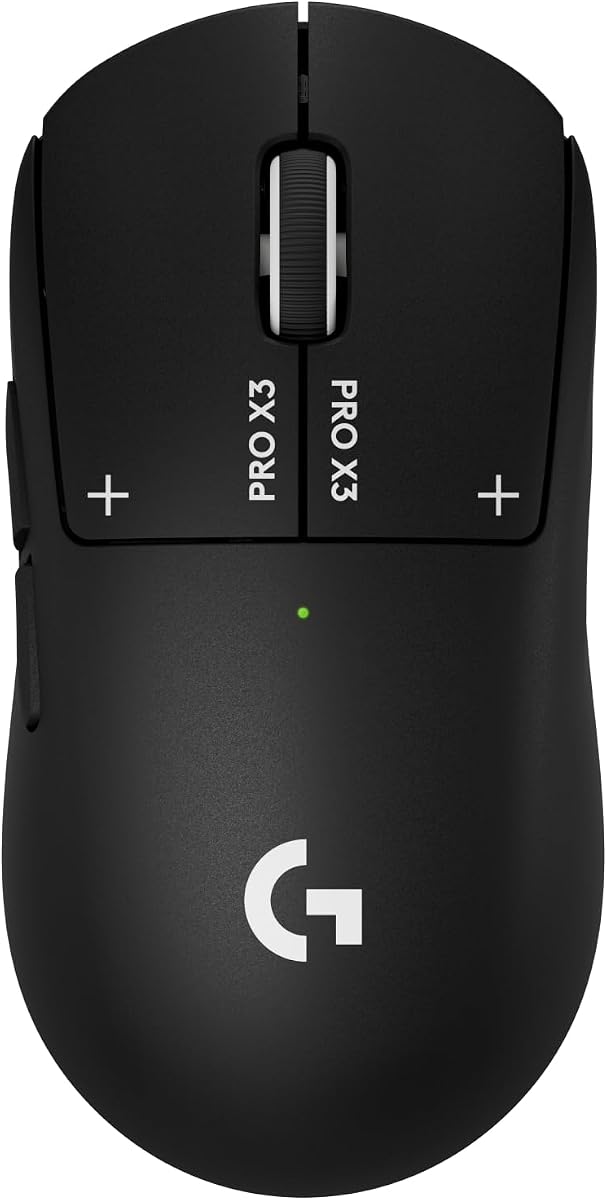
The Logitech G PRO X3 SUPERSTRIKE is designed to deliver tournament-grade performance with minimal weight. It holds a 4.3 rating from professional users.
We may earn a commission when you buy through this link, at no additional cost to you.
It features a HERO 2 sensor capable of tracking 930 IPS with 48,000 DPI. The LIGHTSPEED wireless technology ensures a highly responsive connection. The 135-hour battery life means long uninterrupted sessions.
The UHMWPE feet provide effortless movement across pads. The thin-wall case makes it durable yet light. Users appreciate the speed, though the price point is a consideration for general consumers.
This is a top-tier choice for competitive gaming. It is engineered for those who prioritize speed and wireless reliability above all else.
8kHz polling ensures your clicks are registered instantly on the server.
Extra-large UHMWPE feet offer smooth movement on any surface.
We may earn a commission when you buy through this link, at no additional cost to you.
The Logitech M185 is a reliable and compact option for everyday work tasks. It has a 4.4 rating for its simplicity and durability.
We may earn a commission when you buy through this link, at no additional cost to you.
It features 2.4 GHz wireless connectivity with a tiny nano receiver. The battery lasts up to a year thanks to smart sleep modes. Its ambidextrous shape fits most hand sizes comfortably.
The design is small enough for travel, making it a great laptop companion. Users find it superior to touchpads for productivity. It lacks gaming features but excels in office reliability.
If you need a basic wireless mouse for browsing and documents, this is an excellent choice. It offers convenience without unnecessary complexity or weight.
The compact design makes it easy to carry in a laptop bag.
Sleep modes extend battery life to a full year on a single charge.
We may earn a commission when you buy through this link, at no additional cost to you.
The Logitech M330 Silent Plus reduces noise significantly for shared workspaces. It has a 4.5 rating due to its focus on comfort and silence.
We may earn a commission when you buy through this link, at no additional cost to you.
SilentTouch technology cuts click noise by 90 percent. The contoured grip is designed for right-handed comfort. Battery life lasts 18 months with power-saving auto-sleep modes.
It is ideal for offices where sound matters. The tracking works well on most surfaces. While it lacks gaming specs, its primary job is to keep quiet without disrupting colleagues.
Buy this if you need a silent mouse for daily tasks. It is a practical tool for professional environments.
SilentTouch ensures you can click without disturbing others nearby.
Contoured plastic grips offer long-lasting comfort during extended work.
We may earn a commission when you buy through this link, at no additional cost to you.
The Logitech MX Master 4 offers advanced productivity tools with haptic feedback. It holds a 4.2 rating for its specialized features.
We may earn a commission when you buy through this link, at no additional cost to you.
It includes a customizable Haptic Sense Panel for shortcuts and notifications. The MagSpeed wheel allows scrolling 1,000 lines per second. The ergonomic tilt reduces hand stress for fluid navigation.
Connectivity includes both USB-C dongle and Bluetooth. Quiet clicks reduce noise by 90 percent. While it is heavier, the focus is on precision and workflow efficiency.
This mouse is perfect for content creators and heavy users. It is a sophisticated tool designed to enhance productivity and reduce strain.
Feel feedback for actions and shortcuts without needing to look at the screen.
Scroll through long documents quickly with pinpoint pixel stopping.
We may earn a commission when you buy through this link, at no additional cost to you.
The Logitech G PRO X2 SUPERSTRIKE is built to win esports matches with speed. It shares the same 4.6 rating as the first model.
We may earn a commission when you buy through this link, at no additional cost to you.
It features 30 ms faster clicks and deep actuation customization. The HERO 2 sensor ensures accuracy. Haptic feedback adds immersion to gameplay. It supports POWERPLAY for endless wireless play.
The design is ultra-durable with thin-wall casing. The weight is optimized for rapid movements. Users appreciate the focus on competitive integrity and precision.
If speed is your main requirement, this is the top tier. It delivers the fastest and most reliable performance available for pros.
30 ms faster clicks ensure your commands execute instantly.
The thin-wall case offers robust protection without adding weight.
We may earn a commission when you buy through this link, at no additional cost to you.
Selecting the right lightweight mouse requires considering several factors to match your specific needs.
The sensor is the core of accuracy. Look for HERO or high-DPI optical sensors to ensure your movements translate precisely. Zero smoothing and acceleration are critical for competitive play.
Prioritize a sensor with a high DPI range and high IPS speed for fast tracking.
Wireless mice offer freedom of movement but require battery management. Wired models eliminate latency risks entirely but limit range. LIGHTSPEED technology has largely closed the wireless gap.
Choose wireless for comfort and wired for zero lag if possible.
For wireless options, battery life varies significantly. Some models last months on a single AA battery, while others recharge via USB-C. Consider your usage frequency.
Look for models that support long continuous play or quick recharge options.
Lightweight mice range from 60g to 90g. Heavier mice can provide stability, but lighter ones reduce strain. Ensure the balance feels comfortable for your grip style.
Check the gram weight and center of gravity for ergonomics.
The shape must fit your hand size and grip style. Contoured shapes offer support for claw grips, while ambidextrous shapes suit both hands. Comfort is key for marathon sessions.
Choose a design that aligns with your natural hand posture.
Additional buttons allow for macros and shortcuts. Gamers need many keys for tactics, while professionals need quick access. Ensure they are accessible without stretching your fingers.
Select a mouse with enough buttons for your specific workflow.
Durable materials ensure longevity. Thin-wall designs reduce weight without sacrificing strength. Check for high-quality switches and smooth gliding feet.
Invest in models with high-grade materials for long-term use.
Prices range from budget to premium. High-end models offer better sensors and materials, but budget ones provide core features. Decide what matters most for your daily use.
Balance your budget against the features you truly need.
Keep the sensor lens clean to maintain tracking accuracy. Use a soft cloth to wipe off dust from the optical eye regularly.
If using wireless, insert fresh batteries or charge fully before use. Disable unused features to extend battery life during critical sessions.
Store your mouse in a protective case if traveling. Avoid dropping or exposing it to moisture to prevent internal damage.
Yes, lighter mice reduce hand strain during extended use. This helps prevent fatigue and maintains productivity over time. Consider ergonomics alongside weight.
Absolutely. Gaming mice offer precision and extra buttons useful for productivity. However, they may feel too light or sensitive for casual tasks.
Modern wireless tech like LIGHTSPEED has near zero latency. They perform as fast as wired options. Lag is minimal and often unnoticeable.
Battery life ranges from a few days to over a year. It depends on usage and features like RGB. Check specs for specific hours.
Most pros prefer under 80 grams for speed. This balance ensures agility without sacrificing control. Find a weight that suits your grip style.
Many models use thin-wall cases to reduce weight while maintaining strength. High-quality materials ensure they survive daily drops and wear.
We reviewed top models like the Logitech G305 and Redragon M612 to cover various needs. Each pick offers unique strengths in speed, comfort, and affordability.
Prioritize sensor accuracy and ergonomic fit when selecting your new mouse. These factors impact your daily experience most significantly.
Remember that prices fluctuate, so check current listings before finalizing your purchase. We hope this guide helps you find the perfect tool.