
Switch Cooling Fan with Bottom Cooling
Bottom cooling with vertical stand design
Real-time LED fan speed display
Compatible with Switch OLED and Steam Deck
This guide compares the top cooling fan Nintendo Switch Dock options to help you prevent overheating and extend console life during long gaming sessions.
Keeping your gaming console cool is essential for longevity and performance. A dedicated cooling fan for the Nintendo Switch dock helps dissipate heat generated during intense play sessions effectively.
We evaluated ten top-rated cooling solutions based on fan speed, noise levels, build quality, and compatibility with various Switch models. Each product offers unique features tailored to different user needs.
Our picks highlight key benefits like adjustable speeds and LED displays. Remember that prices and availability change frequently, so check current listings before making your final purchase decision today.

4.6Editor score

4.4Editor score
Compare all ten cooling solutions side by side to find the perfect match for your specific Switch model and gaming setup needs.



This cooling fan ranks as the top choice for its comprehensive feature set and reliable performance on the original Switch dock. It boasts a high rating of 4.6 stars from satisfied users who praise its effectiveness.
We may earn a commission when you buy through this link, at no additional cost to you.
The standout quality is the LED display showing both fan speed in RPM and exhaust temperature. This real-time feedback helps you monitor thermal conditions precisely while playing demanding titles for hours without interruption.
While highly effective, the fan can produce noticeable sound when pushed to maximum speeds above 2400 RPM. However, this trade-off is acceptable given the powerful cooling it provides during intense gaming sessions.
Hardcore gamers seeking maximum performance and temperature monitoring should buy this model. It offers the best balance of features and reliability to keep your system running smoothly and extend its lifespan.
The LED display lets you see exact exhaust temperatures so you know when to increase fan speed before heat affects performance.
Adjustable RPM settings allow you to match cooling intensity to your session length and game type for optimal airflow.
We may earn a commission when you buy through this link, at no additional cost to you.
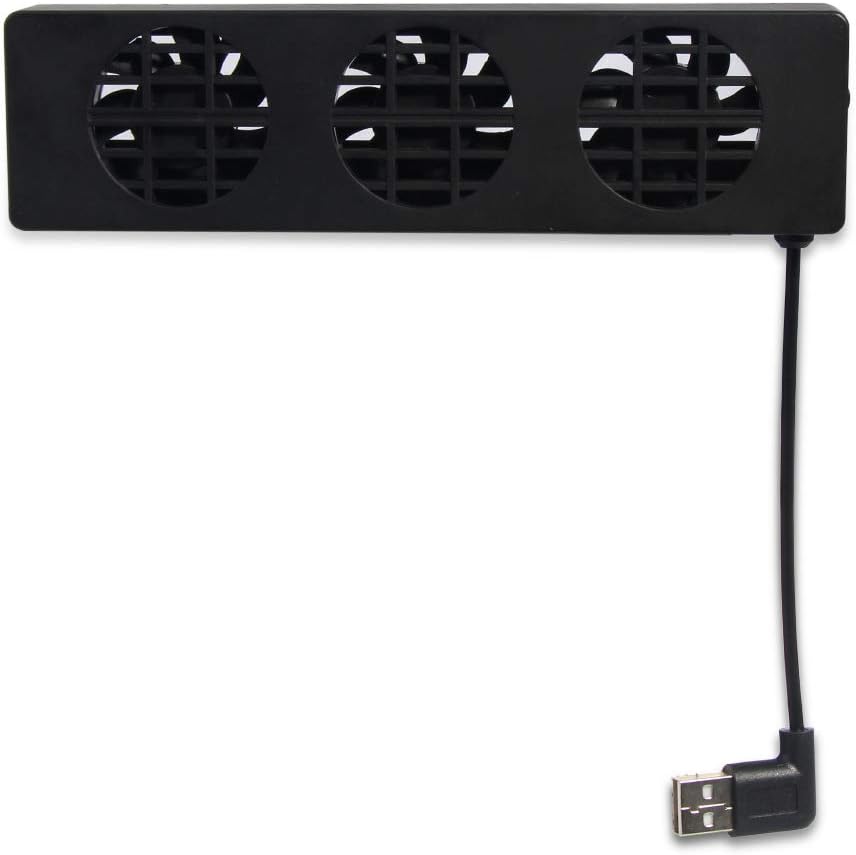
The TNP Cooling Fan focuses on raw ventilation power with three high-speed fans designed specifically for the original Switch dock. It has earned a moderate rating indicating mixed but generally positive user experiences.
We may earn a commission when you buy through this link, at no additional cost to you.
Its key strength lies in the triple fan setup which ensures strong airflow across the dock surface. The compact design fits neatly behind the console without consuming much space on your entertainment stand.
Some users note that speed control is limited to presets rather than adjustable levels. This simplicity makes it easy to use but offers less flexibility for fine-tuning noise and cooling balance.
Gamers who prioritize straightforward cooling without complex controls should consider this option. It provides a reliable way to improve heat dissipation using a simple plug-and-play mechanism for everyday gaming.
Three fans working together provide robust ventilation that quickly lowers the console temperature during extended play sessions.
With dedicated Turbo and Normal switches, you can select the intensity level quickly without navigating menus or adjusting knobs.
We may earn a commission when you buy through this link, at no additional cost to you.
This unit is uniquely designed for the new Switch 2 charging dock featuring dual fans and extensive connectivity options. It has a solid rating reflecting its readiness for next-generation hardware needs.
We may earn a commission when you buy through this link, at no additional cost to you.
It offers a unique combination of cooling and storage with six game card slots built into the stand. This organization feature plus USB ports makes it a hub that reduces cable clutter on your desk.
The RGB lighting adds a modern aesthetic but might be unnecessary for minimalists who prefer clean looks. However it can be turned off or customized to match your gaming environment if desired.
Owners of the Switch 2 looking for an all-in-one docking and cooling solution should choose this model. It future-proofs your setup with versatile features that go beyond simple heat dissipation.
Built specifically for the Switch 2 charging dock ensuring perfect fit and optimized airflow for the latest console architecture.
Three USB ports allow you to connect controllers and accessories directly to the cooling stand without extra adapters.
We may earn a commission when you buy through this link, at no additional cost to you.
The GLDRAM Cooling Fan is engineered specifically for the 2021 OLED dock HEG-007 ensuring a seamless fit and high efficiency performance. It has received strong praise from OLED owners for its tailored design.
We may earn a commission when you buy through this link, at no additional cost to you.
Its premium feature is the massive fourteen game card slot storage that keeps your library organized on top of the fan. The blue light design matches the OLED aesthetic and adds a modern touch.
Some users might find the light distracting in dark rooms though it syncs with the fan power for convenience. This is a minor trade-off for the improved airflow and storage it provides.
If you own the Switch OLED model and want a dedicated upgrade this is the ideal choice. It combines effective cooling with organizational benefits that enhance your dock experience significantly.
Designed precisely for the HEG-007 model the base aligns perfectly to maximize cooling efficiency without gaps or wobbles.
Fourteen slots provide ample space for your favorite cartridges keeping them secure and easily accessible during game swaps.
We may earn a commission when you buy through this link, at no additional cost to you.
Dobe offers a clean white cooling fan that matches the aesthetic of the Switch OLED base. It maintains a good rating due to its quiet operation and effective heat dissipation for standard use.
We may earn a commission when you buy through this link, at no additional cost to you.
The device uses a high-speed internal fan to increase air circulation within the base. It is designed to be silent during operation making it suitable for bedroom or low-noise environments.
While it lacks adjustable speed controls, the simple on-off switch makes it very straightforward to use. This simplicity appeals to those who do not want complex settings or extra hardware.
Genters seeking a quiet and visually matching accessory for their OLED console will appreciate this option. It provides essential cooling without adding noise or clutter to your setup.
The fan runs quietly to ensure you focus on your game without constant background noise from the cooling system.
The white color blends seamlessly with the OLED console base maintaining a clean and cohesive look for your setup.
We may earn a commission when you buy through this link, at no additional cost to you.
This cooling attachment focuses on quick heat reduction with a 3000 r/min turbo fan. It has a compact design that prevents your entertainment stand from getting cluttered while keeping the OLED cool.
We may earn a commission when you buy through this link, at no additional cost to you.
The fan accelerates airflow instantly to provide better heat dissipation during intense gameplay. It draws power directly from the USB port of the docking station for easy setup without extra cables.
Since it lacks a specific user rating you should review recent feedback before purchasing. The blue LED adds a stylish touch but the feature set is straightforward compared to more advanced models.
If you need a fast and compact solution without extra complexity this might suit you. It offers a direct way to improve thermal management during heavy gaming loads quickly.
The turbo fan speed ensures quick heat removal helping to maintain optimal performance even during extended play.
Its compact footprint allows it to fit neatly in tight spaces without obstructing other accessories on your shelf.
We may earn a commission when you buy through this link, at no additional cost to you.
The Bewinner unit offers a robust external bracket with three cooling fans designed for general console use. It holds a solid rating for its durable construction and straightforward utility.
We may earn a commission when you buy through this link, at no additional cost to you.
Its internal triple fan setup helps dissipate heat effectively while keeping the console cool during gaming. The small and compact design makes it easy to set up and take on the go.
While it uses a side switch for Turbo Normal and Off modes it does not offer detailed speed control. This simplicity ensures reliability but less precision than digital displays.
Gamers looking for a durable and general-purpose external cooling bracket will find this useful. It provides solid heat dissipation without requiring complex installation or additional hardware.
Made from superior materials the bracket withstands regular use while maintaining structural integrity for consistent cooling performance.
A single side switch lets you quickly toggle between fan modes or turn the unit off with minimal effort.
We may earn a commission when you buy through this link, at no additional cost to you.
OSTENT provides a budget-friendly triple fan cooler that attaches easily to the dock for improved ventilation. It has a lower rating but many users find it effective for basic cooling needs.
We may earn a commission when you buy through this link, at no additional cost to you.
Three fans provide powerful ventilation to quickly reduce game console temperature during intense gaming sessions. The design is lightweight and portable making it easy to store or transport when needed.
Quality control may vary slightly given the lower average score so inspecting upon arrival is wise. However the affordable price makes it a low-risk addition for casual gamers seeking extra airflow.
If you want an affordable way to add fans to your setup this is a viable option. It delivers solid ventilation at a competitive price point for general home use.
The low price makes it easy to try out additional cooling without spending much on your gaming accessories budget.
Power is drawn directly from the dock USB port eliminating the need for extra power adapters or outlets.
We may earn a commission when you buy through this link, at no additional cost to you.
This vertical stand fan offers exceptional value with an adjustable speed range from 510 to 6000 RPM and an LED display. It is designed to work with both Switch OLED and Steam Deck models.
We may earn a commission when you buy through this link, at no additional cost to you.
It runs nearly silent below 2400 RPM allowing for quiet background cooling during casual play. The adjustable speed feature lets you balance noise and cooling performance precisely for any situation.
The lack of a specific rating suggests it is a newer or lower volume product so reading detailed reviews is recommended. However its feature set at this price point makes it compelling.
Budget conscious gamers who want adjustable cooling for multiple devices should try this model. It offers robust controls and cross compatibility at a very affordable price point today.
Running below 2400 RPM it provides nearly silent airflow ideal for light gaming without disturbing others in the room.
Compatibility with both Switch OLED and Steam Deck means you can use one fan across your different portable devices.
We may earn a commission when you buy through this link, at no additional cost to you.
This listing represents a variant specifically designed for the OLED model with a black finish. It holds a decent rating indicating reliable performance for users within its specific market region.
We may earn a commission when you buy through this link, at no additional cost to you.
The cooling fan aims to fit compatible OLED dock models providing essential ventilation without additional complexity. Users in its target region have found it effective for standard use cases.
Since detailed specifications are limited in the listing you may need to contact the seller for exact details. The black finish offers a stylistic alternative to white models for dark themed setups.
If you are in the region where this listing is available and want a black fan this is a good option. It provides essential cooling with a distinct aesthetic choice for your dock.
The black finish blends with dark consoles and stands offering a sleek alternative to standard white cooling accessories.
This version is tailored to specific market needs ensuring it matches local dock standards and user requirements effectively.
We may earn a commission when you buy through this link, at no additional cost to you.
Choosing the right cooling fan requires looking at several key factors to ensure compatibility and performance for your specific setup.
Ensure the fan matches your exact console model like Original or OLED to avoid fit issues. Some units are built specifically for newer docking stations.
Always check the product title and description for compatibility notes before purchasing.
Look for adjustable speeds so you can balance cooling power with noise levels. Higher RPM usually means better cooling but more sound.
Adjustable fans offer flexibility for different gaming scenarios and room settings.
Check user reviews for feedback on noise during operation especially at high speeds. Quiet fans are crucial for bedroom gaming setups.
Lower RPM settings often provide adequate cooling without being distracting.
Materials like ABS plastic are durable and lightweight for mounting on the dock. Sturdy construction prevents wobbling or scratching your console.
Solid build ensures the fan stays in place during long play sessions.
Most fans draw power from the dock USB port which simplifies setup. Check if you need a cable included with your purchase.
USB power ensures you do not use extra outlets for cooling.
Some models offer LED displays temperature monitoring or game card slots. These add value and functionality to your cooling setup.
Decide which extra features matter most to your specific gaming experience.
Prices vary significantly depending on the brand and feature set. Set a budget that fits your needs without overspending on unnecessary tech.
Higher price does not always guarantee better cooling performance.
Check the warranty terms to ensure protection against defects and issues. A longer warranty shows confidence in product quality and longevity.
Customer service responsiveness matters if you need to return the item.
To install, attach the fan to the back of your dock ensuring it fits securely. Plug the USB cable into the dock port to power the unit.
Turn on the fan before starting a gaming session and adjust the speed based on your comfort and noise tolerance.
Regularly clean dust from the fan blades to maintain airflow. Check cables periodically to ensure a stable power connection.
While the Switch has internal cooling fans long gaming sessions can still cause heat buildup. An external dock fan helps dissipate this heat and keeps the system running smoothly.
Not all fans fit the OLED dock. You must check the product description for compatibility with the OLED model before buying to ensure a proper fit.
Most dock fans draw power from the USB port on the dock itself. They usually include a USB cable to plug into the dock for power.
Fans do make noise especially at high speeds. Look for adjustable speeds or reviews mentioning quiet operation if you are sensitive to sound.
Dock cooling fans are designed for docked mode. For handheld use you might need a different accessory designed for direct console mounting.
Some premium models include card slots on the fan unit. However most basic models focus solely on cooling without storage features.
Our top picks include the cooling fan for Switch 1/2 with its LED display and the GLDRAM option for OLED models with storage.
Prioritize compatibility and noise level when choosing to ensure the fan fits your dock and does not disturb your gaming experience.
Prices and availability change so check current listings to find the best deal for your preferred model today.