
APC Smart-UPS SRT 5kVA
4.0Editor score
High capacity 5kVA
Extensive outlet variety
Transformer included
Compare the top 240V UPS systems for workstations. This guide reviews capacity, waveform, and reliability to help you choose the right power protection.
Selecting the right uninterrupted power supply is crucial for modern workstations. A quality system ensures your critical hardware stays online during outages. Proper voltage matching prevents equipment damage and extends battery life significantly.
We evaluated ten leading 240V UPS models based on technical specifications and user feedback. Our analysis covers waveform types, outlet configurations, and voltage regulation features. These insights help you match the unit to your specific workstation needs accurately.
Each product review highlights key strengths and potential limitations for informed decisions. We include detailed specs and real-world performance data from manufacturer listings. Please note that prices and availability may change frequently over time.
4.0Editor score

5.0Editor score

4.0Editor score
The following table provides a side-by-side comparison of all ten evaluated models. It highlights critical specifications like capacity, waveform, and input voltage to help you quickly identify the best fit for your workstation setup.


The OPTI-UPS online double conversion unit offers exceptional reliability for critical workstations. With a perfect rating, this model delivers uninterrupted power through true online technology. It ensures zero transfer time during outages for continuous operation.
We may earn a commission when you buy through this link, at no additional cost to you.
Its pure sine wave output supports active PFC power supplies commonly found in modern workstations. The system includes monitoring software and an LCD screen for detailed status updates. You can manage settings and track battery health easily with these tools.
Users should note that this is a European model designed for 230 volt inputs. It may not work with standard US voltage without additional adapters. Ensure your power environment matches the input requirements before purchasing this unit.
This system is ideal for data centers or mission critical setups needing stable power. The robust build and high output capacity make it a premium choice. Choose this if you need absolute continuity for sensitive equipment.
This feature ensures no interruption in power delivery even during brief outages. It is essential for servers and workstations that cannot tolerate any downtime.
Double conversion isolates connected equipment from raw utility power entirely. This results in clean sine wave power free from voltage spikes or sags.
We may earn a commission when you buy through this link, at no additional cost to you.
The APC Smart-UPS SRT 5kVA stands out for its massive power capacity. It supports heavy workstations with multiple high-power devices simultaneously. The tower design makes it suitable for floor placement in server rooms or offices.
We may earn a commission when you buy through this link, at no additional cost to you.
Outlets include various NEMA types like 5-20R and L6-20R for flexibility. The included transformer allows for 208/240V to 120V conversion if needed. This versatility reduces the need for additional adapters in mixed voltage environments.
While the price is high, the reliability and capacity justify the investment for enterprise users. The heavy weight requires careful placement on a stable surface. It is built for demanding industrial or commercial applications.
Buy this unit if you need to power multiple high-load systems. It is excellent for environments where power density is a priority. Prioritize stability and capacity over cost when selecting this model.
The mix of outlet types allows connection of diverse equipment without extra adaptors. This simplifies cable management and improves safety in crowded setups.
This high capacity supports long runtimes for workstations with multiple GPUs. It ensures your data remains safe during extended power interruptions.
We may earn a commission when you buy through this link, at no additional cost to you.
The Tripp Lite OMNIVSX1500 provides a cost-effective solution for workstation protection. Its 1.5kVA capacity suits small to medium workloads efficiently. Automatic voltage regulation helps maintain stable power without draining the battery unnecessarily.
We may earn a commission when you buy through this link, at no additional cost to you.
A standout feature is the fast recharge time of eight hours. This ensures the unit is ready for the next outage quickly. The tower design fits neatly under desks or in corners without taking much space.
While it lacks pure sine wave output, it works well with standard power supplies. Users should check device requirements before using with sensitive servers. It is best suited for general office workstations.
Choose this model for budget-conscious buyers needing reliable backup. It balances cost and functionality well for non-critical environments. Ensure your equipment does not require true sine wave power.
AVR adjusts incoming voltage levels to prevent unnecessary battery usage. This extends the lifespan of the battery and reduces energy costs.
A rapid recharge ensures the UPS is ready for use immediately after an outage. This is crucial for maintaining availability in busy workspaces.
We may earn a commission when you buy through this link, at no additional cost to you.
The CyberPower CP2000PFCRM2U is designed for space-constrained rack installations. It delivers a pure sine wave output which is crucial for active PFC power supplies. The color LCD panel provides clear visibility of power conditions.
We may earn a commission when you buy through this link, at no additional cost to you.
Its short depth design fits easily into compact server racks. This feature is ideal for small offices where rack space is limited. The unit also supports security systems and audio visual equipment effectively.
While it offers great protection, installation requires proper rack mounting. Ensure your rack rails are compatible before purchasing. It is not designed for standalone tower use without specific kits.
This UPS is perfect for IT professionals managing network racks. Prioritize the pure sine wave feature for modern servers. Choose this if you need a deep rack compatible solution.
The shallow depth allows fitting into tight spaces like shallow wall cabinets. This maximizes rack space for other critical networking hardware.
Pure sine wave power ensures compatibility with sensitive electronics and active PFC. It prevents potential damage caused by lower quality waveforms.
We may earn a commission when you buy through this link, at no additional cost to you.
This model supports high voltage inputs of 220 to 240 volts. It offers flexibility for various international power standards. The rotatable LCD screen makes viewing easy in both rack and tower positions.
We may earn a commission when you buy through this link, at no additional cost to you.
Nine C13 outlets and one C19 outlet provide ample connection options. This suits network servers and telecom installations well. Remote monitoring is available with the optional SNMP card.
Users may find the setup more complex than standard units. The rating suggests some variability in user experience. It is best for specific high voltage requirements rather than general use.
Consider this if your power environment requires specific high voltage handling. Ensure you have the monitoring card for full remote features. Prioritize compatibility with your existing infrastructure.
This feature allows safe operation in regions with higher nominal voltages. It protects your equipment from voltage mismatches without extra converters.
A rotatable display ensures you can see status lights regardless of orientation. This improves usability whether the unit is standing or rack mounted.
We may earn a commission when you buy through this link, at no additional cost to you.
This unit provides a pure sine wave output suitable for active PFC loads. It ensures reliable performance for modern servers and workstations. Automatic voltage regulation helps manage minor power fluctuations efficiently.
We may earn a commission when you buy through this link, at no additional cost to you.
The LCD panel displays detailed runtime and battery capacity information. This helps users plan for shutdowns before power runs out. The included business software offers further management tools for monitoring.
It is a robust unit that may be heavy to move. Ensure you have stable support where you plan to place it. The focus is on high-quality power delivery for network devices.
Buy this if your workstations rely on active PFC power supplies. It prevents compatibility issues common with simulated sine wave units. Choose it for better hardware protection in mixed loads.
Active PFC power supplies need pure sine wave to avoid damage. This UPS delivers the correct waveform for safe operation.
The panel offers clear details on load and battery capacity. This transparency helps users manage their power needs effectively.
We may earn a commission when you buy through this link, at no additional cost to you.
This model offers a balance of capacity and simplicity for standard racks. It uses a simulated sine wave which works well for non PFC loads. The LCD screen gives essential status updates during operation.
We may earn a commission when you buy through this link, at no additional cost to you.
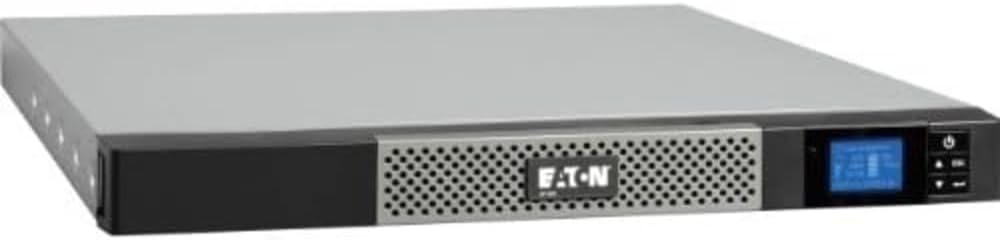
It fits easily into standard 1U racks and also stands as a tower. The eight outlets provide enough connections for typical workgroups. It is a solid choice for general business backup needs.
Users should note the simulated wave may not suit all servers. Check device requirements before installing in critical server rooms. It is best for workstations and network switches.
Choose this for reliable backup in cost-sensitive environments. It covers standard needs without complex features. Ensure your devices are compatible with simulated waveforms.
This unit works in both tower and rack configurations. This versatility allows you to use space efficiently in any room.
The screen shows runtime and power status clearly. It helps you react quickly to any power conditions.
We may earn a commission when you buy through this link, at no additional cost to you.
This model offers high capacity with 2700 watts of continuous power. It supports a wide voltage range including 240 volts. The design fits well into enterprise server environments.
We may earn a commission when you buy through this link, at no additional cost to you.
Connectivity options include USB and RS-232 for monitoring. The outlet configuration supports multiple devices easily. It is built for reliability in demanding settings.
It is heavier and requires proper mounting and ventilation. The interface might be complex for home users. It suits businesses needing robust backup without high cost.
Consider this if you need high output for a cluster of workstations. It is reliable for long-term use. Ensure you check input voltage compatibility carefully.
This range allows operation in different electrical regions without issues. It helps avoid buying multiple models for global offices.
The variety of connectors simplifies cabling for mixed devices. It supports both IT and non IT equipment effectively.
We may earn a commission when you buy through this link, at no additional cost to you.
This compact unit is designed for smaller workstations with lower power needs. It includes TEL DSL protection for additional safety. The line interactive design corrects minor fluctuations efficiently.
We may earn a commission when you buy through this link, at no additional cost to you.
It is small enough to fit on a desk. The USB port allows for software monitoring. It is an economical choice for single computer setups.
Capacity is limited to 800VA so it may not last long for heavy loads. It is best for essential devices like a single PC. Check the wattage requirements before purchasing.
Buy this for small offices with minimal power needs. It balances cost with essential protection features. Ensure it matches your device wattage accurately.
This protects connected phone or internet lines from surges. It prevents damage to communication equipment during storms.
Its small footprint leaves more space on your desk. It is perfect for setups where every inch of space counts.
We may earn a commission when you buy through this link, at no additional cost to you.
This model offers a unique wall mount option for closets or racks. It provides a true sine wave output for modern server supplies. The 1U size saves significant vertical space in enclosures.
We may earn a commission when you buy through this link, at no additional cost to you.
It supports active PFC power supplies effectively. This ensures compatibility with current equipment standards. The UL certification confirms safety compliance in the US.
It does not include a power cord so you must buy one. The rating is lower which may indicate mixed user feedback. It is best for tight spaces where wall mounting is key.
Choose this if you need to mount the UPS on a wall. It provides pure sine wave protection in a small form. Ensure you purchase the required power cord separately.
This output type protects sensitive hardware from power anomalies. It is safer for equipment than simulated waveforms.
Mounting on the wall saves valuable floor space. It is ideal for closets or rooms with limited room.
We may earn a commission when you buy through this link, at no additional cost to you.
Selecting the right UPS requires understanding your power needs and voltage requirements. This guide details the key factors to ensure your workstation remains protected during power outages.
Capacity in VA and Watts determines how much equipment you can support. Higher capacity allows for longer runtime during outages. Calculate your total load to choose a unit that covers your needs with a margin.
Ensure the VA rating exceeds your workstation total to maintain performance under load.
Pure sine wave outputs are essential for equipment with active PFC power supplies. Simulated sine wave units are cheaper but may damage sensitive hardware. Check your power supply requirements to avoid compatibility issues.
Always choose pure sine wave for modern servers and high-end workstations.
Confirm the unit supports 240V input and output to avoid mismatch. Some models are European and may not work with US voltage. Verify the input range matches your local grid standards.
Double check the input specs to ensure safe operation without extra adapters.
Different outlets like C13 or L6-20R provide connection flexibility. Ensure you have enough outlets for your devices without extra strips. Consider the physical layout of your setup to choose the right plugs.
Select a model with outlets matching your device plugs for easy setup.
Tower units sit on the floor or under a desk while rack units fit in server racks. Choose based on available space and mounting options. Wall mount units save space in smaller rooms.
Pick a form factor that fits your environment to save space.
LCD panels and software allow you to track battery health easily. Remote monitoring helps manage units in hard to reach locations. Look for units with free software that supports your OS.
Prioritize units with software if you need to monitor remotely.
AVR adjusts voltage to prevent unnecessary battery usage during brownouts. This extends battery life and reduces wear. It is essential for areas with unstable power grids.
Choose a unit with AVR to protect battery life effectively.
Look for warranties covering the battery and equipment. Longer warranties indicate confidence in product reliability. Check the support policy for battery replacements.
Ensure the warranty covers the battery to avoid hidden costs.
Install the UPS in a cool and dry place to ensure longevity. Avoid direct sunlight or heat sources. Use surge protectors and ensure cords are secure.
Plug your devices into the battery backup outlets. The main outlets provide surge protection only. Connect your workstation to the backup to prevent shutdowns during outages.
Check the LCD panel regularly for status updates. Replace batteries every three to five years to maintain performance. Run self tests to ensure readiness before emergencies.
Not all 240V UPS units are compatible with US voltage. Some are European models that require 230V input. Check the input range specifications before buying to ensure safe operation.
Pure sine wave output mimics standard utility power closely. It is safer for active PFC power supplies found in modern workstations. Simulated waves may cause noise or damage to hardware.
You should test the unit at least once a year to ensure it works. Run a self test using the panel buttons. This confirms the batteries are functional before a real outage.
Automatic Voltage Regulation corrects minor power fluctuations without switching to battery. This saves battery life and ensures stable power. It is vital for areas with unstable voltage.
Batteries typically last three to five years depending on usage. Heat and frequent cycling can shorten this lifespan. Regular checks help you know when replacement is needed.
Yes but ensure the pure sine wave output supports PFC supplies. A 240V unit must match your power input. Higher capacity ensures long runtimes for gaming sessions.
We reviewed ten models covering various needs from budget to enterprise. The OPTI-UPS and APC units stand out for capacity and reliability. The Tripp Lite model offers a solid entry level option.
Prioritize pure sine wave and voltage compatibility for your setup. Ensure the outlet configuration matches your devices before buying. Consider AVR features to maximize battery life.
Prices change frequently so check current listings before ordering. Ensure you have the right accessories like cords included. A quality UPS protects your workstation investment effectively.