
MELOGAGA RGB Computer Speakers
4.2Editor score
7-color RGB lighting
Dual 3W drivers
Inline volume control
This guide compares the best cheap PC speakers for desktops and laptops, evaluating sound quality, connectivity, and build to help you find the right budget
Finding the right audio setup does not require breaking the bank. Cheap PC speakers have evolved significantly, offering surprising clarity and bass even at entry-level prices. Whether you work from home or enjoy casual gaming, having reliable sound is essential for an immersive experience.
We evaluated ten top-rated models based on user feedback, technical specifications, and real-world performance. Our comparison focuses on value, durability, and ease of setup across different budgets. Each product was selected to represent a unique strength in the budget speaker market today.
Every pick includes key features, pros, cons, and detailed analysis to guide your decision. Prices and availability change frequently so check current listings before purchasing. Use this guide to match your specific needs with the right affordable speaker option available now.
4.2Editor score

4.6Editor score

4.2Editor score
Here is a side-by-side look at all ten models we reviewed. This table highlights key specifications and strengths to help you quickly compare options before making a final choice for your setup.



The Creative Pebble 2.0 stands out as the top choice for budget users needing reliable audio. It holds a strong rating from users who appreciate its clear sound and simple setup. This model delivers impressive performance for its compact size and low price point.
We may earn a commission when you buy through this link, at no additional cost to you.
Its 45-degree elevated drivers project sound directly to your ears, creating an immersive listening experience. The single USB cable powers both audio and electricity, reducing cable clutter on your desk. Far-field drivers with passive radiators ensure deep bass without needing a subwoofer.
While the volume control is fixed on the speaker, it requires minimal adjustment during use. The lack of Bluetooth limits wireless options but ensures stable wired performance. These trade-offs are acceptable given the sound quality and design benefits it offers.
This speaker is ideal for office workers, students, and casual gamers seeking value. If you want balanced audio without complexity, the Pebble 2.0 is the recommended pick. It remains a benchmark for what affordable PC speakers should deliver.
The 45-degree angle ensures sound reaches you directly rather than hitting the desk first. This design minimizes distortion and enhances clarity across all frequencies.
Using one USB cable simplifies setup significantly. You avoid the need for separate power adapters or AUX cables, making it perfect for clean desk setups.
We may earn a commission when you buy through this link, at no additional cost to you.
MELOGAGA RGB Computer Speakers are perfect for budget-conscious buyers who want style. They deliver crisp sound with deep bass using dual high-fidelity drivers. The 7-color RGB lighting adds a dynamic touch to any gaming or work setup.
We may earn a commission when you buy through this link, at no additional cost to you.
You can easily adjust volume levels using the built-in inline rotary knob. This allows precise control without reaching for software settings. The slim design fits neatly on small desks, saving valuable space while maintaining quality audio.
The lighting may feel bright in dark rooms if not cycled through colors. Build materials are basic but durable enough for daily use. These minor drawbacks do not outweigh the value and visual appeal provided.
Choose this model if you want fun lighting effects and good sound on a tight budget. It suits gamers and streamers looking to enhance their desk aesthetic. It offers a great balance of form and function for the price.
Dynamic RGB backlighting cycles through seven mesmerizing colors. This feature enhances your workspace ambiance and adds a personalized touch to your setup.
The inline volume knob allows quick adjustments without software. This convenience is ideal for users who prefer physical controls for their audio settings.
We may earn a commission when you buy through this link, at no additional cost to you.
The FUNLOGY Speaker brings premium audio quality to the budget category. With 14W total output, it delivers loud, clear sound with punchy bass. The Japanese design ensures reliable build quality and noise-reducing features for clean audio.
We may earn a commission when you buy through this link, at no additional cost to you.
Its 30-degree tilt directs sound straight to your ears for immersive listening. Gold-plated inputs minimize static even during PC startup or shutdown. The matte finish and compact size fit perfectly into modern home or office spaces.
While priced slightly higher than basic options, the performance justifies the cost. It lacks a battery, meaning it requires constant USB power. These details are minor considering the superior clarity and build reliability it provides.
Ideal for audiophiles on a budget or professionals needing clear sound, this model excels. It is also great for gaming consoles due to broad compatibility. Choose FUNLOGY for a reliable, high-quality audio experience.
The 30-degree upward tilt layout optimizes sound delivery directly to your ears. This design saves desk space while ensuring an immersive listening experience.
Designed by FUNLOGY, a trusted brand recognized with awards. This speaker offers outstanding build quality and reliable customer support with warranty coverage.
We may earn a commission when you buy through this link, at no additional cost to you.
Amazon Basics Stereo 2.0 speakers are a staple for reliable audio. They amplify laptop audio effectively using USB power and an in-line volume control. The metal finish and scratch-free padded base give a durable look despite the budget price.
We may earn a commission when you buy through this link, at no additional cost to you.
The bottom radiator helps produce springy bass that enhances music and movies. Blue LED lights add a subtle visual cue without being too flashy. This design balances functionality and style well for everyday computing tasks.
While the bass isn't as deep as larger models, it suits most users. The plastic body is basic but sturdy enough for regular use. These limitations are typical for entry-level speakers but do not hinder general use.
Choose this if you want a no-frills solution from a trusted brand. It works well for office PCs or dorm rooms where simplicity matters. It remains a solid choice for dependable audio on a budget.
USB-powered from your PC port eliminates extra adapters. This simplifies your setup and keeps cable management tidy and efficient.
In-line volume control provides easy access for adjustments. This feature allows quick sound tuning without needing software interfaces.
We may earn a commission when you buy through this link, at no additional cost to you.
These speakers deliver loud Hi-Fi sound in a small package. They are designed to meet audio needs for movies and music without taking up space. The column-shaped design with matte metal panels fits modern homes and offices perfectly.
We may earn a commission when you buy through this link, at no additional cost to you.
Plug and play setup requires no drivers, making it ready instantly. The 31.5-inch cable length gives you flexibility in placement near your PC. Anti-slip foot pads ensure stability on any desk surface during use.
While sound quality is lower than premium options, it satisfies casual listening. The simple design lacks advanced features like lighting or touch controls. These trade-offs are acceptable if your goal is functional audio on a tight budget.
Ideal for small offices or compact setups, these speakers offer value. They are great for users who prioritize ease of use and cost. Choose them for reliable daily audio without unnecessary complexity.
Unique column-shaped design allows flexible desk placement. This saves precious desk space while ensuring the speakers remain within reach.
Equipped with USB and 3.5mm cables for stable connection. This setup ensures compatibility with most devices without extra adapters.
We may earn a commission when you buy through this link, at no additional cost to you.
This soundbar is perfect for saving desk space. You clip it easily to the top of your monitor to free up workspace. Dual ultra-magnetic drivers with passive radiators provide high-quality stereo sound with deep bass.
We may earn a commission when you buy through this link, at no additional cost to you.
Adaptive-channel-switching ensures left and right channels remain correct regardless of placement. A built-in USB-C adapter makes it compatible with modern laptops and tablets. Touch buttons on the front allow intuitive muting and volume control.
Clipping it to a monitor may not suit all desk configurations. Some users might prefer separate units for stereo separation. However, for tight spaces, the convenience of this design is a clear benefit.
Choose this for setups where desk real estate is limited. It suits office PCs and laptops needing quick audio access. If you value space efficiency, this soundbar is a smart solution.
The patented clamp allows smooth placement on your desk or monitor. This feature helps you save desktop space while ensuring secure positioning.
Includes a USB-C adapter for latest devices. This ensures broad compatibility with Mac, Android, and Windows laptops seamlessly.
We may earn a commission when you buy through this link, at no additional cost to you.
These speakers are designed for portable convenience. Plug directly into a USB port for instant setup without drivers. The compact size makes them easy to move between home and office desks.
We may earn a commission when you buy through this link, at no additional cost to you.
You can connect headphones via the included 3.5mm jack. This is useful for private listening during work hours. The front volume control simplifies adjustments during movies or calls.
Power output is lower than other models, limiting loudness. However, this is acceptable for quiet environments or focused work. The lightweight build supports easy transport without durability concerns.
Ideal for students or travelers needing basic audio, these work well. They are best for casual use where portability matters most. Choose these for simple, reliable audio anywhere.
The 3.5mm jack allows headphone connection for private listening. This feature adds flexibility for users needing focused audio.
Measures roughly 2.76 by 3.55 by 5.3 inches. This size ensures it fits anywhere without taking up desk room.
We may earn a commission when you buy through this link, at no additional cost to you.
This speaker works across various operating systems seamlessly. Whether on Windows, macOS, or Linux, you can plug it in for audio. Dual high-excursion drivers with a passive radiator provide louder sound and better bass.
We may earn a commission when you buy through this link, at no additional cost to you.
Using one cable for power and audio reduces clutter significantly. This design simplifies your desk setup for cleaner visuals. The enhanced bass performance is impressive for this price range.
Users should ensure drivers are up to date for best results. Volume range is limited but sufficient for normal use. These factors do not impact the core benefit of compatibility and ease.
Choose this if you use multiple devices or operating systems. It is ideal for shared office PCs or mixed-device homes. It offers reliable performance across different platforms effortlessly.
Compatible with Windows, macOS, ChromeOS, and Linux. This ensures you can use it with almost any desktop or laptop device.
One cable feeds both audio and electrical power. This eliminates extra wires and makes your workspace look cleaner.
We may earn a commission when you buy through this link, at no additional cost to you.
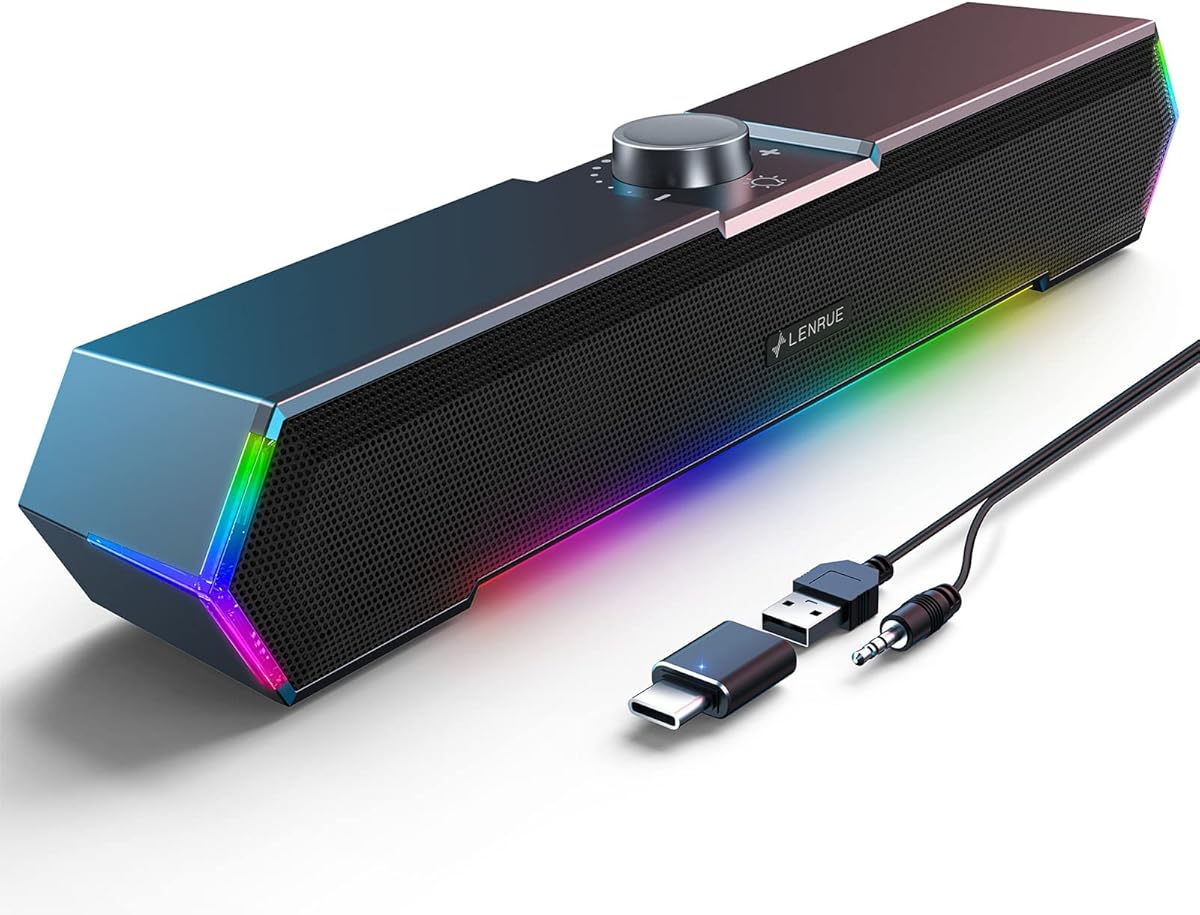
LENRUE G11 speakers offer a dynamic lighting experience. Touch angular game lights create an atmosphere for gaming. Four large amplifier IC horns ensure distortion-free, noiseless sound for movies.
We may earn a commission when you buy through this link, at no additional cost to you.
The cables are glued together to avoid desktop clutter. This design fits perfectly under a monitor to save space. You can turn lights on or off with one touch to suit your preference.
It lacks Bluetooth or a mic, limiting connectivity options. But the audio quality is strong enough for media playback. These limitations are minor considering the visual impact it provides.
Choose this for gamers wanting lights with solid audio. It is perfect for home setups where ambiance matters. It balances style and function effectively for users who want more than standard speakers.
Unique dynamic angular design creates gaming ambiance. This one-touch control offers a stylish glow to your setup.
Four large amplifier IC horns deliver stunning sound. This ensures a cinema effect for all types of media.
We may earn a commission when you buy through this link, at no additional cost to you.
Uakinat speakers are very easy to use for daily tasks. They use 2x3W technology for clear Hi-Fi sound without distortion. The package includes a USB cable and 3.5mm audio cable for instant setup.
We may earn a commission when you buy through this link, at no additional cost to you.
Cables are glued together to avoid desktop clutter. This design keeps your workspace clean and organized. The anti-slip foot pads ensure stability across modern desks.
Basic aesthetics might not appeal to all users. Controls are minimal but sufficient for standard audio needs. These trade-offs are acceptable for users who prioritize simplicity over features.
Ideal for anyone wanting simple audio, these speakers work well. They fit home offices and workspaces needing quick sound. Choose Uakinat for straightforward performance without fuss.
Cables are glued together to reduce mess. This helps you keep your desk tidy and professional.
Includes 18-month worry-free warranty and lifetime support. This ensures you can purchase with confidence and trust.
We may earn a commission when you buy through this link, at no additional cost to you.
Choosing the right speakers requires considering several factors to ensure they meet your needs without overspending.
Sound quality depends heavily on drivers and wattage. Look for models with at least 3W per speaker to ensure enough volume for your room. Passive radiators often improve bass response without adding bulk to the design.
Higher power does not always mean better sound if the tuning is poor. Focus on reviews that mention clarity across music and movies rather than just volume numbers.
Most cheap speakers use USB for power and audio to simplify setup. Ensure your computer has the correct ports, such as USB-C or standard USB-A, for seamless connection. Some models also include a 3.5mm aux input for additional versatility.
If you prefer wireless, check for Bluetooth capabilities though these often cost more. Wired options remain the most reliable for stable audio without lag.
Desk space varies significantly between users and environments. Compact models like soundbars or small cubes save room but may lack depth. Larger speakers often deliver better bass but require more surface area.
Consider the aesthetic fit with your existing setup. Matte finishes or RGB lights can enhance your workspace visually while keeping functionality intact.
Physical controls like volume knobs or touch buttons offer quick access. Some models rely on software controls which can be slower to adjust. Check if muting functions are easily accessible on the unit itself.
Inline volume controls are useful for setups where the main device is far away. This feature adds convenience for changing levels during meetings or gaming sessions.
Ensure the speakers work with your specific operating system. Most modern models support Windows and macOS out of the box. Linux or ChromeOS users should verify driver requirements before purchasing.
Devices like laptops or tablets may need specific adapters. Always check the included cables match your ports to avoid extra purchases later.
Durability matters for daily use in shared spaces. Plastic builds are common at this price point but should include sturdy bases. Look for features like padded bases or anti-slip pads to prevent movement.
Check warranty terms to understand your protection. A good warranty can save you from replacement costs if issues arise within the first year.
Affordability is key when shopping for cheap PC speakers. However, the lowest price does not always mean the best value. Compare features and reviews to determine which model offers the most for your budget.
Sometimes spending a few dollars more yields better long-term performance. Prioritize sound quality and build over minor visual features to ensure satisfaction.
Reviews reveal real-world performance that specs might not show. Look for feedback on long-term reliability and sound consistency. Users often mention issues like noise or connection drops that are critical to know.
High ratings from verified buyers add confidence to your decision. Cross-reference multiple sources to get a balanced view of the product's strengths and weaknesses.
Connect your speakers to a power source using the provided USB cable. Plug the audio cable into your computer's aux port if needed. Allow the system to recognize the new device automatically.
Adjust the volume using the inline knob or touch controls before playing audio. Position speakers at ear level for the best listening experience. Ensure the placement avoids direct contact with walls to reduce muddiness.
Keep speakers away from heat and moisture to maintain longevity. Dust them regularly using a soft cloth to prevent build-up. Check cable connections periodically to ensure stable performance over time.
Many budget speakers are designed for daily use with durable plastic bodies and sturdy bases. Checking reviews for longevity and warranty terms can help confirm this. Proper care like keeping them dry will extend their lifespan significantly.
Most modern USB speakers are plug and play and do not require drivers. They should work immediately when connected to Windows or macOS. However, checking for updates ensures optimal performance and compatibility.
Yes, most cheap speakers work with laptops via USB or aux ports. Ensure your laptop has the correct ports or adapters to connect. Some models include USB-C adapters for compatibility with newer laptops.
Place speakers at ear level on either side of your monitor for balanced sound. Avoid putting them directly against walls to prevent muffled audio. Angling them toward you improves clarity and imaging.
Low output often comes from system settings being too low. Check both the speaker volume knob and your computer volume settings. Ensure cables are connected securely to avoid signal loss or interference.
Most models are compatible with macOS and require no special software. However, always check the product page for specific OS support. A USB connection usually works universally across all modern Mac devices.
Static noise may be caused by loose cables or interference. Try repositioning the cables away from power sources. Updating audio drivers or checking settings can also resolve these issues effectively.
Some models include a headphone jack allowing direct connection. This feature is useful for private listening without affecting speakers. Check product specs to confirm if your model supports this feature.
We have reviewed ten top options ranging from basic setups to advanced budget models. The Creative Pebble 2.0 and FUNLOGY Speaker stand out for performance while others like MELOGAGA offer great visual value. Each model serves different needs depending on your priorities.
Prioritize sound clarity and compatibility when making your final decision. Consider how much desk space you have and whether you need extra features like RGB lights. Balancing these factors will ensure you get the most out of your purchase.
Remember that prices and availability change frequently across retailers. Always check the latest listings to confirm current deals and warranty terms. Use this guide as a reference to secure the right speakers for your setup today.