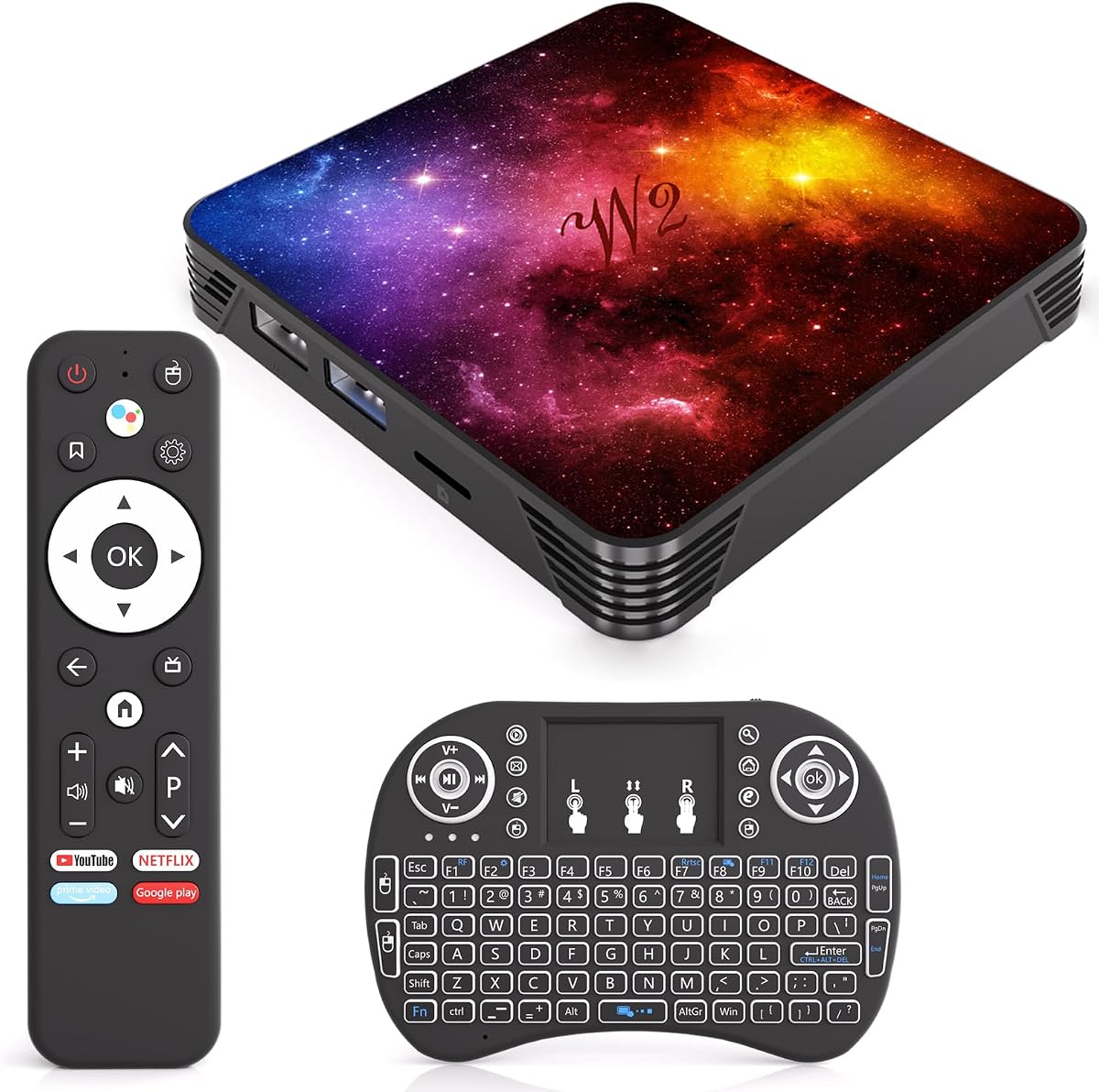
Android 14.0 TV Box
5.0Editor score
Quad-core processor power
64GB large storage
Dual band WiFi connectivity
This guide compares the top ten Android TV boxes available in October 2026, analyzing performance, features, and value to help you choose the best streaming
Android TV boxes transform any standard television into a smart hub capable of accessing thousands of streaming applications and services. These compact devices run on the Android operating system, offering flexibility and power that traditional smart TV interfaces often lack. Choosing the right model ensures smooth performance and access to your favorite content.
We evaluated ten top-rated models based on processing power, storage capacity, connectivity options, and software support. Each product was assessed for its ability to handle high-resolution video, multitasking, and user interface responsiveness. Our comparison focuses on real-world usability and long-term value for different household needs and preferences.
Each pick highlights specific strengths like budget-friendly pricing, premium features, or robust hardware. You will find detailed breakdowns of what makes each box stand out in its category. Please note that prices and availability change frequently, so verify current details before making your final purchase decision.
5.0Editor score

4.4Editor score

4.3Editor score
The following table provides a side-by-side comparison of all ten products reviewed in this guide. It highlights key specifications and features to help you quickly identify the model that best fits your specific requirements and budget constraints for streaming media.





The Xiaomi TV Box S 3rd Gen stands out as a top contender for anyone seeking a balanced mix of performance and software quality. With a 4.4 star rating from users, it delivers exceptional clarity and cinematic visuals right out of the box. Its standout qualities include robust hardware specifications and seamless integration with Google TV.
We may earn a commission when you buy through this link, at no additional cost to you.
This device shines with its 4K Ultra HD support at 60 frames per second, ensuring that high frame rate content plays smoothly. The Dolby Vision and HDR10+ support enhance contrast and color accuracy significantly. Additionally, the quad-core CPU and 2GB RAM provide sufficient power for multitasking without lagging during standard streaming sessions.
While the 32GB storage is adequate for most apps, power users might find it slightly limiting compared to competitors offering more space. The HDMI 2.1 port is a great addition for next-gen consoles but might be overkill for standard setups. These trade-offs are acceptable given the overall value and feature set provided.
If you want a reliable streamer that keeps your TV smart and responsive for years, this box is a strong recommendation. It works well for families and individuals who rely heavily on major streaming apps. The voice remote makes navigation intuitive and adds convenience for daily use.
The combination of Dolby Vision and Dolby Atmos creates a theater-like experience at home without extra hardware.
Google TV aggregates content from various apps so you can find shows faster across your subscriptions.
We may earn a commission when you buy through this link, at no additional cost to you.
This Android 14.0 TV Box is an impressive option for those looking to maximize hardware specs without spending a fortune. With a perfect 5.0 rating, it indicates high user satisfaction with its stability and speed. The generous RAM and storage make it ideal for heavy app users.
We may earn a commission when you buy through this link, at no additional cost to you.
The device supports a wide range of apps from the app store and ensures better system optimization thanks to the new OS. It handles high-quality video smoothly with H.265 hardware decoding which reduces load on the CPU. The dual-band WiFi ensures that your stream remains stable even in congested network environments.
Users should be aware that as a budget option, the physical build might not feel as premium as branded alternatives. Long-term software update support is often shorter than major tech companies offer for their devices. However, the included mini keyboard adds significant value for navigation and text entry.
For budget-conscious buyers who want to store many offline files or games, this box is an excellent choice. It turns any standard TV into a powerful media center quickly. The easy setup process makes it accessible for less tech-savvy users too.
The 64GB ROM allows you to install many large games and store local media files without needing external drives.
Android 14.0 provides a smoother and more secure interface compared to older versions found on cheaper boxes.
We may earn a commission when you buy through this link, at no additional cost to you.
This variant of the Xiaomi Box emphasizes connectivity and smart home control features that modern households demand. With a 4.1 rating, it offers a robust set of capabilities centered around high-speed transmission and voice interaction. The 360-degree remote design allows for flexible interaction with your device.
We may earn a commission when you buy through this link, at no additional cost to you.
The built-in Google TV platform integrates personalized recommendations that help users discover new content across apps. WiFi 6 support utilizing OFDMA technologies ensures faster transmission speeds which is vital for streaming high bitrate content. The voice search feature makes finding specific titles or controlling playback effortless.
Occasional reports of connectivity issues suggest that network settings may need optimization for the best experience. The 32GB storage might fill up quickly if you rely heavily on caching or offline downloads. These drawbacks are manageable for most casual viewers who prioritize streaming over local storage.
Ideal for smart home enthusiasts who want voice commands for lights and thermostat control via Google Assistant. It is a great tool for navigating complex streaming ecosystems efficiently. The cross-app search capability saves time when looking for specific shows across different services.
Use voice commands to manage smart devices around your home directly from the TV interface.
The support for WiFi 6 reduces interference and improves streaming stability in crowded wireless environments.
We may earn a commission when you buy through this link, at no additional cost to you.
Positioned as a forward-looking device, this TV box prepares your home entertainment setup for future resolution standards. The 4.4 rating reflects user confidence in its ability to handle heavy loads and large files. The high storage capacity is a major selling point for media collectors.
We may earn a commission when you buy through this link, at no additional cost to you.
Serving as a practical media box, it supports ultra-clear 8K UHD decoding which future-proofs your TV setup. The quad-core processor and large memory allow it to run various streaming software and offline games without lagging. USB 3.0 ports provide high-speed transmission for external drives.
Since true 8K content is limited today, users might not see immediate benefits from this specific feature. The price point is higher than basic 4K boxes which might not justify the cost for current usage only. However, the 128GB storage ensures you will not run out of space anytime soon.
Tech enthusiasts and collectors who store large libraries of high-resolution media will appreciate this box most. It is compatible with most display devices allowing for diverse entertainment usage beyond standard streaming. The hassle-free setup makes it accessible even for less technical users.
With 8K decoding support, this box ensures your system is ready for the next generation of high-quality video content.
The 128GB ROM offers ample space for offline downloads and large applications without needing external drives.
We may earn a commission when you buy through this link, at no additional cost to you.
This box emphasizes sleek design and performance in a small form factor that blends well with modern TVs. The 4.4 rating indicates consistent quality in terms of video output and system stability. Its compact size makes it easy to hide behind displays or mount discreetly.
We may earn a commission when you buy through this link, at no additional cost to you.
Powered by a high-performance 6nm platform, it ensures smooth operation even when switching between demanding apps. The Google TV entertainment center offers tailored recommendations that simplify browsing. High-speed connectivity ensures minimal buffering during peak viewing times.
The remote control is functional but lacks some convenience features like a backlight for dark viewing. The absence of an SD card slot limits expandability for storage beyond the internal memory. These are minor limitations given the focus on streaming and core functionality.
Perfect for users with limited shelf space who still want top-tier picture quality and smart features. It integrates well into a setup where aesthetics matter as much as performance. The voice control adds a layer of ease for quick searches and launches.
The small footprint ensures the device remains out of sight while delivering powerful performance capabilities.
Voice control allows you to launch apps and find content quickly without typing on a small remote.
We may earn a commission when you buy through this link, at no additional cost to you.
The TiVo Stream 4K focuses on eliminating app switching by bringing your favorite services onto one screen. With a 4.2 rating, it is praised for its ability to recommend content across your subscriptions effectively. This centralizes your watchlist and simplifies decision making during downtime.
We may earn a commission when you buy through this link, at no additional cost to you.
Integrated Google Assistant allows you to launch apps and dim lights using voice commands. The device supports 4K UHD and Dolby Vision which ensures high visual fidelity. Its one screen approach helps users avoid getting lost in multiple menus and interfaces.
Users seeking heavy offline storage might find the limitations restrictive compared to boxes with more memory. The recommendation engine relies on user habits which might take time to learn preferences accurately. However, for live TV and standard streaming, it performs excellently.
If you have multiple subscriptions and want a unified interface to browse them easily, this is a strong contender. It reduces clutter by consolidating your entertainment apps into one place. The support for major streaming apps ensures you can access your content quickly.
Search for a title once and see results across all your installed streaming apps without switching screens.
The system recommends shows based on your interests regardless of which specific service they are on.
We may earn a commission when you buy through this link, at no additional cost to you.
This premium streamer delivers your favorite entertainment quickly and personalized to your household interests. With a 4.3 rating it is noted for its speed and smooth interface interactions. It brings together movies shows and live TV into a cohesive viewing experience.
We may earn a commission when you buy through this link, at no additional cost to you.
The device supports up to 4K HDR with Dolby Vision which provides captivating true-to-life detail. You can connect speakers that support Dolby Atmos for immersive 3D sound that fills the room. It includes access to over 800 free channels via Pluto TV and Tubi.
The requirement for an HDMI 2.1 cable sold separately adds to the total cost of ownership. The premium price is higher than many competitors which might deter budget shoppers. These costs are offset by the build quality and seamless integration with Google ecosystem features.
Users who want a high-quality experience directly from Google with minimal setup hurdles will love this box. It is ideal for households that value fast response times and rich media features. The smart home control adds versatility for managing your connected devices.
Dolby Atmos support allows you to connect compatible speakers for a three-dimensional sound experience.
Access live content and free channels directly from the home screen without downloading extra apps.
We may earn a commission when you buy through this link, at no additional cost to you.
This device is built for those who prioritize raw processing power and connectivity options over the latest OS. With a 4.5 rating it delivers excellent heat dissipation and stability for long viewing sessions. The hexa-core CPU handles demanding tasks that might slow down other devices.
We may earn a commission when you buy through this link, at no additional cost to you.
The WiFi 6 and 1000M LAN ensure that your data and video output remain efficient and stable. USB 3.0 ports provide fast transfer speeds for external hard drives. The unique Ugoos settings give you deep control over system behavior and hardware resources.
It runs Android 9.0 which means some newer apps might not be supported without manual workarounds. The interface and settings can be complex for casual users who prefer simplicity out of the box. However, for enthusiasts this depth of control is highly valued.
Ideal for tech-savvy users who want to tweak system performance and run local media servers. It supports high-quality decoding like H.265 and HDR for true color restoration. The hardware is robust enough to play 4K 60fps videos without jerking.
Gigabit Ethernet and USB 3.0 ensure your box handles large files and stable network connections easily.
The unique settings allow power users to optimize performance for specific apps and tasks.
We may earn a commission when you buy through this link, at no additional cost to you.
This box aims to deliver modern OS features at a budget friendly price point. With a 3.8 rating it offers decent performance for casual users who need basic streaming capabilities. The inclusion of a mini keyboard adds value for those who prefer typing over voice.
We may earn a commission when you buy through this link, at no additional cost to you.
Powered by an Allwinner H618 Quad core CPU it ensures the android box running stable and smooth for loading movies and pictures. The support for 3D and 6K video decoding brings higher resolution viewing to home setups. Fast WiFi 6 signals allow for better browsing and streaming.
Some users report that the quality control on accessories varies between units. The build quality might feel less sturdy than premium options. These issues are often acceptable given the low cost and high storage capacity provided.
For families or dorm rooms where a budget is primary and storage is key this box fits the bill. The latest OS ensures you get updated security and app compatibility. The mini keyboard helps when searching for content with specific characters.
Android 12.0 provides a smoother interface and better app support than older versions on budget devices.
The included mini keyboard makes typing search terms easier than using a traditional remote control.
We may earn a commission when you buy through this link, at no additional cost to you.
This box offers a strong operating system and a physical keyboard for easier navigation. With a 3.7 rating it provides stable performance during extended use. It is designed to offer premium-grade image output paired with a robust graphics processor.
We may earn a commission when you buy through this link, at no additional cost to you.
The RK3528 quad-core processor delivers responsive performance for seamless multitasking and quick app loading. The 64GB ROM offers plenty of space for your streaming apps and media files. The mini keyboard makes text search and menu navigation easier than standard remotes.
Users should note that real-world 8K streaming is rare so the decoding capability is future-focused. Some users find the performance adequate but not exceptional compared to higher-end models. These trade-offs are acceptable for those prioritizing the keyboard and OS version.
Best for users who do a lot of typing or browsing and want a modern OS experience. The multi-screen interaction feature lets you cast content from mobile devices easily. It supports various USB devices so you can expand storage or connect peripherals.
The mini keyboard makes searching for long titles or entering logins much faster than with a remote.
Multi-screen interaction lets you share content from your phone to the TV without extra cables.
We may earn a commission when you buy through this link, at no additional cost to you.
Selecting the right Android TV box depends on your specific viewing habits and technical requirements. This guide breaks down the key factors to consider so you can make an informed decision.
The version of Android or Google TV your device runs significantly impacts app compatibility and security. Newer versions like Android 14 offer better optimization and features but may not be available on budget models. Always check if the box receives regular updates to stay secure against vulnerabilities.
Choose a device with at least Android 12 to ensure longevity and broad app support.
The CPU and RAM determine how smoothly your box handles multitasking and high-resolution video. A quad-core processor with 4GB RAM is ideal for heavy users who open multiple apps simultaneously. Insufficient RAM leads to lag and longer loading times for content.
Prioritize 4GB RAM and a quad-core CPU for a future-proof experience without lag.
Internal storage is crucial for installing apps and caching content. Boxes with 64GB or more are preferable for those who download many games or apps. If you only stream online content 32GB may suffice but limits offline flexibility.
Look for models with at least 64GB ROM if you plan to install many apps or games.
Support for 4K UHD and HDR10+ is standard now but check for Dolby Vision if your TV supports it. Audio features like Dolby Atmos create a more immersive experience if you have a compatible sound system. Ensure the box supports the formats your TV can display.
Ensure your box supports 4K at 60FPS and the HDR formats your TV supports.
WiFi 6 ensures stable high-speed wireless connections which are vital for 4K streaming. Bluetooth connectivity is needed for wireless speakers and game controllers. Ethernet ports offer the most reliable connection if your router is close to the TV.
Prioritize WiFi 6 and Bluetooth 5.0 for reliable wireless performance.
A good remote with voice control simplifies navigation significantly. Some boxes include mini keyboards which help with text entry. Check if the remote supports essential media control buttons like play pause and volume.
Look for voice control support to make searching for content faster and easier.
Google TV integration offers a curated interface that combines content from different apps. Ensure the box supports your preferred streaming services like Netflix and Disney+. Open platforms allow more flexibility but may have a steeper learning curve.
Choose a device that runs Google TV or Android TV to access your favorite apps easily.
Budget boxes offer decent performance for basic streaming but may lack long-term updates. Premium models cost more but provide better build quality and support. Consider your usage needs to decide which price tier fits best.
Compare features against price to ensure you get the best value for your budget.
Start by connecting the box to your TV via the HDMI cable and plugging it into a power outlet. Most devices will automatically detect the connection and guide you through a setup wizard on the screen. Follow the prompts to connect to your WiFi network and sign in to your Google account.
Once set up download your preferred streaming apps from the Play Store. You can arrange icons on the home screen for quick access to your most used services. Use the voice remote to search for shows or control playback to enjoy a streamlined viewing experience.
To maintain performance avoid blocking the vents on the device to prevent overheating. Periodically uninstall apps you no longer use to free up storage space. Keeping your firmware updated ensures you get the latest security patches and performance improvements.
No you do not need a smart TV to use an Android TV box. This device adds smart capabilities to any television with an HDMI port. It turns your standard display into a connected media center that can access streaming apps and the internet.
Google TV is an interface layer that runs on top of the Android TV operating system. It offers a more personalized home screen with content recommendations from your subscriptions. Most modern boxes use this new interface to organize your entertainment better.
Yes you can play games on an Android TV box as it supports games from the Play Store. Many titles are designed for remote controls while others work best with a Bluetooth controller. The performance depends on the hardware power of the specific model you choose.
Buffering usually occurs when your internet speed is too slow to support high resolution video. Check if your network is congested or try connecting via Ethernet for a stable link. Ensure the box has enough free space to cache data effectively.
For primarily online streaming 32GB of storage is often sufficient for apps and system files. If you plan to download shows for offline viewing store 64GB or more is recommended. More storage also allows you to install larger games and applications.
Most Android TV boxes support external mice and keyboards via USB or Bluetooth. This is useful for text entry and navigating the web browser more precisely. You can pair a Bluetooth keyboard directly through the settings menu on the device.
Updates can be automatic if you enable automatic system updates in the settings. Some devices require manual checks depending on the brand and model used. Keeping updates enabled ensures you get security patches and feature improvements timely.
Yes most modern Android TV boxes support 4K streaming up to 60 frames per second. Ensure your TV is also 4K compatible to benefit from the resolution. Check that you have a fast internet connection to stream 4K content smoothly.
We have explored ten diverse options ranging from budget-friendly 4K boxes to premium streamers with advanced features. The Xiaomi TV Box S 3rd Gen stands out as an all-around winner for most users. The Google TV Streamer 4K offers top-tier performance for those willing to invest.
When making your choice prioritize the operating system version and RAM capacity to ensure longevity. Ensure the device supports your preferred video standards like Dolby Vision or HDR10. A reliable connection via WiFi 6 or Ethernet is essential for smooth playback.
Remember that prices and availability can change so verify current offers before buying. We hope this guide helps you find the perfect streamer to upgrade your home entertainment system. Enjoy your favorite shows and movies with improved quality and convenience.