
PC Power Supply Diagnostic LCD Computer Testing Device
4.4Editor score
Affordable pricing point
Intuitive voltage display
Automatic error alarm
This guide compares ten top ATX Computer Power Supply Testers to help you choose the right diagnostic tool for reliable voltage testing and system safety.
Finding a reliable ATX Computer Power Supply Tester is crucial for diagnosing hardware issues quickly. These tools help you verify voltage stability without complex multimeter setups, ensuring your PC components receive safe power levels during routine checks or troubleshooting sessions.
We evaluated ten highly rated testers based on compatibility, display clarity, and alarm features. Each product supports standard ATX interfaces and includes essential connectors for SATA, IDE, and PCIe devices, making them versatile choices for builders, repair techs, and DIY enthusiasts alike.
Every pick below highlights key strengths and potential limitations to guide your decision. Prices fluctuate frequently on online marketplaces, so check current listings before purchasing to ensure you get the best value for your specific testing needs and budget constraints.
4.4Editor score

4.5Editor score

4.6Editor score
The following table provides a side-by-side comparison of all ten selected testers. It outlines their core specifications, compatibility ranges, and unique selling points to help you quickly identify the model that best fits your technical requirements and usage scenarios.
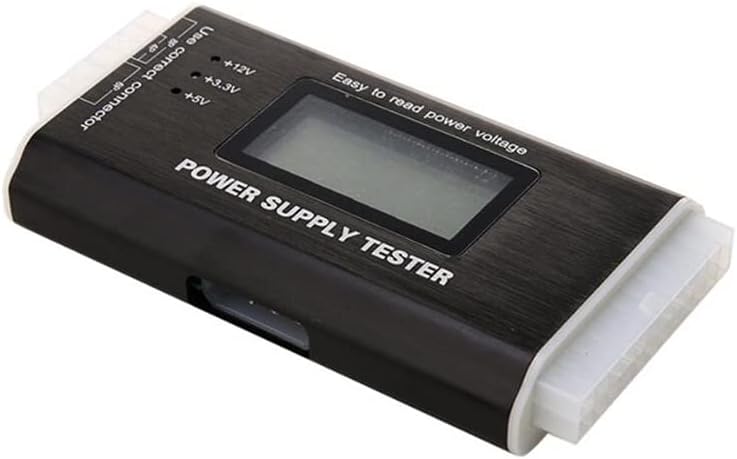


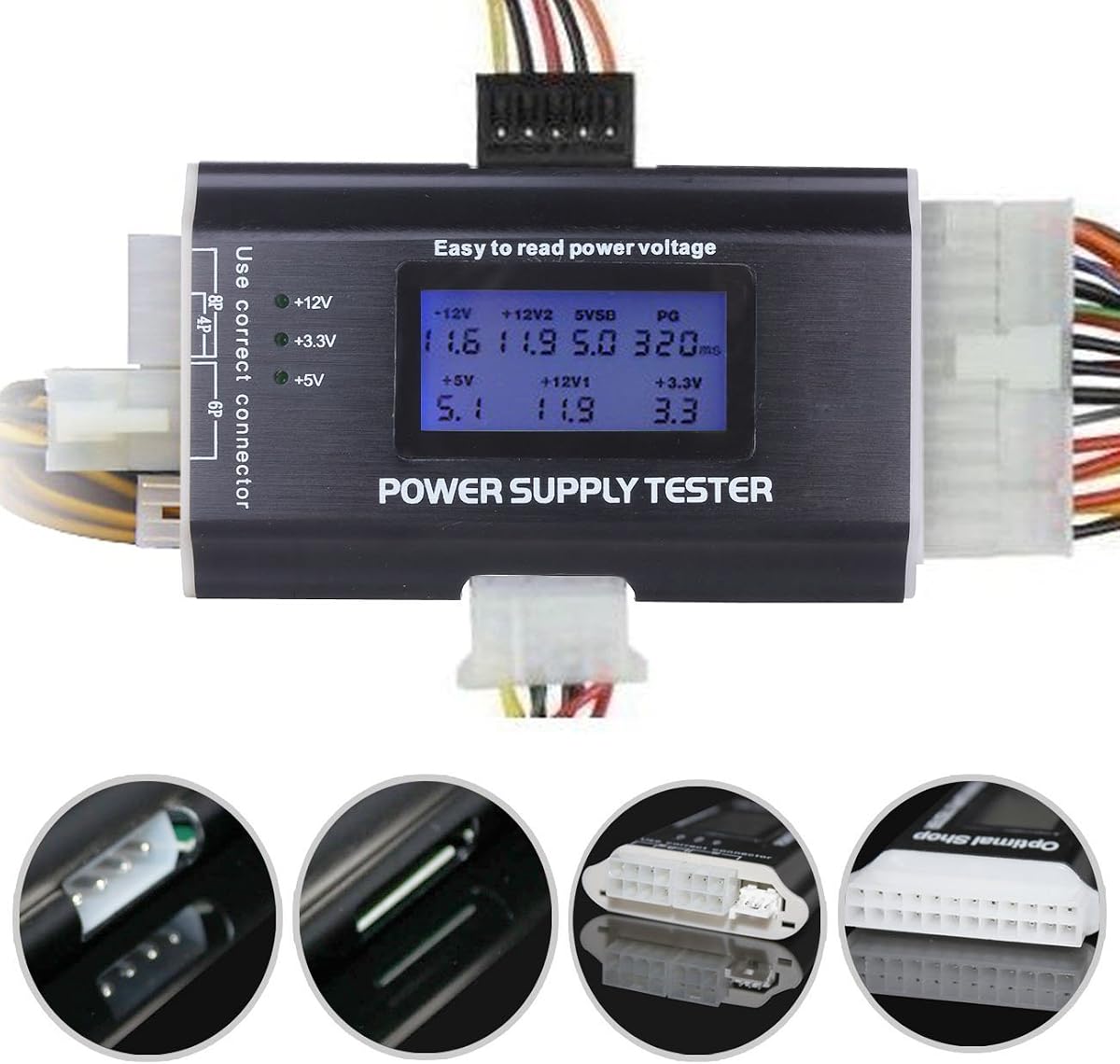
This Computer PC Power Supply Tester stands out as a versatile tool for diagnosing power unit issues. It supports a wide range of connectors including ATX, IDE, and SATA, making it suitable for various system configurations. The clear LCD display ensures you can read voltage outputs at a glance.
We may earn a commission when you buy through this link, at no additional cost to you.
The aluminum alloy enclosure provides durability and thermal conductivity, ensuring the device remains stable during extended use. Users appreciate the beep alarm feature that alerts them immediately when voltage values fall outside the normal range. This proactive warning helps prevent potential hardware damage during testing.
While the unit is robust, the screen is prone to scratches, though a protective film is included to mitigate this issue. Some users may find the lack of PCI-e 8-pin support limiting for modern high-end systems. However, for standard ATX testing, it remains a reliable choice.
This tester is ideal for technicians and enthusiasts who need a portable and straightforward diagnostic tool. It simplifies the process of verifying power supply health without requiring complex equipment. If you value durability and ease of use, this model offers strong value for your toolkit.
The tester supports 20-pin and 24-pin ATX along with HDD, floppy, and SATA connectors ensuring compatibility with most PC setups.
An integrated beep alarm triggers when values exceed normal ranges allowing you to address faults before they damage connected components.
We may earn a commission when you buy through this link, at no additional cost to you.
This LCD Computer PC Power Supply Tester offers a straightforward way to check voltage outputs. It connects directly to the ATX connector and displays parameters like 3.3V and 12V clearly on the screen. The intuitive interface makes it accessible even for users with limited technical experience.
We may earn a commission when you buy through this link, at no additional cost to you.
When parameters exceed normal values, the buzzer sounds and the value flashes to draw immediate attention to the issue. This feature is crucial for quickly identifying faults without needing to scrutinize every number constantly. The device is compact, making it easy to store and transport for on-site repairs.
One limitation is that voltage is only shown on the LCD for the main ATX connector; peripheral connectors rely on light indicators instead. While this keeps costs low, it means less detailed readouts for SATA or IDE lines. However, the core functionality remains effective for primary power rail checks.
Ideal for quick diagnostics in repair shops or home setups, this tester balances simplicity with essential features. It helps prevent hardware burnouts by confirming power stability before connecting sensitive components. If you need a basic but reliable tool, this option delivers consistent performance.
The device measures voltage with 0.01V accuracy providing precise data to ensure your power supply operates within safe limits.
Its small and beautiful appearance ensures it fits easily in any toolkit making it perfect for mobile repair technicians.
We may earn a commission when you buy through this link, at no additional cost to you.
The Kingwin Digital Power Supply Tester is designed for efficiency and reliability in various testing scenarios. Its aluminum build ensures longevity while remaining lightweight enough for daily use. The clear LCD provides real-time readouts, making it easy to monitor voltage levels during checks.
We may earn a commission when you buy through this link, at no additional cost to you.
It supports a wide range of power supply types including ATX, ITX, and BTX, ensuring versatility for different system configurations. Safety features protect against short circuits and overvoltage, adding a layer of security for both the user and the equipment. This makes it a trusted choice for professional environments.
While it may cost slightly more than basic models, the added durability and safety features justify the investment. Some users might find the standard rail coverage limiting if they need testing for non-standard pins, but it covers most mainstream needs. The user-friendly design minimizes the learning curve significantly.
This tester is best suited for system builders and technicians who prioritize build quality and safety. It simplifies troubleshooting with fast results that help prevent damage to computer components. If you need a robust tool for frequent testing, this model offers excellent value and reliability.
Built-in protections against overvoltage and short circuits ensure a safe testing environment for both the user and hardware.
Its lightweight and compact design makes it easy to carry and store, ideal for on-site diagnostics and quick checks.
We may earn a commission when you buy through this link, at no additional cost to you.
This ATX Power Supply Host Inspection Maintenance Tool emphasizes precision and intelligent monitoring. It displays key parameters like SB and PG signals in real time, giving users a complete view of power supply status. The high precision measurement capability helps detect even minor voltage fluctuations that could indicate issues.
We may earn a commission when you buy through this link, at no additional cost to you.
An intelligent monitoring system triggers a buzzer and flashes abnormal parameters on the LCD screen when values go out of range. This immediate feedback allows for quick detection and resolution of power supply faults, preventing potential hardware damage. It is ideal for both repair personnel and everyday users.
The device supports various interfaces including 20-pin, 24-pin, and TFX power supplies, covering mainstream market needs. However, the casing is basic plastic which might not offer the same durability as aluminum options. Despite this, its ease of use makes it a practical choice for routine maintenance tasks.
For those needing accurate voltage readings without complex equipment, this tester is a solid option. It enhances efficiency and convenience by simplifying the detection process. If you value precision and straightforward operation, this model provides reliable performance for your power supply testing needs.
Measure voltage with 0.01V precision to accurately determine if output is stable or has high or low deviations.
Immediate buzzer alerts and flashing values help users deal with power supply issues quickly to prevent damage.
We may earn a commission when you buy through this link, at no additional cost to you.
This ATX Power Supply Tester offers a practical solution for users who want to avoid using a multimeter for simple checks. It features an LCD display that shows output voltage clearly, making it easy to spot any defects. The automatic alarm ensures you are notified immediately if there is a problem.
We may earn a commission when you buy through this link, at no additional cost to you.
While it does not show voltage for peripheral connectors on the LCD, it uses light indicators to confirm their status. This design keeps the tool compact and simple for average users. It covers ATX, BTX, and ITX power supplies ensuring it fits many common system types effectively.
The price point is very competitive, making it accessible for home enthusiasts who need occasional testing capabilities. However, the build materials are basic compared to premium aluminum options. For routine checks where cost is a priority, this tester delivers essential functionality without unnecessary extras.
If you need a reliable helper to quickly detect PC power issues without spending much, this model is a strong choice. It simplifies the process of verifying output stability and preventing hardware burnouts. Its simplicity and affordability make it a practical tool for basic diagnostic needs.
The output voltage is clear at a glance on the LCD screen making it easy to see if the supply is functioning correctly.
A buzzer alarm triggers automatically if there is any defect ensuring you are immediately aware of any power supply issues.
We may earn a commission when you buy through this link, at no additional cost to you.
This Computer Power Supply Tester is designed with portability in mind. The aluminum material makes it lightweight yet durable, and it carries well in any toolkit. The clear LCD screen provides real-time reading of voltage levels, which is easy to read even in low light conditions.
We may earn a commission when you buy through this link, at no additional cost to you.
Built-in measures prevent short circuits, adding a layer of safety during testing. The alarm design ensures that when a power PG number fails, a buzzer sounds and the value flashes. This combination of safety and alert systems makes it reliable for regular use in repair settings.
The compact structure is one of its strongest points, allowing for easy storage and transport. However, the interface is basic and may not offer advanced features found in higher-end models. For standard ATX, BTX, and TFX units, it covers the essential testing requirements effectively.
If you need a quick and portable solution for checking PC power supplies, this tester is a good fit. Its lightweight design and safety features make it ideal for technicians who move between sites frequently. It balances practicality with essential functions well for routine diagnostics.
Made of aluminum material it is lightweight with high strength and good thermal conductivity for reliable testing performance.
When failures occur a buzzer sounds and values flash to alert you immediately while built-in measures prevent short circuits.
We may earn a commission when you buy through this link, at no additional cost to you.
This Computer PC Power Supply Tester is marketed as a practical kit for maintaining power supply safety. It provides accurate data through its display and includes an automatic buzzer alarm to alert you of any defects. This helps prevent further damaging to components by ensuring timely repairs.
We may earn a commission when you buy through this link, at no additional cost to you.
The thick plastic shell material ensures high hardness and resistance to breakage, making it suitable for long life use. You only need to connect it to the ATX connector to see if the output is normal. The LCD display is readable even in dark places which is helpful for cramped setups.
It supports all 24 pin or 20 pin power supplies and can measure output wires with light indicators for external devices. While the casing is plastic, it is well made and durable for daily handling. This makes it a reliable choice for those focused on safety and simplicity in testing.
For anyone dedicated to keeping usage safe and preventing hardware failures, this kit is a solid investment. It simplifies the inspection process and ensures you can identify faults quickly. If you prioritize safety and durability at a reasonable price, this model is worth considering.
The automatic buzzer alarm indicates problems so you can repair timely and prevent further damaging ensuring safe usage.
Made of quality thick plastic shell material it has high hardness and is hard to break or damage for long life use.
We may earn a commission when you buy through this link, at no additional cost to you.
This PC Power Supply Tester is designed for users who need a straightforward way to check power quality. It connects to the ATX connector to show if the output is normal quickly. The LCD display offers intuitive and accurate voltage readings making it easy to judge power supply quality without hassle.
We may earn a commission when you buy through this link, at no additional cost to you.
The automatic alarm ensures you know immediately if values are out of range. It supports multiple types including BTX and ITX units which covers a broad range of systems. For those who find multimeters troublesome this tester offers a convenient alternative for regular maintenance checks.
While it does not display voltage for peripheral connectors on the LCD, it uses lights to indicate their status. This keeps the device small and practical for everyday use. The complete test interface ensures you can check most standard connections without needing extra tools.
If you want a helper to quickly detect PC power issues without complexity this model is ideal. Its practicality and ease of use make it a reliable choice for average users and repair technicians. It ensures system stability by verifying output levels effectively.
The intuitive and accurate display voltage helps you judge power supply quality reliably without needing complex multimeter setups.
Supports multiple interfaces ensuring you can test most standard connections without needing extra tools for diagnostics.
We may earn a commission when you buy through this link, at no additional cost to you.
This PC Power Supply Diagnostic LCD Computer Testing Device is a powerful tool for detecting power supply performance. It displays voltage and PG values on the LCD quickly allowing for fast detection of issues. Its compact and beautiful appearance makes it easy to handle and store in a toolkit.
We may earn a commission when you buy through this link, at no additional cost to you.
If any voltage or PG problem alerts the device displays the value and triggers a buzzer warning signal. This solves limitations of older testers that could not test low voltage groups effectively. It is a reliable helper for sales personnel and companies needing quick diagnostics.
While the casing is basic the functionality covers a wide range of power supplies including ATX, BTX, and ITX. The price point makes it accessible for those on a budget who still need accurate readings. It simplifies the process of verifying output stability and safety.
If you want a rare recognition tool that is convenient and affordable this tester is a strong choice. It helps prevent hardware failures by ensuring power levels are correct before connecting components. For basic diagnostics this model offers solid performance and reliability.
Quick detection of PC power supply issues ensures you can address faults before they cause hardware failures.
LCD displays output voltage and PG values accurately to help you quickly detect power supply performance and status.
We may earn a commission when you buy through this link, at no additional cost to you.
This 20+4 Pin LCD Computer Power Supply Tester offers broad compatibility for various hardware types. It supports testing for HDD floppy disk and PCIe connectors making it versatile for different system setups. The aluminum alloy shell ensures it is easy to carry and resistant to corrosion.
We may earn a commission when you buy through this link, at no additional cost to you.
The 1.8 inch LCD screen displays output voltage clearly for easy reading. A protective film is included because the screen scratches easily but it is removable if needed. The buzzer alarm emits a warning when PG numbers fail ensuring you know immediately if there is an issue.
When testing with various connectors indicator lights on the left show the output voltage levels. This design simplifies the process of verifying power stability without needing extra equipment. It is a practical tool for those needing comprehensive testing across multiple device types.
If you need a versatile tester that handles various connectors this model is a good option. Its durability and clear readout make it reliable for regular use in workshops or home labs. It helps ensure system stability by verifying voltage levels effectively.
Supports testing 20-pin, 24-pin, HDD, floppy disk, and PCIe connectors ensuring compatibility with most system types.
Made of aluminum alloy it is easy to carry and has good thermal conductivity and corrosion resistance for long term use.
We may earn a commission when you buy through this link, at no additional cost to you.
Selecting the right ATX Computer Power Supply Tester depends on your specific needs and technical requirements. This guide breaks down key factors to help you make an informed decision.
Ensure the tester supports the specific connectors your power supply uses. Most units handle 20-pin and 24-pin ATX but some may lack support for newer PCIe or TFX interfaces. Checking the product data for supported types like SATA, IDE, and PCIe will prevent compatibility issues during testing.
Always verify that the unit covers all connectors you need before purchasing.
Look for models with clear LCD screens to read voltage values accurately. Some testers use LED lights for peripherals while others show everything on the LCD. High visibility ensures you can spot faults quickly even in dimly lit workspaces.
Prioritize models with large, backlit screens for better readability.
Build material affects durability and portability. Aluminum enclosures offer better thermal conductivity and resistance to corrosion compared to plastic. While plastic is lighter and cheaper, aluminum ensures longer lifespan under frequent use.
Choose aluminum for heavy-duty or professional use cases.
Automatic alarms are critical for safety. Buzzer alerts combined with flashing values help you identify faults without constant monitoring. This feature prevents damage to components by notifying you immediately of out-of-range voltages.
Ensure the unit has both audible and visual alarm indicators.
High precision measurement capabilities allow you to detect minor voltage fluctuations. Units that measure to 0.01V accuracy provide more reliable data for troubleshooting. This helps ensure power stability and safety for sensitive PC components.
Opt for testers that specify high precision voltage readouts.
Weight and size matter if you travel between work sites. Compact and lightweight testers are easier to store in toolkits and carry around. Avoid bulky models that hinder mobility during on-site repairs or installations.
Look for lightweight designs that fit easily in a toolbox.
Built-in safeguards against short circuits and overvoltage are essential. These features protect both the tester and the power supply from damage during testing. Always check for safety certifications or descriptions of protective mechanisms.
Prioritize models with documented safety protections.
Prices vary significantly across models with basic units costing less than premium ones. Determine how often you need the tester and what features are essential. Balance cost with necessary functions to find the best value for your situation.
Set a budget that aligns with your usage frequency and needs.
To use the tester, first ensure your PC is powered off and unplugged from the outlet. Connect the tester to the 20-pin or 24-pin ATX connector on the power supply unit. Then plug the power supply into a wall outlet and turn it on using the switch on the back of the unit.
Observe the LCD display or indicator lights to check if voltages are within normal ranges. If a buzzer sounds or a value flashes, unplug the power supply immediately to avoid potential damage. Repeat this process for other connectors like SATA or IDE if supported by the device.
After testing, disconnect the tester and power supply safely. Store the device in a dry place away from extreme temperatures to prolong its life. Regularly check the protective film on the screen and remove it if it becomes too scratched for clear reading.
An ATX Computer Power Supply Tester works by connecting directly to the power supply's main connectors. It measures the voltage levels on various rails like 3.3V, 5V, and 12V and displays them on a screen. If values exceed normal limits, it triggers alarms to alert the user to potential faults.
Most testers support standard ATX power supplies including 20-pin and 24-pin variants. Some models also cover BTX, ITX, and TFX types. Always check the compatibility list before purchasing to ensure it works with your specific power supply configuration.
Many testers use LED lights instead of LCD for peripheral connectors to save costs and simplify design. This designates the power rail status using colored lights rather than numerical values. It is sufficient for basic checks where exact voltage numbers are not required.
Yes, these testers are designed with built-in safeguards to prevent damage during testing. They isolate the power supply from the rest of the system allowing you to check voltages safely. However always follow instructions to avoid short circuits or overloading the device.
No technical skills are required as these devices are designed for user-friendly operation. You simply connect the tester to the power supply and read the results on the display. This makes them accessible to both beginners and experienced technicians alike.
Accuracy varies by model but many high-end testers offer precision up to 0.01V. This level of accuracy helps detect minor voltage fluctuations that could indicate problems. Always review product specifications to choose a unit that meets your accuracy needs.
Choosing the right ATX Computer Power Supply Tester involves balancing features, durability, and cost. The top picks cover various needs from basic home checks to professional diagnostics. Whether you need precision, portability, or broad compatibility there is a model to suit your workflow.
Prioritize safety features and build quality when making your decision. These tools protect your expensive PC components from power-related failures so investing in a reliable tester is wise. Consider how often you will use it to determine if a premium or budget option fits best.
Remember that prices change frequently so check current listings before buying. Verify that the model supports your specific connectors and has the accuracy you need. With the right tool, you can confidently maintain and troubleshoot your computer systems with ease.