
USB C Docking Station Dual Monitor for HP,Laptop Docking Station 3 Monitors
4.3Editor score
Affordable Multiport Adapter
Multiple Video Output Options
100W Power Delivery
This guide compares the top 10 docking stations for 3 monitors to help you find the perfect triple display solution for your laptop.
Creating a productive workspace often requires multiple screens to manage tasks efficiently. A docking station for 3 monitors allows you to connect several displays through a single cable. This setup transforms your laptop into a powerful desktop replacement for work or creative projects.
We evaluated ten leading models based on port variety, video output capabilities, and charging power. Each product was assessed for compatibility with Windows, Mac, and Chrome OS systems. Our analysis focuses on reliability, data transfer speeds, and overall value for money.
Each pick highlights key features, pros, and cons to help you make an informed decision. Prices and availability change frequently so verify current details before purchasing. Our goal is to simplify your search for the ideal multi-monitor expansion hub.
4.3Editor score

4.3Editor score

4.4Editor score
Compare the key specifications and features of the top ten docking stations side by side to find the right fit for your workflow.


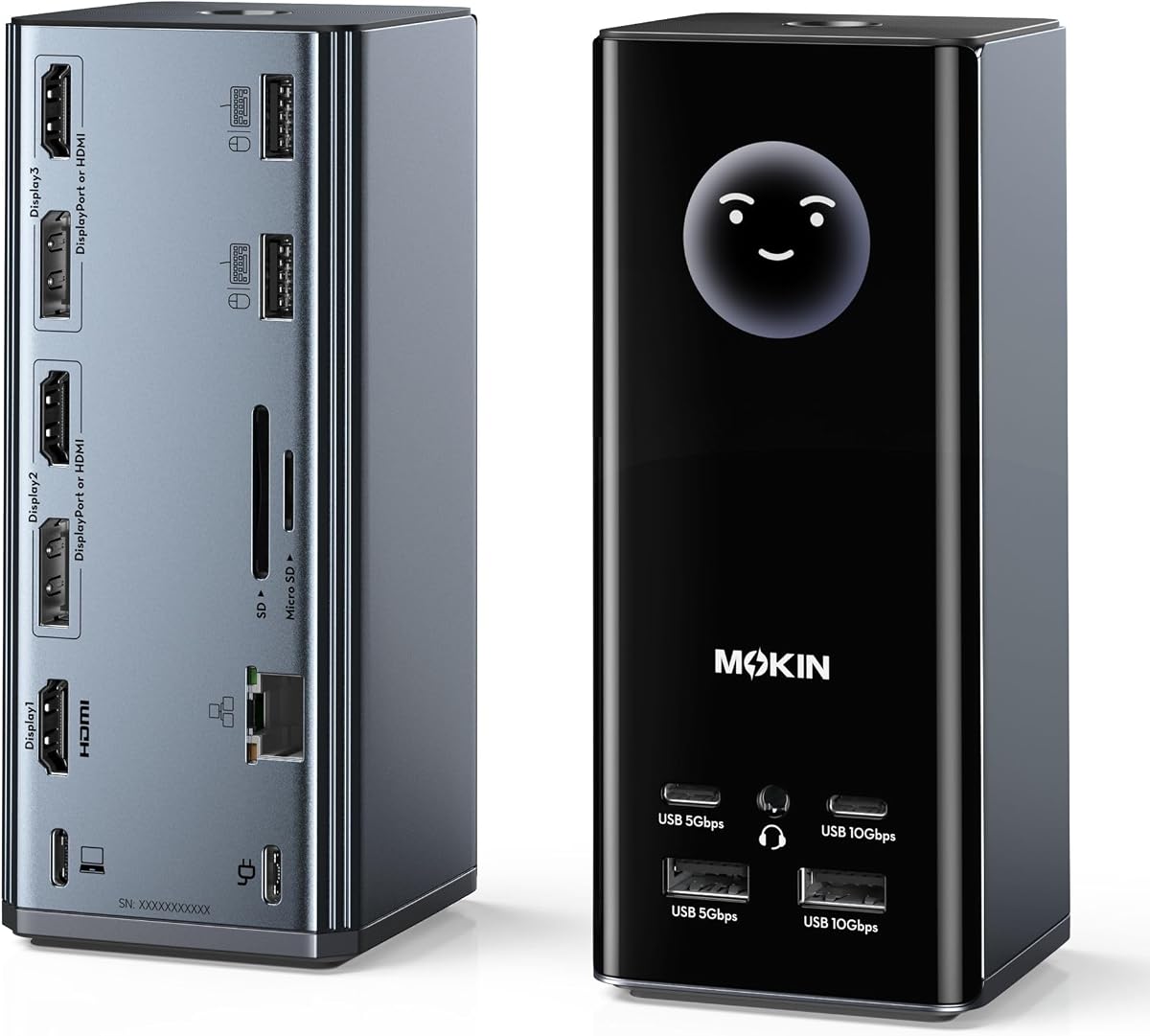
The Selore Laptop Docking Station stands out as a versatile choice for users needing extensive connectivity. It boasts a high rating and a comprehensive port layout that includes three HDMI and two DisplayPort outputs. This makes it ideal for setting up complex workspaces with multiple screens.
We may earn a commission when you buy through this link, at no additional cost to you.
Its standout feature is the built-in LCD screen that shows weather and charging status. This adds a touch of utility without cluttering your desktop with extra gadgets. The 100W power delivery ensures your laptop stays charged even under heavy load with three monitors connected.
While the triple display support is excellent on Windows, Mac users should note the limitations. Apple chips restrict independent displays to mirror mode only. Additionally, you must purchase a power adapter separately to reach full functionality.
This docking station is perfect for data analysts and creative professionals who prioritize screen real estate. If you need a single hub to manage video, data, and power efficiently, this is a top contender worth considering.
The built-in LCD display syncs weather data via Wi-Fi to provide quick glanceable info.
Supports three independent displays on Windows via MST for enhanced multitasking productivity.
We may earn a commission when you buy through this link, at no additional cost to you.
The TobenONE 18-in-1 Docking Station offers an impressive array of connectivity options. With nine USB ports and triple 4K video support, it handles almost any peripheral you might need. This makes it a powerhouse for users who rely on many external devices.
We may earn a commission when you buy through this link, at no additional cost to you.
Its ability to support triple 4K displays at 60Hz ensures smooth visual performance for design tasks. The high number of USB ports allows you to connect keyboards, mice, and drives without extra hubs. This consolidation helps keep your desk tidy and organized.
One limitation is that it is designed primarily for Windows and Chrome OS systems. Mac users may find compatibility issues limiting its utility. Also, like many docks, the power adapter is not included in the box which adds to the cost.
If you need maximum connectivity and powerful video output, this dock is a strong choice. It is particularly well-suited for office environments or home setups where device density is high.
Multiple USB ports support fast data transfer for efficient file handling and peripheral connection.
Delivers smooth 4K video on three screens for immersive multitasking and creative workflows.
We may earn a commission when you buy through this link, at no additional cost to you.
The Plugable USB-C Triple Monitor Docking Station is engineered for reliability in business settings. It features DisplayLink technology which allows multiple extended displays even on Macs with Apple Silicon. This is a rare feature that solves a common limitation for Mac users.
We may earn a commission when you buy through this link, at no additional cost to you.
Its compliance with TAA and NDAA standards makes it suitable for government and enterprise deployments. Users also benefit from lifetime technical support from a North American team. This ensures long-term reliability and easy troubleshooting if issues arise.
However, using it on Mac requires installing a DisplayLink driver which adds a step to setup. Also, it does not support HDCP protected content so streaming services like Netflix will not work through the HDMI ports.
For professionals who need guaranteed compatibility and support, this dock is a safe bet. It is particularly valuable for organizations that need to standardize their desktop setups across different systems.
Supports M1 through M5 Macs with DisplayLink to enable multiple extended displays.
Meets TAA and NDAA standards for use in government and secure enterprise environments.
We may earn a commission when you buy through this link, at no additional cost to you.
The Plugable USB C Triple Display Docking Station is designed to streamline IT deployments for hybrid teams. It supports up to three extended HDMI displays and works across Windows, macOS, and ChromeOS. This flexibility makes it ideal for mixed device environments.
We may earn a commission when you buy through this link, at no additional cost to you.
Its DisplayLink integration allows it to bypass native single display limits on newer MacBooks. You can enjoy a fully expanded workspace without worrying about GPU limitations. The included power adapter ensures consistent charging performance throughout the day.
Keep in mind that Linux systems are not supported and HDCP content cannot be streamed. These are specific technical trade-offs common with DisplayLink technology. However for most productivity tasks these limitations do not impact daily use.
If your organization needs a reliable solution that works across different operating systems, this dock is a solid option. The brand reputation for quality and support adds significant value for business users.
Optimized for hot-desking and managed offices with diverse laptop fleets.
Bypasses single display limits on Apple Silicon laptops for extended workspace.
We may earn a commission when you buy through this link, at no additional cost to you.
The HoDo USB C Docking Station offers a budget-friendly solution for extending your display setup. With HDMI and VGA outputs, you can connect multiple screens at a fraction of the cost of premium hubs. This makes it accessible for students or casual users.
We may earn a commission when you buy through this link, at no additional cost to you.
Its power delivery port supports up to 100W input ensuring your laptop charges efficiently while in use. The compact design fits well in small bags or tight desk spaces. It is particularly compatible with HP laptops that support DisplayPort Alternate Mode.
However, USB ports are limited to USB 2.0 speeds which means slower data transfer. Also, Mac users will not get extended desktop support due to OS limitations. These factors make it best for basic connectivity needs.
If you need a simple and affordable dock to add two or three screens, this is a great entry point. It balances cost and functionality effectively for users who do not need high-speed data transfer.
Provides multiple video outputs at a low price point for budget conscious buyers.
Supports high wattage power pass-through to keep your laptop running while connected.
We may earn a commission when you buy through this link, at no additional cost to you.
The Acer 13-in-1 Laptop Docking Station features a premium aluminum build that looks great on any desk. It includes a robust 110W power adapter which simplifies setup by ensuring you have all needed power sources. The design focuses on stability and heat dissipation.
We may earn a commission when you buy through this link, at no additional cost to you.
With two HDMI and one DisplayPort output, it supports triple displays for Windows laptops effectively. The aluminum body helps dissipate heat during long work sessions. Plus, a security slot adds a layer of theft deterrence for public spaces.
Mac users should note that extended display mode is not available due to system limitations. Also, achieving triple 4K on Windows requires host GPU support for Display Stream Compression. These details are worth checking before purchase.
For those who value build quality and power reliability, this dock is an excellent choice. The included adapter and security features add practical value that many competitors lack.
Aluminum body ensures efficient heat dissipation and a sleek professional look.
Comes with a dedicated 110W adapter to ensure consistent power delivery.
We may earn a commission when you buy through this link, at no additional cost to you.
The Selore 13-in-1 Laptop Hub simplifies connectivity with its plug-and-play design. It offers three HDMI outputs for triple displays on Windows without requiring extra drivers. This ease of use is a major advantage for non-technical users.
We may earn a commission when you buy through this link, at no additional cost to you.
Its 10Gbps USB ports support fast data transfer which is great for photographers or creatives. The included card readers allow quick offloading of high-resolution media directly. A dedicated one-touch button helps switch between screen modes easily.
However, macOS users should verify their system limits before buying as it supports only two displays on Mac. Also, ensure your laptop supports DisplayPort Alt Mode for full functionality. These prerequisites ensure smooth operation.
If you want a simple and effective hub for Windows laptops, this is a solid option. The fast data speeds and user-friendly design make it a good balance of performance and cost.
Plug and play functionality allows immediate use without installing complex software drivers.
High speed USB ports enable quick file transfers for productivity and media workflows.
We may earn a commission when you buy through this link, at no additional cost to you.
The TobenONE DisplayLink Docking Station is a premium solution for those needing maximum power and display options. It includes a 120W adapter and supports up to four extended displays on Windows. This makes it ideal for high-end professional workstations.
We may earn a commission when you buy through this link, at no additional cost to you.
Its DisplayLink technology ensures reliable multi-monitor support across various OS including Mac. The included adapter provides enough power to charge the dock and laptop simultaneously. This eliminates the need for extra chargers on your desk.
Keep in mind that you must install drivers for full functionality and streaming services are restricted. These are standard trade-offs for DisplayLink systems. However the performance gains usually outweigh these minor hurdles for users.
If you need a high-performance hub with robust power and support, this dock is worth the investment. It is designed for professionals who need reliability and advanced connectivity features.
Includes a 120W adapter to ensure consistent power for demanding setups.
Enables reliable extended displays on Mac and Windows for better multitasking.
We may earn a commission when you buy through this link, at no additional cost to you.
The Plugable 15-in-1 UD-MSTH3 Docking Station is optimized for Windows users needing fast connectivity. It includes a 2.5GbE Ethernet port which offers faster network speeds than standard Gigabit Ethernet. This is useful for large file transfers and low latency tasks.
We may earn a commission when you buy through this link, at no additional cost to you.
It is driverless on Windows systems making it easy to use right out of the box. The three HDMI ports allow flexible triple display configurations for improved productivity. USB ports support up to 10Gbps for fast peripheral data transfer.
Mac users should avoid this dock as it is not recommended for Apple systems. Also, streaming services like Netflix may not work due to HDCP restrictions. These factors make it best for Windows focused environments.
If you need a high-speed networking dock for a Windows laptop, this is a top choice. The combination of fast Ethernet and plug-and-play ease is a significant advantage.
Provides faster wired network speeds for efficient data transfer and cloud access.
Driverless connectivity for Windows ensures immediate use without complex configuration.
We may earn a commission when you buy through this link, at no additional cost to you.
The MOKiN USB C Docking Station offers a unique mix of connectivity and utility features. Its LCD screen displays weather updates and charging status which adds convenience to your desk. The privacy lock button lets you turn off screens instantly for security.
We may earn a commission when you buy through this link, at no additional cost to you.
It supports multiple video outputs via HDMI and DisplayPort to enable flexible screen setups. USB ports support fast data transfer speeds for efficient file handling. The silicone suction base ensures the dock stays stable on your desk.
Mac users should note that extended displays are not supported due to OS limitations. Also, you need to buy a power adapter separately to reach full power capabilities. These are minor drawbacks for the overall feature set.
For users who want added smart features like weather and privacy control, this dock is interesting. It provides a blend of practical connectivity and modern conveniences for daily use.
Syncs real-time weather data via Wi-Fi to keep you informed on your desk.
Double-tap to turn off screens instantly for quick privacy protection.
We may earn a commission when you buy through this link, at no additional cost to you.
Selecting the right docking station involves considering several technical factors to ensure compatibility and performance.
Check how many HDMI or DisplayPort outputs are available to connect your monitors. Some docks use a single port for multiple screens via MST while others offer independent connectors. Ensure the resolution support matches your monitor needs.
Choose a model with enough independent video ports for your setup to avoid signal issues.
Windows and Mac handle multiple displays differently especially with newer Apple chips. Some docks use DisplayLink drivers to extend screens on Mac which requires software installation. Verify the dock lists your OS as supported before buying.
Confirm OS support to ensure your monitors extend properly and not just mirror.
Power Delivery or PD charging ensures your laptop stays powered while connected to the dock. Look for at least 65W to 100W output depending on your laptop size. Insufficient power may cause the battery to drain under heavy load.
Pick a dock with high wattage PD to maintain full performance without external chargers.
USB ports vary in speed from 480Mbps to 10Gbps and beyond. Faster speeds are important if you connect external drives or large storage devices regularly. USB 3.1 or higher is recommended for efficient file transfers.
Opt for high-speed USB ports to prevent bottlenecks when moving large data files.
Aluminum bodies often provide better heat dissipation than plastic which helps performance during long sessions. A sturdy base prevents accidental tipping when plugging or unplugging cables. Good ventilation ensures the device does not overheat.
Choose a sturdy build with heat dissipation features for stability and longevity.
Some docks offer extra features like card readers Ethernet ports or privacy controls. These can simplify your workspace by reducing the need for peripheral dongles. Consider which features match your daily workflow needs.
Select a dock that includes specific ports or utilities relevant to your workflow.
Prices vary significantly based on brand and feature set. Basic models may lack high-speed ports while premium ones offer more connectivity. Set a budget that allows for the features you truly need.
Balance cost against must-have features to get the best value for your setup.
Look for companies that provide warranty coverage and technical support. This gives peace of mind if the dock develops issues after purchase. Lifetime support is a sign of quality and customer service.
Prioritize brands with good support policies to ensure reliable long-term use.
Begin by connecting your monitors to the dock's video ports using HDMI or DisplayPort cables. Ensure the power adapter is plugged in to supply enough energy for all devices.
Then connect the USB-C or Thunderbolt cable to your laptop to establish the data link. Adjust display settings on your computer to arrange the extended desktop properly.
Keep the dock clean and free from dust to prevent overheating. Use it on a flat surface and avoid bending cables excessively during regular use.
Not all laptops support three external monitors due to GPU limitations. Most modern USB-C laptops support at least two. For three, you may need MST or DisplayLink technology depending on your operating system.
Yes but Macs often require specific docks that use DisplayLink for extended displays. Apple Silicon chips typically limit independent displays to two. Check manufacturer compatibility notes before purchasing.
Many docks require an external power adapter to function fully with multiple monitors. Some include it in the box while others do not. Verify the listing to avoid extra costs.
DisplayLink allows multiple video outputs through a single USB port using software compression. It helps bypass hardware limits on some systems like Mac. It requires driver installation to work correctly.
USB-C is the physical port shape while Thunderbolt is a high-speed protocol. Thunderbolt 3 and 4 use USB-C connectors but offer higher speeds. Ensure your dock matches your laptop port type.
Most docks do not support HDCP protected content so streaming apps may not work. This is a technical limitation of many multi-monitor setups. You may need to watch directly on your laptop for now.
The Selore 17-in-1 Docking Station stands out as a top choice for its smart features and comprehensive ports. It offers a unique LCD display and strong video support ideal for diverse users.
Prioritize power delivery and OS compatibility when choosing to ensure your setup runs smoothly. A dock with high wattage and correct driver support prevents performance issues.
Remember that prices and availability change regularly so check current details before finalizing your purchase. Our guide aims to simplify finding the right triple display solution for you.