
Thermalright Aqua Elite 120 V3
4.6Editor score
Compact 120mm radiator
PWM ARGB fans included
Affordable pricing option
Discover the top AIO liquid coolers for AMD AM4 and AM5 platforms. This guide compares performance, noise, and features to help you choose the right cooler for
Choosing the right all-in-one liquid cooler for your AMD AM4 or AM5 system is crucial for maintaining optimal performance. A good AIO cooler keeps temperatures low during heavy workloads while ensuring quiet operation for a comfortable environment.
We have carefully analyzed ten top-rated AIO coolers to find the best options available for AM4 and AM5 socket compatibility. Our comparison focuses on thermal performance, noise levels, build quality, and additional features like RGB lighting and LCD screens.
Each product in this list highlights key strengths and specific use cases to guide your decision-making process. Keep in mind that availability and pricing may fluctuate, so check current details before finalizing your purchase for your system.
4.6Editor score

4.6Editor score

4.2Editor score
This table provides a side-by-side comparison of all ten AIO coolers selected for AMD AM4 and AM5 platforms. Review each model to understand its core specifications, cooling capabilities, and unique features.


The ARCTIC Liquid Freezer III Pro 360 A-RGB stands out as a top choice for users seeking high performance without excessive noise. With a 4.5-star rating, it delivers reliable cooling for demanding AM4 and AM5 processors while maintaining a sleek aesthetic through ARGB lighting.
We may earn a commission when you buy through this link, at no additional cost to you.
Its standout features include the P12 PRO fans that provide powerful airflow at low speeds and an integrated VRM fan that cools voltage regulators for system stability. The native offset mounting optimizes contact pressure to the CPU hotspot for improved heat transfer efficiency.
While the unit is robust and effective, its size may limit fit in compact cases, and the integrated cable management requires attention during setup to keep the build tidy. These trade-offs are acceptable given the superior cooling output and durability it offers.
This cooler is ideal for gamers and workstation users who prioritize thermal performance and system longevity. We recommend it for anyone building a high-end system with ample case space and a need for comprehensive cooling solutions.
The P12 PRO fans deliver more power at any speed compared to previous models, ensuring optimal performance under high loads without excessive noise.
Integrated VRM fan and cable management help stabilize the entire platform while reducing clutter for a cleaner and more professional appearance.
We may earn a commission when you buy through this link, at no additional cost to you.
The ARCTIC Liquid Freezer III Pro 360 offers exceptional cooling performance with a focus on silent operation, earning a 4.3-star rating for its reliability and effectiveness. It is an excellent choice for users who want high-quality cooling without sacrificing acoustic comfort during intensive tasks.
We may earn a commission when you buy through this link, at no additional cost to you.
This model features P12 PRO fans that are quieter and more powerful at any speed, especially at low speeds for minimal noise. The integrated VRM fan further protects your system by lowering voltage converter temperatures, ensuring stable performance under heavy loads.
While it lacks ARGB lighting and the cable management requires careful planning to hide wires neatly, these factors are minor compared to the cooling efficiency and durability it provides. The setup effort results in a cleaner build that runs cooler and quieter over time.
We recommend this cooler for professional users and gamers who prioritize performance and silence over flashy lighting. It is particularly suitable for large cases where the radiator size is well-supported and cable management can be optimized.
P12 PRO fans deliver more power at any speed than previous models, ensuring quiet operation even when cooling high-performance processors under load.
The integrated VRM fan actively cools voltage converters to maintain system stability and extend the lifespan of your motherboard components.
We may earn a commission when you buy through this link, at no additional cost to you.
The Thermalright Peerless Vision 360 ARGB combines high-performance cooling with a stunning 3.95-inch IPS LCD screen, earning a 4.6-star rating for its innovative design and functionality. It appeals to users who want both effective thermal management and personalized visual elements in their build.
We may earn a commission when you buy through this link, at no additional cost to you.
Key features include a 480×480 resolution screen that supports videos and animations, plus wireless splicing fans with infinity mirror effects for a sleek appearance. The S-FDB bearings ensure smooth, quiet operation while extending the lifespan of the fans during continuous use.
While it carries a higher price point and requires separate AM platform backplane installation, these factors are minor trade-offs for the unique customization and cooling performance it offers. The screen adds significant value for builders who enjoy showcasing system metrics and animations.
This cooler is perfect for enthusiasts who prioritize aesthetics alongside cooling power and want full control over display content. We recommend it for those who have the budget for premium features and the technical know-how for proper installation.
The 480×480 resolution IPS screen supports video playback and system monitoring, allowing full customization through TRCC software for a unique setup.
Wireless splicing fans with S-FDB bearings reduce vibration and noise while delivering strong airflow through the radiator for effective heat dissipation.
We may earn a commission when you buy through this link, at no additional cost to you.
The MSI MAG Coreliquid A13 360 earns a 4.7-star rating for its robust construction and reliable pump performance, making it a strong choice for AM5 and AM4 platforms seeking long-term stability. Its integrated pump and split-flow design enhance durability while maintaining excellent cooling efficiency.
We may earn a commission when you buy through this link, at no additional cost to you.
Standout features include the three-phase pump running at speeds up to 3800 RPM and high-quality ceramic bearings for a balance of performance and quiet operation. The evaporation-proof tubing ensures the system remains sealed and functional over time without leaks.
While it lacks extensive RGB customization and the mounting may vary by case, these factors are outweighed by the build quality and ease of installation. The cooling performance is consistent and suitable for users who value reliability and consistent thermal output.
We recommend this cooler for builders who prioritize dependability and want a sleek, high-performance solution without complex setup. It is ideal for both gaming rigs and professional workstations needing dependable cooling.
The high-performance pump operates at speeds up to 3800 RPM with ceramic bearings, ensuring quiet and efficient coolant circulation under any load.
Triple-layered tubing with reinforced mesh sheathing prevents evaporation and maintains system integrity for reliable long-term cooling performance.
We may earn a commission when you buy through this link, at no additional cost to you.
The Thermalright Aqua Elite 240 V3 delivers strong cooling performance in a compact 240mm design, earning a 4.7-star rating for its efficiency and affordability. It is an excellent choice for users seeking reliable thermal management without overspending on unnecessary features.
We may earn a commission when you buy through this link, at no additional cost to you.
Key strengths include the fourth-generation pump head with a life up to 40,000 hours and TL-C12B-S fans that provide strong airflow at low noise. The ARGB lighting syncs with your motherboard for customizable lighting effects to enhance your build's appearance.
While the 240mm radiator offers less surface area than 360mm models and lacks advanced visual features, these trade-offs are minimal for casual users and small builds. The cooling efficiency remains high, and the installation process is straightforward for most setups.
We recommend this cooler for budget-conscious users and those with smaller cases who need dependable cooling. It is particularly suitable for mid-range AMD systems where space is limited and performance remains a priority.
The octagonal pump head features a fourth-generation water pump design with a life up to 40,000 hours for long-term durability and efficiency.
Dual TL-C12B-S fans deliver strong airflow with ARGB lighting options, offering a practical blend of thermal performance and visual appeal.
We may earn a commission when you buy through this link, at no additional cost to you.
The NZXT Kraken Plus 360 LCD offers advanced monitoring and control through a bright 1.54-inch LCD screen, earning a 4.2-star rating for its innovative features. It is ideal for users who want to track system temps and display personalized content on their cooler.
We may earn a commission when you buy through this link, at no additional cost to you.
Standout features include the NZXT Turbine pump for high flow and low-noise cooling plus Zero RPM Mode that stops fans entirely at low loads for silence. The LCD supports custom images, GIFs, and web integrations like Spotify and YouTube for a unique setup.
While it is more expensive than comparable coolers and relies on NZXT CAM software for full functionality, these factors are acceptable for users prioritizing customization. The pre-applied thermal paste and breakout cable simplify installation and reduce clutter.
We recommend this cooler for enthusiasts who value advanced features and display capabilities. It is perfect for those building high-end systems with ample budget and a desire for personalized system aesthetics.
The bright 1.54-inch LCD screen displays real-time temps and animated GIFs, fully customizable through NZXT CAM software for a unique look.
High-static pressure fans with Zero RPM Mode ensure complete silence during light loads while delivering efficient cooling when the system needs it.
We may earn a commission when you buy through this link, at no additional cost to you.
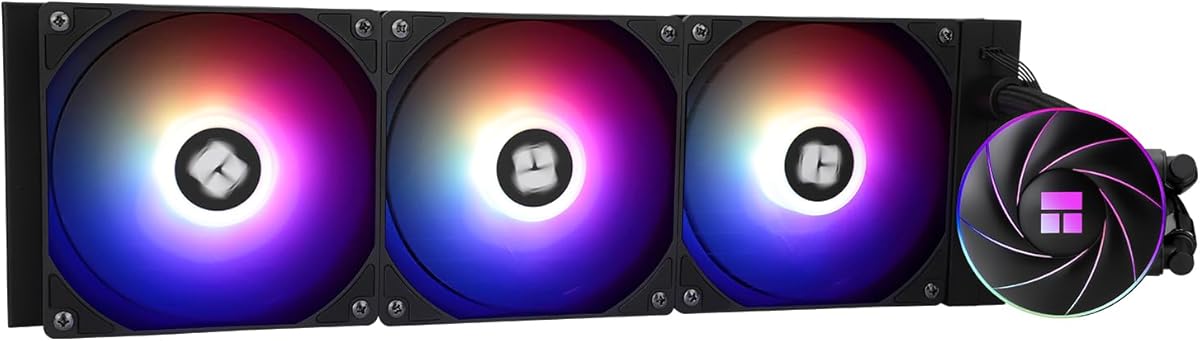
The Thermalright Aqua Elite 120 V3 is an affordable and effective cooling solution for users with limited budgets or case space, earning a 4.6-star rating for its value and performance. It provides reliable thermal management without sacrificing essential features or aesthetics.
We may earn a commission when you buy through this link, at no additional cost to you.
Key strengths include the fourth-generation pump head with a life up to 40,000 hours and TL-C12B-S fans that deliver strong airflow at low noise. The ARGB lighting syncs with your motherboard for customizable effects to enhance your build's appearance.
While the 120mm radiator limits cooling capacity for high-end CPUs and lacks advanced features, these trade-offs are acceptable for entry-level and mid-range systems. The low vibration design and simple installation make it an excellent choice for first-time builders.
We recommend this cooler for budget-conscious users and those with smaller cases who need dependable cooling. It is particularly suitable for mid-range AMD systems where space is limited and performance remains a priority.
The 120mm radiator provides high heat dissipation in a compact design, ensuring low evaporation and a long lifespan for reliable cooling performance.
Fans and pump header sync ARGB with motherboard headers, providing rich lighting effects without requiring extra lighting interfaces.
We may earn a commission when you buy through this link, at no additional cost to you.
The NZXT Kraken Core 360 RGB provides powerful cooling with minimal noise, earning a 4.6-star rating for its performance and build quality. It is an excellent choice for gamers seeking consistent temperatures without distracting fan noise during intense sessions.
We may earn a commission when you buy through this link, at no additional cost to you.
Key features include a powerful 3100 RPM pump that maintains cool temperatures during heavy workloads while minimizing noise. The optimized fan blades push air through radiator fins efficiently, and PWM-enabled fans allow precise adjustments for customizable performance.
While RGB features are less advanced and customization options are limited, these factors are outweighed by the cooling efficiency and simple connectivity. The single-frame design reduces screws and cables, making installation easier and keeping your build cleaner.
We recommend this cooler for gamers who prioritize performance and noise reduction over extensive customization. It is suitable for those looking for a reliable, low-maintenance cooling solution for long-term use.
Optimized fan blades push air through radiator fins efficiently for stronger cooling with less noise during gaming and multitasking.
Simple connectivity to the motherboard and a single-frame design reduce cables and screws, making setup easier for a cleaner build.
We may earn a commission when you buy through this link, at no additional cost to you.
The CORSAIR Nautilus 360 RS delivers strong cooling with low noise, earning a 4.6-star rating for its engineering and performance reliability. It is ideal for users seeking dependable thermal management and simplified cable management in their builds.
We may earn a commission when you buy through this link, at no additional cost to you.
Standout features include an efficient pump running at a whisper-quiet 20 dBA and RS120 fans with Magnetic Dome bearings for great cooling and low noise. The daisy-chain connections reduce wiring complexity, allowing a single 4-pin header connection.
While it lacks advanced RGB features and requires precise installation for optimal performance, these trade-offs are acceptable given the consistent cooling output. The convex cold plate ensures maximum CPU contact and pre-applied thermal paste speeds up the setup process.
We recommend this cooler for builders who value simplicity and performance. It is suitable for those looking for a reliable, low-maintenance cooling solution for long-term use.
Daisy-chain connections reduce wiring complexity by allowing all RS fans to connect to a single 4-pin PWM header on your motherboard.
The convex cold plate ensures maximum contact with your CPU's integrated heat spreader for enhanced heat transfer and cooling efficiency.
We may earn a commission when you buy through this link, at no additional cost to you.
The Thermalright Aqua Elite 360 ARGB offers excellent cooling performance at an affordable price, earning a 4.6-star rating for its value and functionality. It is a strong choice for users needing high-end cooling without the premium cost.
We may earn a commission when you buy through this link, at no additional cost to you.
Key features include a full copper mirror plane base for enhanced heat dissipation, S-FDB bearing fans for low noise, and PWM speed adjustment based on CPU temperature. The ARGB lighting syncs with your motherboard for customizable lighting effects.
While it requires a case larger than 250mm and lacks advanced RGB features, these trade-offs are minimal given the overall value. The pump life of up to 40,000 hours ensures durability and consistent performance over time.
We recommend this cooler for value-conscious users needing reliable 360mm cooling. It is particularly suitable for mid-range to high-end AMD systems where space is available.
The full copper mirror plane base provides low resistance and high cooling efficiency, ensuring your CPU remains at optimal temperatures.
TL-C12C-S fans with S-FDB bearings reduce noise and vibration while delivering strong airflow for effective heat transfer.
We may earn a commission when you buy through this link, at no additional cost to you.
Selecting the right all-in-one liquid cooler for your AM4 or AM5 system involves considering multiple factors to ensure optimal performance and compatibility.
The radiator size determines the surface area available for heat dissipation. Common sizes include 120mm, 240mm, and 360mm. Larger radiators generally offer better cooling performance but require more space inside your case.
Choose a radiator size that fits your case and matches your CPU's thermal output.
Ensure the cooler supports your CPU socket. AM4 and AM5 have different mounting requirements, so verify compatibility before purchasing. Some coolers come with pre-installed mounting brackets for AMD sockets.
Check the manufacturer's compatibility list to avoid installation issues with your specific motherboard.
The pump circulates coolant through the system and is critical for heat dissipation. Look for pumps with high flow rates and low noise levels. Ceramic bearings often improve pump longevity and reliability.
Opt for a pump with proven durability and smooth operation to maintain consistent cooling over time.
Fan noise can impact your overall computing experience. Many modern coolers use PWM fans that adjust speed based on temperature, balancing performance and noise levels.
Consider the decibel rating and fan speed ranges to ensure the cooler matches your noise tolerance.
RGB lighting and LCD screens add aesthetic value but are not essential for cooling performance. LCDs allow you to display system metrics or custom images, while RGB lighting can sync with your motherboard.
Decide if visual features are worth the extra cost based on your priorities and budget.
Good cable management simplifies installation and improves airflow. Some coolers feature integrated cable channels or daisy-chain fan connections to reduce clutter.
Choose a model with thoughtful design to make setup easier and keep your case interior clean.
High-quality materials like aluminum radiators and reinforced tubing prevent leaks and extend the cooler's lifespan. Look for models with proven reliability and durable components.
Prioritize build quality to ensure long-term performance and system safety.
Warranty terms vary by manufacturer and can indicate confidence in product quality. Longer warranties offer peace of mind and protection against defects.
Review warranty details and customer support options before making your final decision.
Install the cooler according to the manufacturer's instructions to ensure proper mounting and seal integrity. Use the included brackets and thermal paste for optimal CPU contact.
Monitor coolant levels and temperature readings regularly. Some coolers have software tools that track performance and alert you to potential issues.
Keep the radiator fins clean of dust to maintain airflow efficiency. Use compressed air periodically to remove debris and ensure consistent cooling performance.
Most modern AIO coolers support AM5 sockets but check the product details for specific mounting bracket compatibility. Some models come with AM5 support out of the box, while others may require separate adapters. Verify compatibility before purchasing to avoid installation issues.
AIO cooler noise varies by model but most range from 20 to 35 dBA under load. PWM fans can reduce noise during light tasks by slowing down. Choose a cooler with low noise ratings if you prioritize a quiet environment.
Many models support RGB customization through motherboard software or dedicated apps. Check if the cooler uses standard 5V ARGB headers or proprietary connections. Some brands like NZXT and Thermalright offer their own lighting control tools.
High-quality AIO coolers use sealed systems that prevent leaks under normal conditions. Modern tubing materials and manufacturing processes have improved reliability significantly. Always monitor for signs of moisture or pressure changes during operation.
A 360mm radiator offers superior cooling but requires a large case. Smaller radiators like 240mm or 120mm are sufficient for many CPUs. Choose based on your CPU's heat output and available case space to ensure proper fit.
Most pump heads last between 30,000 to 60,000 hours depending on usage and quality. Look for models with long warranties and high hour ratings for reliability. Proper maintenance helps extend the lifespan of your cooling system.
We hope this guide helped you identify the best AIO cooler for your AM4 or AM5 system based on performance and features. The ARCTIC, Thermalright, and NZXT models offer excellent options across different price ranges.
Prioritize factors like radiator size, socket compatibility, and noise levels to match your specific needs. Investing in quality cooling ensures your system stays reliable and performs well under heavy workloads.
Prices and availability change frequently so check current product pages for updated details before purchasing. Happy building and enjoy your optimized AMD setup.