
Apevia TFX-PFC500W
4.2Editor score
Full Range Active PFC
Silent Start Cooling Fan
High Output 12V Rail
This guide compares the top 10 low power PSU options for small form factor builds, focusing on efficiency, size, and reliability for compact systems.
Choosing the right low power PSU is essential for building efficient compact systems that run quietly without wasting energy. These power supplies are designed specifically for small form factor cases where space is limited but reliability remains critical for daily use.
We evaluated ten distinct models based on their efficiency ratings, physical dimensions, connector types, and protection features to ensure you find the best fit. Each unit was analyzed for its ability to deliver stable power to modern components while maintaining a small footprint suitable for desktop or server applications.
Each pick in this list highlights specific strengths such as modular cabling, silent fans, or high efficiency certifications to help you make an informed decision. Keep in mind that product prices and availability can change frequently so always verify current details before completing your purchase online.
4.2Editor score

4.6Editor score

5.0Editor score
The following table provides a side-by-side comparison of all ten models featured in this guide. It highlights key specifications such as wattage, efficiency, form factor, and unique features to help you quickly identify which unit meets your specific build requirements.




The Thermaltake Smart 500W stands out as a reliable choice for users seeking a balance between performance and cost. With an 80 PLUS White certification it ensures efficient power delivery while the 120mm fan keeps noise levels low during daily operation. This model has earned its top spot due to its consistent performance and robust safety features.
We may earn a commission when you buy through this link, at no additional cost to you.
Its 500W continuous output provides ample power for most standard desktop configurations including integrated graphics or entry level dedicated cards. The Active PFC design helps maintain power factor correction which reduces wasted energy and stabilizes voltage under varying loads. High quality components contribute to an MTBF of 100,000 hours ensuring long term reliability.
While the unit does not offer modular cables which can make cable management slightly more challenging in tight cases the fixed cables are sufficient for standard builds. The lack of premium aesthetic features is a minor trade-off considering the functional benefits and warranty protection it provides to your system hardware.
This PSU is ideal for users building a budget friendly workstation or home office PC who value stability over flashy features. It delivers exactly what is needed without unnecessary extras making it a smart investment for those prioritizing efficiency and quiet operation in their daily computing environment.
The 80 PLUS White certification guarantees at least 80 percent efficiency under typical load conditions which helps lower electricity costs and reduce heat generation within the system case.
The 120mm ultra quiet cooling fan is designed to operate silently while effectively dissipating heat ensuring that internal components remain within safe temperature ranges during extended use.
We may earn a commission when you buy through this link, at no additional cost to you.
The 600W Flex ATX PSU represents the pinnacle of efficiency and build quality for small form factor enthusiasts. Achieving over 92 percent efficiency it minimizes heat output and power waste which is critical in compact cases where airflow is limited. The fully modular design allows you to connect only the cables you need keeping the interior clean and organized.
We may earn a commission when you buy through this link, at no additional cost to you.
This unit features Japanese capacitors which are known for their longevity and stability under stress. The inclusion of a 12VHPWR connector ensures compatibility with the latest high performance graphics cards that require higher wattage delivery. The built-in silent 4020 ball-bearing fan operates quietly even when the system is under heavy load.
The main drawback is the higher price compared to standard ATX units which may not fit every budget. Additionally the Flex ATX form factor requires a case that specifically supports this size so compatibility checking is essential before purchase. However the performance and reliability justify the cost for serious builders.
Ideal for NAS systems high-end mini PCs or professional workstations this PSU delivers premium performance in a tiny package. If you need maximum efficiency and modern connector support in a small footprint this model is unmatched and provides peace of mind for critical applications.
The standard 16-Pin connector design resists sudden power drops and supports peak power draw of high-end GPUs making it future-proof for modern gaming and rendering workloads.
Built with high standard Japanese capacitors and comprehensive protection mechanisms this unit ensures stable output and long-term reliability for demanding server or workstation environments.
We may earn a commission when you buy through this link, at no additional cost to you.
The Apevia TFX-PFC500W offers exceptional value for builders needing a reliable power source without breaking the bank. Its TFX form factor fits many small cases while the full range Active PFC ensures it works with any voltage without manual switching. The smart silent cooling fan only engages when needed keeping noise to a minimum during light tasks.
We may earn a commission when you buy through this link, at no additional cost to you.
A standout feature is the heavy-duty 33A 12V rail which provides stable power for gaming and workstation performance. The auto-switching universal power design prevents accidental damage from incorrect voltage settings as it automatically detects 115V or 230V. Industrial protections like OVP and SCP keep your components safe from electrical surges.
Fixed cables are a limitation compared to modular units but they are sufficient for standard builds where space is not extremely tight. It is not compatible with proprietary motherboards from Dell or HP so check your case and board before buying. These trade-offs are minimal for the price and performance you receive.
This PSU is perfect for budget builds or upgrades for older cases that require a TFX unit. It delivers reliable power efficiently and quietly making it a smart choice for anyone looking to upgrade their system without spending extra on features they may not need.
Full range Active PFC automatically adjusts to 115V or 230V eliminating the need for a manual switch and reducing the risk of user error during installation.
The silent-start fan remains stationary during low loads to stay quiet and only engages as temperatures rise ensuring efficient cooling without unnecessary noise.
We may earn a commission when you buy through this link, at no additional cost to you.
The MSI MAG A650BE brings high wattage and semi-modular convenience to compact builds. With 650W output it supports more demanding components while maintaining a small footprint. The 80 PLUS Bronze certification ensures efficient power usage and the low-noise fan keeps acoustic levels low during operation. It is a solid choice for mid-range systems.
We may earn a commission when you buy through this link, at no additional cost to you.
The semi-modular design means essential cables are fixed while others are detachable balancing cable management and stability. DC-DC circuit design ensures clean power delivery to components which helps maintain system stability under load. Industrial level protections including OVP OCP OTP and SCP safeguard your hardware against electrical issues.
While it is slightly larger than a pure ITX unit it still fits many compact cases comfortably. The fixed main cables can limit routing options in very small enclosures. However the performance and protection levels make it a reliable option for users needing more power than 500W offers.
Buy this if you need 650W in a relatively small case and value semi-modular features. It is well suited for gaming PCs that require extra headroom for GPU upgrades while keeping power costs and noise levels reasonable for daily use.
The 80 PLUS Bronze certification guarantees a minimum efficiency level that reduces energy waste and heat output for a cooler and more cost-effective system.
Industrial level protection features including OVP OCP OTP and SCP work together to prevent damage from electrical surges or short circuits keeping your system safe.
We may earn a commission when you buy through this link, at no additional cost to you.
The Apevia ITX-PFC500W is a fully modular unit designed specifically for Mini-ITX and FLEX ATX cases. Its fully modular cables simplify installation and improve airflow in tight spaces. The 500W output supports standard desktops while the full range Active PFC ensures compatibility with various voltage standards. It is a flexible choice for compact builds.
We may earn a commission when you buy through this link, at no additional cost to you.
Connectors include one 20+4pin main two PCIe 6+2pin and multiple SATA and Molex ports which cover most storage needs. The forced air ventilation uses a 40mm double ball bearing fan to keep the unit cool. Protection features like OVP OLP OCP OTP and SCP ensure safety during operation.
The small 40mm fan may be louder than larger units under load and it may not spin without proper connection to a motherboard. It is important to verify case clearance before installation. The modular design helps offset this by reducing clutter inside the case.
This PSU is ideal for users who prioritize clean cabling in small ITX cases. It provides the necessary power and connectors without the bulk of a standard ATX unit making it a practical choice for home theater or mini PC builds.
Fully modular power supply cables allow you to connect only what you need reducing clutter and improving airflow in compact Mini-ITX or FLEX ATX chassis.
Full range Active PFC supports 90-264V ensuring stable operation across different regions without requiring manual voltage switching or additional adapters.
We may earn a commission when you buy through this link, at no additional cost to you.
The Apevia ITX-AP300W is designed for standard Mini-ITX and Flex-ATX cases requiring a budget power source. It delivers 300W reliable output suitable for retail motherboards HTPCs and compact servers. The unit includes separable connectors to support both modern and legacy motherboards ensuring versatility across different hardware generations.
We may earn a commission when you buy through this link, at no additional cost to you.
Features include a 40mm double ball-bearing fan with thermal speed control for quiet efficient operation. A full industrial safety suite protects against OVP OCP and SCP ensuring total system protection. The manual selector switch allows users to set voltage but requires attention during international use.
The 300W limit restricts it to low-power systems without dedicated graphics cards. The manual voltage switch adds a step to setup which could lead to errors if not set correctly. However for very basic builds or specific servers it remains a functional option.
Choose this for low-cost small form factor builds where high wattage is not needed. It fits standard ITX chassis and provides the essential connections required for basic system operation at an affordable price point.
Designed for Mini-ITX and Flex-ATX standards this unit fits 1U cases and retail motherboards making it suitable for compact servers and HTPC builds.
Equipped with 2x SATA and 2x Molex connectors it powers internal SSDs hard drives and system fans while supporting separable main and CPU connectors.
We may earn a commission when you buy through this link, at no additional cost to you.
The NovaMist unit is a straightforward power supply focused on reliable operation and quiet performance. With an 80 PLUS Bronze certification it ensures efficient energy usage while the low noise fan maintains a quiet environment. A 5-year limited warranty guarantees long term reliable operation for your system.
We may earn a commission when you buy through this link, at no additional cost to you.
This unit provides essential power delivery without extra frills making it easy to install and use. The Bronze rating helps reduce electricity waste compared to non-certified models. It is a solid choice for users who want a dependable power source without complex features or excessive spending.
The lack of advanced features like modular cables or multiple voltage protections means it is best suited for standard builds. Some users may find the connector selection limited for expanding storage. However for basic needs it performs well and offers good value.
This PSU is suitable for home PCs or office setups requiring a quiet efficient power source. If you prioritize a long warranty and steady performance over premium features this model is a practical choice for everyday computing tasks.
The 80 PLUS Bronze certification ensures the unit meets specific efficiency standards reducing energy waste and heat output for better system stability.
A 5-year limited warranty provides peace of mind and guarantees reliable operation for years ensuring your investment in hardware remains secure.
We may earn a commission when you buy through this link, at no additional cost to you.
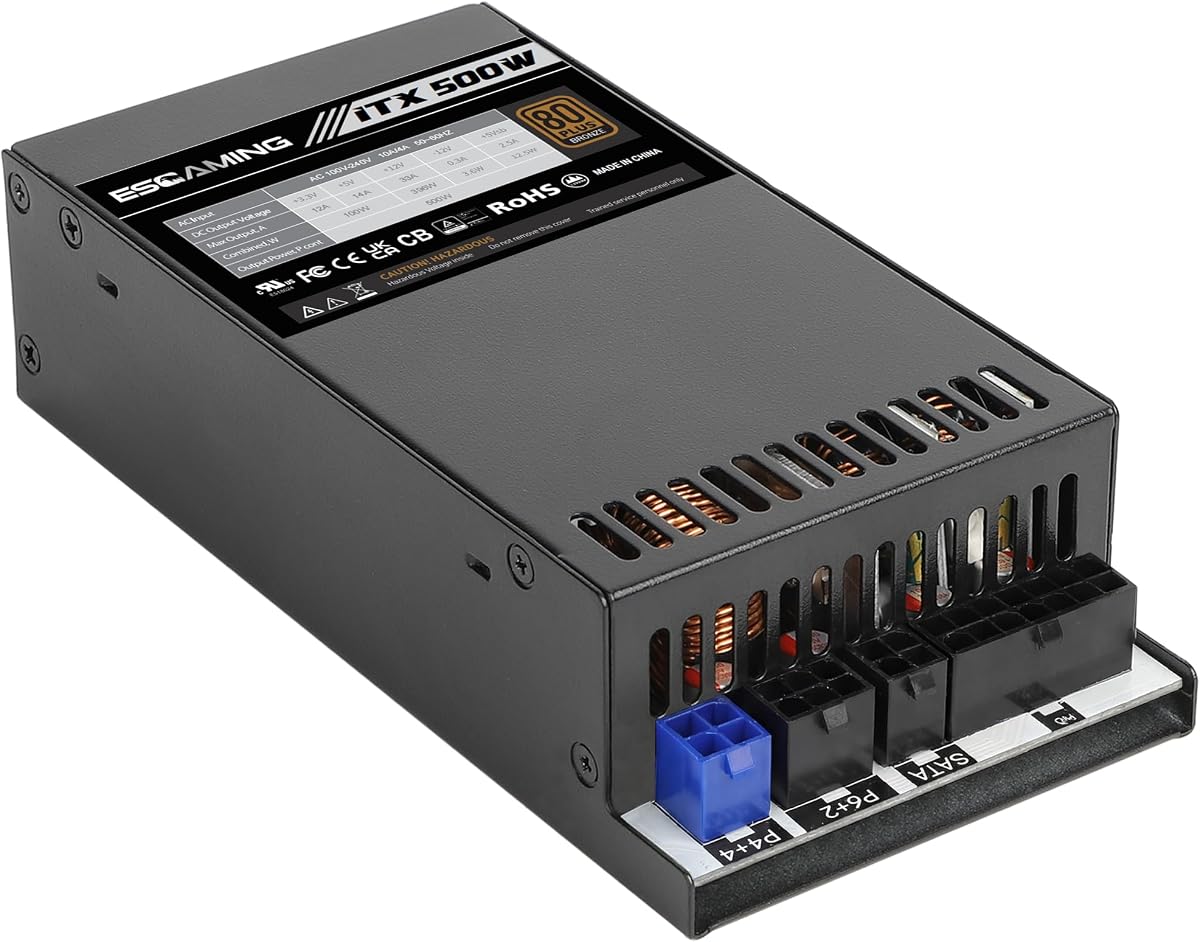
The ESGAMING Fully Modular unit offers a modular solution for compact builds requiring 500W power. Its fully modular cable system simplifies installation and improves airflow in 1U chassis. The Active PFC design supports 90-264V input ensuring stable power and reduced electrical interference across different regions.
We may earn a commission when you buy through this link, at no additional cost to you.
With connectors including 20+4pin motherboard 8pin CPU and 6+2 PCIE this unit covers most standard needs. The 80 PLUS Bronze certification helps reduce energy waste and heat output. Customer support is available for any purchase issues adding confidence to the buying decision.
The unit is designed for 1U cases so compatibility is critical. The cables are shorter than standard ATX units which can be tricky in larger enclosures. For the right case it provides a clean and efficient power solution at a competitive price.
This PSU is ideal for server or compact builds where cable management and efficiency are key. It offers modular flexibility without the cost of Gold units making it a great option for small space systems.
The fully modular cable system simplifies installation and improves airflow in compact 1U chassis for a clutter-free build environment.
Full range Active PFC improves power stability reduces electrical interference and delivers cleaner output for consistent system operation.
We may earn a commission when you buy through this link, at no additional cost to you.
The APEVIA VENUS500W is a reliable 500W ATX power supply delivering steady power for standard computer systems. It includes a comprehensive range of connectors to support various storage and graphics cards. The auto-thermally controlled fan manages temperature efficiently while maintaining quiet operation during typical usage.
We may earn a commission when you buy through this link, at no additional cost to you.
With complete protection against short-circuit over-current over-voltage and over-temperature this unit safeguards your hardware from electrical damage. The 115/230V switch allows international use but requires manual adjustment. Voltage tolerance is maintained at 5 percent ensuring stable delivery to components.
The manual voltage switch may be overlooked by users in different regions which could lead to damage. The styling is functional rather than aesthetic. However for basic ATX cases it offers dependable performance at an accessible price point.
This PSU is suitable for users building standard desktops who need basic power delivery and protections. It provides the necessary connectors and safety features for everyday computing without unnecessary cost or complexity.
An auto-thermally controlled 120mm fan manages temperature efficiently while maintaining quiet operation during typical usage conditions.
Complete protection against short-circuit over-current over-voltage and over-temperature safeguards your hardware from electrical damage and ensures safe operation.
We may earn a commission when you buy through this link, at no additional cost to you.
The Smart W3 Series 600W is designed for modern standards with full compatibility for the Intel ATX v3.1 specification. It features a high amperage +12V rail design that supports demanding components efficiently. The DC-DC design ensures clean power delivery and the 120mm FDB fan provides reliable cooling.
We may earn a commission when you buy through this link, at no additional cost to you.
With up to 80 percent efficiency the unit reduces energy waste while maintaining stable voltage. Flat low-profile cables help with cable management in standard cases. Industrial grade protection ensures hardware safety and the 5-year warranty adds long-term reliability to the package.
While it uses standard fixed cables which can be less flexible than modular options the performance and modern spec compliance are strong. The fan is generally quiet but may ramp up under heavy load. It is a solid option for users seeking modern specs.
This PSU is recommended for builders needing ATX v3.1 compliance and stable 12V power. It is a practical choice for modern workstations or gaming rigs that benefit from the latest power standards without requiring premium pricing.
Fully compatible with Intel ATX v3.1 specification this unit supports modern power delivery requirements for efficient and stable system operation.
DC to DC high amperage +12V rail design ensures efficient power delivery and voltage regulation for consistent performance under load.
We may earn a commission when you buy through this link, at no additional cost to you.
Selecting the right low power PSU requires considering factors like efficiency wattage form factor and protection features to ensure compatibility with your specific build needs.
The physical size of the power supply must match your case to prevent installation issues. Small form factor cases often require Mini-ITX Flex ATX or TFX units which are significantly shorter or wider than standard ATX models. Always check your case manual for clearance requirements before purchasing.
Ensure the unit fits your case by verifying the length width and height dimensions match the specified standards. Compatibility is critical to avoid physical conflicts with drive bays or cables.
Efficiency ratings such as 80 PLUS White Bronze or Gold indicate how much electrical power is converted to usable DC power. Higher efficiency means less wasted energy which reduces heat output and lowers electricity costs over time. Look for certified units to ensure reliability and performance.
Choose a PSU with at least 80 PLUS Bronze certification to minimize waste and heat. Higher ratings like Gold offer better performance for systems that run for long periods.
The total wattage must meet the combined needs of your CPU GPU storage and other components. For most compact builds without dedicated graphics 500W is often sufficient. If you plan to upgrade or use multiple drives consider 600W or higher to ensure headroom.
Calculate your system's total power draw and select a PSU with at least 20 percent more wattage than needed. This ensures stability and allows for future upgrades without needing a replacement.
Modular cables allow you to connect only the wires you need which improves airflow and reduces clutter inside tight cases. Semi-modular units keep essential cables fixed for stability while allowing others to be detached. Non-modular units are simpler but can make cable management difficult.
Prioritize modular or semi-modular designs if your case is small or airflow is limited. This ensures easier installation and cleaner internal layout for optimal cooling performance.
Modern components require specific connectors such as PCIe 6+2pin for graphics cards and 20+4pin for motherboards. Some high-end units now include 12VHPWR for next-gen GPUs. Check your components' needs to ensure all necessary power headers are included.
Verify that the unit has the correct connectors for your motherboard GPU and storage devices. Missing adapters can lead to compatibility issues or unsafe modifications.
Essential safety features include Overvoltage Protection (OVP) Overcurrent Protection (OCP) and Short Circuit Protection (SCP). These mechanisms prevent damage from power surges or electrical faults ensuring hardware safety. Some units also include Overtemperature Protection (OTP) for thermal management.
Always look for units with comprehensive industrial-level protections to safeguard your investment. These features are critical for maintaining hardware longevity during power instability.
Some units feature full range Active PFC that supports 90-264V input automatically adjusting to local voltage. Others require a manual switch to toggle between 115V and 230V. Incorrect voltage settings can damage the unit so check this before setup.
Opt for full range Active PFC units to avoid manual voltage switching errors. This ensures safe operation across different regions without user intervention.
A longer warranty period indicates manufacturer confidence in product reliability. Most units come with 3 to 5-year warranties. Customer support responsiveness can also be a deciding factor if issues arise after purchase.
Choose a unit with at least a 5-year warranty to ensure long-term protection and support. Reliable customer service adds value if the unit needs to be serviced.
Install the power supply by securing it firmly in the case using the provided screws. Ensure all cables are connected securely to the motherboard and components before powering on. Verify that voltage settings match your region to prevent damage to the unit.
Keep the area around the intake and exhaust vents clean to maintain efficient airflow. Dust buildup can restrict cooling and cause overheating so periodically clean the filters or vents using compressed air. This helps maintain optimal performance and longevity.
Avoid overloading the PSU with too many components beyond its rated wattage. Distribute power loads evenly across available connectors to maintain stable voltage levels. Regular monitoring of system temperatures can help detect early signs of power issues.
ITX power supplies are designed for Mini-ITX and Flex-ATX cases with a compact footprint that fits into small chassis. TFX units are slightly taller and wider often used in small form factor desktops that require a different depth. Always check your case specifications before buying.
Modular power supplies allow you to connect only the cables you need which reduces clutter and improves airflow in tight spaces. While not mandatory they are highly recommended for compact builds where space is limited. Non-modular units can work but may make cable management harder.
Look for the 80 PLUS certification on the label which indicates efficiency levels under typical loads. Higher ratings like Bronze Gold or Platinum mean less wasted energy and lower heat output. Efficient units save on electricity bills and help keep internal temperatures lower.
Most high-end graphics cards require significant power which often exceeds 500W total system usage. You should check the card's recommended PSU wattage in its specs. Using insufficient power can cause system instability or crashes during gaming sessions.
If you set the voltage switch incorrectly such as choosing 115V when using 230V the PSU may fail to start or sustain severe electrical damage. Always verify your outlet voltage before switching the manual toggle. Using a unit with automatic voltage detection avoids this risk entirely.
The fan dissipates heat generated by internal components during operation preventing overheating and maintaining efficient power conversion. Without active cooling the unit may become too hot to operate safely causing shutdowns or damage. Modern fans often use silent-start technology to remain quiet under light loads.
We explored ten distinct low power PSU options each offering unique benefits for compact builds and efficient systems. From the budget-friendly Apevia TFX to the premium 600W Flex ATX units there is a choice for every requirement. Consider your case size power needs and budget carefully.
Prioritize efficiency ratings and form factor compatibility first to ensure your build runs smoothly and stays cool. Safety features and warranties are critical to protect your hardware from unexpected electrical issues. Modular cabling can simplify your build process significantly in tight enclosures.
Remember that prices and availability change frequently so verify the current details before completing your purchase. Choosing the right power supply sets the foundation for a stable and efficient system that will serve you well for years to come.